sketchucation logo sketchucation
    • Login
    Oops, your profile's looking a bit empty! To help us tailor your experience, please fill in key details like your SketchUp version, skill level, operating system, and more. Update and save your info on your profile page today!
    Mac User? | Join the Rayscaper Beta for Mac Learn More

    [Plugin] RichSection V0.5.8 UPDATED march 2015

    Scheduled Pinned Locked Moved Plugins
    395 Posts 85 Posters 231.8k Views 85 Watching
    Loading More Posts
    • Oldest to Newest
    • Newest to Oldest
    • Most Votes
    Reply
    • Reply as topic
    Log in to reply
    This topic has been deleted. Only users with topic management privileges can see it.
    • P
      pgarmyn
      last edited by

      @krisidious said:

      Yes, that's the version I'm on.

      Can you send me the log file after ...

      • In a NEW model.... (Not opening an existing model)
      • create a closed box
      • group it
      • select the tool 'RichSection creation' ( the most left on the RichSection toolbox)
      • create a section through the unique group (important : wait until the plugin has finished : see ruby console)
      • copy and post the log file (when opening Sketchup, a panel tells you where the log file will be created )
        Thanks
      1 Reply Last reply
      Reply Quote 0
      • KrisidiousK
        Krisidious
        last edited by

        actually that did produce a face with a material in the section.

        is a "solid" required for sectioning?

        here's the log file.


        RichSection_log.txt

        By: Kristoff Rand
        Home DesignerUnique House Plans

        1 Reply Last reply
        Reply Quote 0
        • P
          pgarmyn
          last edited by

          @krisidious said:

          actually that did produce a face with a material in the section.

          is a "solid" required for sectioning? ...

          As explained in the first post :
          Elements don't have to be solid, but only closed sections will generate section-materials.
          ( and solids alwys produce closed sections)

          1 Reply Last reply
          Reply Quote 0
          • KrisidiousK
            Krisidious
            last edited by

            This is what I get on a simple structure or complex for that matter.
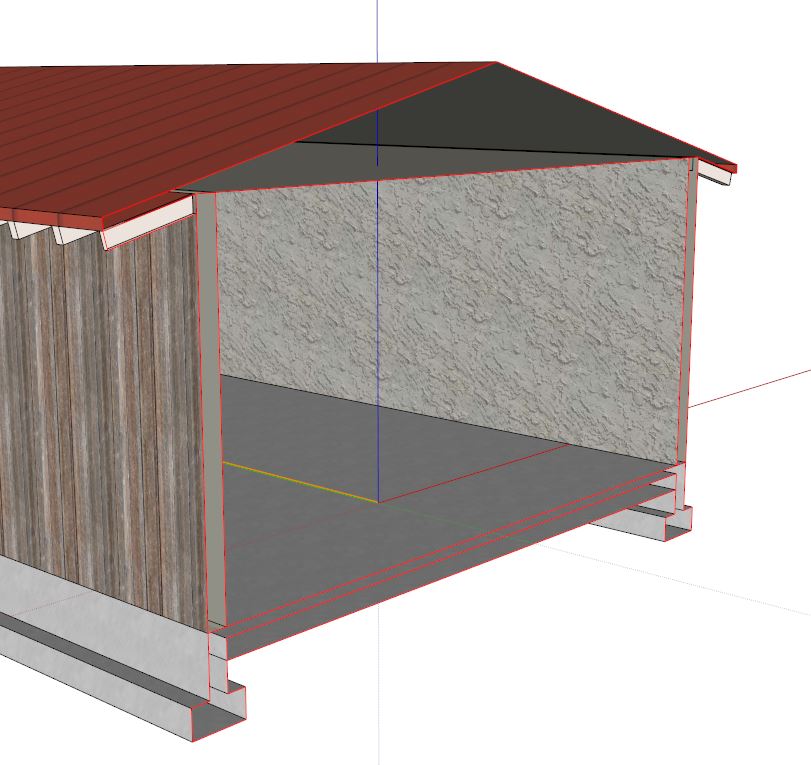
            section.JPG

            By: Kristoff Rand
            Home DesignerUnique House Plans

            1 Reply Last reply
            Reply Quote 0
            • C
              caronte01
              last edited by

              HI Kristoff,

              Can you post that model?

              S

              1 Reply Last reply
              Reply Quote 0
              • KrisidiousK
                Krisidious
                last edited by

                sure...


                0000.skp

                By: Kristoff Rand
                Home DesignerUnique House Plans

                1 Reply Last reply
                Reply Quote 0
                • C
                  caronte01
                  last edited by

                  In your rs settings, section was off (the first item on the list). Also, some of the groups/components in your model were non solid.

                  From my experience, rs works better with solids. I use tt's solid inspector a lot. RS works well with nested solids, and even with multi mesh solids (something native su solid tools has problems with).

                  Things to avoid:
                  Ungrouped geometry.
                  Dividing lines on coplanar faces, except when they are used to separate different materials.

                  Santiago

                  0000.skp

                  1 Reply Last reply
                  Reply Quote 0
                  • KrisidiousK
                    Krisidious
                    last edited by

                    Thanks for the help Santiago, I did have "Yes" selected when I created the section. as for the solids and such no.

                    By: Kristoff Rand
                    Home DesignerUnique House Plans

                    1 Reply Last reply
                    Reply Quote 0
                    • C
                      caronte01
                      last edited by

                      Hi Piet,

                      Some screenshots of the dialog boxes, win vs. mac. I´ve highlighted in red the clipped text. I tried shortening some of those lines, but the dialog would resize, and clip other text. It also happens in the english translation...
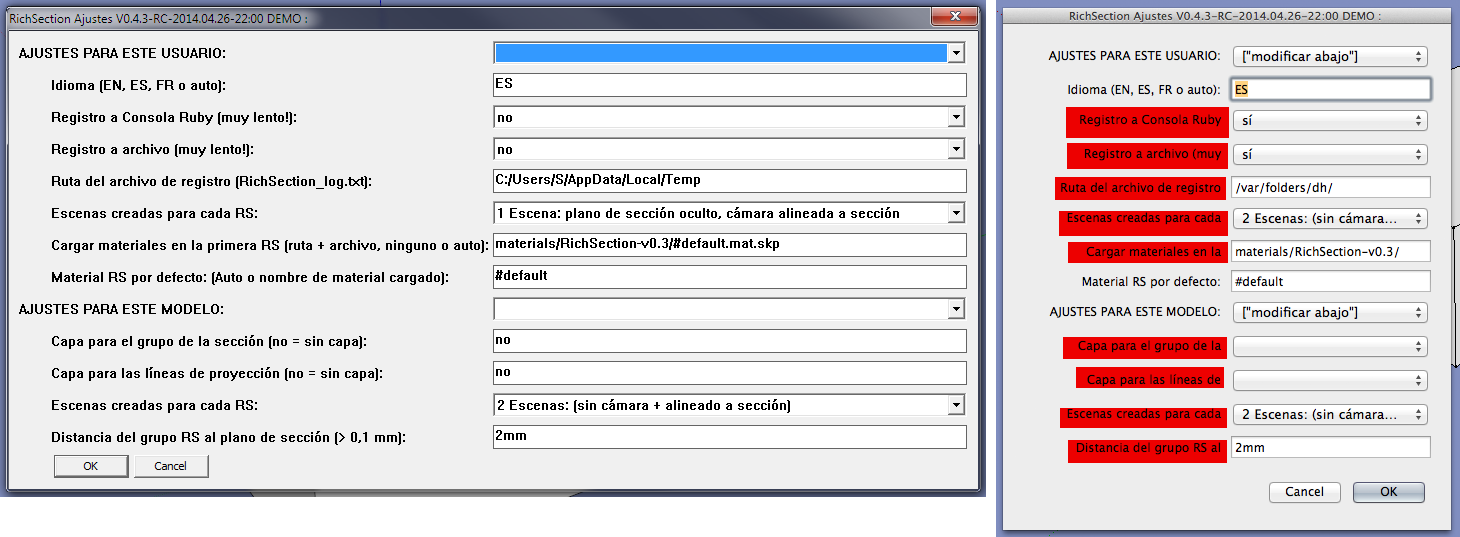
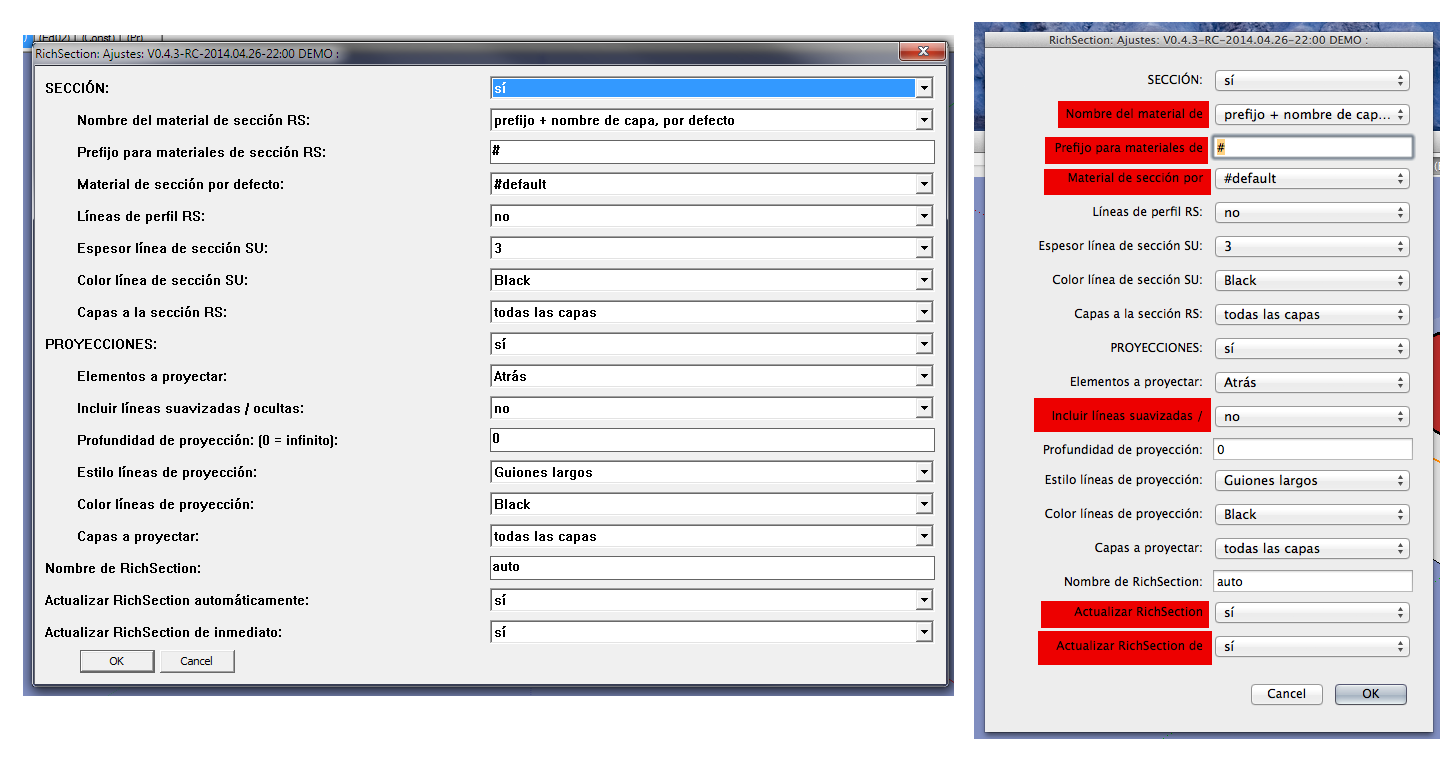
                      Config

                      Settings

                      Legend

                      del

                      1 Reply Last reply
                      Reply Quote 0
                      • P
                        pgarmyn
                        last edited by

                        Hi Santiago
                        Good job ❗
                        I will report this to the sketchup team and the community!
                        See : http://sketchucation.com/forums/viewtopic.php?f=11%26amp;t=57642%26amp;p=524309#p524309
                        Thanks !

                        1 Reply Last reply
                        Reply Quote 0
                        • C
                          caronte01
                          last edited by

                          Hi Piet,

                          Three small things.

                          Can default settings be saved, at least per session? I´m creating several rs on a model, I´m changing some of the settings from the default (rs profile lines to yes, so I can snap to the rs in layout, and projections to off) I have to do this every time I create an rs. Seems simple, but if I forget, and leave projections on, it takes forever to create an rs.

                          It would be great to have esc abort the rs creation/update. Right now, the only way I´ve found is to either leave rs running, or force quit sketchup....

                          In the settings dialog, move RSName to the top... Right now it is not easily found, down at the bottom.

                          Cheers,

                          Santiago

                          1 Reply Last reply
                          Reply Quote 0
                          • P
                            pgarmyn
                            last edited by

                            Hi Santiago

                            • about settings saved: i planned to propose the last used settings in creation, except name, section on/off and projection on/off, but i can limit the exception to the name...
                            • escape : very usefull (was planned), but more difficult : Have to rewrite a lot. Will have to find the time.
                            • name on the top : ok
                              Thanks for the suggestions
                            1 Reply Last reply
                            Reply Quote 0
                            • C
                              caronte01
                              last edited by

                              Thanks!

                              1 Reply Last reply
                              Reply Quote 0
                              • C
                                caronte01
                                last edited by

                                Hi Piet,

                                Do you have a new version available? The current demo version expired yesterday....

                                Thanks!

                                santiago

                                1 Reply Last reply
                                Reply Quote 0
                                • P
                                  pgarmyn
                                  last edited by

                                  @caronte01 said:

                                  Hi Piet,

                                  Do you have a new version available? The current demo version expired yesterday....

                                  Thanks!

                                  santiago

                                  Ok, it will be there in 2 or 3 hours

                                  1 Reply Last reply
                                  Reply Quote 0
                                  • P
                                    pgarmyn
                                    last edited by

                                    UPDATED : VERSION 0.4.4 is in the PLUGINSTORE

                                    1 Reply Last reply
                                    Reply Quote 0
                                    • P
                                      pgarmyn
                                      last edited by

                                      @bimbachi @diegob

                                      It must be a MAC related problem, you are both running on MAC ?
                                      Any other Mac users with problems ❓ ❓ ❓ ❓ ❓

                                      I have no explanation. For me it works on SU8 and SU2013. But i can't test it on mac.
                                      Can you test the following : disable all the other plugins ❓

                                      If this doesn't help, can you test the following file : replace PiGa_RichSection.rb (in directory ..SketchUp..\Plugins) by the file below, and tell me if it works ❓

                                      Thanks in advance.

                                      file deleted

                                      1 Reply Last reply
                                      Reply Quote 0
                                      • C
                                        caronte01
                                        last edited by

                                        Thanks Piet!!!!

                                        Cheers

                                        Santiago

                                        1 Reply Last reply
                                        Reply Quote 0
                                        • B
                                          bimbachi
                                          last edited by

                                          @pgarmyn said:

                                          UPDATED : VERSION 0.4.4 is in the PLUGINSTORE

                                          Did you abandoned mac problems?

                                          1 Reply Last reply
                                          Reply Quote 0
                                          • P
                                            pgarmyn
                                            last edited by

                                            @bimbachi said:

                                            @pgarmyn said:

                                            UPDATED : VERSION 0.4.4 is in the PLUGINSTORE

                                            Did you abandoned mac problems?

                                            Caronte01 reported that the standard input box from the sketchup-API isn't working properly on mac.
                                            http://sketchucation.com/forums/viewtopic.php?f=323%26amp;t=55072%26amp;start=210#p524280
                                            Actually i don't have time to work on it.
                                            Did you find other problems?

                                            1 Reply Last reply
                                            Reply Quote 0

                                            Hello! It looks like you're interested in this conversation, but you don't have an account yet.

                                            Getting fed up of having to scroll through the same posts each visit? When you register for an account, you'll always come back to exactly where you were before, and choose to be notified of new replies (either via email, or push notification). You'll also be able to save bookmarks and upvote posts to show your appreciation to other community members.

                                            With your input, this post could be even better 💗

                                            Register Login
                                            • 1
                                            • 2
                                            • 6
                                            • 7
                                            • 8
                                            • 9
                                            • 10
                                            • 19
                                            • 20
                                            • 8 / 20
                                            • First post
                                              Last post
                                            Buy SketchPlus
                                            Buy SUbD
                                            Buy WrapR
                                            Buy eBook
                                            Buy Modelur
                                            Buy Vertex Tools
                                            Buy SketchCuisine
                                            Buy FormFonts

                                            Advertisement