sketchucation logo sketchucation
    • Login
    Oops, your profile's looking a bit empty! To help us tailor your experience, please fill in key details like your SketchUp version, skill level, operating system, and more. Update and save your info on your profile page today!
    FredoBend | Powerful new bending tool for SketchUp Download

    Shadows not showing

    Scheduled Pinned Locked Moved Newbie Forum
    sketchup
    6 Posts 4 Posters 414 Views 4 Watching
    Loading More Posts
    • Oldest to Newest
    • Newest to Oldest
    • Most Votes
    Reply
    • Reply as topic
    Log in to reply
    This topic has been deleted. Only users with topic management privileges can see it.
    • T Offline
      timdean
      last edited by

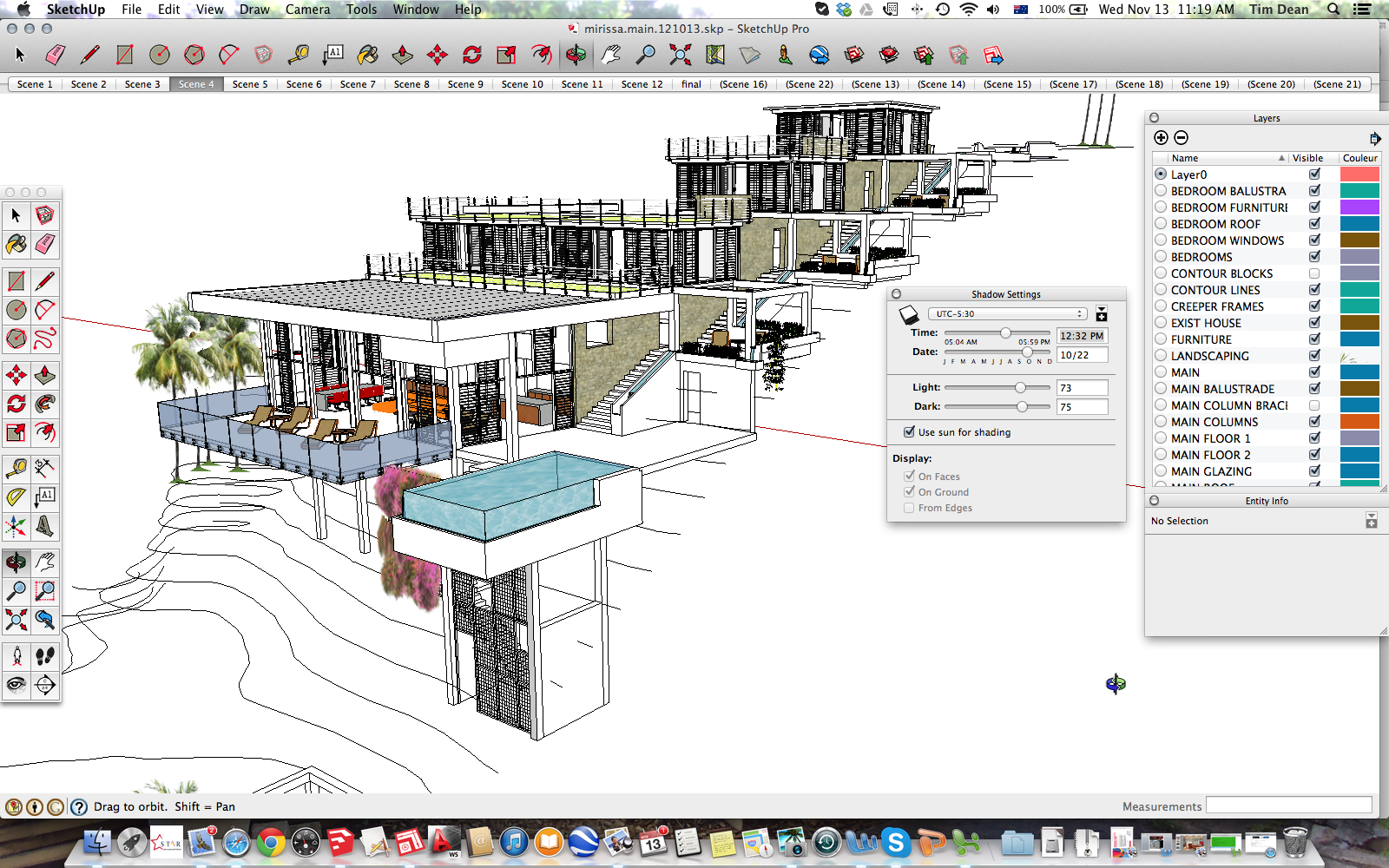
      Hi, I am using 2013 Pro on Mac and despite tinkering with every setting I can think of after reading various articles on the subject, I cannot get shadows to project on the ground, or even clearly on surfaces as I have seen in others' architectural models. All that happens as I slide time and date is a subtle variation in shading on surfaces until it blacks out. Any suggestions?

      1 Reply Last reply Reply Quote 0
      • cottyC Offline
        cotty
        last edited by

        Is the checkbox "on ground" activated in the shadow settings window?
        (Is your geometry over the ground plane (blue z=0)?)

        my SketchUp gallery

        1 Reply Last reply Reply Quote 0
        • T Offline
          timdean
          last edited by

          Hi Cotty,
          Thanks for the reply. Here's a screen shot of a current project. Shadows on ground is checked - although greyed out.
          2013-11-13 11.19.55 am.png

          1 Reply Last reply Reply Quote 0
          • cottyC Offline
            cotty
            last edited by

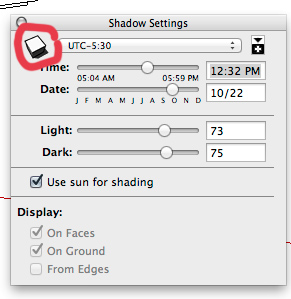
            In windows, there is a toggle button in this window which turns on shadows...

            toggle.jpg

            my SketchUp gallery

            1 Reply Last reply Reply Quote 0
            • gillesG Offline
              gilles
              last edited by

              Also it seems that part of your building is under the red axis, this part will not cast shadows on the ground.

              " c'est curieux chez les marins ce besoin de faire des phrases "

              1 Reply Last reply Reply Quote 0
              • Wo3DanW Offline
                Wo3Dan
                last edited by

                @timdean said:

                ......I cannot get shadows to project on the ground, or even clearly on surfaces as I have seen in others' architectural models. All that happens as I slide time and date is a subtle variation in shading on surfaces until it blacks out. Any suggestions?

                Where are your axes? See if reset is available if you right click on an axes in empty space. (Ground plane [R/G] for some reason could very well be 100m above your modeling space).


                1 Reply Last reply Reply Quote 0

                Hello! It looks like you're interested in this conversation, but you don't have an account yet.

                Getting fed up of having to scroll through the same posts each visit? When you register for an account, you'll always come back to exactly where you were before, and choose to be notified of new replies (either via email, or push notification). You'll also be able to save bookmarks and upvote posts to show your appreciation to other community members.

                With your input, this post could be even better đź’—

                Register Login
                • 1 / 1
                • First post
                  Last post
                Buy SketchPlus
                Buy SUbD
                Buy WrapR
                Buy eBook
                Buy Modelur
                Buy Vertex Tools
                Buy SketchCuisine
                Buy FormFonts

                Advertisement
