sketchucation logo sketchucation
    • Anmelden
    Oops, your profile's looking a bit empty! To help us tailor your experience, please fill in key details like your SketchUp version, skill level, operating system, and more. Update and save your info on your profile page today!
    ⚠️ Important | Libfredo 15.6b introduces important bugfixes for Fredo's Extensions Update

    Sketchup and Blender

    Geplant Angeheftet Gesperrt Verschoben Extensions & Applications Discussions
    extensions
    170 Beiträge 26 Kommentatoren 30.6k Aufrufe 26 Watching
    Lade mehr Beiträge
    • Älteste zuerst
    • Neuste zuerst
    • Meiste Stimmen
    Antworten
    • In einem neuen Thema antworten
    Anmelden zum Antworten
    Dieses Thema wurde gelöscht. Nur Nutzer mit entsprechenden Rechten können es sehen.
    • soloS Offline
      solo
      zuletzt editiert von

      I thought I'd start a new thread for everyone to participate if they want, a thread we can all learn together in.

      I have in the past tried and quit on Blender many times as it really is a complex software, again I'm going to attempt to learn it as the benefits by far outweigh the stress of learning a new software.
      Like the Vaping thread in the corner bar where we supported one another to quit smoking (I'm now 7 months cigarette free) I thought learning Blender as a group would be easier as we can ask those stupid noob questions with impunity here.

      The reasons for learning Blender for me are numerous from animations, nurb modeling, general modeling, staging and compiling when Sketchup hits it's poly limit, UV mapping SU models, Video editing, Motion tracking for video montage, etc.

      I was hoping we could share resources and discuss workflow here, I know Rich O'Brian has made some huge strides in Blender to a point that he can guide us to a point where we are familiar to go it on our own, he made a few tutorials a while back for me that I hope he would share here for all to use.

      Blender is free so if you want to join this learning thread then download the new version here: http://www.blender.org/download/get-blender/

      If you are learning Blender feel free to chirp in and let us know your level and how and why you use it and also how you learned it (from what tutorials and sources)

      http://www.solos-art.com

      If you see a toilet in your dreams do not use it.

      1 Antwort Letzte Antwort Antworten Zitieren 0
      • soloS Offline
        solo
        zuletzt editiert von

        I guess I'll ask the first question, Is there a way to fix a Sketchup mesh in Blender?

        I would love to turn it to quads or something useable in Blender, are there tools to change tri's to quads or at least smooth out the mesh?

        This is how it looks in SU:
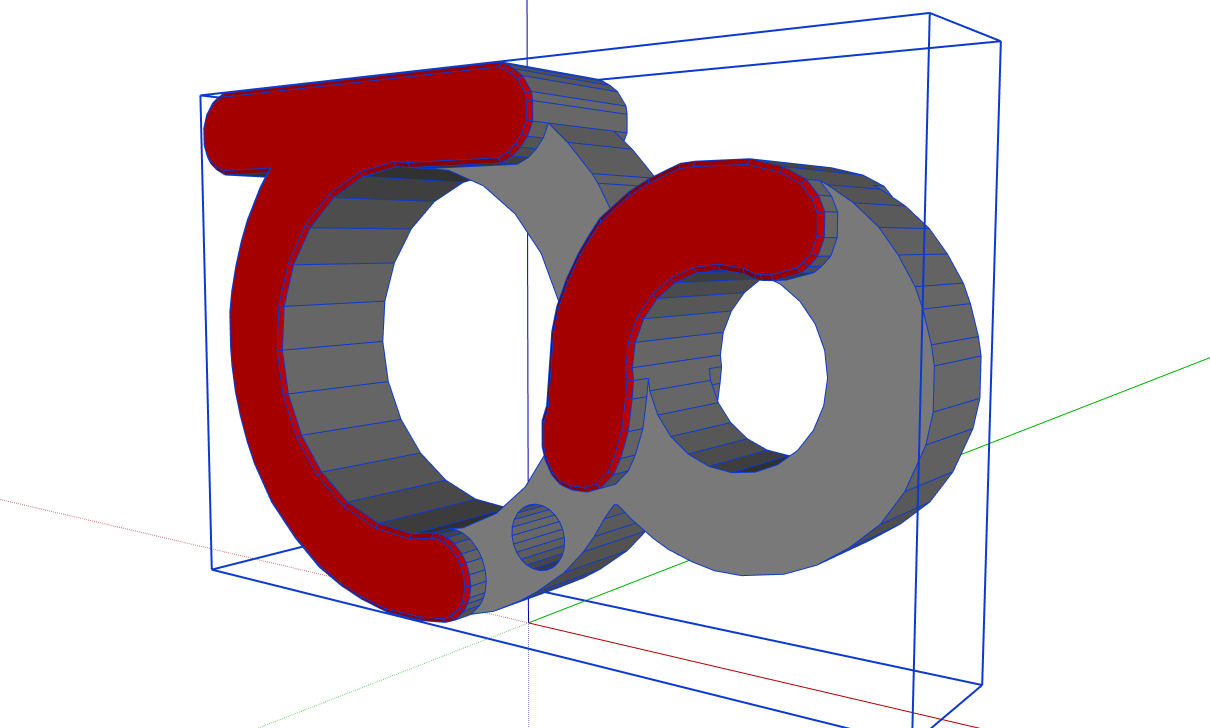
        su image.jpg

        But when in Blender it looks like this:
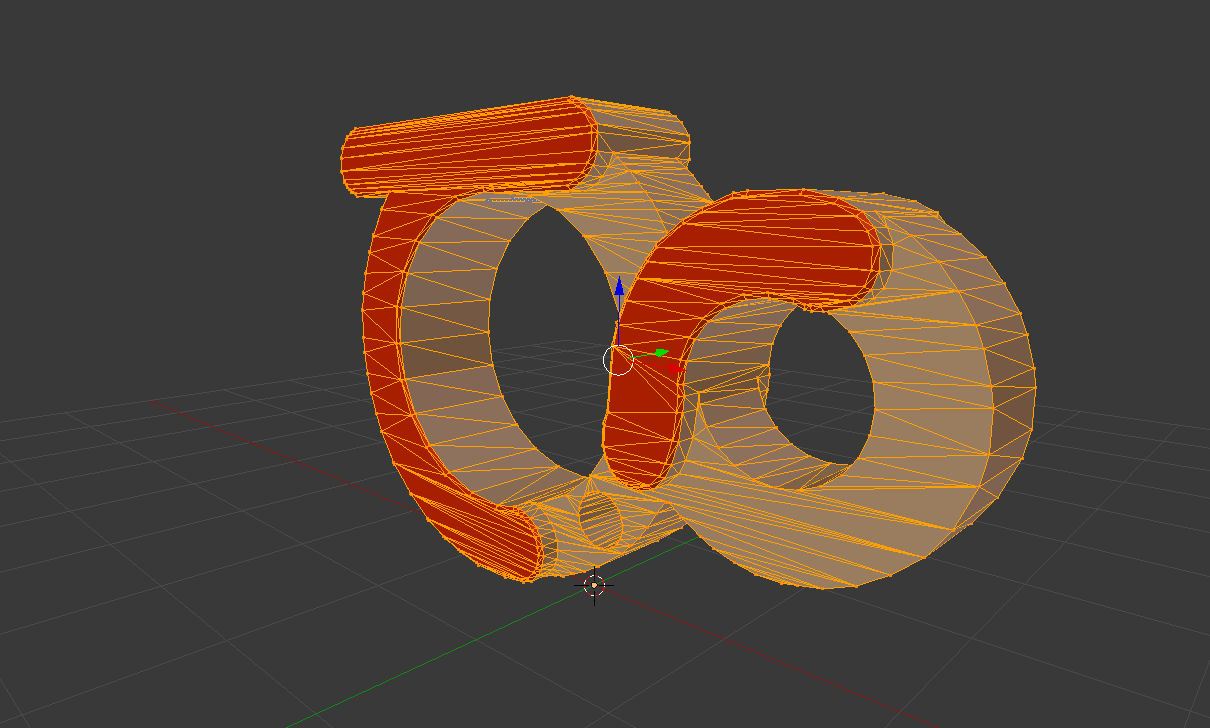
        thea logo in blender.jpg

        I assume Blender turns all ngons into tri's?

        http://www.solos-art.com

        If you see a toilet in your dreams do not use it.

        1 Antwort Letzte Antwort Antworten Zitieren 0
        • cottyC Offline
          cotty
          zuletzt editiert von

          @solo said:

          I have in the past tried and quit on Blender many times ...

          I know what you mean 😒
          Great idea to start this thread!

          my SketchUp gallery

          1 Antwort Letzte Antwort Antworten Zitieren 0
          • soloS Offline
            solo
            zuletzt editiert von

            Exporting as obj seems a slight improvement but still not useable.
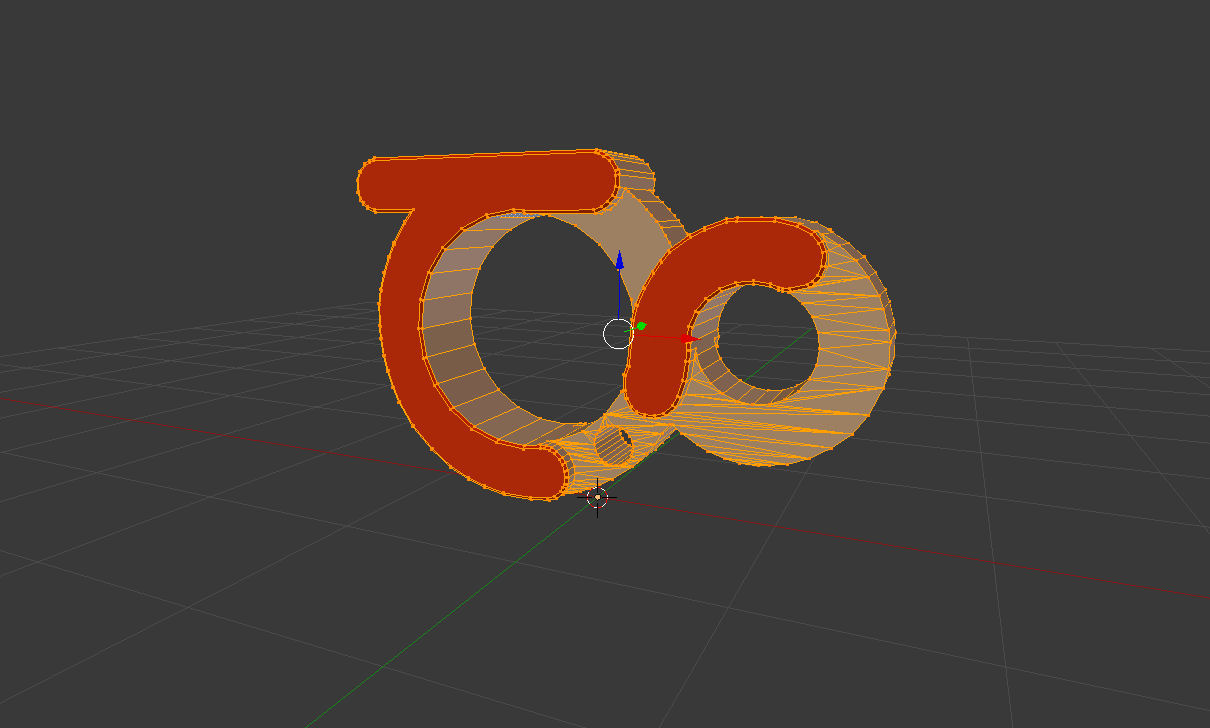
            export obj.jpg

            http://www.solos-art.com

            If you see a toilet in your dreams do not use it.

            1 Antwort Letzte Antwort Antworten Zitieren 0
            • D Offline
              dedmin
              zuletzt editiert von

              Welcome to the Club! 😄
              I'm in the same boat - started a month ago to climb the Blender Mountain!
              I started with these free tutorials:

              http://gryllus.net/Blender/3D.html
              https://www.youtube.com/user/BlenderForNoobs/videos
              http://cgcookie.com/blender/cgc-courses/blender-basics-introduction-for-beginners/
              https://www.youtube.com/user/cgboorman/videos

              1 Antwort Letzte Antwort Antworten Zitieren 0
              • soloS Offline
                solo
                zuletzt editiert von

                @dedmin said:

                Welcome to the Club! 😄
                I'm in the same boat - started a month ago to climb the Blender Mountain!
                I started with these free tutorials:

                http://gryllus.net/Blender/3D.html
                https://www.youtube.com/user/BlenderForNoobs/videos
                http://cgcookie.com/blender/cgc-courses/blender-basics-introduction-for-beginners/
                https://www.youtube.com/user/cgboorman/videos

                Thanks, will look at those links.

                So how much have you learned so far?

                Maybe one day this place can be called "SketchuBlend" 😄

                http://www.solos-art.com

                If you see a toilet in your dreams do not use it.

                1 Antwort Letzte Antwort Antworten Zitieren 0
                • soloS Offline
                  solo
                  zuletzt editiert von

                  I can recommend Lynda.com as the ONLY tutorial so far that kept me interested and on a path to learn Blender, I cannot say if it's because of the quality and good skills of teacher or the fact that I was paying and thus was forced to get money's worth.

                  http://www.lynda.com/Blender-training-tutorials/164-0.html

                  Once that is done then there are many awesome sites with more advanced tutorials, the most important is knowing where everything is, here is a pdf cheat with all the shortcut keys from BlenderGuru.

                  Blender_Cheat_Sheet.pdf

                  http://www.solos-art.com

                  If you see a toilet in your dreams do not use it.

                  1 Antwort Letzte Antwort Antworten Zitieren 0
                  • Rich O BrienR Offline
                    Rich O Brien Moderator
                    zuletzt editiert von

                    Alt+J to turn tris to quads

                    Download the free D'oh Book for SketchUp 📖

                    1 Antwort Letzte Antwort Antworten Zitieren 0
                    • cottyC Offline
                      cotty
                      zuletzt editiert von

                      I've watched only some of them, but they were great...
                      Youtube playlist from Andrew Price

                      my SketchUp gallery

                      1 Antwort Letzte Antwort Antworten Zitieren 0
                      • Rich O BrienR Offline
                        Rich O Brien Moderator
                        zuletzt editiert von

                        Just a query as to why you say the above is unusable?

                        Download the free D'oh Book for SketchUp 📖

                        1 Antwort Letzte Antwort Antworten Zitieren 0
                        • D Offline
                          dedmin
                          zuletzt editiert von

                          Baby steps - don't have much time to learn.
                          Some tips for Sketchupers:

                          • in SketchUp we select with a left mouse button, but in Blender by default it is the right button - so, change it here:
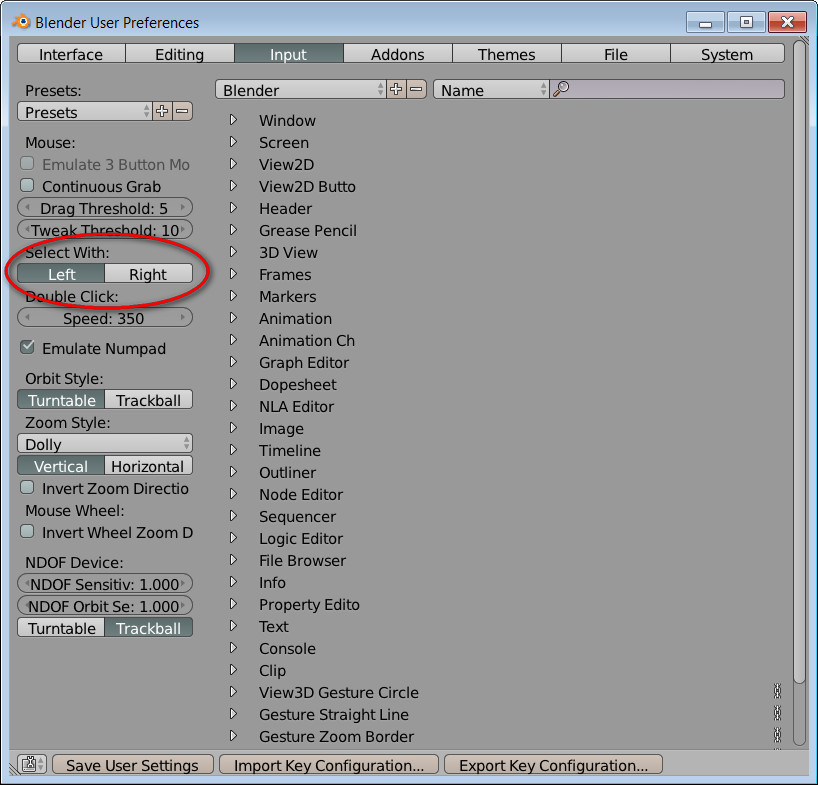
                            2013-11-03_215458.jpg
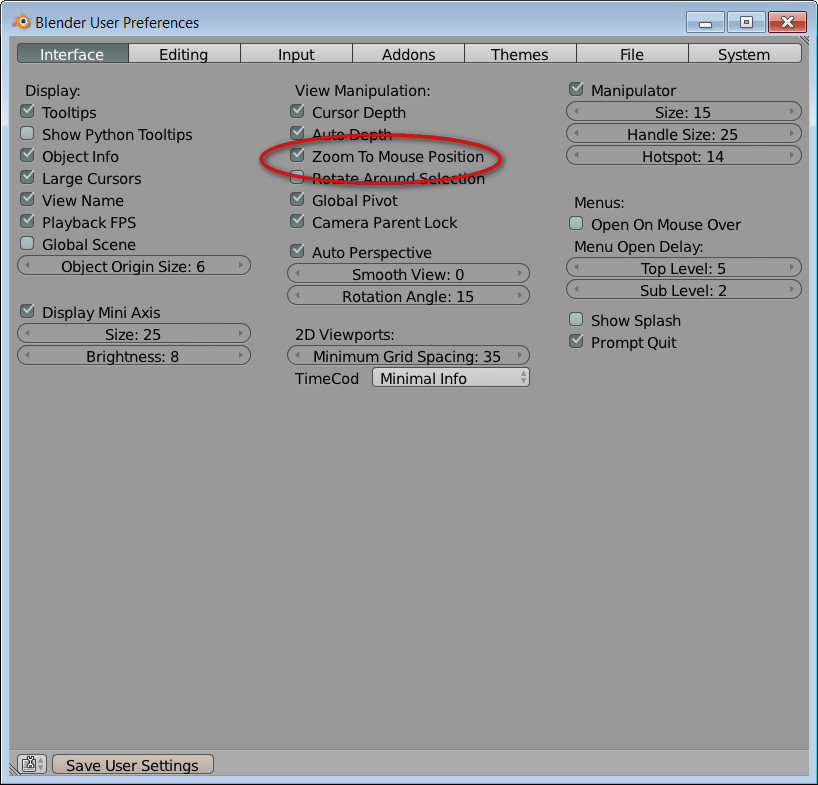
                          • zoom to mouse position:
                            2013-11-03_215751.jpg
                            -Blender doesn't warn you to save the file when quitting, so check this:
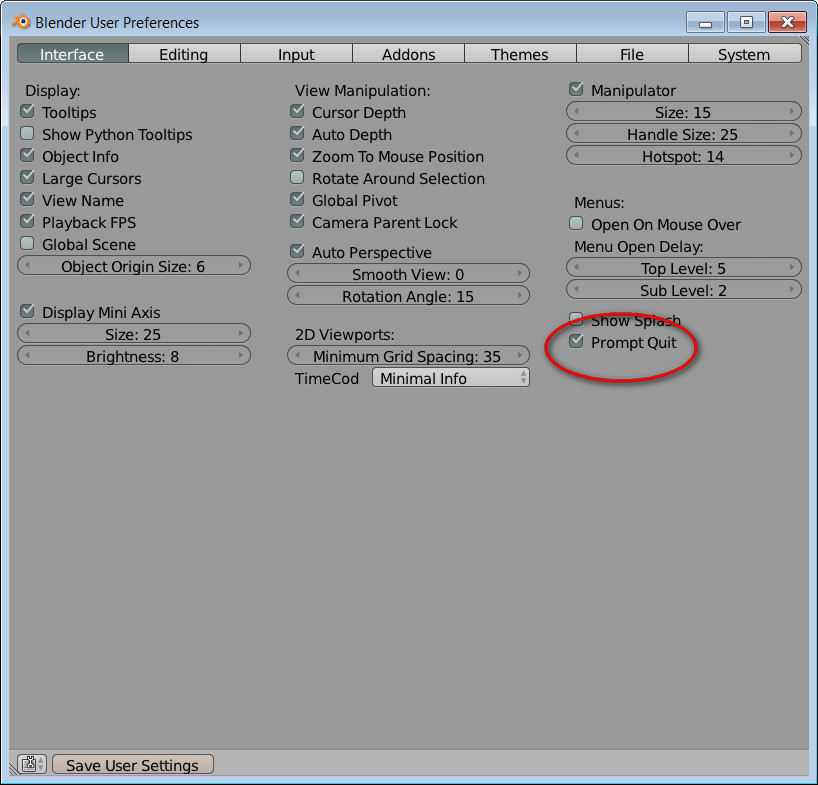
                            2013-11-03_220054.jpg

                          And to unify SketchUp and Blender navigation adjust SketchUp's keystrokes the same as in Blender.

                          1 Antwort Letzte Antwort Antworten Zitieren 0
                          • soloS Offline
                            solo
                            zuletzt editiert von

                            Those are good tips, first thing I did was switch to left button, the zoom to mouse point was brilliant, gives an SU feel to orbit in Blender.

                            http://www.solos-art.com

                            If you see a toilet in your dreams do not use it.

                            1 Antwort Letzte Antwort Antworten Zitieren 0
                            • D Offline
                              dedmin
                              zuletzt editiert von

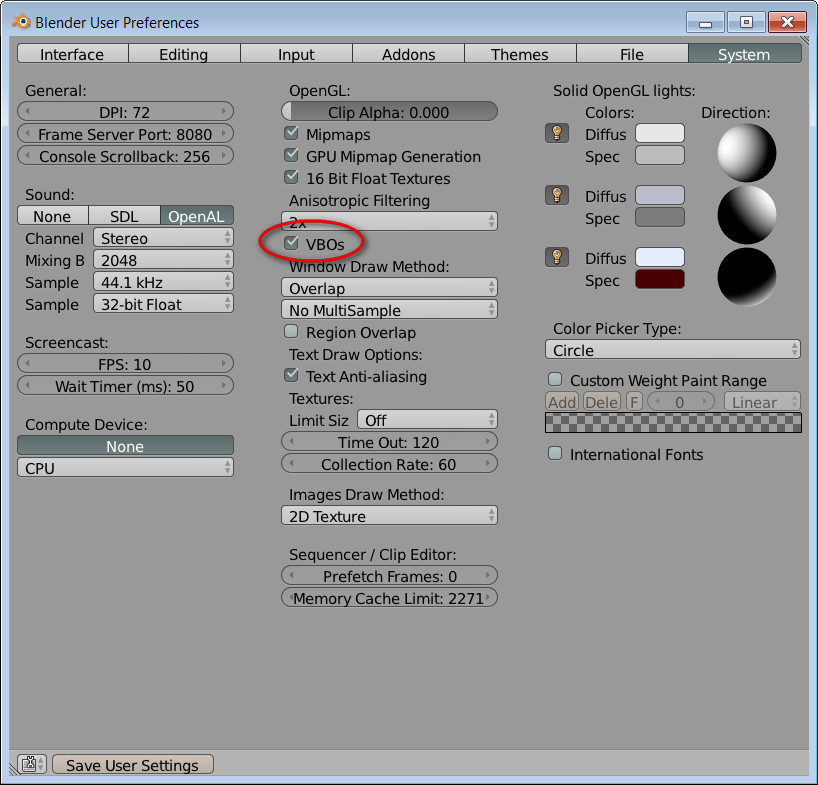
                              • for heavy files try this setting:
                                2013-11-03_221342.jpg
                              • to have ortho when switching top/bottom/left/right/front/back check this:
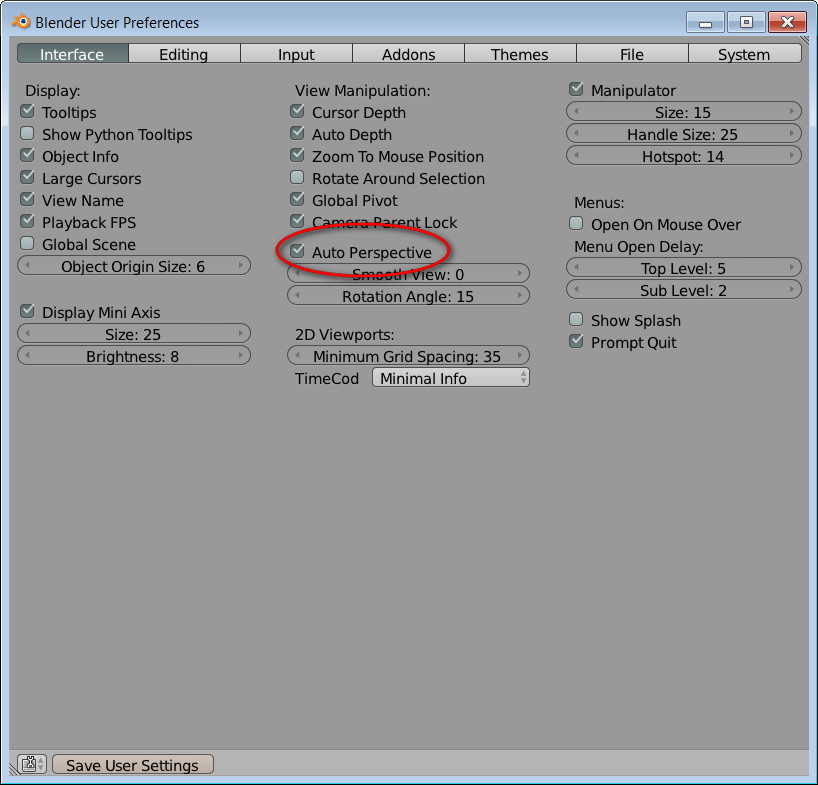
                                2013-11-03_221721.jpg
                              1 Antwort Letzte Antwort Antworten Zitieren 0
                              • J Offline
                                jaxcoffee
                                zuletzt editiert von

                                I decided to go the SolidWorks direction instead of Blender. If I'm going to learn something more complex than SketchUp, I'm going to learn an industry standard. At least that is my reasoning. Your milage may vary. Would love to see this kind of thread for SolidWorks. Anyway, carry on. This is a good thing for Blender folks.

                                1 Antwort Letzte Antwort Antworten Zitieren 0
                                • D Offline
                                  dedmin
                                  zuletzt editiert von

                                  We love plugins and scripts - here is the Blender's place to search for treasures:

                                  301 Moved Permanently

                                  favicon

                                  (wiki.blender.org)

                                  And Blender comes with some that are not enabled by default:
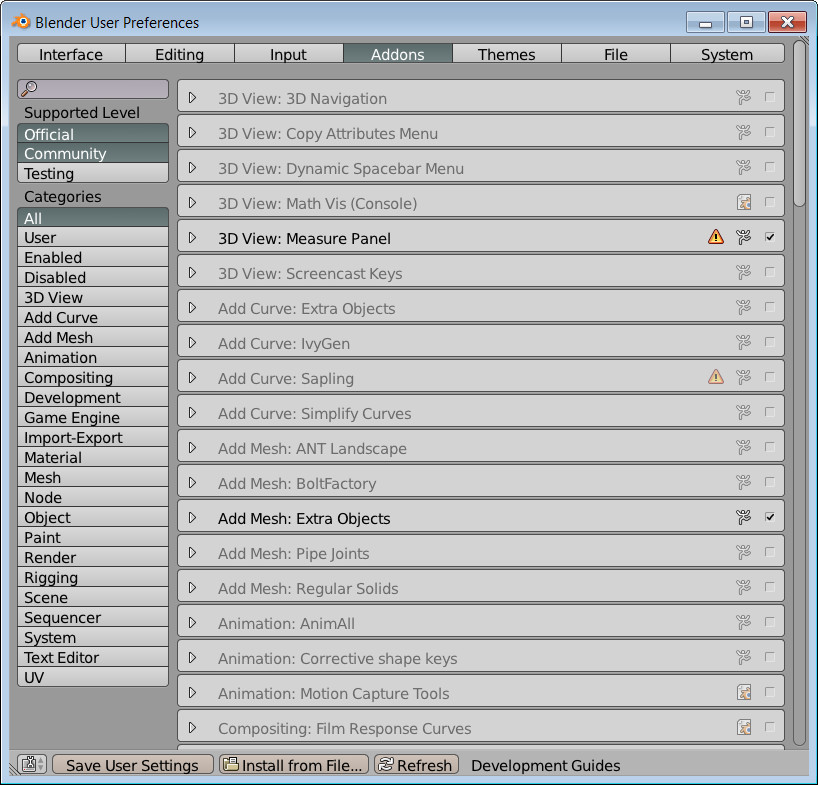
                                  2013-11-03_222354.jpg

                                  This is from here - http://blenderartists.org/forum/showthread.php?316335-2-69-released

                                  @unknownuser said:

                                  For those interested and that do not use regularly update builds (buildbot/graphicall), the official releases do not include the addons_contrib folder that contain many addons that some may find usefull.
                                  I have uploaded the recent one i had from r61020 (from the buildbot) on that dropbox link - https://www.dropbox.com/s/0eert8068okz3ag/addons_contrib269.rar?m

                                  To install, just take the "addons_contrib" directory from the downloaded addons_contrib269.rar and move it to
                                  \yourblender269directory\2.69\scripts
                                  So you obtain
                                  \yourblender269directory\2.69\scripts\addons_contr ib\

                                  Once done, when launching Blender and going to File -> User Preferences -> Addons, you'll see them if you enable the "Testing" button
                                  (additionally you'll have more themes)

                                  Note : the addon contrib does not include every user made addons available for Blender, you'll have to remember there are several of them that are not in it but that you can still find in the Addon&Release board :
                                  http://blenderartists.org/forum/foru...pts-and-Themes

                                  1 Antwort Letzte Antwort Antworten Zitieren 0
                                  • soloS Offline
                                    solo
                                    zuletzt editiert von

                                    @jaxcoffee said:

                                    I decided to go the SolidWorks direction instead of Blender. If I'm going to learn something more complex than SketchUp, I'm going to learn an industry standard. At least that is my reasoning. Your milage may vary. Would love to see this kind of thread for SolidWorks. Anyway, carry on. This is a good thing for Blender folks.

                                    I looked at SolidWorks, it is an awesome bit of software, especially for engineering and I guess if you intend 3D printing.

                                    http://www.solos-art.com

                                    If you see a toilet in your dreams do not use it.

                                    1 Antwort Letzte Antwort Antworten Zitieren 0
                                    • Rich O BrienR Offline
                                      Rich O Brien Moderator
                                      zuletzt editiert von

                                      @Pete

                                      Can the Thea logo be shared?

                                      Why is the tris a problem?

                                      What is it you want exactly to do with the mesh?

                                      Download the free D'oh Book for SketchUp 📖

                                      1 Antwort Letzte Antwort Antworten Zitieren 0
                                      • soloS Offline
                                        solo
                                        zuletzt editiert von

                                        @rich o brien said:

                                        @Pete

                                        Can the Thea logo be shared?

                                        Why is the tris a problem?

                                        What is it you want exactly to do with the mesh?

                                        Yes, here it is:

                                        AutoSave_thea logo.skp

                                        I want to follow a Blender tutorial and finally render it with Thea4Blender, but I cannot get a smooth mesh in Blender in order to render and put materials on that I need.

                                        http://www.solos-art.com

                                        If you see a toilet in your dreams do not use it.

                                        1 Antwort Letzte Antwort Antworten Zitieren 0
                                        • Rich O BrienR Offline
                                          Rich O Brien Moderator
                                          zuletzt editiert von

                                          Are you setting the shading to smooth in the toolshelf?

                                          Whilst in object mode press T to show/hide toolshelf. Select the object and choose smooth for the shading

                                          Download the free D'oh Book for SketchUp 📖

                                          1 Antwort Letzte Antwort Antworten Zitieren 0
                                          • soloS Offline
                                            solo
                                            zuletzt editiert von

                                            @rich o brien said:

                                            Are you setting the shading to smooth in the toolshelf?

                                            Whilst in object mode press T to show/hide toolshelf. Select the object and choose smooth for the shading

                                            I tried that originally but looks ugly.
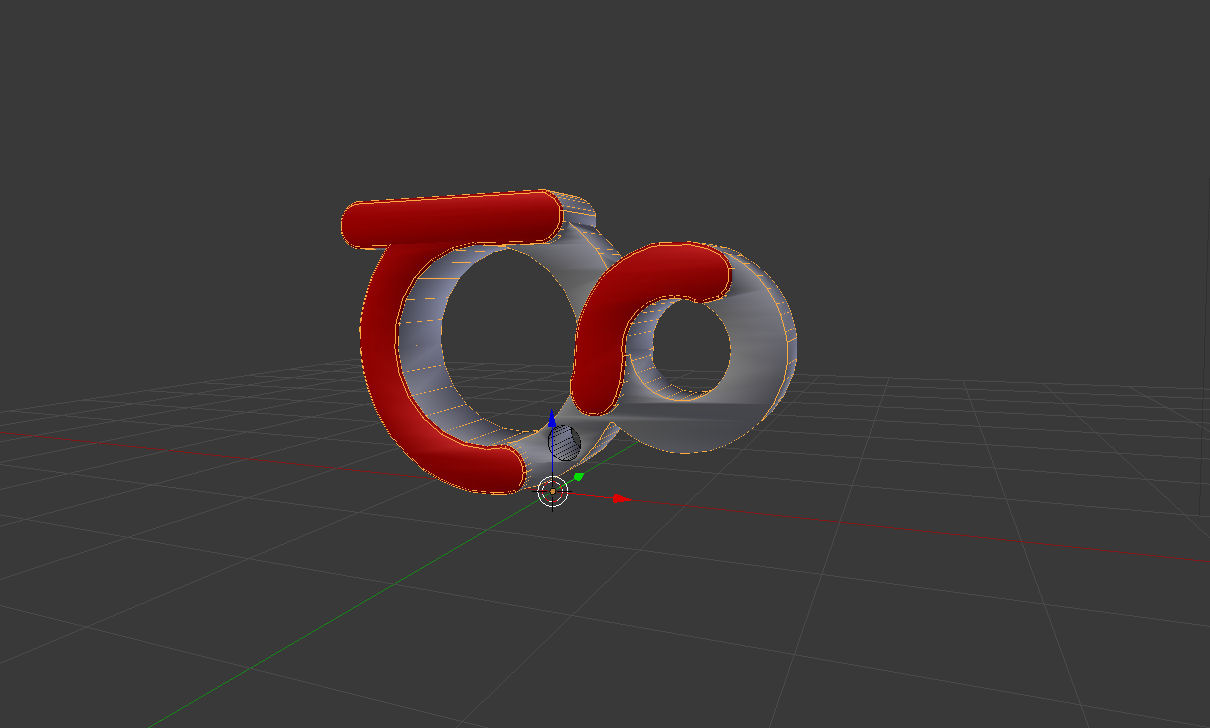

                                            logo smooth.jpg

                                            http://www.solos-art.com

                                            If you see a toilet in your dreams do not use it.

                                            1 Antwort Letzte Antwort Antworten Zitieren 0
                                            • 1
                                            • 2
                                            • 3
                                            • 4
                                            • 5
                                            • 8
                                            • 9
                                            • 3 / 9
                                            • Erster Beitrag
                                              Letzter Beitrag
                                            Buy SketchPlus
                                            Buy SUbD
                                            Buy WrapR
                                            Buy eBook
                                            Buy Modelur
                                            Buy Vertex Tools
                                            Buy SketchCuisine
                                            Buy FormFonts

                                            Advertisement