Moving geometry/text
-
When I try moving geometry or text in LayOut it moves in a jumpy behavor snapping to invisible points. Is there a way to move freely without the snapping?
Another problem I have is when resizing an imported view. Usually when I reduce the view from one side it moves the geometry with it when what I want is to clip the frame. Is there a way to pan inside the view to center the geometry?
-
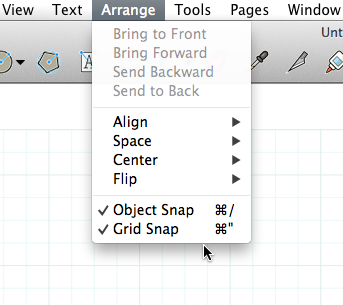
If you right click the canvas is grid snap or object snap enabled?
-
You're getting the snapping to an apparent grid because that's what you have it set to do. Untick Grid Snap and it won't do that.
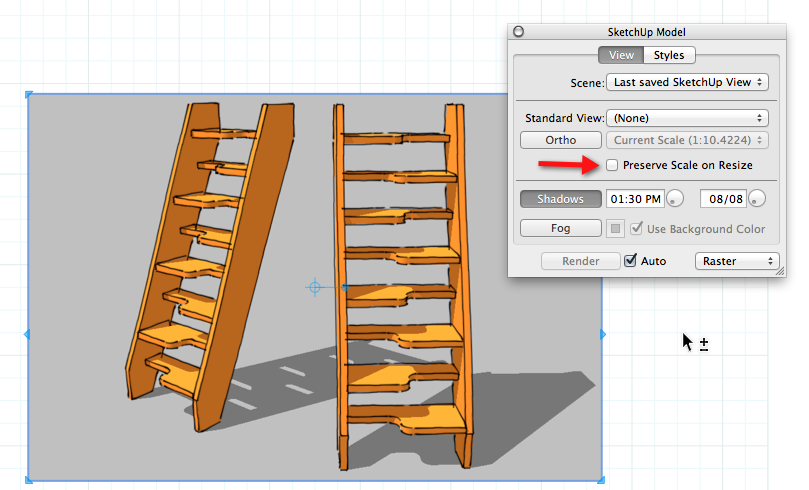
If you want to adjust the viewport size without adjusting the size of the model, tick the box for Preserve scale on resize. Leave it ticked for that viewport or it will resize when you untick it.



Hello! It looks like you're interested in this conversation, but you don't have an account yet.
Getting fed up of having to scroll through the same posts each visit? When you register for an account, you'll always come back to exactly where you were before, and choose to be notified of new replies (either via email, or push notification). You'll also be able to save bookmarks and upvote posts to show your appreciation to other community members.
With your input, this post could be even better 💗
Register Login


Advertisement