sketchucation logo sketchucation
    • Login
    Oops, your profile's looking a bit empty! To help us tailor your experience, please fill in key details like your SketchUp version, skill level, operating system, and more. Update and save your info on your profile page today!
    ⚠️ Update | Sketchucation Tools 5.0.8 released with licensing improvements and bugfixes Download

    [Plugin][$] JointPushPull Interactive - v4.9a - 02 Apr 25


    Scheduled Pinned Locked Moved Plugins
    619 Posts 156 Posters 938.1k Views 155 Watching
    Loading More Posts
    • Oldest to Newest
    • Newest to Oldest
    • Most Votes
    Reply
    • Reply as topic
    Log in to reply
    This topic has been deleted. Only users with topic management privileges can see it.
    • A
      aleman_1940 Newcomers
      last edited by

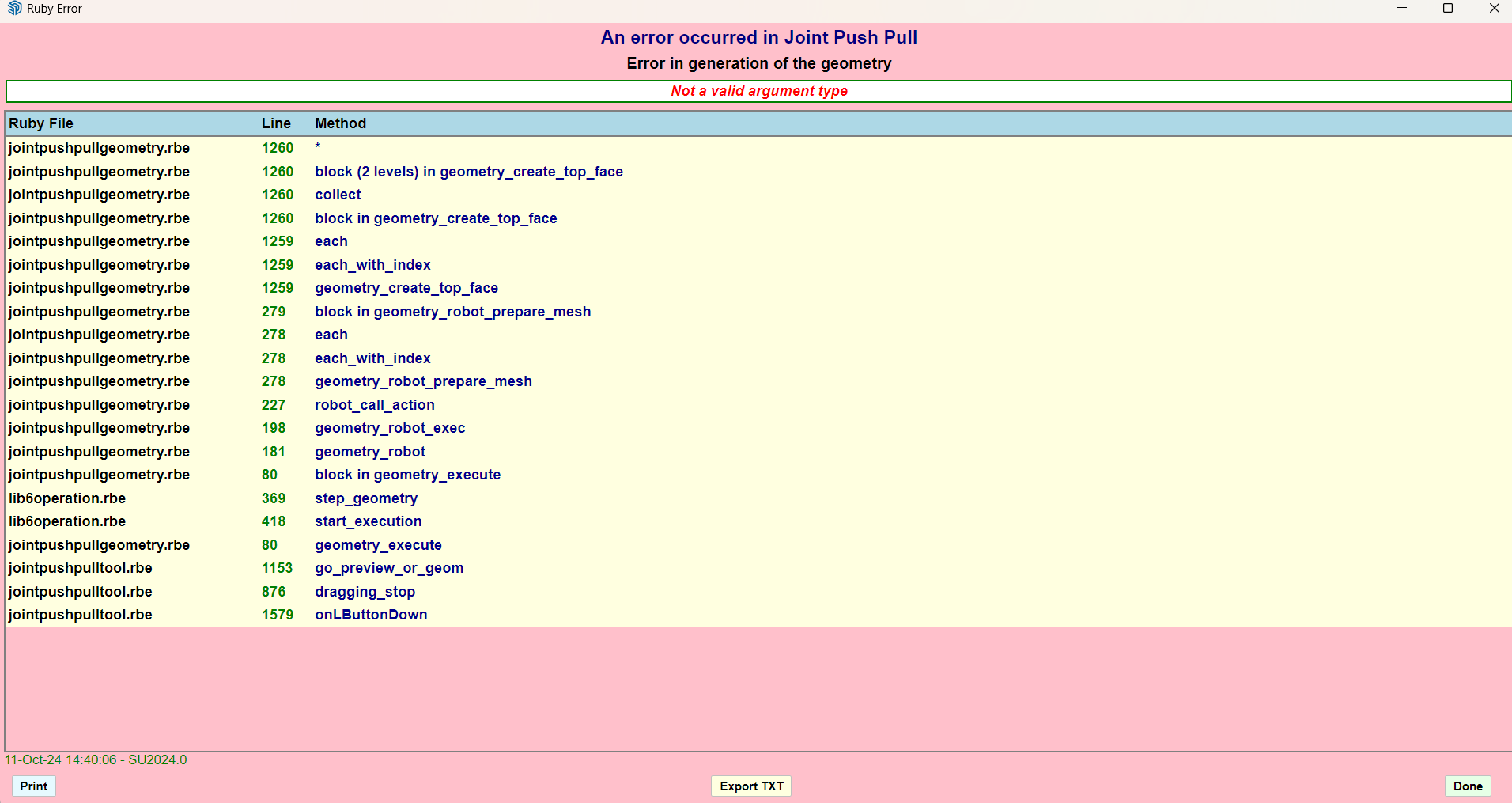
      I have an error with the JointPushPull pluggin, every time i try the "J" Jointpushpull tool appears this error, i have the libfredo6-v16.a and the JointPushPull-v4.8a
      Captura de pantalla 2024-10-11 144017.png
      I Just wanted to make thicker a simple rectangle, i know i can use the other tools, but why do this error keeps appearing me
      What can i do?

      fredo6F 1 Reply Last reply
      Reply Quote 0
      • fredo6F
        fredo6 @aleman_1940
        last edited by

        @aleman_1940
        I would need to get the model where it is faulty.

        Possibly, you may work on tiny faces....

        1 Reply Last reply
        Reply Quote 0
        • J
          jskwonb
          last edited by

          This post is deleted!
          TIGT 1 Reply Last reply
          Reply Quote 0
          • TIGT
            TIG Moderator @jskwonb
            last edited by

            @jskwonb
            Have you tried following the advice in the error-message ?
            Have you installed the latest versions of the extension, LibFredo6 and the SketchUcation tools [for the licensing], and restarted Sketchup to sync every thing ?
            Also, this kind of error relating to reading a license file often occurs if your computer has not been named following Microsoft's conventions - e.g. its name should contain only ASCII letters and numbers, and a few other common punctuation characters; it should not contain special characters [I note your image's name contains some Asian characters]. You could try renaming your computer ?? Also your PC's user-name has similar restrictions...

            TIG

            1 Reply Last reply
            Reply Quote 0
            • W
              wkearney99 @whddnjs8474
              last edited by wkearney99

              Does 4.8a support doing vector pulls to a plane using SU2017?

              I'm not seeing the added elements on the toolbar for it.

              fredo6F 1 Reply Last reply
              Reply Quote 0
              • fredo6F
                fredo6 @wkearney99
                last edited by

                @wkearney99
                Do you mean the option in the Misc section?

                2792046b-5491-4e54-9666-6cdbc377a6c4-image.png

                Normally, there is no difference between Sketchup versions.

                W 1 Reply Last reply
                Reply Quote 0
                • W
                  wkearney99 @fredo6
                  last edited by

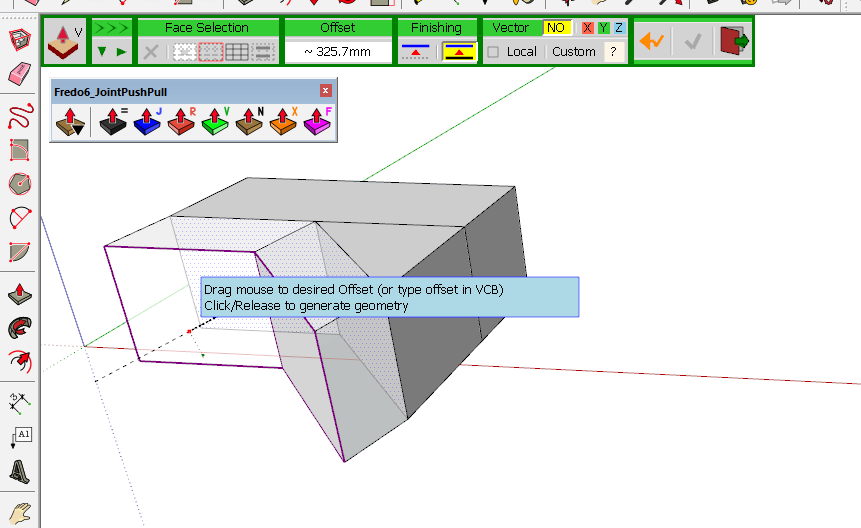
                  @fredo6 yes, those, I don't see contours and the rest.
                  do they only appear when you're manipulating a certain kind of shapes or something?

                  I created a shape, selected some faces, selected the V tool
                  7af97b30-d3d4-4e5e-8937-e6bfcf7b87da-image.png

                  I ask this because I'm using the trial version and wanted to make sure I wasn't going to purchase something that wasn't going to work. I'm only using SU for 3D printing hobby stuff. I don't mind spending a few bucks to get decent software. I just wanted to make sure it'd work with what I've got.

                  - Sketchup: 17.2.2555
                  - LibFredo6: v14.9a
                  - LibFredo6 Binary loaded
                  - Sketchucation ExtensionStore: 4.4.1
                  - SCFLicense: v6.4a - 74
                  - Fredo6 Plugins
                      > FredoCorner v2.7a
                      > JointPushPull v4.8a
                      > RoundCorner v3.4a
                  - SCFLicense directory present
                      > Signature File: absent
                  

                  Forgive me if I'm not doing something right. I saw the plugin on some videos and have tried to follow their steps and got stymied at not seeing the contour and other buttons.

                  My use-case for this is I've got a surface mesh from an STL that I want to extrude to a flat plane behind it.

                  W 1 Reply Last reply
                  Reply Quote 0
                  • W
                    wkearney99 @wkearney99
                    last edited by

                    @wkearney99 oh wait, I'm a dope, I didn't know about this button: 9dcfdde9-fc59-4b7b-a672-35ca04849d7e-image.png

                    Which gives me:
                    f9e5e63c-7e00-43ab-bd48-a0b529b29a42-image.png

                    so, yeah, nevermind...

                    fredo6F 1 Reply Last reply
                    Reply Quote 0
                    • fredo6F
                      fredo6 @wkearney99
                      last edited by

                      @wkearney99
                      Yes, all buttons palettes in JPP have a compact mode, because some users said there was too many options....!

                      1 Reply Last reply
                      Reply Quote 1
                      • M
                        Msayed25say
                        last edited by

                        so the plugin does not work offline?!

                        1 Reply Last reply
                        Reply Quote 0
                        • fredo6F
                          fredo6
                          last edited by fredo6

                          NEW RELEASE: JointPushPull Interactive v4.9a - 02 Apr 25

                          JointPushPull Interactive 4.9a is a major release including:

                          • Trimming and Hole Extrusion

                          IMPORTANT: JointPushPull 4.9a requires LibFredo6 15.3 or above


                          See plugin home page of JointPushPull for Download of JointPushPull.

                          Main Post of the JointPushPull thread on this forum

                          1 Reply Last reply
                          Reply Quote 0
                          • Gus RG
                            Gus R
                            last edited by

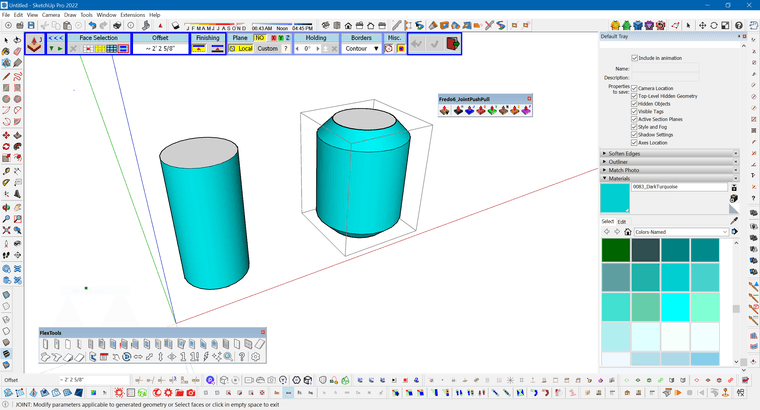
                            I don't know what I changed but I'm suddenly getting like beveled offset when using Joint Push Pull. Just the regular Joint Push Pull.
                            JPP.PNG

                            www.instagram.com/gusrobatto/

                            www.facebook.com/gusrobatto

                            www.flickr.com/photos/gusrobatto

                            Gus RG 1 Reply Last reply
                            Reply Quote 0
                            • Gus RG
                              Gus R @Gus R
                              last edited by

                              @Gus-R Never mind.

                              www.instagram.com/gusrobatto/

                              www.facebook.com/gusrobatto

                              www.flickr.com/photos/gusrobatto

                              1 Reply Last reply
                              Reply Quote 0
                              • F
                                ferol
                                last edited by

                                I just bought the plugin and am testing it. I thought I could replace the classic push-pull with some of its functions, but I have a problem: when I "push" inside an object, the surface often disappears. I made a short video about it:

                                The only icons that don't do this are "R" and "F."

                                Is this a bug?

                                1 Reply Last reply
                                Reply Quote 0
                                • F
                                  ferol
                                  last edited by

                                  I just bought the plugin and am testing it. I thought I could replace the classic push-pull with some of its functions, but I have a problem: when I "push" inside an object, the surface often disappears. I made a short video about it:

                                  The only icons that don't do this are "R" and "F."

                                  Is this a bug?

                                  1 Reply Last reply
                                  Reply Quote 0

                                  Hello! It looks like you're interested in this conversation, but you don't have an account yet.

                                  Getting fed up of having to scroll through the same posts each visit? When you register for an account, you'll always come back to exactly where you were before, and choose to be notified of new replies (either via email, or push notification). You'll also be able to save bookmarks and upvote posts to show your appreciation to other community members.

                                  With your input, this post could be even better 💗

                                  Register Login
                                  • 1
                                  • 2
                                  • 27
                                  • 28
                                  • 29
                                  • 30
                                  • 31
                                  • 31 / 31
                                  • First post
                                    Last post
                                  Buy SketchPlus
                                  Buy SUbD
                                  Buy WrapR
                                  Buy eBook
                                  Buy Modelur
                                  Buy Vertex Tools
                                  Buy SketchCuisine
                                  Buy FormFonts

                                  Advertisement