[Plugin][$] JointPushPull Interactive - v4.9a - 02 Apr 25




-
yes, I had many faces in the model (organic modelling)...
But why there are 2 different uses for ENTER (when cursor on face, or not on face?) Is possible that is why I miss it many times... because i move the cursor around. I am not used to pay attention to it when i don't actively use it to manipulate geometry. Do you think this behavior is actually useful?Thanks for all explanations

-
Fredo,
Would it be easy to have normal push pull Taper with an angle or a offset distance instead of exclusivelly by ratio? It would be a nice feature to have for chanfering faces outside their plane with a double click. (I love this double click through groups/components)
-
Where do i download it!!!???!!!
-
@bapito said:
Where do i download it!!!???!!!
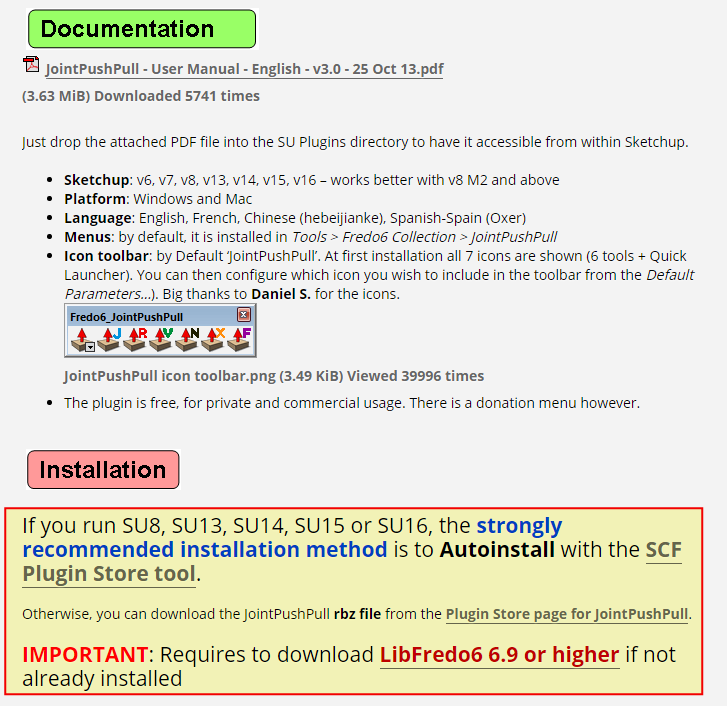
See the first post of this thread. It is clearly spelled out with bold type and links.
-
Hi I'm having a small issue that I can't for the life of me understand.
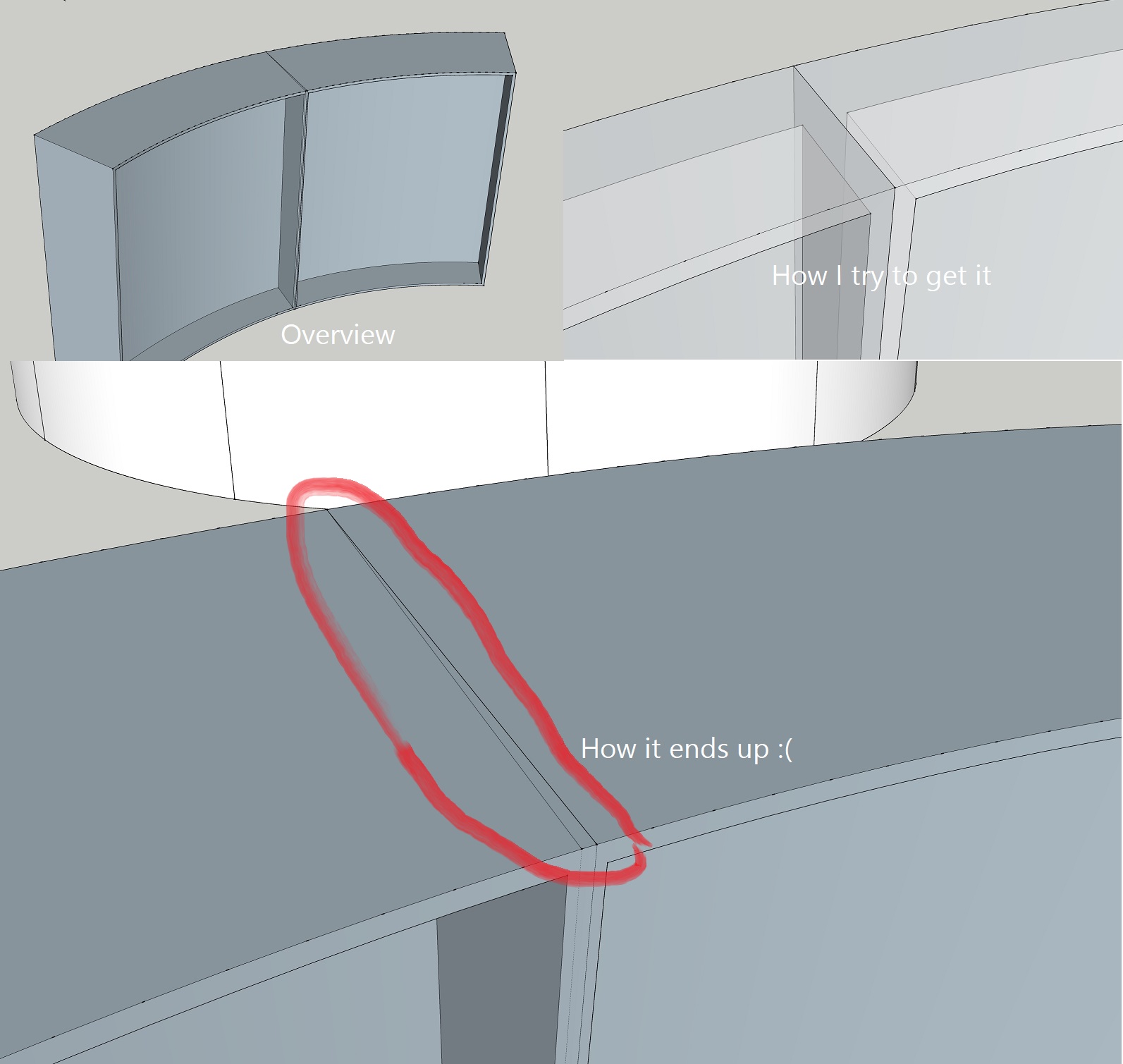
I'm extruding the wall of a truncated cone, or more like a rounded plate that along with 11 other identical plates will make up the cone. I'm trying to make flanges around the sides of one plate to then instance it, but the sides keep intersecting and I can't seem to control them!
I did manage to get it right at first, but there were some other issues with the model so I have restarted and this time around I can't get it to work.
I'm using Joint Push Pull and Round Push Pull.
-
I'm getting this error message when trying to Joint Push pull:
` [/Date: 21-Sep-16 09:11:28
An error occurred in Joint Push Pull
Error in generation of the geometryundefined method `smooth?' for nil:NilClass
JointPushPullGeometry.rb: 1107 -- block in geometry_coplanar_edges_overhang
JointPushPullGeometry.rb: 1105 -- each
JointPushPullGeometry.rb: 1105 -- each_with_index
JointPushPullGeometry.rb: 1105 -- geometry_coplanar_edges_overhang
JointPushPullGeometry.rb: 354 -- block in geometry_robot_erase_coplanar_edges
JointPushPullGeometry.rb: 352 -- each
JointPushPullGeometry.rb: 352 -- geometry_robot_erase_coplanar_edges
JointPushPullGeometry.rb: 214 -- robot_call_action
JointPushPullGeometry.rb: 177 -- geometry_robot_exec
JointPushPullGeometry.rb: 160 -- geometry_robot
JointPushPullGeometry.rb: 75 -- block in geometry_execute
Lib6Operation.rb: 332 -- call
Lib6Operation.rb: 332 -- step_geometry
Lib6Operation.rb: 374 -- start_execution
JointPushPullGeometry.rb: 75 -- geometry_execute
JointPushPullTool.rb: 892 -- go_preview_or_geom
JointPushPullTool.rb: 698 -- dragging_stop
JointPushPullTool.rb: 1320 -- onLButtonUp` -
Thanks for signaling. This seems to be an unusual case.
Anyway, I have fixed the problem and will re-release soon.Fredo
-
Hi. I'm having a problem with the plugin gui showing up really small in SU. See attached picture.
I'm on SU2016, OS X 10.9.5.
How can I make it bigger?
//Mike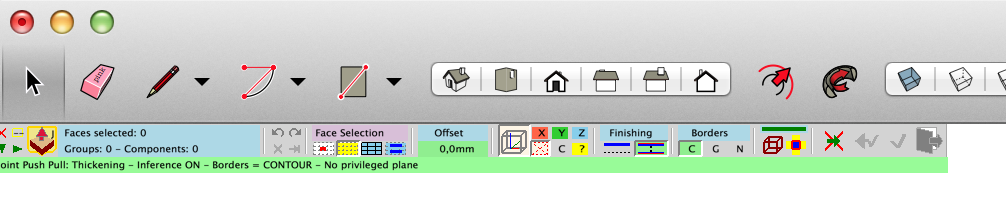
-
@surfmike said:
Hi. I'm having a problem with the plugin gui showing up really small in SU. See attached picture.
I'm on SU2016, OS X 10.9.5.
How can I make it bigger?
//Mike[attachment=0:26p179xb]<!-- ia0 -->Screen Shot 2016-11-26 at 11.35.17.png<!-- ia0 -->[/attachment:26p179xb]
Mike,
If you go to Windows > libFredo6 Settings... > Default Parameters..., you will find an option "Retina Screen" in the section "Palette Configuration".
If you check the option, you should get the palette buttons bigger (x 2). However, the text may remain small.
If you are OK, and since you are on SU2016, you can help me to see if we can resolve the issue, if you are OK to test some changes in the LibFredo6 library. I was hoping that it would be solved by Sketchup 2017, but that's not the case!
Otherwise, other high-dpi screen users have discussed some ways to avoid the issue by system set up. See discussion here.
Fredo6
-
What may I be doing wrong. Trying to pull up three surfaces sharing three edges.
ate: 30-Nov-16 08:55:30
An error occurred in Joint Push Pull
Error in generation of the geometryCould not compute valid matrix from points
JointPushPullGeometry.rb:: 1169 -- position_material
JointPushPullGeometry.rb:: 1169 -- block in geometry_transfer_material_top
JointPushPullGeometry.rb:: 1145 -- each
JointPushPullGeometry.rb:: 1145 -- geometry_transfer_material_top
JointPushPullGeometry.rb:: 337 -- block in geometry_robot_transfer_material
JointPushPullGeometry.rb:: 337 -- each
JointPushPullGeometry.rb:: 337 -- geometry_robot_transfer_material
JointPushPullGeometry.rb:: 212 -- robot_call_action
JointPushPullGeometry.rb:: 177 -- geometry_robot_exec
JointPushPullGeometry.rb:: 160 -- geometry_robot
JointPushPullGeometry.rb:: 75 -- block in geometry_execute
Lib6Operation.rb:: 332 -- call
Lib6Operation.rb:: 332 -- step_geometry
Lib6Operation.rb:: 374 -- start_execution
JointPushPullGeometry.rb:: 75 -- geometry_execute
JointPushPullTool.rb:: 890 -- go_preview_or_geom
JointPushPullTool.rb:: 696 -- dragging_stop
JointPushPullTool.rb:: 1318 -- onLButtonUp -
I guessed that although it looked simple, there might be some errant geometry from making the faces. I grouped the faces and ran TT Cleanup3 and that fixed it.
-
@fredo6 said:
@surfmike said:
Hi. I'm having a problem with the plugin gui showing up really small in SU. See attached picture.
I'm on SU2016, OS X 10.9.5.
How can I make it bigger?
//Mike[attachment=0:leehgwfs]<!-- ia0 -->Screen Shot 2016-11-26 at 11.35.17.png<!-- ia0 -->[/attachment:leehgwfs]
Mike,
If you go to Windows > libFredo6 Settings... > Default Parameters..., you will find an option "Retina Screen" in the section "Palette Configuration".
If you check the option, you should get the palette buttons bigger (x 2). However, the text may remain small.
If you are OK, and since you are on SU2016, you can help me to see if we can resolve the issue, if you are OK to test some changes in the LibFredo6 library. I was hoping that it would be solved by Sketchup 2017, but that's not the case!
Otherwise, other high-dpi screen users have discussed some ways to avoid the issue by system set up. See discussion here.
Fredo6
Hi Fredo,
Sorry for late response.
Tried it.
The field/icons becme bigger.
Still small text size.
/Mike -
Hi Fredo,
I am a beginner in the use of Sketchup so maybe I did a bad manipulation, but for me, the installation of plugins JoinPushPull and Tools on Surface doesn't work (signature obsolete).
Do you have an explanation?
My version of SU is 17.1.173 and I'm on Mac.
Thank you for your help.Kawet
-
@kawet said:
I am a beginner in the use of Sketchup so maybe I did a bad manipulation, but for me, the installation of plugins JoinPushPull and Tools on Surface doesn't work (signature obsolete).
The plugin vetting process put in place with SU2017 calls for signatures. Just because a plugin / extension shows "outdated signature" or "unsigned" doesn't mean it won't work, it only controls what is to be loaded. If you're super paranoid and have set up SU2017 to only load signed plugins / extenstions then trying to load an unsigned / out of dated signature plugin / extenstion won't work. However if your plugin / extension loading setup is unrestricted then these will load.
-
Hi Juju,
Thank you, i'm not ''super paranoid'', but i like to understand ... and its my first day on SU !
Now i understand.
ty -
@kawet said:
Hi Fredo,
I am a beginner in the use of Sketchup so maybe I did a bad manipulation, but for me, the installation of plugins JoinPushPull and Tools on Surface doesn't work (signature obsolete).
Do you have an explanation?
My version of SU is 17.1.173 and I'm on Mac.
Thank you for your help.Kawet
I will republish JPP with SU2017 certification.
Fredo
-
@kawet said:
Hi Juju,
Thank you, i'm not ''super paranoid'', but i like to understand ... and its my first day on SU !
Now i understand.
tyThere is nothing wrong with asking questions to understand. Anyhows, welcome to SketchUp! I must warn you, it is addictive!
As long as you get your plugins from reputable sources you should not have problems with rogue plugins and, as such, be able to leave the plugin/extension loading settings to unrestricted.
Happy Sketch(Up)ing!
-
Hey Fredo,
great tool! I've been using this plugin since 2 years ago. However, I've encountered a bug when trying to use JointPushPull.
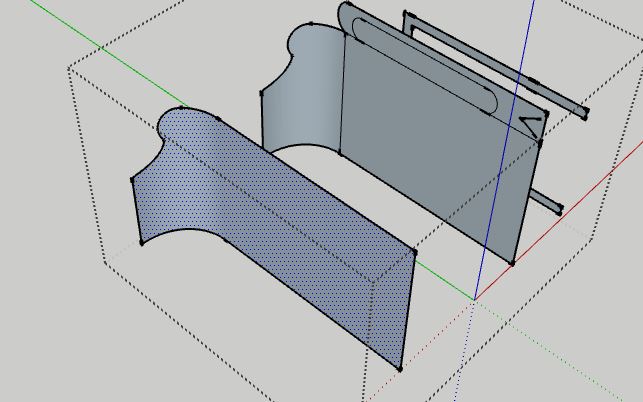
I was trying to extrude this plane:
@unknownuser said:
Date: 02-Feb-17 16:36:14
An error occurred in Joint Push Pull
Error in generation of the geometryundefined method `smooth?' for nil:NilClass
JointPushPullGeometry.rb: 1107 -- block in geometry_coplanar_edges_overhang
JointPushPullGeometry.rb: 1105 -- each
JointPushPullGeometry.rb: 1105 -- each_with_index
JointPushPullGeometry.rb: 1105 -- geometry_coplanar_edges_overhang
JointPushPullGeometry.rb: 354 -- block in geometry_robot_erase_coplanar_edges
JointPushPullGeometry.rb: 352 -- each
JointPushPullGeometry.rb: 352 -- geometry_robot_erase_coplanar_edges
JointPushPullGeometry.rb: 214 -- robot_call_action
JointPushPullGeometry.rb: 177 -- geometry_robot_exec
JointPushPullGeometry.rb: 160 -- geometry_robot
JointPushPullGeometry.rb: 75 -- block in geometry_execute
Lib6Operation.rb: 332 -- call
Lib6Operation.rb: 332 -- step_geometry
Lib6Operation.rb: 374 -- start_execution
JointPushPullGeometry.rb: 75 -- geometry_execute
JointPushPullTool.rb: 892 -- go_preview_or_geom
JointPushPullTool.rb: 931 -- modify_execute
JointPushPullTool.rb: 944 -- modify_offset
JointPushPullTool.rb: 2081 -- action_from_VCB
JointPushPullTool.rb: 2058 -- onUserTextHere's the file: jpp error.skp
I've encountered quite a number of errors, but today I decided want to learn more what's going on.
-
Can you attach the model which has the bugs.
The one you attached does not provoke errors, and is different from what you show on the picture.Fredo
-
NEW RELEASE: JointPushPull Interactive v3.6a - 02 Feb 17
JointPushPull Interactive 3.6a is certified for SU2017 and includes a few bug fixing in the generation of geometry.
See main post of this thread for Download of JointPushPull.
Fredo










Advertisement