[Plugin] SketchUcation Tools
-
sorry I will activate license and this pop up is appear."Sorry-An error occured in the communication with Sketchucation " How can i fixed it.
-
@intara said:
sorry I will activate license and this pop up is appear."Sorry-An error occured in the communication with Sketchucation " How can i fixed it.
Do you have the latest version of the Sketchucation Tool? Do you have a firewall that might be blocking the connection? What version of SketchUp are you actually using? Your profile says 2020 Free/Make which is impossible as there is no such version.
-
You need the latest version of the SketchUcation toolset installing, and the extension itself, and in the case of Fredo's extensions Libfredo6...
After the installation restart SketchUp to sync everything.Save the license files to somewhere safe on your computer.
Try SCF license validation again...
-
We just published v4.3.1 with some small but important changes.
- License improvements for releasing seats
- Tooltip fixes
- Link pasting (Experimental)
The licensing part is important for those encountering issue when going offline. So please try testing if this resolves your issues. Especially the need to revalidate.
Link pasting, while experimental, is a new way to install extensions using a URL. So if your browsing around https://sketchucation.com/pluginstore and see something you like just right click > copy link

Now in SketchUp use the Paste icon in the footer to prompt for a link...

Paste in your link i.e https://sketchucation.com/pluginstore?pln=HoleEditor and hit Enter/OK
Or if your lazy pln=HoleEditor will also work
It's experimental at the moment and untested on Mac. So expect funky behaviour.
If you don't see a Paste icon in the footer press CTRL + F5 with the ExtensionStore dialog active to force a hard reload.
-
The install from link got a little more polish server side. No need to update extension. But a CTRL + F5 maybe needed to refresh cache in the dialog.
-
REQUEST TO THE DEVELOPER: Tackle this issue, it has not been solved by reinstalling neither SU (to 2023) nor removing and reinstalling a freshly downloaded Sketchucation Tools v4.3.1.
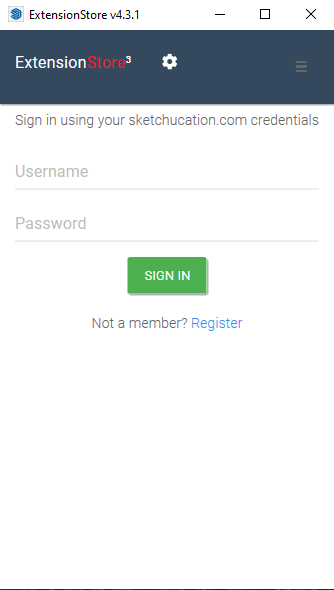
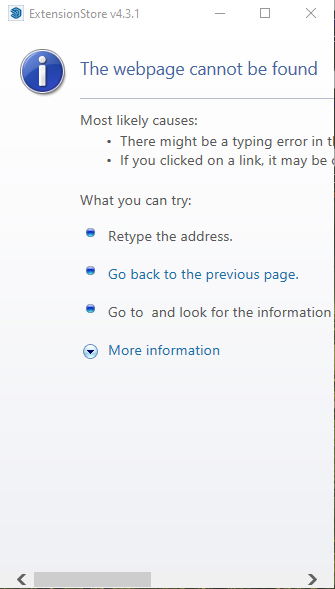
Every time I startup Sketchup, the ExtensionStore v4.3.1 from SketchUcation starts up as well and asks for its credentials, very annoying. Is there a way to stop this? Filling in the credentials doesn't help, every time the window is closed your credentials are lost and you can start from scratch...
Furthermore, the menu item on the right side is grayed out, and when clicking the settings button, you get a "Webpage cannot be found error". Please improve the tool.
-
It sounds like you have not installed the toolset correctly.
There should be a SketchUcation.rb loader file in your Plugins folder.
Also in the Plugins folder there should be a subfolder named SketchUcation - this contains several RBE files and other subfolders etc which are loaded and used as needed.
There's also an SCFlicense.rb and matching subfolder in that subfolder too.There should be nothing else loading from the Plugins folder when SketchUp starts except the SketchUcation.rb file which sets up the main extensions...
Reinstall the SketchUcation toolset from the RBZ which you can download from our PluginStore...
That way you'll get a 'clean install'...
Use the native Extension Manager > install button.
I suggest you delete all files and subfolders found within the Plugins folder that are NOT the SketchUcation.rb file or its subfolder. You can see these by opening the SketchUcation folder - there should be no duplicates of these files in Plugins.Another possibility is that you've somehow installed the toolset in the alternative Plugins folder usually reserved for complex extensions like renderers...
If it's [perhaps duplicated] there, as it starts up SketchUp will try to load it too...
Look in the probably hidden folder C:\ProgramData\SketchUp\SketchUp NNNN\SketchUp\Plugins [where NNNN is the version year] and delete the SketchUcation.rb and matching subfolder if its there... -
UPDATE PROBLEM SOLVED (although I am still not sure why the toolbars went missign)
SketchUp needs to be restarted after the plugin install !!!!- I always forget...I can not install the FREDO CORNER plugin. I have a license and I had the toolbar on the side, which disappeared.
I tried installing it manually. Downloaded the plugin from here, then install...but it doesn't appear in the toolbox....I can see in the Extension Manager - Fredo6 Fredo Corner, but not in the toolbar???
Also. in Windows ---> LibFredoSettings ---> Cherck Fredo6 Pluging for update it shows quite a few plugins out of date. For example LibFredo. But I re-intalled them all, and they are al up-to date. As they are by the EXTENSION STORE PLUGIN (SKETCHUCATION TOOLS plugin)...
-
My sketchup (original) pro 2022 crashes everytime i install Sketchucation Tools 4.3.0 or 4.3.1.
I have tried many times. All plugins works fine, i use many. This is the only one that makes sketchup crashes when i open it..
I need to activate my Lib6 products and i can't do it or use it... Please solve it...
-
@rafaelms1 said:
My sketchup (original) pro 2022 crashes everytime i install Sketchucation Tools 4.3.0 or 4.3.1.
Make sure you have installed SketchUp 2022 correctly. On Windows that rquires right clicking on the downloaded installer and choosing Run as administrator. Close SketchUp now, find the installer in your Downloads folder, right click on it, choose Run as administrator, and then choose Repair when the option is presented. After that install the current version of the Sketchucation tool.
By the way, your forum profile says you are using a pre-2013 version. Please correct that information. It helps us help you.
-
Apparently I require this "ExtensionStore" plugin now to use some of my protectivity ones like Joint Push Pull but he download shows a file size of 0mb and you get the following when trying to to use the download link:
/pluginrepo/rbz/
/var/www/html/pluginrepo/rbz/SketchUcationTools.rbz
File does not exist. Make sure you specified correct file name.Quick Tip, if you are going to make a function mandatory, make people able to get hold of it!
-
@abba said:
Quick Tip, if you are going to make a function mandatory, make people able to get hold of it!
Thanks for the tip. It is normally always available. There was an issue with the Amazon server today but it seems to be fixed. At least I am able to download extensions including this one now.
https://sketchucation.com/forums/viewtopic.php?f=323&t=71951&p=689650#p689650
-
@abba said:
Quick Tip, if you are going to make a function mandatory, make people able to get hold of it!
Thanks for the tip

Have tried download since? We had amazon server demount issues earlier but we sorted those
-
Latest updated killed the download. Shows as 0.0 Mb, and download link says file is non-existent.
-
It is resolved now. Normal service has resumed.
It had nothing to do with any update just Amazon bucket failure
-
@nl71hsms said:
REQUEST TO THE DEVELOPER: Tackle this issue, it has not been solved by reinstalling neither SU (to 2023) nor removing and reinstalling a freshly downloaded Sketchucation Tools v4.3.1.
Every time I startup Sketchup, the ExtensionStore v4.3.1 from SketchUcation starts up as well and asks for its credentials, very annoying. Is there a way to stop this? Filling in the credentials doesn't help, every time the window is closed your credentials are lost and you can start from scratch...
Furthermore, the menu item on the right side is grayed out, and when clicking the settings button, you get a "Webpage cannot be found error". Please improve the tool.
Reporting your post or editing your post does not highlight your post for attention. Posting a new reply or a new thread makes it visible.
In your report you say no one answered. But the very next post is TIG replying to you...
https://sketchucation.com/forums/viewtopic.php?p=688987#p688987
Have you tried the suggestions in TIG's post?
-
Hi all.
I recently installed the new version of SketchUp 2023.
I had to uninstall all the previous versions.
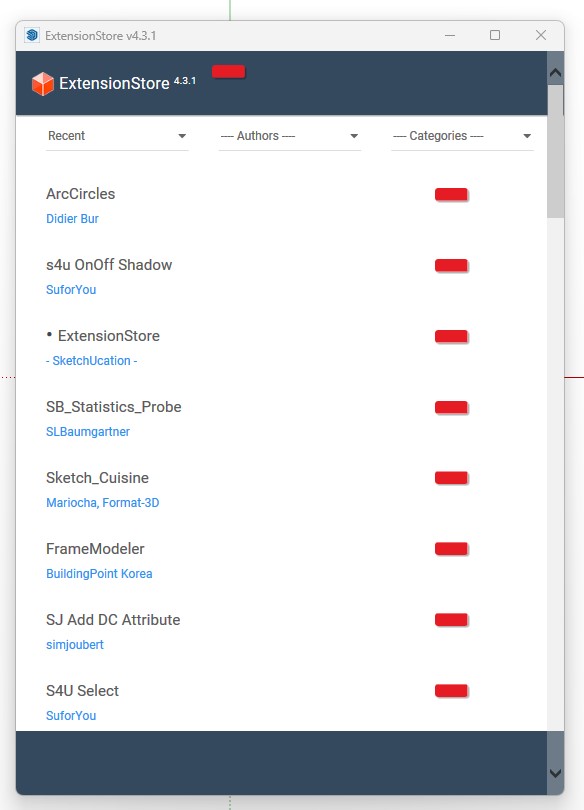
After I installed the Sketchup 2023 and ExtensionStore 4.3.1, the plugin became too slower.
Whenever I click the extensionstore button in the too bar, it takes more than 15 secs until it show the list of plugins.
Also there is no menu appeared at the bottom and if I click the setting button at the top it doesn't response.
I can't log in to my account, so I can't install the bundle that I have been using.How can I fix this?
-
Try making the window larger by dragging the bottom right corner.
-
@dave r said:
Try making the window larger by dragging the bottom right corner.
Thank you for response.
I tried and it still doesn't show the bottom menu icon.
It is still too slow in responding on my input. If I click 'click here to continue', it takes more than 14 seconds. -
@nl71hsms said:
REQUEST TO THE DEVELOPER: Tackle this issue, it has not been solved by reinstalling neither SU (to 2023) nor removing and reinstalling a freshly downloaded Sketchucation Tools v4.3.1.
Every time I startup Sketchup, the ExtensionStore v4.3.1 from SketchUcation starts up as well and asks for its credentials, very annoying. Is there a way to stop this? Filling in the credentials doesn't help, every time the window is closed your credentials are lost and you can start from scratch...
Furthermore, the menu item on the right side is grayed out, and when clicking the settings button, you get a "Webpage cannot be found error". Please improve the tool.
I have this exact same problem. It was forced to install it to license RoundCorner. I wish there was simpler way to manage licenses than this janky bloatware.






Advertisement