sketchucation logo sketchucation
    • 登入
    Oops, your profile's looking a bit empty! To help us tailor your experience, please fill in key details like your SketchUp version, skill level, operating system, and more. Update and save your info on your profile page today!
    🔌 Smart Spline | Fluid way to handle splines for furniture design and complex structures. Download

    [Plugin] Layers Panel 1.2.1

    已排程 已置頂 已鎖定 已移動 Plugins
    672 貼文 109 Posters 202.6k 瀏覽 109 Watching
    正在載入更多貼文
    • 從舊到新
    • 從新到舊
    • 最多點贊
    回覆
    • 在新貼文中回覆
    登入後回覆
    此主題已被刪除。只有擁有主題管理權限的使用者可以查看。
    • jiminy-billy-bobJ 離線
      jiminy-billy-bob
      最後由 編輯

      @kct3937 said:

      Sorry for being weird.

      I meant the issue is weird, not you! 😄

      25% off Skatter for SketchUcation Premium Members

      1 條回覆 最後回覆 回覆 引用 0
      • jiminy-billy-bobJ 離線
        jiminy-billy-bob
        最後由 編輯

        New version 0.10.1 beta !

        Changelog :

        • Fixed options dialog on OSX
        • Added Command key for shortcuts on OSX
        • Fixed naming issue with Google Earth terrain

        Download in the plugin store !

        25% off Skatter for SketchUcation Premium Members

        1 條回覆 最後回覆 回覆 引用 0
        • jiminy-billy-bobJ 離線
          jiminy-billy-bob
          最後由 編輯

          Ok so none of the options are working. This is weird.
          Would you be ok with me getting in touch with you by PM, so you can test some things?

          @kct3937 said:

          In the attached video, I see two extra panels. If I am supposed to be seeing both or either of them…I do not I see only one panel.

          Layers Panel is only one panel. In the video, there is the layers toolbar, and then the Vray progress window and main render window.

          EDIT : Nevermind, I fixed it 😉

          25% off Skatter for SketchUcation Premium Members

          1 條回覆 最後回覆 回覆 引用 0
          • EdsonE 離線
            Edson
            最後由 編輯

            hi jbb,

            it is working on mac os 10.8.5 now.

            almost all the features work, except the render one. I understand the kettle icons are for one to disable scenes as far as rendering goes. however, nothing happens when I hover the cursor over the kettle icons: there is no indication that I can click on them, as all the others do.

            when clicking on the podium icon I got a message that it was not installed but the rendering process started anyway although id did not go through to the end.

            I am sure you will fix those little glitches soon. Layers Panel is already an important part of my workflow. thanks.

            best regards.

            edson mahfuz, architect| porto alegre • brasil
            http://www.mahfuz.arq.br

            1 條回覆 最後回覆 回覆 引用 0
            • jiminy-billy-bobJ 離線
              jiminy-billy-bob
              最後由 編輯

              @edson said:

              almost all the features work, except the render one. I understand the kettle icons are for one to disable scenes as far as rendering goes. however, nothing happens when I hover the cursor over the kettle icons: there is no indication that I can click on them, as all the others do.

              You mean there is no "hand" icon?
              What happens if you click anyway?

              25% off Skatter for SketchUcation Premium Members

              1 條回覆 最後回覆 回覆 引用 0
              • EdsonE 離線
                Edson
                最後由 編輯

                @jiminy-billy-bob said:

                @edson said:

                almost all the features work, except the render one. I understand the kettle icons are for one to disable scenes as far as rendering goes. however, nothing happens when I hover the cursor over the kettle icons: there is no indication that I can click on them, as all the others do.

                You mean there is no "hand" icon?
                What happens if you click anyway?

                this is the point: nothing happens!

                two more issues: Layers Panel does not keep the layers in the order I set them originally. why is that? the other is that it does not pick up all my original layers. see the attached image: layers AUX-Pergola and AUX-Pergola 2 are nowhere to be seen, and layer AUX-Pergola 3 is way down below the others with the AUX prefix.

                thanks.
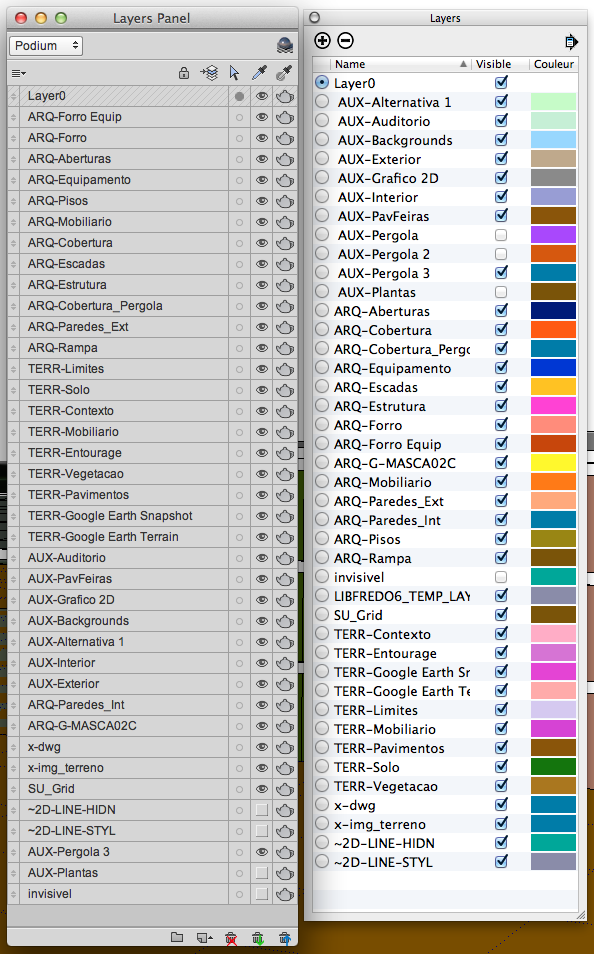
                Screenshot 2014-02-07 14.19.32.png

                edson mahfuz, architect| porto alegre • brasil
                http://www.mahfuz.arq.br

                1 條回覆 最後回覆 回覆 引用 0
                • jiminy-billy-bobJ 離線
                  jiminy-billy-bob
                  最後由 編輯

                  When first opened, Layers Panel sorts the layers in the order they were created. There is no way to recover the order of the layers window.

                  As for the missing layers, could you send me the file by PM? (Even with all the geometry deleted if you're not comfortable with that)

                  25% off Skatter for SketchUcation Premium Members

                  1 條回覆 最後回覆 回覆 引用 0
                  • EdsonE 離線
                    Edson
                    最後由 編輯

                    no problem. I will send you the file right away.

                    edson mahfuz, architect| porto alegre • brasil
                    http://www.mahfuz.arq.br

                    1 條回覆 最後回覆 回覆 引用 0
                    • jiminy-billy-bobJ 離線
                      jiminy-billy-bob
                      最後由 編輯

                      Thanks, I'll take a look at it.

                      25% off Skatter for SketchUcation Premium Members

                      1 條回覆 最後回覆 回覆 引用 0
                      • EdsonE 離線
                        Edson
                        最後由 編輯

                        LP has a nice feature that allows one to decide whether it opens when Sketchup starts or not. now, could you include something to tell it to open the main dialog at the same spot it was when Sketchup closed for the last time? right now it opens always on the same place of the screen.

                        edson mahfuz, architect| porto alegre • brasil
                        http://www.mahfuz.arq.br

                        1 條回覆 最後回覆 回覆 引用 0
                        • jiminy-billy-bobJ 離線
                          jiminy-billy-bob
                          最後由 編輯

                          Oh? On Windows it remembers the position. Anyone else has the same issue?

                          25% off Skatter for SketchUcation Premium Members

                          1 條回覆 最後回覆 回覆 引用 0
                          • jiminy-billy-bobJ 離線
                            jiminy-billy-bob
                            最後由 編輯


                            New version 0.10.2 beta !

                            Changelog :

                            • Better management of multiple models opened on OSX (You need to pan/orbit/zoom to trigger the change)
                            • Added debug dialog
                            • Fixed bug at startup

                            Download in the plugin store !


                            25% off Skatter for SketchUcation Premium Members

                            1 條回覆 最後回覆 回覆 引用 0
                            • F 離線
                              function
                              最後由 編輯

                              this keeps getting better and better. 😎

                              i had an idea from a screen a few posts up. how about layer colors? and then on top of that, 'auto-color sub-group' this would be a great way to quickly locate layers when you are dealing with quite a few.
                              thanks for the great plug

                              1 條回覆 最後回覆 回覆 引用 0
                              • jiminy-billy-bobJ 離線
                                jiminy-billy-bob
                                最後由 編輯

                                Unfortunatly, there is no way to retreive or set the layer colors in the current versions of Sketchup. Let's hope Trimble adds it to the API in future versions!

                                Can you explain a bit more your 'auto-color sub-group' idea?

                                25% off Skatter for SketchUcation Premium Members

                                1 條回覆 最後回覆 回覆 引用 0
                                • jiminy-billy-bobJ 離線
                                  jiminy-billy-bob
                                  最後由 編輯


                                  New version 1.0.0 !

                                  This is the first "stable" version. The plugin is now out of beta, as all features are now present, and it's running fine on OSX.

                                  Changelog :

                                  • Added layer colors for SketchUp 2014 (Right-click on a color to change it)
                                  • Fixed issue with undo operations

                                  Download in the plugin store !


                                  http://i.imgur.com/UgA185k.png

                                  25% off Skatter for SketchUcation Premium Members

                                  1 條回覆 最後回覆 回覆 引用 0
                                  • jiminy-billy-bobJ 離線
                                    jiminy-billy-bob
                                    最後由 編輯

                                    @function said:

                                    how about layer colors?

                                    @jiminy-billy-bob said:

                                    Unfortunatly, there is no way to retreive or set the layer colors in the current versions of Sketchup. Let's hope Trimble adds it to the API in future versions!

                                    It was hard not to tell you this was coming.
                                    The feature was ready and just waiting for SU2014 to officialy come out. 😄

                                    Hope you guy will like it. Now Layers Panel has all the features of Su's default layers window.

                                    25% off Skatter for SketchUcation Premium Members

                                    1 條回覆 最後回覆 回覆 引用 0
                                    • F 離線
                                      function
                                      最後由 編輯

                                      awesome! thanks jiminy-billy-bob
                                      by "auto-color groups" The idea was that layers could inherit the color of their group folder- this may cause problems with nested folders however

                                      1 條回覆 最後回覆 回覆 引用 0
                                      • EdsonE 離線
                                        Edson
                                        最後由 編輯

                                        jbb,

                                        I am still experiencing some difficulties on mac: there is always a missing layer comparing to what the native panel shows. until all the layers appear in your Layers Panel all the time it will be difficult to switch definitely to it.

                                        please, keep up the great work.

                                        edson mahfuz, architect| porto alegre • brasil
                                        http://www.mahfuz.arq.br

                                        1 條回覆 最後回覆 回覆 引用 0
                                        • jiminy-billy-bobJ 離線
                                          jiminy-billy-bob
                                          最後由 編輯

                                          Even when using the debug dialog?
                                          Could you send me your file?

                                          25% off Skatter for SketchUcation Premium Members

                                          1 條回覆 最後回覆 回覆 引用 0
                                          • EdsonE 離線
                                            Edson
                                            最後由 編輯

                                            jbb,

                                            I am sorry. I had completely forgotten what you taught me. after debugging the missing layer showed up.

                                            now I will be able to switch to LP. great.

                                            edson mahfuz, architect| porto alegre • brasil
                                            http://www.mahfuz.arq.br

                                            1 條回覆 最後回覆 回覆 引用 0
                                            • 1
                                            • 2
                                            • 19
                                            • 20
                                            • 21
                                            • 22
                                            • 23
                                            • 33
                                            • 34
                                            • 21 / 34
                                            • 第一個貼文
                                              最後的貼文
                                            Buy SketchPlus
                                            Buy SUbD
                                            Buy WrapR
                                            Buy eBook
                                            Buy Modelur
                                            Buy Vertex Tools
                                            Buy SketchCuisine
                                            Buy FormFonts

                                            Advertisement
