sketchucation logo sketchucation
    • 登入
    Oops, your profile's looking a bit empty! To help us tailor your experience, please fill in key details like your SketchUp version, skill level, operating system, and more. Update and save your info on your profile page today!
    🔌 Smart Spline | Fluid way to handle splines for furniture design and complex structures. Download

    [Plugin] Layers Panel 1.2.1

    已排程 已置頂 已鎖定 已移動 Plugins
    672 貼文 109 Posters 203.6k 瀏覽 109 Watching
    正在載入更多貼文
    • 從舊到新
    • 從新到舊
    • 最多點贊
    回覆
    • 在新貼文中回覆
    登入後回覆
    此主題已被刪除。只有擁有主題管理權限的使用者可以查看。
    • jiminy-billy-bobJ 離線
      jiminy-billy-bob
      最後由 編輯

      Really ? It was supposed to be fixed, and this to be an option... Did you do a clean install of the plugin ? Is the option checked ?

      25% off Skatter for SketchUcation Premium Members

      1 條回覆 最後回覆 回覆 引用 0
      • jiminy-billy-bobJ 離線
        jiminy-billy-bob
        最後由 編輯

        New version 0.8 beta !

        Changelog :

        • Added ALT+click on layer visibility : Isolate layer
        • Added CTRL+click on layer visibility : Isolate layer in its group
        • Added SHIFT+click on layer visibility : Toggle all highlighted layers
        • Added button to highlight selection's layer
        • Added button to select highlighted layer's entities
        • Fix copy/paste between instances

        Download in the plugin store !

        25% off Skatter for SketchUcation Premium Members

        1 條回覆 最後回覆 回覆 引用 0
        • jiminy-billy-bobJ 離線
          jiminy-billy-bob
          最後由 編輯

          New version 0.7 beta !

          Changelog :

          • Added a dark bar at the top to minimize/maximize the dialog
          • Added CTRL+G : Group selected layers
          • Added CTRL+SHIFT+G : Ungroup layers
          • Added CTRL+A : Select all
          • Added CTRL+E : Merge selected layers
          • Added different color for groups
          • Layer0 is now selectable
          • Fix bug with sorted groups
          • Potential fix for IE version bug

          Download in the plugin store !

          25% off Skatter for SketchUcation Premium Members

          1 條回覆 最後回覆 回覆 引用 0
          • bagateloB 離線
            bagatelo
            最後由 編輯

            Can you reply the features of this plugin for 3dsmax to sketchup?

            Attention Required! | Cloudflare

            favicon

            (www.scriptspot.com)

            While the cat's away, the mice will play

            1 條回覆 最後回覆 回覆 引用 0
            • jiminy-billy-bobJ 離線
              jiminy-billy-bob
              最後由 編輯

              What features exactly ? LP already allows to group and merge layers.
              What do "Alternate Material", "Alternate Property", "Import of REZN8 LayerManager Information" exactly ?

              25% off Skatter for SketchUcation Premium Members

              1 條回覆 最後回覆 回覆 引用 0
              • ElibjrE 離線
                Elibjr
                最後由 編輯

                Wow, this plugin is really coming along! When you add the color functionality to the plugin. I will be able to use it exclusively. See as a developer and designer of buildings where renovation is the norm. Having a colored layer for existing work and a second color for work to be removed as well as a new work layer color is critical in developing the scope of a project long before you figure out materials. Thanks for the good work. The great aspect of your plugin would be to start off with the default color and only color the needed layers, but then anything put into that layer would have that color. This is a great checking system to make sure what you have created is in the correct layer. Thanks for your great work.

                1 條回覆 最後回覆 回覆 引用 0
                • jiminy-billy-bobJ 離線
                  jiminy-billy-bob
                  最後由 編輯

                  Unfortunatly, I won't be able to add layer colors until the API is updated. There are some workaround, but they're just so heavy, I don't think that would be usable...
                  In the meantime, layer colors still work in the default layers window.

                  25% off Skatter for SketchUcation Premium Members

                  1 條回覆 最後回覆 回覆 引用 0
                  • jiminy-billy-bobJ 離線
                    jiminy-billy-bob
                    最後由 編輯

                    FYI, TT is currently helping me porting the plugin on OSX. Cheers to him ! 😄

                    25% off Skatter for SketchUcation Premium Members

                    1 條回覆 最後回覆 回覆 引用 0
                    • marcorigamonti74M 離線
                      marcorigamonti74
                      最後由 編輯

                      Let me know when the plugin will be ready for OSX sistem!!!
                      THANKS!!!!!!

                      1 條回覆 最後回覆 回覆 引用 0
                      • nanolinN 離線
                        nanolin
                        最後由 編輯

                        Hello
                        You can sort the list by alphabetical order of layers? . It can be added as an option?
                        thanks

                        1 條回覆 最後回覆 回覆 引用 0
                        • D 離線
                          db11
                          最後由 編輯

                          @jiminy-billy-bob said:

                          FYI, TT is currently helping me porting the plugin on OSX. Cheers to him ! 😄

                          Been patiently waiting for a functioning OSX version of this must-have plugin, so this is the best news I've heard in a long time!

                          Any idea on the ETA?

                          1 條回覆 最後回覆 回覆 引用 0
                          • jiminy-billy-bobJ 離線
                            jiminy-billy-bob
                            最後由 編輯

                            @nanolin said:

                            Hello
                            You can sort the list by alphabetical order of layers? . It can be added as an option?
                            thanks

                            Someone (maybe you ?) already suggested this. So it's on my todo list 😉

                            @db11 said:

                            Any idea on the ETA?

                            Nope. In the meantime, you guys can help by filling the issue tracker on the github projet : https://github.com/jiminy-billy-bob/Layers-Panel/issues?state=open

                            25% off Skatter for SketchUcation Premium Members

                            1 條回覆 最後回覆 回覆 引用 0
                            • jiminy-billy-bobJ 離線
                              jiminy-billy-bob
                              最後由 編輯

                              Hey guys, I've added a poll at the top of the topic.
                              Choose what render engine you would like to be supported by Layers Panel.

                              I don't garanty that I can make it work with every engine, but it some cases it can be done by the engine's dev (Like Tomasz is supposed to be doing with Thea 😄 ). So if an engine gets lots of vote and it has to be done by the dev, I can communicate them that there is high demand.

                              25% off Skatter for SketchUcation Premium Members

                              1 條回覆 最後回覆 回覆 引用 0
                              • jiminy-billy-bobJ 離線
                                jiminy-billy-bob
                                最後由 編輯

                                It's here guys ! 😄

                                New version 0.9 beta !

                                Changelog :

                                • OSX support
                                • Fixed clicking on layer's name not selecting it

                                Download in the plugin store !

                                A huge thanks to TT for the OSX support ! 👍 👍

                                It's the first OSX version, so it still has bugs. We need you to find them 😉

                                25% off Skatter for SketchUcation Premium Members

                                1 條回覆 最後回覆 回覆 引用 0
                                • tt_suT 離線
                                  tt_su
                                  最後由 編輯

                                  A couple known bugs:

                                  • "Add Group" doesn't work the first time you click it.
                                  • Unfolding the window doesn't work correct. Instead of unfolding it expands a little in the width.
                                  1 條回覆 最後回覆 回覆 引用 0
                                  • Bob JamesB 離線
                                    Bob James
                                    最後由 編輯

                                    After loading the latest version I still get this upon opening a model.
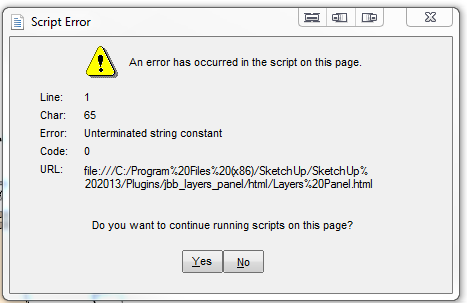

                                    Layer Panel 0.9.PNG

                                    i7-4930K 3.4Ghz, 2x GTX780 6GB, 32GB DDR3-1600 ECC, OCZ Vertex 4 500GB, WD Black 3TB, 32TB NAS, 4x 27" Monitors, SpaceMouse Pro, X-keys XK-60

                                    1 條回覆 最後回覆 回覆 引用 0
                                    • H 離線
                                      huckrorick
                                      最後由 編輯

                                      Is there a way to tell within Sketchup which version I am using?

                                      1 條回覆 最後回覆 回覆 引用 0
                                      • tt_suT 離線
                                        tt_su
                                        最後由 編輯

                                        @bob james said:

                                        After loading the latest version I still get this upon opening a model.

                                        Any model_ Or a specific model?

                                        1 條回覆 最後回覆 回覆 引用 0
                                        • jiminy-billy-bobJ 離線
                                          jiminy-billy-bob
                                          最後由 編輯

                                          @bob james said:

                                          After loading the latest version I still get this upon opening a model.

                                          "Still", you mean you had this issue before 0.9 ?
                                          Does it happen everytime ? Only when opening a model, not when opening the dialog ?

                                          @huckrorick said:

                                          Is there a way to tell within Sketchup which version I am using?

                                          Window > Preferences > Extensions > click on Layers Panel. You'll get the version at the bottom.

                                          25% off Skatter for SketchUcation Premium Members

                                          1 條回覆 最後回覆 回覆 引用 0
                                          • Bob JamesB 離線
                                            Bob James
                                            最後由 編輯

                                            @tt_su said:

                                            Any model_ Or a specific model?

                                            Any model

                                            @jiminy-billy-bob said:

                                            "Still", you mean you had this issue before 0.9 ?

                                            Yes. And when I change the condition or existence of layers in SU Layers it does not "track" into Layers Panel.

                                            @jiminy-billy-bob said:

                                            Does it happen everytime ? Only when opening a model, not when opening the dialog ?

                                            Yes. On two different computers: home and work (Win7)

                                            •It also pops up when using Ctrl-Z to restore a Ctrl-X.
                                            •It also still disrupts the layers associated with a scene: if I change the layer combination in a scene and the go back to a different scene the layers in that previous scene have been lost. When I disable Layers Panel the problem goes away (repeatable experience over many models and both machines)


                                            i7-4930K 3.4Ghz, 2x GTX780 6GB, 32GB DDR3-1600 ECC, OCZ Vertex 4 500GB, WD Black 3TB, 32TB NAS, 4x 27" Monitors, SpaceMouse Pro, X-keys XK-60

                                            1 條回覆 最後回覆 回覆 引用 0
                                            • 1
                                            • 2
                                            • 8
                                            • 9
                                            • 10
                                            • 11
                                            • 12
                                            • 33
                                            • 34
                                            • 10 / 34
                                            • 第一個貼文
                                              最後的貼文
                                            Buy SketchPlus
                                            Buy SUbD
                                            Buy WrapR
                                            Buy eBook
                                            Buy Modelur
                                            Buy Vertex Tools
                                            Buy SketchCuisine
                                            Buy FormFonts

                                            Advertisement