Need help using Shape Bender
-
It does look incredibly intricately detailed.
For sure if it's at 'normal sze it'll be trying to make tiny facets and will fail when they fall below SketchUp's 1/1000th inch toleranace - which is usually enough for building space-rockets
Try scaling everything by x100, do the bending and scale down by x1/100 again...
Try x1000 etc if it still fails...
There are limits to what SketchUp can make - 1/1000th inch long [short!] edges and small facets etc...
These can exist in SketchUp [e.g. after scaling down again], but they cannot be made initially. -
And on top of Tig's advice, you may need to wait for it, it's a lot of work for the bender to do. You never know, leave it overnight and when you get up in the morning it could have finished.
And you can't upload a 29 Mg file, I think the limit here is 5mg, maybe 10. -
It WILL take a while to bend it... be patient...
Uploads are limited to <=~4Mb...
You can ZIP files to get them as small as possible...Although it looks complex that size seems excessive...
Have you used Model Info > Statistics > Purge Unused... ? -
As I mentioned in my earlier post I did try to scale it up by 100 and by 1000 and neither worked. I may let it run overnight and see what happens. Last time I think I got a bugsplat after quite some time but ill give it another shot. and no I have not purged it...Another thing to try. Thanks Ill let you know what happens.
-
It's hard to tell from the oblique angle in your screen shot but the thing looks like it is symmetrical. You could cut it in half down the centerline and bend only the half. That would cut the entity count roughly in half and maybe speed up the bend. Then copy the resulting component, flip it and move the copy into place.
-
I need help please! I have used shape bender before (successfully)to create roadways with a 3D alignment file, but this time it does not seem to be working. I have my file below (link to dropbox)- my base model (roadway section, at the correct length) is to the left, the alignment "curve" is to the right. I have my horizontal line parallel to the base section (3' to the left of it)
I have gotten it to the point of preview, but the preview when it does try to create the bend, it's not curved, and just strange, looks like it's up in space (however, there is another preview in red and blue colors that seems to be correct, but when I hit enter; it created the more geometric, strange one. It also has on a few occasions changed my orientation (start and end at opposite locations)
Please let me know if you can help, I need to have this in a couple of days (rendered)
***Let me know if the link below does not work
https://www.dropbox.com/s/cm1pb9wd36xtv6u/Shufflebeam%20Road.skp?dl=0
-
Use the arrow keys to change the selection.
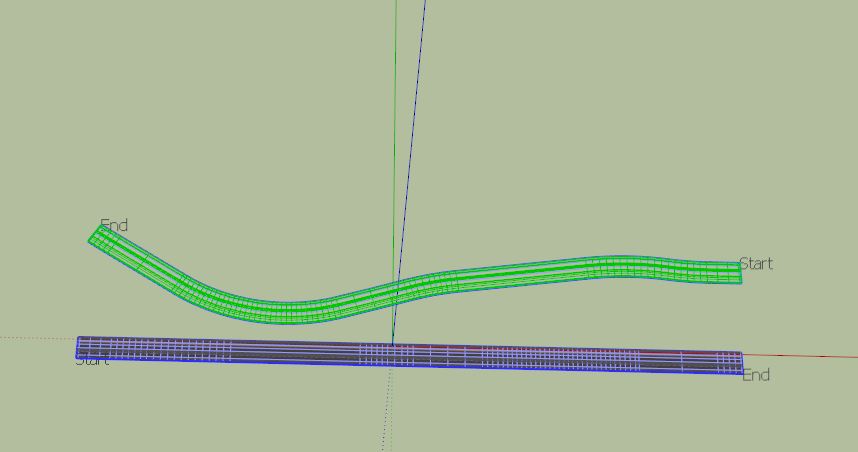
-
There's an awful lot of geometry, some of it is not needed. For example, in the gutter areas, there are a bunch of coplanar faces that don't need to have edges dividing them. You probably don't need as many segments in the curves, either. All that geometry is going to make SketchUp work hard and probably take a while to process. Another problem is that you've got some reversed faces. Those ought to be repaired and maybe affecting Shape Bender.
You could use Follow Me for that curve too.
-
@box said:
Use the arrow keys to change the selection.
Thanks for the quick response - It looks like you may have gotten it to work? Yes, I knew how to toggle the start and end points back and forth, but it still just wasn't creating the curves, and doing crazy things....your version actually looks like the curves are intact?
-
@dave r said:
There's an awful lot of geometry, some of it is not needed. For example, in the gutter areas, there are a bunch of coplanar faces that don't need to have edges dividing them. You probably don't need as many segments in the curves, either. All that geometry is going to make SketchUp work hard and probably take a while to process. Another problem is that you've got some reversed faces. Those ought to be repaired and maybe affecting Shape Bender.
You could use Follow Me for that curve too.
I welded the alignment "curve" together, is there another way to reduce the segments? To create the "base" straight section, I just extruded all of the faces of the road, trail, landscape, curb/gutter, the same length as the alignment curve - should I do this another way?
Thanks in advance!
-
Here I have simplified the profile curves and made one face that can be extruded. I haven't simplified the path, but you certainly could to reduce the geometry further.
As you can see since you component is flat it doesn't need to be the same length as the curve.
The line along the red axis tells it to make the full length of the shape all the way along the curve.
It does it, but works hard to do it.
Follow me also creates the shape faster and with less setup.
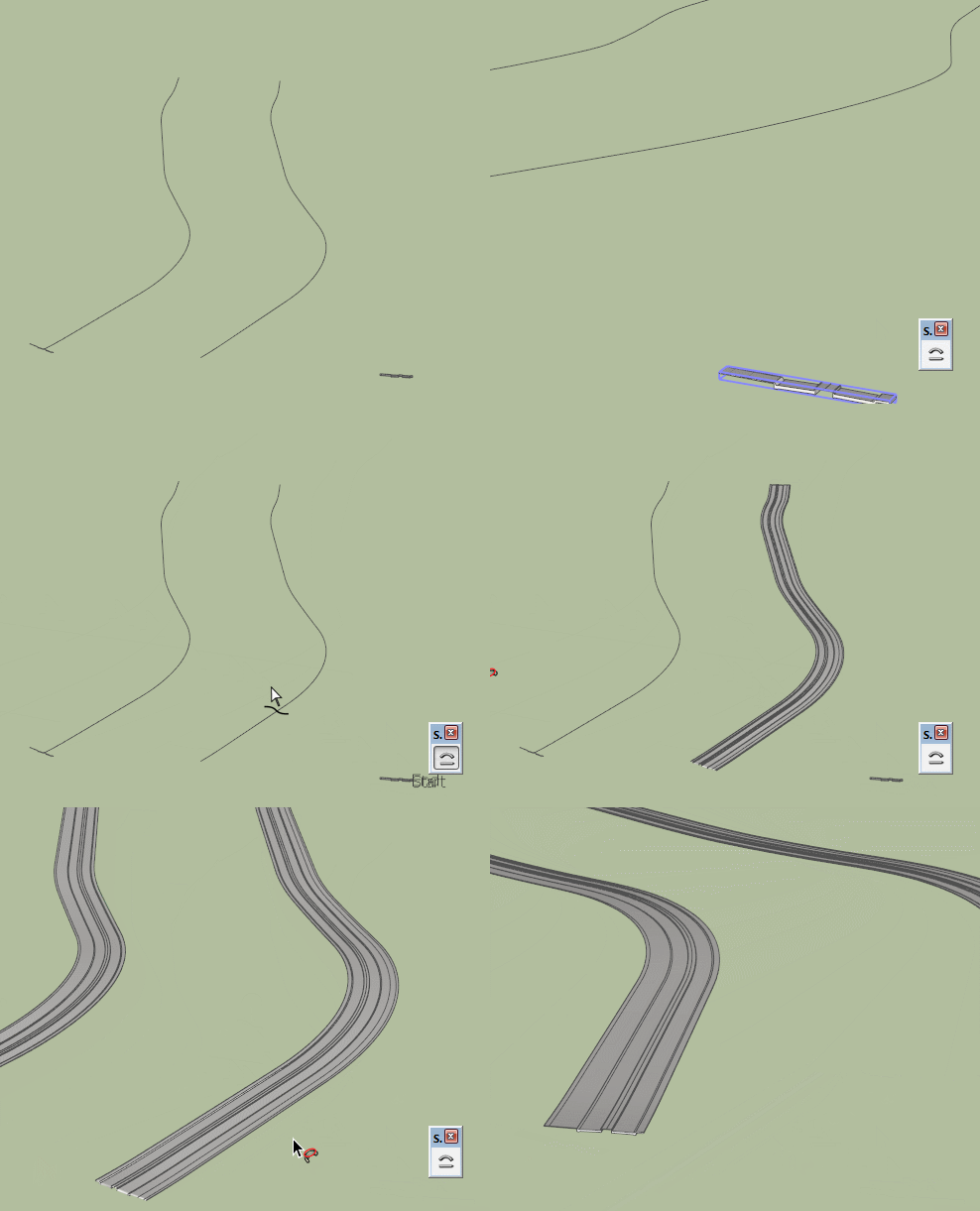
-
welding does not reduce segments or geometry
-
As Peter wrote, welding doesn't not simplify. It's still the same number of segments. I expect you could reduce the number of segments in the curve for the road path but that isn't really a problem this time.
I was referring to the huge number of segments in the gutters. There's no reason to have 99 segments for that curve. You could reduce SketchUp's processing time by reducing the amount of geometry it needs to crank through.
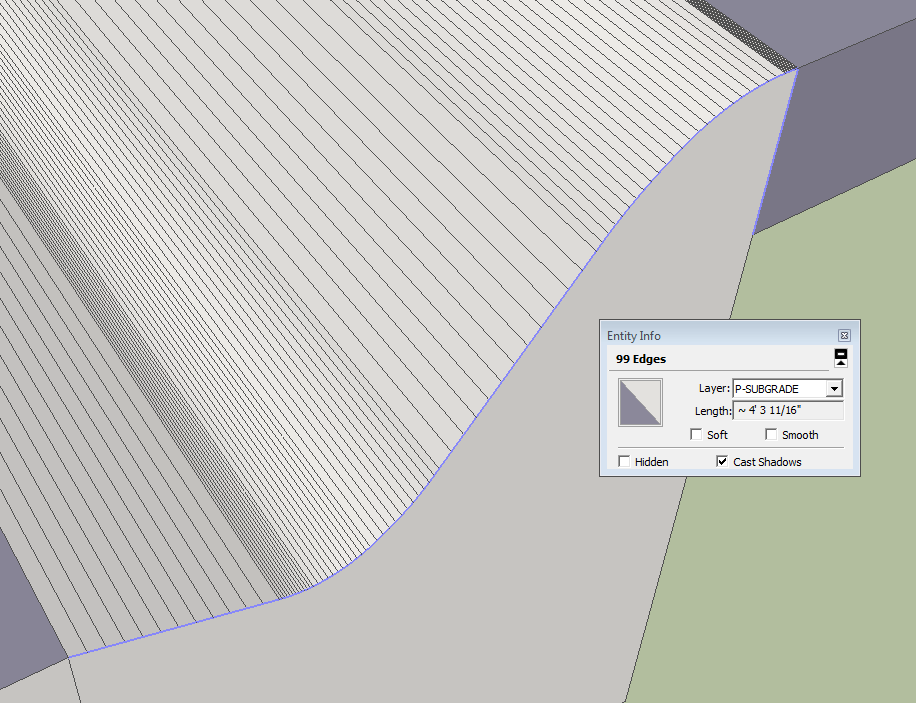
And here's a screen shot showing the reversed faces. I expect you made the extrusion in a number of steps since the faces are divided on the end. Deleting the vertical lines that split the road profile before extruding would have prevented the reversed faces. Applying materials over the reversed faces won't fix that.
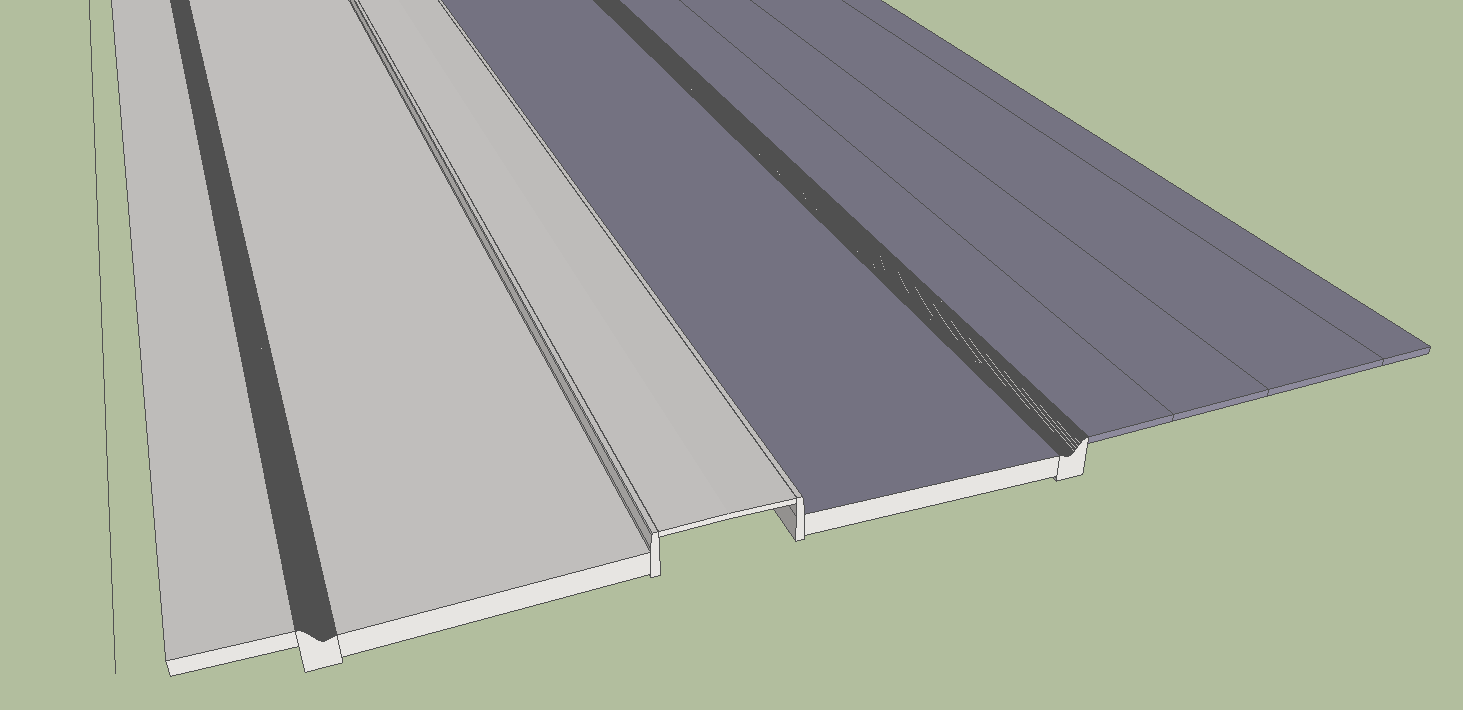
-
@box said:
Here I have simplified the profile curves and made one face that can be extruded. I haven't simplified the path, but you certainly could to reduce the geometry further.
As you can see since you component is flat it doesn't need to be the same length as the curve.
The line along the red axis tells it to make the full length of the shape all the way along the curve.
It does it, but works hard to do it.
Follow me also creates the shape faster and with less setup.
[attachment=1:2v52fiaz]<!-- ia1 -->Bender V Follow.gif<!-- ia1 -->[/attachment:2v52fiaz]Thank you! Any chance you could save down to 2013 so I can see what you did?? Thanks for all the comments!
-
@dave r said:
As Peter wrote, welding doesn't not simplify. It's still the same number of segments. I expect you could reduce the number of segments in the curve for the road path but that isn't really a problem this time.
I was referring to the huge number of segments in the gutters. There's no reason to have 99 segments for that curve. You could reduce SketchUp's processing time by reducing the amount of geometry it needs to crank through.
[attachment=1:w7238tmd]<!-- ia1 -->Screenshot - 2_24_2015 , 4_11_26 AM.png<!-- ia1 -->[/attachment:w7238tmd]
And here's a screen shot showing the reversed faces. I expect you made the extrusion in a number of steps since the faces are divided on the end. Deleting the vertical lines that split the road profile before extruding would have prevented the reversed faces. Applying materials over the reversed faces won't fix that.
[attachment=0:w7238tmd]<!-- ia0 -->Screenshot - 2_24_2015 , 4_09_44 AM.png<!-- ia0 -->[/attachment:w7238tmd]I did another version and tried to simplify my curb (no roll curb, just straight edges) - still no avail:( Is it possible I might just have an older version and it doesn't work as well with 2013? I think I got this plugin before I upgraded.
-
Dave actually counts your segments, so beware!
 That's a smoother curve than the concrete guys could do.
A side note. When you get to rendering, what will be more important is to stress the joints of concrete and asphalt for more realism. Create a groove or (sparsely) rounded offset at joints. For cross concrete control joints try a texture.
-
Whether or not that has an impact on the operation, you should install the most current version of Shape Bender. You should keep all plugins up to date.





Advertisement