Subdivision Modeling Furniture
-
Hi Micha,
Love your style. Seems you got the whole UV mapping and displacement thing under control. I've had a look at Z-brush. I like to possibilities of teh app but the navigation and UI are not my cup of tea. Can't get my head around the navigation. For the basic sculpting of furniture I use other sculpting app.
Greetz Twan
-
thanks Twan
Though real displacements can be activated, what you see in render is only a new bumps algorithm of cycles.Plus the use of a pre baked AO map.
Problems with the zbrush navigation? There's a whole documentation located in zb folder.
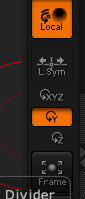
However, because you obviously prefer the SUp style, instead of the default xyz, select the y. (the buttons column on the right)
-
@unknownuser said:
Problems with the zbrush navigation? There's a whole documentation located in zb folder.
And when you press Ctrl when your mouse is over an Icone you will have some help's text!

-
Twan - these models are stunning!!!!!
I look forward to your suggestion of getting them into the SCF store! Will be a great inclusion!
-
@unknownuser said:
The hardest part in my opinion is the creases of the fabric. There are a few methods to make creases like sculpting or using displacement maps. I'm still not sure what the best method is. Still a long way to go but I hope I'm on the right track. Love some comments on the model and render.
Your modeling is impressive.
Fabric creases isn't that hard. Your best option is the excellent sculpt mode (multiresolution modifier) of blender.
Then you can have UVs (blender is one of the most advanced on this matter) and bake displacements or bumps or normal maps (from multires). This is important for exporting these models as low poly base with displ or bumps.
Staying in blender/cycles render, you don't need it. Because you can have the low poly in preview scene, sending the hi subd data to the render engine.
The hardest part, IMO, is the UV mapping. Especially on geometrical patterns like fabrics tartans etc. You may need to have the unwrapped faces (in UV editor) aligned to these patterns. Manually this is quite a PITA.
In blender there's a wonderful method of unwrapping. "Follow active quad". Not the right place to explain it further but you may visit my small tutorial on such methods http://blenderartists.org/forum/showthread.php?273033-Sculpting-with-UVs-and-displacements&p=2245866&viewfull=1#post2245866
Though this method deals with something different, the way I use the UV editor may interests you.You mentioned the term "crease". But it was about sculpting.
However, in subdivision modeling there is an important hidden trick.
You can select loops, edges, and apply a crease value. When subd (catmul clark smoothing) takes place, these edges will remain sharp-er according to the value of crease.
Great !! But, exporting as obj there may be an issue. Will crease data will exported as well? Obj supports it. Blender? You have to try the most recent betas from official http://builder.blender.org/download/
I'm sure, C4D already supports it.
If you export low poly assets + displ maps in SUp, you just apply the subsurf modifiers, so, no issues on this.
In recent blender builds, collada works just fine. This is how you export in SUp. -
@unknownuser said:
If you export low poly assets + displ maps in SUp, you just apply the subsurf modifiers, so, no issues on this.
In recent blender builds, collada works just fine. This is how you export in SUp.Some of us have a .obj exporter for SketchUp that can export tri'd quads into Blender and in Blender it is only Quads

-
Your thread is Epic!
 (48 pages for the moment)
By Michalis
-
Thanks pilou, too kind of you. 48 pages, but I posted a synopsis in the second post of the most important tricks and post around these pages.
@Rich, we're talking about the opposite.Exporting from SUp to blender or to other apps can be a PITA.
We suggest TIG's free obj exporter, I guess so. Excellent to export a rather huge SUp scene and render in cycles.- triangulation.
- not welded vertices. Edit mode (blender) selelct all [W] menu, delete doubles
- Select all, [ctrl+F] menu in blender, tris to quads, cross your fingers.
- UVs in SUp: Every face is a UV not connected island. -10 for SUp. LOL
(Most SUp users fear to get involved into a decent UV editor. If they knew all about the SUp UV editor... well nevermind). UV editor ha ha. Just use blender, select [U] menu, reset/ ctrl+P to pack these separated faces on UV texture map and have something similar to the SU UV editor. Ask for follow active quad and have something much more interesting. If it is a house something walls, select cubic and have something better. Or, like me, start thinking how great is to have an advanced UV editor for free. Learn how to use it. For archi vis use, it is one of the most important tools anyway.
-
We speak the same Mick.
I now use Blender extensively and where i deal SU models I use the unreleased SU2Blender obj exporter that removes tris from SU mesh and delivers to blender quad only mesh.
It does mean adopting a new modeling philosophy in SU but that is what users need to do anyway if they wish to become proficient in Blender.
-
@unknownuser said:
I now use Blender extensively and where i deal SU models I use the unreleased SU2Blender obj exporter that removes tris from SU mesh and delivers to blender quad only mesh.
Some more informations Rich?
-
If you use Thomthom's QuadFace tools to apply the soft/smooth/cast shadows off to the edge dividing the quad then you can export that 'SketchUp QuadFace' to Blender as a Quad.
The exporter is not available publicly but I'll give someone a poke about it.
-
Thanks Rich.
I just tried the collada exporter today. (SU)
And the new collada importers in blender.
No triangulation, in fact even n-gons are preserved.
Of course, I'm not sure if everyone will appreciate n-gons. -
@michaliszissiou said:
Just use blender, select [U] menu, reset/ ctrl+P to pack these separated faces on UV texture map and have something similar to the SU UV editor.
Do the textures get fragmented again if you export to obj from Blender?
-
@unknownuser said:
Do the textures get fragmented again if you export to obj from Blender?
What do you mean fragmented?
I don't remember such issues, I use obj all the time, exchanging with 3dcoat, zbrush, modo and other apps. -
@michaliszissiou said:
What do you mean fragmented?
Do they become separated again (as they were when first imported into Blender)?
I'm just trying to figure out a better workflow for getting SU models into other formats. For DAE & OBJ I currently have to triangulate and explode everything to avoid textures fragmenting into lots of separate materials.
-
@unknownuser said:
Why not texture the mesh in Blender?
I never texture in SU as it leads to more problems l
Why not texture the mesh in Blender?
I never texture in SU as it leads to more problems long term
-
@rich o brien said:
Why not texture the mesh in Blender?
It's on my to-do list. I just need to find some free time and good tutorials.
-
Stay away from Blender's tutorials if you want to remain sane, David...

-
It's to late for that Massimo!
Every time I open Blender it feels like I've entered a universe where the laws of physics have been completely rewritten.
-
Once you begin to understand Blender you will never look back.
An adding bonus is you will never model in the typical SketchUp fashion again.









Advertisement