SketchUp 2014 Wishlist
-
-
Click "Post a reply" and then there is an "Upload attachment" tab under the textbox.
-
Ok, here it is! Thanks thomthom!
Edit: removed the file now since it has been d/led. OG
-
?
-
@thomthom said:
?
Didn't you download the file? I didn't want to keep it up as public as it is a WIP for a VW. Content creators will snatch any chance they can get to swipe a working mesh!

If you still wanted to see it, I can PM it to you?
-
more than one active section plane
-
Yes, you can send it by PM if you don't want to share it in public. No problem.
-
Physics, physics, physics.
Doesn't have to be fancy. The previous Sketchy Physics plug-in was quite nice.
-
@dod3r said:
more than one active section plane
It's not a straightforward function of SU, but you can make several cuts simultaneously active.
The first section plane is inside of a group, and then the second is outside of it.
Well, it's a "workaround", I know...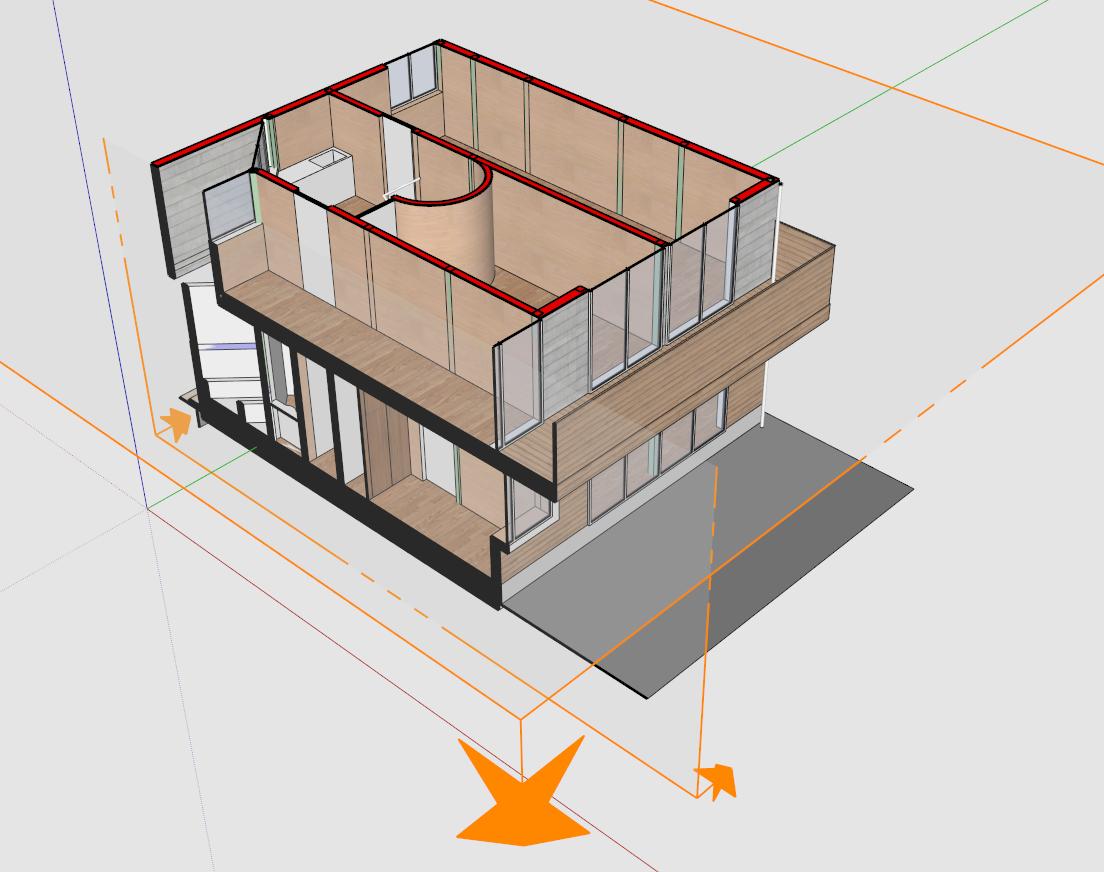
-
thanks takesh h,
I know about this possibility, but as you sad it is workaround.
Multi section planes active would be pretty useful for creating scene for layout, where i need to generate vector drawing. And having 4 layers of group or component just for section cuts is pure pain.
Basic philosophy is: I have big model, from with i need to generate some drawing through layout and in order to this process being fast i need to make the su model smaller and just show just the geometry from with the drawing should be generated.
I hope this is better explanation of what i needD.
-
It would be nice to have entity.path function that will return an array of parent entities.
Ex:<span class="syntaxdefault">model </span><span class="syntaxkeyword">=</span><span class="syntaxdefault"> Sketchup</span><span class="syntaxkeyword">.</span><span class="syntaxdefault">active_model<br />ents </span><span class="syntaxkeyword">=</span><span class="syntaxdefault"> model</span><span class="syntaxkeyword">.</span><span class="syntaxdefault">entities<br />ents</span><span class="syntaxkeyword">[</span><span class="syntaxdefault">0</span><span class="syntaxkeyword">][</span><span class="syntaxdefault">2</span><span class="syntaxkeyword">].</span><span class="syntaxdefault">path<br /></span><span class="syntaxcomment"># -> [#<Sketchup;;Group;0xc69a4f4>] # returns path containing parent groups/components<br /></span><span class="syntaxdefault">ents</span><span class="syntaxkeyword">[</span><span class="syntaxdefault">0</span><span class="syntaxkeyword">].</span><span class="syntaxdefault">path<br /></span><span class="syntaxcomment"># -> [] # return empty array, since ents[0] is top entity<br /></span><span class="syntaxdefault">ents</span><span class="syntaxkeyword">[</span><span class="syntaxdefault">0</span><span class="syntaxkeyword">][</span><span class="syntaxdefault">2</span><span class="syntaxkeyword">][</span><span class="syntaxdefault">0</span><span class="syntaxkeyword">].</span><span class="syntaxdefault">path<br /></span><span class="syntaxcomment"># -> [#<Sketchup;;Group;0xc69a4f4>, #<Sketchup;;Group;0xc6428a8>] # returns path containing parent groups/components </span><span class="syntaxdefault"></span>This follows from this topic: Finding deepest entity in pick path
-
@anton_s said:
It would be nice to have entity.path function that will return an array of parent entities.
This isn't doable because an entity, say a face, might appear multiple times in a model due to components. When you have a reference to an entity you must keep track of the path from where you picked it yourself.
There is model.active_path that will give you the path of the active context if you obtained the reference for the entity there. And the PickHelper will also return a path for each possible pick solutions.
-
Ok then, what about that?
- Add view.active_entities - that will return a list of entities visible in the view
- Add a clear button to the standard ruby console. I don't like how developers console and ruby console+ adds extra spaces, or removes the "\n" from text, which ruins the reports.
-
i would like to control the visibility of layers of sketch-up model in layout
-
shift key, when used with something like the move or line tool, can lock to any vector as opposed to x,y,z only
-
why not replace photo match by video match !!
Ex:
http://www.youtube.com/watch?v=vda2RAEuW_g -
Wow, nice!
-
I little improvement to the UI::Toolbar would be great:
<span class="syntaxdefault">unless file_loaded</span><span class="syntaxkeyword">?(</span><span class="syntaxdefault">__FILE__</span><span class="syntaxkeyword">)<br /></span><span class="syntaxdefault"> toolbar </span><span class="syntaxkeyword">=</span><span class="syntaxdefault"> UI</span><span class="syntaxkeyword">;;</span><span class="syntaxdefault">Toolbar</span><span class="syntaxkeyword">.</span><span class="syntaxdefault">new </span><span class="syntaxstring">"Test"<br /></span><span class="syntaxdefault"> cmd </span><span class="syntaxkeyword">=</span><span class="syntaxdefault"> UI</span><span class="syntaxkeyword">;;</span><span class="syntaxdefault">Command</span><span class="syntaxkeyword">.new(</span><span class="syntaxstring">"Test"</span><span class="syntaxkeyword">)</span><span class="syntaxdefault"> </span><span class="syntaxkeyword">{</span><span class="syntaxdefault"> UI</span><span class="syntaxkeyword">.</span><span class="syntaxdefault">messagebox</span><span class="syntaxkeyword">(</span><span class="syntaxstring">"Hello World"</span><span class="syntaxkeyword">)</span><span class="syntaxdefault"> </span><span class="syntaxkeyword">}<br /></span><span class="syntaxdefault"> cmd</span><span class="syntaxkeyword">.</span><span class="syntaxdefault">menu_text </span><span class="syntaxkeyword">=</span><span class="syntaxdefault"> </span><span class="syntaxstring">"My Command"<br /></span><span class="syntaxdefault"> cmd</span><span class="syntaxkeyword">.</span><span class="syntaxdefault">small_icon </span><span class="syntaxkeyword">=</span><span class="syntaxdefault"> </span><span class="syntaxstring">"pause small.png"<br /></span><span class="syntaxdefault"> cmd</span><span class="syntaxkeyword">.</span><span class="syntaxdefault">large_icon </span><span class="syntaxkeyword">=</span><span class="syntaxdefault"> </span><span class="syntaxstring">"pause large.png"<br /></span><span class="syntaxdefault"> </span><span class="syntaxcomment"># Changing icons after calling add_item will not work<br /></span><span class="syntaxdefault"> toolbar </span><span class="syntaxkeyword">=</span><span class="syntaxdefault"> toolbar</span><span class="syntaxkeyword">.</span><span class="syntaxdefault">add_item cmd<br /> toolbar</span><span class="syntaxkeyword">.</span><span class="syntaxdefault">show<br /> </span><span class="syntaxcomment"># So this won't modify the icon<br /></span><span class="syntaxdefault"> cmd</span><span class="syntaxkeyword">.</span><span class="syntaxdefault">small_icon </span><span class="syntaxkeyword">=</span><span class="syntaxdefault"> </span><span class="syntaxstring">"play small.png"<br /></span><span class="syntaxdefault"> cmd</span><span class="syntaxkeyword">.</span><span class="syntaxdefault">large_icon </span><span class="syntaxkeyword">=</span><span class="syntaxdefault"> </span><span class="syntaxstring">"play large.png"<br /><br /></span><span class="syntaxdefault"> file_loaded</span><span class="syntaxkeyword">(</span><span class="syntaxdefault">__FILE__</span><span class="syntaxkeyword">)<br /></span><span class="syntaxdefault">end</span>This follows a very old post: Changing Command Icons of the Toolbar
-
Yesrterday, I actually went to see my temp folder and found there is a lot of "SketchUpUndo..." files. Would it be nice if they be automatically deleted?

Or will it be even better if the user was able to undo operations that were done in the previous saves
Example:- User draws a rectangle, and then push-pulls the face.
- Saves the model
- Closes SU
- Launches the model once again
- Presses Ctrl-Z and undoes the pushpull operation
Let the user undo operations even after restarting SU...
Just an idea
-
what's really needed:
- line-styles, line-colors and line-weights
- workplanes for dimensioning (now it's somewhere in space speaking about dimensioning a layout/plans/sections) and annotations (text without leader in certain workplane)
- hatches of cutted components coresponding material types
- improved relation with LO: now to print SU model in LO make no sence - terible quality, or vector rendering option shall be reconsidered (probably this is an improvement for LO)





Hello! It looks like you're interested in this conversation, but you don't have an account yet.
Getting fed up of having to scroll through the same posts each visit? When you register for an account, you'll always come back to exactly where you were before, and choose to be notified of new replies (either via email, or push notification). You'll also be able to save bookmarks and upvote posts to show your appreciation to other community members.
With your input, this post could be even better 💗
Register Login


Advertisement