Annoying autosave location 0.skp
-
Hi all,
I don't really get the autosave feature. When working from home I noticed that Sketchup saves a temp file "0.skp" in whatever folder I browsed last, and not straight to the autosaves file on my desktop.
That is quite annoying since I deliberatly placed my model on the desktop to avoid up and downloading to a remote folder. Still, every now and then SU freezes for 10 mins uploading a temp file to an obscure location on my work server.
Any workaround for this apart from cutting the VPN connection?
thanks, LEGOsketcher
-
What OS? Make it easier to get help by updating your profile.
What do you have selected for the Save location for models?
-
If you are working on a slow network connection or memory-stick then the backup process gets messed up and the intermediate file used when swapping the previous skp to skb and making the new skp etc is left behind [0 etc]. If you work on your local hard-disk this delay glitch is usually avoided.
Are these skp and skb files local or elsewhere ? -
Hi & thanks for your comments.
I'm running SU8 on windows 7/64bit.Both the work file .skp & .skb backup sit on my local desktop. I copied them there to avoid the autosave over the server but the 0.skp swap files are still being tried to save on the server, e.g. material library. Whenever my PC is stuck in autosave back to server I cut the VPN, a 0.skp warning appears and save manually.
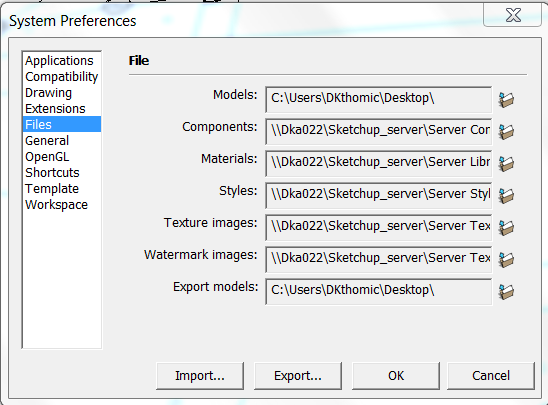
Attached a screenshot of preferences > files. All linkes used to point to the server so I just changed models and export to the desktop - do you think that would help?


Hello! It looks like you're interested in this conversation, but you don't have an account yet.
Getting fed up of having to scroll through the same posts each visit? When you register for an account, you'll always come back to exactly where you were before, and choose to be notified of new replies (either via email, or push notification). You'll also be able to save bookmarks and upvote posts to show your appreciation to other community members.
With your input, this post could be even better 💗
Register Login


Advertisement