Bug Splat Constantly in Win 7
-
Hi guys,
I am an engineer at SketchUp and wanted to let you know that we confirmed this as a bug. It is high on our list to fix. The workaround for now is to make sure the material (if it has attributes) is in the model before applying it to an entity. Sorry about the inconvenience.
Thanks!
Bugra -
So JD, how is Maxwell able to avoid this issue. I see that when running Maxwell, there is material information stored in the skm file, and I can load it with no problem into SU and all the Maxwell properties are there. Does your particular setup not use the observer somehow? There must be some specific trigger that some plugins effect but others don't. I am way out of my depth on this one, but it's really peculiar to me that some plugins would be affected and others aren't.
-
Your intuition is correct -- by luck, I just happen not to have used this particular observer yet. And to follow up a bit, I'll mention, since I have been able to reproduce it independent of any 3rd-party plugin, that I've made a report for it on the SketchUp beta tester bug tracker. The upshot is: until this is no longer an issue, you should be able to work around it simply by making sure to import SKMs into your model before trying to apply them to entities. Naturally I can't give any guarantee on that, but from what I can tell, it appears to circumvent the problem.
-
I can confirm everything JD Hill has said, V-Ray is using the Sketchup::Entities observer to track scene changes for RT updates, which is why we are having this headache. You can temporarily disable the observer by running this:
entsList = [Sketchup.active_model.active_entities];Sketchup.active_model.definitions.each{|deff| entsList.push deff.entities};entsList.each{|ents| ents.remove_observer VRayForSketchUp.entity_observer}
Then if you decide to enable it again, run this:
entsList = [Sketchup.active_model.active_entities];Sketchup.active_model.definitions.each{|deff| entsList.push deff.entities};entsList.each{|ents| ents.add_observer VRayForSketchUp.entity_observer}
Restarting SketchUp will result in restoring the observer as well.
-
@bugra said:
The workaround for now is to make sure the material (if it has attributes) is in the model before applying it to an entity. Sorry about the inconvenience.
If it has attributes? I find that the material needs to be in the model regardless.
See: http://www.thomthom.net/thoughts/2012/03/the-secrets-of-sketchups-materials/#current-material-bugsplat-warningOr, when you say "in the model" - do you mean it should be applied to an entity in the model, or simply that it's in the list of materials for that model (regardless if it's applied or not).
-
@thomthom said:
@bugra said:
The workaround for now is to make sure the material (if it has attributes) is in the model before applying it to an entity. Sorry about the inconvenience.
If it has attributes? I find that the material needs to be in the model regardless.
See: http://www.thomthom.net/thoughts/2012/03/the-secrets-of-sketchups-materials/#current-material-bugsplat-warningOr, when you say "in the model" - do you mean it should be applied to an entity in the model, or simply that it's in the list of materials for that model (regardless if it's applied or not).
Does he mean this:
@jd hill said:
you should be able to work around it simply by making sure to import SKMs into your model before trying to apply them to entities. Naturally I can't give any guarantee on that, but from what I can tell, it appears to circumvent the problem.
If you select the material in the SU material library, and select the "add to model" option, it doesn't seem to trigger the crash. Only if you use the paintbucket to apply the new skm (that's not already in the model) directly to geometry.
-
That's the bug I knew about. I've not noticed that attributes made any difference. Curious if it's the same bug or some similar variation.
-
Hi guys,
Yeah the crash I was able to reproduce happens only when the material has attributes, it's not in the model's list of materials yet, and there is at least one EntitiesObserver listening.
Thomthom: if there's another crash that triggers without attributes, let us know and I'll get it in the list (if it's not already).
Thanks guys.
Bugra -
@bugra said:
Thomthom: if there's another crash that triggers without attributes, let us know and I'll get it in the list (if it's not already).
I was under the impression that using
materials.current- when that material came from the Component Browser library (not in model) and then applied would cause a BugSplat regardless because applying the material from the Ruby API didn't add it to the In Model material list. That eventually caused a crash. (See video in my previous link.) That is a bug I've reported earlier I believe.Though I'm not sure if there was any observers or attributes around. I'd have to go back and double check.
-
@thomthom said:
I was under the impression that using
materials.current- when that material came from the Component Browser library (not in model) and then applied would cause a BugSplat regardless because applying the material from the Ruby API didn't add it to the In Model material list. That eventually caused a crash. (See video in my previous link.) That is a bug I've reported earlier I believe.Though I'm not sure if there was any observers or attributes around. I'd have to go back and double check.
Ok, I will try to reproduce that when I get a chance and see if it's already captured in our issue tracker.
-
I reproduced it. Material with no attributes and no EntitiesObserver.
I started SketchUp 8 with out of the box configuration. No other third party extension.
I picked a material from the material library and referenced it via the API:
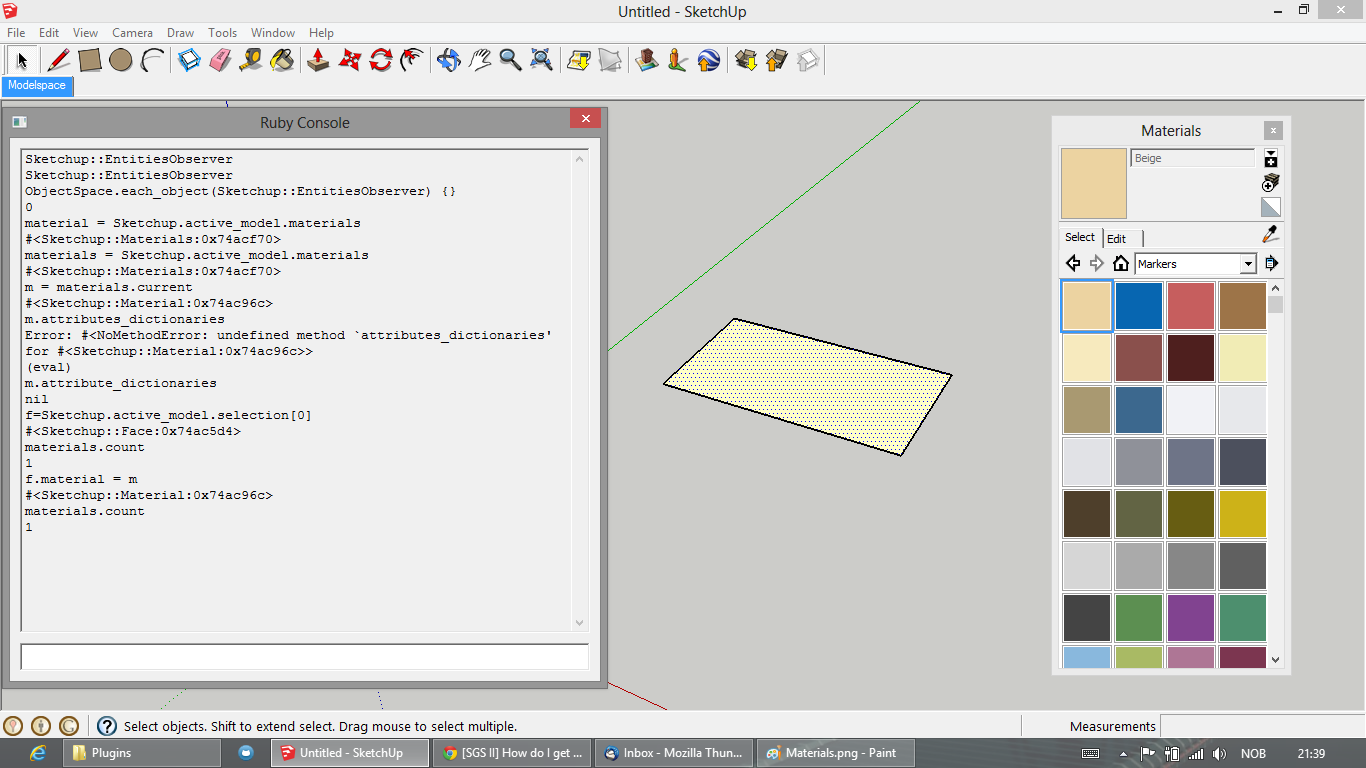
As you can see here, after the material was applied to the face, also using the API, it did not exist in the In Model material list. None the less, it's applied to the face.
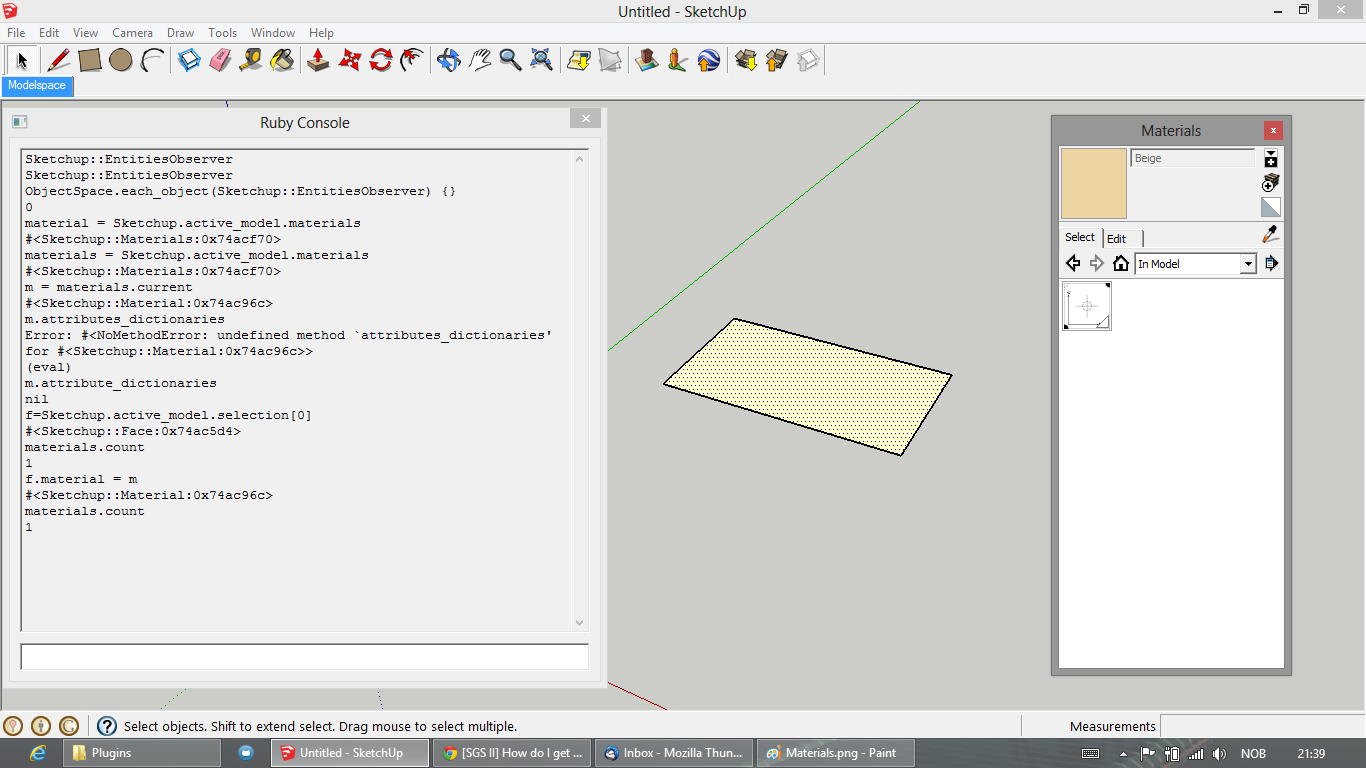
Now, normally SketchUp crashes quickly after I do this. In this instance it didn't right away. I activated the Paint Bucket tool and applied the material to another face. The material was now added to the In Model list.
I then selected another material from the material list, the blue one to the right of the first one I'd picked seen in my first screenshot.
I then selected the face seen in screenshot 1, which now had the Beige material applied to it.
Then I used the API again to apply the currently selected blue material. SketchUp did not update the viewport and just sat for a a couple of seconds until a BugSplat appeared:

I submitted the BugSplat.
-
@thomthom said:
I reproduced it.
..Great! I will follow along your steps and see if I can reproduce it myself. As soon as I get a chance.

-
Right'o! Let me know if you need further info or you'd like me to try further testing.
-
Hi, I only speak Spanish.
I have a similar problem with "BugSplat" and I have a response to a possible conflict.I deactivated the box "USE HARDWARE ACCELERATION"
The "BugSplat" disappeared.the problem may be in the Hardware or drivers.
If someone helped this track, just ask.
Bye, greetings to allIn Spanish/en Español
A mi me parece el "BugSplat" aun que sólo cuando se cierra el programa.
En un momento desactive la casilla "USAR ACELERADOR DE HARDWARE" y el "BugSplat" desapareció. asi que puede ser problema de compatibilidad del Hardware o de los drivers.
...Si alguien le ayuda esta pista no dude en preguntar cualquier otra cosa.
Saludos a todos.







Advertisement