sketchucation logo sketchucation
    • 登入
    Oops, your profile's looking a bit empty! To help us tailor your experience, please fill in key details like your SketchUp version, skill level, operating system, and more. Update and save your info on your profile page today!
    🔌 Smart Spline | Fluid way to handle splines for furniture design and complex structures. Download

    [Plugin] 3D Text Editor

    已排程 已置頂 已鎖定 已移動 Plugins
    202 貼文 50 Posters 174.3k 瀏覽 49 Watching
    正在載入更多貼文
    • 從舊到新
    • 從新到舊
    • 最多點贊
    回覆
    • 在新貼文中回覆
    登入後回覆
    此主題已被刪除。只有擁有主題管理權限的使用者可以查看。
    • thomthomT 離線
      thomthom
      最後由 編輯

      hmm... could be Unicode issues. Could you send me the translated version?

      Thomas Thomassen — SketchUp Monkey & Coding addict
      List of my plugins and link to the CookieWare fund

      1 條回覆 最後回覆 回覆 引用 0
      • H 離線
        hebeijianke
        最後由 編輯

        @thomthom said:

        hmm... could be Unicode issues. Could you send me the translated version?

        This is translated


        tt_texteditor.rb

        1 條回覆 最後回覆 回覆 引用 0
        • jolranJ 離線
          jolran
          最後由 編輯

          @unknownuser said:

          apart from my wife, no.
          😄

          1 條回覆 最後回覆 回覆 引用 0
          • R 離線
            ralph102
            最後由 編輯

            ThomThom,
            Great plugin.
            Any chance you could make the text follow a predefined path or arch?
            Since your plugin works with installed system fonts, would it be difficult to add other typographical controls such as kerning or line spacing?

            1 條回覆 最後回覆 回覆 引用 0
            • thomthomT 離線
              thomthom
              最後由 編輯

              @ralph102 said:

              Any chance you could make the text follow a predefined path or arch?

              I just had a request from a colleague yesterday about this. Might do a separate plugin to fit sets of meshes to a path. But no promises.

              @ralph102 said:

              Since your plugin works with installed system fonts, would it be difficult to add other typographical controls such as kerning or line spacing?

              Nope. Not unless they add these features in the SketchUp Ruby API. At the moment all that I can adjust is in that dialogue.

              Thomas Thomassen — SketchUp Monkey & Coding addict
              List of my plugins and link to the CookieWare fund

              1 條回覆 最後回覆 回覆 引用 0
              • jim smithJ 離線
                jim smith
                最後由 編輯

                Thom,

                thanks for this plug in.

                I like the way I can change text styles, and sizes. However, once I hit close, if I want to edit further, I can't...... Am I missing something?

                "Out of clutter find simplicity,
                from discord find harmony,
                In the middle of difficulty lies opportunity"
                Albert Einstein

                1 條回覆 最後回覆 回覆 引用 0
                • TIGT 離線
                  TIG Moderator
                  最後由 編輯

                  Select a piece of 3d-text > right-click > context-menu ...Edit Text

                  TIG

                  1 條回覆 最後回覆 回覆 引用 0
                  • jim smithJ 離線
                    jim smith
                    最後由 編輯

                    Thanks TIG.

                    I missed seeing the "edit text" line down on the bottom of my long list of context selection items.

                    "Out of clutter find simplicity,
                    from discord find harmony,
                    In the middle of difficulty lies opportunity"
                    Albert Einstein

                    1 條回覆 最後回覆 回覆 引用 0
                    • R 離線
                      rv1974
                      最後由 編輯

                      😕 (SU2013 win7 x64, latest TT_lib (v.7.1)))
                      there's nothing in combo-box, height parameter is down.
                      Any hints?
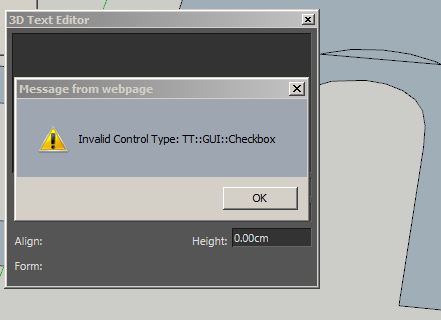

                      Capture.JPG

                      1 條回覆 最後回覆 回覆 引用 0
                      • TIGT 離線
                        TIG Moderator
                        最後由 編輯

                        @rv1974 said:

                        :? (SU2013 win7 x64, latest TT_lib (v.7.1)))
                        there's nothing in combo-box, height parameter is down.
                        Any hints?
                        Are you doubly sure that this Lib is 'latest' and properly installed ?
                        Screen-shot of Plugins WE window ?
                        What can you do after closing that error-message ?

                        TIG

                        1 條回覆 最後回覆 回覆 引用 0
                        • thomthomT 離線
                          thomthom
                          最後由 編輯

                          @rv1974 said:

                          :? (SU2013 win7 x64, latest TT_lib (v.7.1)))
                          there's nothing in combo-box, height parameter is down.
                          Any hints?

                          Try these possible solutions - in order.

                          #1: Check that you don't have an old version of TT_Lib in the VirtualStore: http://sketchucation.com/forums/viewtopic.php?t=48399

                          #2: Manually reinstall TT_Lib - by closing all SketchUp windows and removing the TT_Lib2 lib files before reinstalling.

                          (BTW: What is your Internet Explorer version? )

                          (P.S. The latest version of TT_Lib is 2.8.2 - currently only available on the Extension Warehouse. Ditto for an updated version of 3D Text Editor - though the very latest revision is still in moderation. I'm still in the process in updating my plugins to comply with the EW requirements - and I'm currently awaiting some changes to the SCF PluginStore before I start updating my plugin threads here.)

                          Thomas Thomassen — SketchUp Monkey & Coding addict
                          List of my plugins and link to the CookieWare fund

                          1 條回覆 最後回覆 回覆 引用 0
                          • R 離線
                            rv1974
                            最後由 編輯

                            Good news:
                            I managed to make tt_text work properly.
                            Bad news: now I've got 2 the same "editable 3d text" lines in Draw menu. the same happens in the Context menu.
                            I guess I should purge something i plugins folder. Could you look at the attached search filter (by 'tt')?
                            BTW#1 I've got IE 9.0.8112
                            BTW#2 I have vertigo with all those 'shops' (SU Ext wharehouse, virtualstore, sketchucation forum threads, sketchucation plugin store 😲 ). Where from I should get your goodies?
                            Thank you for trying to sort it out.
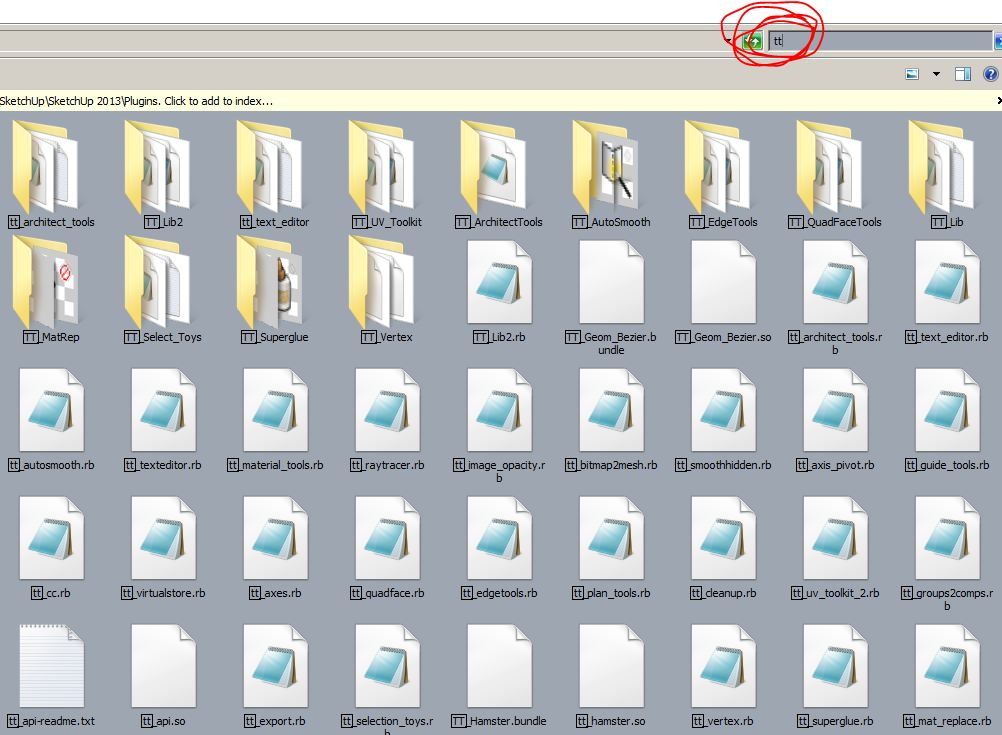

                            Capture.JPG

                            1 條回覆 最後回覆 回覆 引用 0
                            • thomthomT 離線
                              thomthom
                              最後由 編輯

                              VirtualStore is not a plugin repository. It's a security feature in Windows that will place files in a "virtual" ghost folder mirroring the original one. Please check out the link in #1 of my previous post - install the utility and use it to check of you have files trapped in Virtual Store.

                              (alternatively: when you look at your Plugins folder with Explorer, do you see a Compatibility Files button?)

                              Thomas Thomassen — SketchUp Monkey & Coding addict
                              List of my plugins and link to the CookieWare fund

                              1 條回覆 最後回覆 回覆 引用 0
                              • thomthomT 離線
                                thomthom
                                最後由 編輯

                                @rv1974 said:

                                BTW#2 I have vertigo with all those 'shops' (SU Ext wharehouse, virtualstore, sketchucation forum threads, sketchucation plugin store 😲 ). Where from I should get your goodies?

                                Currently the very latest versions of my plugins are at Extension Warehouse. I will migrate the forum posts at SCF to point to the PluginStore and update these as well. But there are some things that needs to be done to the PluginStore first.

                                Thomas Thomassen — SketchUp Monkey & Coding addict
                                List of my plugins and link to the CookieWare fund

                                1 條回覆 最後回覆 回覆 引用 0
                                • R 離線
                                  rv1974
                                  最後由 編輯

                                  @thomthom said:

                                  VirtualStore is not a plugin repository. It's a security feature in Windows that will place files in a "virtual" ghost folder mirroring the original one. Please check out the link in #1 of my previous post - install the utility and use it to check of you have files trapped in Virtual Store.

                                  (alternatively: when you look at your Plugins folder with Explorer, do you see a Compatibility Files button?)

                                  I run the 'virtualstore' and the report says there are no files in it.
                                  I see no 'Compatibility Files' button in Plugins folder. Where it should be located?

                                  1 條回覆 最後回覆 回覆 引用 0
                                  • thomthomT 離線
                                    thomthom
                                    最後由 編輯

                                    It's only visible if there are files in VirtualStore. Since that isn't the case I'm not sure what is going on here. It's not something I've seen.

                                    Can you post a screenshot of your Plugins folder in Explorer?

                                    ...you don't have anything like Organizer installed, have you?

                                    Thomas Thomassen — SketchUp Monkey & Coding addict
                                    List of my plugins and link to the CookieWare fund

                                    1 條回覆 最後回覆 回覆 引用 0
                                    • R 離線
                                      rv1974
                                      最後由 編輯

                                      After some manual deleting\reinstalling I set the things right. No worries.
                                      P.S. Here are some points that could make this tool more efficient:

                                      1. make it non-modal (like windowizer 4 or profile builder), it'd speed up the editing of large number of components drastically.
                                      2. height and extrude values come true only after some editing.
                                      3. in complex models (with lot of nesting) the tool's snapping does not work correctly.
                                        Had no problems with native 3d text.
                                      4. After running TIG's 'uniquify' script some 3d text component look unchanged, but
                                        when one would try to edit the text it get mirrored (see attached). Donno where your this bug come from.

                                      KKKK.zip

                                      1 條回覆 最後回覆 回覆 引用 0
                                      • thomthomT 離線
                                        thomthom
                                        最後由 編輯

                                        @rv1974 said:

                                        1. make it non-modal (like windowizer 4 or profile builder), it'd speed up the editing of large number of components drastically.

                                        But, it's not modal... and whether it would be modal or not - how would that improve performance?

                                        @rv1974 said:

                                        1. height and extrude values come true only after some editing.

                                        This is fixed in the version that is plaiting moderation in EW.

                                        @rv1974 said:

                                        1. in complex models (with lot of nesting) the tool's snapping does not work correctly.
                                          Had no problems with native 3d text.

                                        Can you explain further to what isn't working correctly? What am I looking for to reproduce this?

                                        @rv1974 said:

                                        1. After running TIG's 'uniquify' script some 3d text component look unchanged, but
                                          when one would try to edit the text it get mirrored (see attached). Donno where your this bug come from.

                                        I don't know what his uniquify script does... but if it doesn't preserve the transformation and orientation of the original component then it'll mess things up. When third party tools modify the text group it's hard to predict what will happen.

                                        Thomas Thomassen — SketchUp Monkey & Coding addict
                                        List of my plugins and link to the CookieWare fund

                                        1 條回覆 最後回覆 回覆 引用 0
                                        • J 離線
                                          JuanV.Soler
                                          最後由 編輯

                                          Hi thomthom
                                          I think this is a great plugin that you could keep improving . There is trouble when changing heights that I workaround by clicking and unclicking the extrude buttom . My question is can it be possible to update a bunch of texts to a chosen one ? Sort of Matching Properties ?

                                          thankyou

                                          ,))),

                                          1 條回覆 最後回覆 回覆 引用 0
                                          • thomthomT 離線
                                            thomthom
                                            最後由 編輯

                                            @juanv.soler said:

                                            There is trouble when changing heights that I workaround by clicking and unclicking the extrude buttom .

                                            This bug has been fixed - but only released on Extension Warehouse. I've not gotten around to update my plugins to SCF's new PluginStore. For the time being - check EW for latest versions of my scripts.

                                            @juanv.soler said:

                                            My question is can it be possible to update a bunch of texts to a chosen one ? Sort of Matching Properties ?

                                            It's technically possible. But I cannot promise when/if. It's very busy at the moment.

                                            Thomas Thomassen — SketchUp Monkey & Coding addict
                                            List of my plugins and link to the CookieWare fund

                                            1 條回覆 最後回覆 回覆 引用 0
                                            • 1
                                            • 2
                                            • 3
                                            • 4
                                            • 5
                                            • 6
                                            • 10
                                            • 11
                                            • 4 / 11
                                            • 第一個貼文
                                              最後的貼文
                                            Buy SketchPlus
                                            Buy SUbD
                                            Buy WrapR
                                            Buy eBook
                                            Buy Modelur
                                            Buy Vertex Tools
                                            Buy SketchCuisine
                                            Buy FormFonts

                                            Advertisement


