sketchucation logo sketchucation
    • Login
    Oops, your profile's looking a bit empty! To help us tailor your experience, please fill in key details like your SketchUp version, skill level, operating system, and more. Update and save your info on your profile page today!
    ⚠️ Update | Sketchucation Tools 5.0.8 released with licensing improvements and bugfixes Download

    [Plugin] 3D Text Editor

    Scheduled Pinned Locked Moved Plugins
    204 Posts 51 Posters 224.5k Views 50 Watching
    Loading More Posts
    • Oldest to Newest
    • Newest to Oldest
    • Most Votes
    Reply
    • Reply as topic
    Log in to reply
    This topic has been deleted. Only users with topic management privileges can see it.
    • tt_suT
      tt_su
      last edited by

      What version of TT_Lib2 do you have installed?

      1 Reply Last reply
      Reply Quote 0
      • dkdickialD
        dkdickial
        last edited by

        @tt_su said:

        What version of TT_Lib2 do you have installed?

        TT Library v2.8.3

        1 Reply Last reply
        Reply Quote 0
        • Dave RD
          Dave R
          last edited by

          Should the file path be .../SketchUp**%20**2013/...? Could that be a problem?

          Etaoin Shrdlu

          %

          (THERE'S NO PLACE LIKE)

          G28 X0.0 Y0.0 Z0.0

          M30

          %

          1 Reply Last reply
          Reply Quote 0
          • TIGT
            TIG Moderator
            last edited by

            It is... but the string breaks at the % because it can't fit in the dialog.
            The error is that the font-list is empty so the js can't work with it...
            So something is stopping the font-list getting made... or at least 'displayed' in the dropdown...
            Perhaps the dropdown making code is at fault - that's why the newest Lib is required as that has reused methods for that kind of thing...

            Assuming it is...
            In tt's code if the fonts-list that the code tries to make is 'empty' it then uses a default fonts-list anyway... So there should be fonts listed ??
            It does seem to be making some 3d text using Arial [?]...
            So it suggests that you have somehow mis-installed the toolset's files ?
            Is there any Windows Explorer > Compatibility Files / VirtualStore issues ?
            Do you have FULL Security permissions to read/write files to the Plugins folder ?

            TIG

            1 Reply Last reply
            Reply Quote 0
            • Dave RD
              Dave R
              last edited by

              I wasn't thinking of the line break in the dialog box but rather the %20 instead of a space. Maybe it doesn't matter in this case.

              Etaoin Shrdlu

              %

              (THERE'S NO PLACE LIKE)

              G28 X0.0 Y0.0 Z0.0

              M30

              %

              1 Reply Last reply
              Reply Quote 0
              • dkdickialD
                dkdickial
                last edited by

                @tig said:

                It is... but the string breaks at the % because it can't fit in the dialog.
                The error is that the font-list is empty so the js can't work with it...
                So something is stopping the font-list getting made... or at least 'displayed' in the dropdown...
                Perhaps the dropdown making code is at fault - that's why the newest Lib is required as that has reused methods for that kind of thing...

                Uh, seems a little complex...

                1. I'm login as administrator, so I think I have full security permissions to read/write files to the Plugins folder.
                2. All plugins are auto-installed in the sketchUcation store, so I think the "mis-installed" question doesn't exist.
                3. As for the "Windows Explorer > Compatibility Files / VirtualStore issue", I have no idea 😞
                1 Reply Last reply
                Reply Quote 0
                • Dave RD
                  Dave R
                  last edited by

                  Being logged in as administrator does not assure full permissions to the Plugins folder are granted. You need to check that and change it if permissions are not granted. Not that complex.

                  Etaoin Shrdlu

                  %

                  (THERE'S NO PLACE LIKE)

                  G28 X0.0 Y0.0 Z0.0

                  M30

                  %

                  1 Reply Last reply
                  Reply Quote 0
                  • TIGT
                    TIG Moderator
                    last edited by

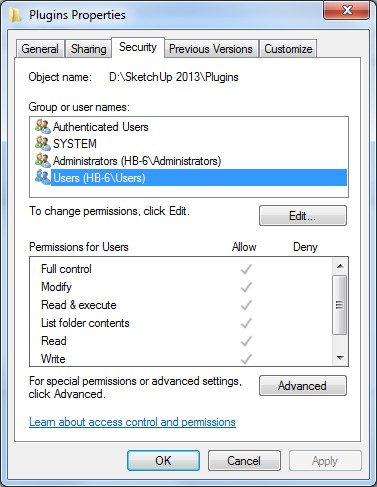
                    With admin powers...
                    Select the Plugins folder icon.

                    Right-click
                    Context-menu
                    Properties
                    Security
                    Edit...

                    Ensure everyone in the list has FULL permissions ticked.

                    Apply/OK

                    The permissions to subfolders within the 'Program Files' tree, of everyone - including admins - are limited by Windows by default. You simply need to reset them to FULL, otherwise you will not be able to add/change files into that folder - although you think you have !

                    Also while you are at it...
                    Select the SketchUp.exe file icon [in the same folder as the Plugins folder].
                    Right-click
                    Context-menu
                    Properties
                    Compatibility
                    Always run as administrator... should be ticked

                    Apply/OK

                    The 'Compatibility Files' issue arises if you have limited security permissions to a folder - like Plugins - and Windows [weirdly] lets you think you have installed actually the file[s] and subfolders etc, but in fact it has put them into a VirtualStore - so if you have a 'Compatibility Files...' link/button in the top bars of your Windows Explorer window for a folder like Plugins then that's a sign of you having insufficient permissions to add/change files; click on the link to see what you think was installed but is squirreled away by the OS 😒

                    TIG

                    1 Reply Last reply
                    Reply Quote 0
                    • tt_suT
                      tt_su
                      last edited by

                      Hm... I've not had time to look at this yet, but TIG's comment about the font list not being populated could be a clue. Maybe IE11 had removed the MS hack I used to get the font list...

                      The %20 instead of a space is just IE transforming the path string into a URL string. Nothing wrong there.

                      1 Reply Last reply
                      Reply Quote 0
                      • dkdickialD
                        dkdickial
                        last edited by

                        @tig said:

                        With admin powers...
                        Select the Plugins folder icon.

                        Right-click
                        Context-menu
                        Properties
                        Security
                        Edit...

                        Bad news.
                        I'v make everyone in the list has full permissions ticked, and still, it doesn't work 😞
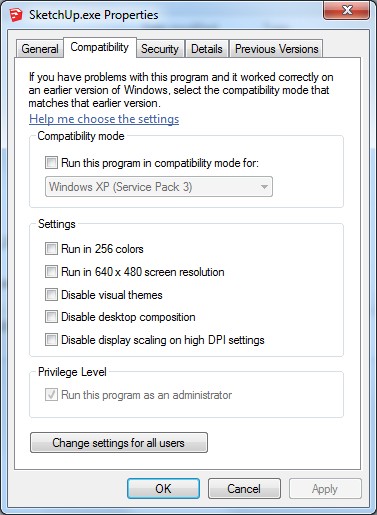
                        20131120100350.jpg
                        20131120100429.jpg

                        1 Reply Last reply
                        Reply Quote 0
                        • G
                          greg24k
                          last edited by

                          For some reason I get error when I start the plug-in. Everything else works, but it will not load the fonts. I get a java error is in the TT Lib2 in the webdialog/base.js It says that Unable to ger property "count" of undefined or null reference. Line 115 Char 9

                          Is anyone else experienced that, and if there a fix for it?

                          Thanks!

                          1 Reply Last reply
                          Reply Quote 0
                          • Dave RD
                            Dave R
                            last edited by

                            What operating system? What SketchUp version? Help us help you. Please complete your profile.

                            Etaoin Shrdlu

                            %

                            (THERE'S NO PLACE LIKE)

                            G28 X0.0 Y0.0 Z0.0

                            M30

                            %

                            1 Reply Last reply
                            Reply Quote 0
                            • tt_suT
                              tt_su
                              last edited by

                              I'm going to guess that you have Windows 8.x? I'm getting some reports that it's not working there. I'm not sure why - it might be Windows 8.x preventing me from using the font list or it could be IE11. Either way - I've not had time to investigate in detail yet.

                              1 Reply Last reply
                              Reply Quote 0
                              • G
                                greg24k
                                last edited by

                                @dave r said:

                                What operating system? What SketchUp version? Help us help you. Please complete your profile.

                                Sorry about that... Windows 7 Sketchup Pro 2013

                                1 Reply Last reply
                                Reply Quote 0
                                • tt_suT
                                  tt_su
                                  last edited by

                                  What version of Internet Explorer do you have?

                                  1 Reply Last reply
                                  Reply Quote 0
                                  • doppelD
                                    doppel
                                    last edited by

                                    Nice & Useful plugin!!! thanks for your work.
                                    But since the last version of TT_Lib², i always have this message on Sketchup starts :
                                    "TT_Lib² detected that some of the files in SketchUp's plugin folder has ended up
                                    in Window's Virtual Store. It happens because of insufficint permissions for the
                                    plugin folder. Please move the files into the real Plugins folder."

                                    TT Lib² v.2.9.4
                                    Internet Explorer 11
                                    Sketchup 8

                                    EDIT : uninstall et install TT Lib². The message doesn't appeared anymore.
                                    But now, when I start the plugin, i have a message with an error script about the file base.js. And whatever i click yes or no, i can't choose my font 😕 😆

                                    1 Reply Last reply
                                    Reply Quote 0
                                    • tt_suT
                                      tt_su
                                      last edited by

                                      @doppel said:

                                      Nice & Useful plugin!!! thanks for your work.
                                      But since the last version of TT_Lib², i always have this message on Sketchup starts :
                                      "TT_Lib² detected that some of the files in SketchUp's plugin folder has ended up
                                      in Window's Virtual Store. It happens because of insufficint permissions for the
                                      plugin folder. Please move the files into the real Plugins folder."

                                      TT Lib² v.2.9.4
                                      Internet Explorer 11
                                      Sketchup 8

                                      EDIT : uninstall et install TT Lib². The message doesn't appeared anymore.
                                      But now, when I start the plugin, i have a message with an error script about the file base.js. And whatever i click yes or no, i can't choose my font 😕 😆

                                      1. The VirtualStore warning - did you follow its instructions? Move the files from Virtual Store to the proper Plugins folder?

                                      2. You unintalled TT_Lib2? Then 3D Text Editor wont' work. (But yet you indicate it does? This could be a result of the files in the VirtualStore.)

                                      3. Regarding the Javascript error, do you have Windows 8? I've gotten reports from Windows 8 users that this plugin doesn't work for them. But I'm not sure if it's Window 8 or IE11...

                                      1 Reply Last reply
                                      Reply Quote 0
                                      • doppelD
                                        doppel
                                        last edited by

                                        @tt_su said:

                                        1. The VirtualStore warning - did you follow its instructions? Move the files from Virtual Store to the proper Plugins folder?

                                        2. You unintalled TT_Lib2? Then 3D Text Editor wont' work. (But yet you indicate it does? This could be a result of the files in the VirtualStore.)

                                        3. Regarding the Javascript error, do you have Windows 8? I've gotten reports from Windows 8 users that this plugin doesn't work for them. But I'm not sure if it's Window 8 or IE11...

                                        1 - yes, i moved the files in the plugin folder of Sketchup
                                        2 - uninstalled and re-install TT_Lib²
                                        3 - Windows 7

                                        I will try few things to fix that. Thanks all of you for your replies 😄

                                        1 Reply Last reply
                                        Reply Quote 0
                                        • tt_suT
                                          tt_su
                                          last edited by

                                          Windows 7 eyh... then IE11 might be the culprit. I might be lucky and be able to force the webdialog to user IE10 compatibility mode.

                                          1 Reply Last reply
                                          Reply Quote 0
                                          • doppelD
                                            doppel
                                            last edited by

                                            That's what i thought too. I uninstall IE11 and all work as before! I don't need it anyway, i prefer firefox & chrome ^^


                                            1 Reply Last reply
                                            Reply Quote 0

                                            Hello! It looks like you're interested in this conversation, but you don't have an account yet.

                                            Getting fed up of having to scroll through the same posts each visit? When you register for an account, you'll always come back to exactly where you were before, and choose to be notified of new replies (either via email, or push notification). You'll also be able to save bookmarks and upvote posts to show your appreciation to other community members.

                                            With your input, this post could be even better 💗

                                            Register Login
                                            • 1
                                            • 2
                                            • 5
                                            • 6
                                            • 7
                                            • 8
                                            • 9
                                            • 10
                                            • 11
                                            • 7 / 11
                                            • First post
                                              Last post
                                            Buy SketchPlus
                                            Buy SUbD
                                            Buy WrapR
                                            Buy eBook
                                            Buy Modelur
                                            Buy Vertex Tools
                                            Buy SketchCuisine
                                            Buy FormFonts

                                            Advertisement