sketchucation logo sketchucation
    • Login
    Oops, your profile's looking a bit empty! To help us tailor your experience, please fill in key details like your SketchUp version, skill level, operating system, and more. Update and save your info on your profile page today!
    ⚠️ Update | Sketchucation Tools 5.0.8 released with licensing improvements and bugfixes Download

    Measure arc length

    Scheduled Pinned Locked Moved Newbie Forum
    sketchup
    12 Posts 6 Posters 8.8k Views 6 Watching
    Loading More Posts
    • Oldest to Newest
    • Newest to Oldest
    • Most Votes
    Reply
    • Reply as topic
    Log in to reply
    This topic has been deleted. Only users with topic management privileges can see it.
    • Dave RD
      Dave R
      last edited by

      Open Entity Info (Window Menu), Select the arc. Read the length.

      Etaoin Shrdlu

      %

      (THERE'S NO PLACE LIKE)

      G28 X0.0 Y0.0 Z0.0

      M30

      %

      1 Reply Last reply
      Reply Quote 0
      • D
        drfarkos
        last edited by

        Thank you, Dave!
        There was a small plus icon on the Entity Info panel, that was hiding length.

        1 Reply Last reply
        Reply Quote 0
        • Dave RD
          Dave R
          last edited by

          ah, yes. I'd forgotten about that little plus icon. I keep the box expanded all the time.

          Etaoin Shrdlu

          %

          (THERE'S NO PLACE LIKE)

          G28 X0.0 Y0.0 Z0.0

          M30

          %

          1 Reply Last reply
          Reply Quote 0
          • T
            TguildworksPDX
            last edited by

            When I select multiple arcs to find the total length, the length box disappears from entity info. Is there a way to find total length of many arcs without clicking on them one by one?

            1 Reply Last reply
            Reply Quote 0
            • bazB
              baz
              last edited by

              @tguildworkspdx said:

              When I select multiple arcs to find the total length, the length box disappears from entity info. Is there a way to find total length of many arcs without clicking on them one by one?

              You could use Tig's Weld to make them one entity.

              1 Reply Last reply
              Reply Quote 0
              • Dave RD
                Dave R
                last edited by

                If they are contiguous welding is a good idea but Entity Info would report the total length whether or not they are welded together.

                Etaoin Shrdlu

                %

                (THERE'S NO PLACE LIKE)

                G28 X0.0 Y0.0 Z0.0

                M30

                %

                1 Reply Last reply
                Reply Quote 0
                • bazB
                  baz
                  last edited by

                  Getting out of my depth here perhaps, but if you ctrl click several arcs, length is updated as you go....

                  So it seems Entity Info will show the total length of non-contiguous edges.

                  1 Reply Last reply
                  Reply Quote 0
                  • TIGT
                    TIG Moderator
                    last edited by

                    But be aware that if you Entity Info a selected single arc then the length reported is the arc's length, but if you select two arcs then you will get the total length of their segments, which will always be less that the arcs' total length - the fewer segments the more the discrepancy.

                    To see it draw an arc and get its length using Entity Info.
                    Now copy the arc off to one side and select both arcs - Entity info will display the combined length - but it will not be x2 the single arc's length.

                    TIG

                    1 Reply Last reply
                    Reply Quote 0
                    • M
                      mrossk
                      last edited by

                      @tig said:

                      But be aware that if you Entity Info a selected single arc then the length reported is the arc's length, but if you select two arcs then you will get the total length of their segments, which will always be less that the arcs' total length - the fewer segments the more the discrepancy.

                      To see it draw an arc and get its length using Entity Info.
                      Now copy the arc off to one side and select both arcs - Entity info will display the combined length - but it will not be x2 the single arc's length.

                      I tried it and, not unexpectedly, TIG is correct. But could someone explain what's actually going on? What is the arc's length if not the "total length of their segments"?
                      Apologize if I'm not understanding something obvious, thanks.

                      https://www.mkaplanfinefurniture.com/

                      1 Reply Last reply
                      Reply Quote 0
                      • Dave RD
                        Dave R
                        last edited by

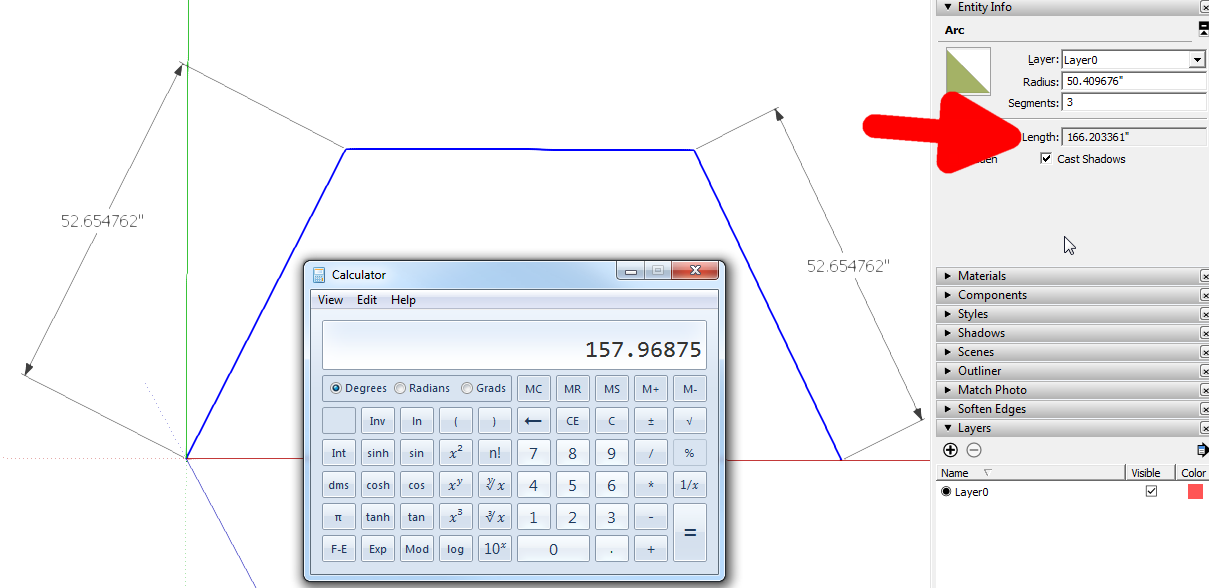
                        Michael, Make an arc with three sides. Measure the length of the segments and compare it with the arc length shown in Entity Info. The arc length given is based on a real circle and not an approximated one.
                        Screenshot - 2_1_2017 , 8_40_57 AM.png

                        Etaoin Shrdlu

                        %

                        (THERE'S NO PLACE LIKE)

                        G28 X0.0 Y0.0 Z0.0

                        M30

                        %

                        1 Reply Last reply
                        Reply Quote 0
                        • M
                          mrossk
                          last edited by

                          Ah yes, the "real" curve/circle/arc versus the "approximate" one. Duh. Thanks!

                          https://www.mkaplanfinefurniture.com/

                          1 Reply Last reply
                          Reply Quote 0

                          Hello! It looks like you're interested in this conversation, but you don't have an account yet.

                          Getting fed up of having to scroll through the same posts each visit? When you register for an account, you'll always come back to exactly where you were before, and choose to be notified of new replies (either via email, or push notification). You'll also be able to save bookmarks and upvote posts to show your appreciation to other community members.

                          With your input, this post could be even better 💗

                          Register Login
                          • 1 / 1
                          • First post
                            Last post
                          Buy SketchPlus
                          Buy SUbD
                          Buy WrapR
                          Buy eBook
                          Buy Modelur
                          Buy Vertex Tools
                          Buy SketchCuisine
                          Buy FormFonts

                          Advertisement