How to set default dimensions?
-
Hi
I to would like to work in mm although I do not have the pro version and am struggling, any tips please.
Thanks
Complete newbie -
jarvis123, your question has nothing to do with LayOut so I've moved it to the Newbie forum.
If you want to work in millimeters, change the units under Window>Model Info>Units.
-
There is no 'mm' Template supplied with SketchUp.
Open a new empty SKP.
Change your Model Info > Units to 'mm' etc...
Also change anything else you'd like to 'standardize' - like text font, dimension style etc, also erase any 2d components etc that you don't want appearing every time you open a new SKP...
Purge your SKP and use File > 'Save as Template' - with perhaps 'mm' in its name.
Then under Preferences > Templates set this new Template as your default-template...
Thereafter whenever you make a new SKP it'll use that template and you'll have 'mm' AND whatever other settings you have decided to adjust to your wishes every time... -
Thanks
-
isnt it easier to simply "choose template" when opening SU?
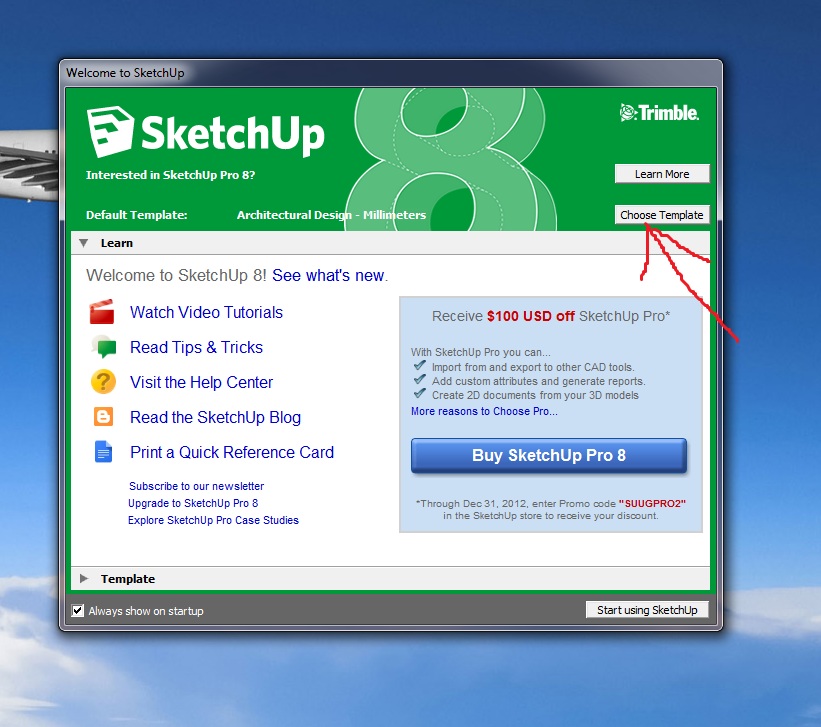
-
@tig said:
There is no 'mm' Template supplied with SketchUp...
AFAIK there is - there is no cm template however...
@steved said:
isnt it easier to simply "choose template" when opening SU?
I would rather call them "examples". True that they are good to start with but there is none (for me at least) that I would have not liked to modify to my own needs.
-
You are right

The standard 'en' template-set does indeed have 'mm' versions - as the 'b' types ['a' types are 'inch'].
During ATC training I had to make a 'mm' training-template for the UK, because there isn't one for 'training' - only a=inch/b=meter - so that's where my memory broke down......



Hello! It looks like you're interested in this conversation, but you don't have an account yet.
Getting fed up of having to scroll through the same posts each visit? When you register for an account, you'll always come back to exactly where you were before, and choose to be notified of new replies (either via email, or push notification). You'll also be able to save bookmarks and upvote posts to show your appreciation to other community members.
With your input, this post could be even better 💗
Register Login


Advertisement