sketchucation logo sketchucation
    • Login
    Oops, your profile's looking a bit empty! To help us tailor your experience, please fill in key details like your SketchUp version, skill level, operating system, and more. Update and save your info on your profile page today!
    Mac User? | Join the Rayscaper Beta for Mac Learn More

    Premium Members Freebies for October

    Scheduled Pinned Locked Moved SketchUp Discussions
    sketchup
    23 Posts 10 Posters 4.3k Views 10 Watching
    Loading More Posts
    • Oldest to Newest
    • Newest to Oldest
    • Most Votes
    Reply
    • Reply as topic
    Log in to reply
    This topic has been deleted. Only users with topic management privileges can see it.
    • pbacotP
      pbacot
      last edited by

      We can choose more than one? 😲 Wow, this is generous indeed.

      Thank you, all (staff and contributors). Looks like beautiful (and useful) offerings!

      Peter

      MacOSX MojaveSketchUp Pro v19 Twilight v2 Thea v3 PowerCADD

      1 Reply Last reply
      Reply Quote 0
      • GaieusG
        Gaieus
        last edited by

        Note guys that these have been there all October - it's just a "reminder" in case you missed something (as it's now November already).

        Gai...

        1 Reply Last reply
        Reply Quote 0
        • andybotA
          andybot
          last edited by

          In that case, thanks also for making it known πŸ˜‰ Since this subscription is a new thing, it's not always clear what to look for on this site. Good to have pointers from you all.

          Andy

          ps, since I'm talking about finding information - I sure would like to have the "view active topics" button available more places than just the top level of the forum... just my 2cents.

          http://charlottesvillearchitecturalrendering.com/

          1 Reply Last reply
          Reply Quote 0
          • GaieusG
            Gaieus
            last edited by

            We are working on a system that lists all the premium content and when there is something new, you can get notification.

            Gai...

            1 Reply Last reply
            Reply Quote 0
            • massimoM
              massimo Moderator
              last edited by

              πŸ‘ πŸ‘
              Would also be nice to have in the shop a search box for author.

              1 Reply Last reply
              Reply Quote 0
              • utilerU
                utiler
                last edited by

                OK, OK, where's the camera...?

                Rich, when I try your woodgrain skm's or the brushed metal I get a bugsplat everytime!!

                Anyone else experiencing this?

                EDIT: Actually, the only SKM's that bugsplat are the woodgrain ones... metal seems to be ok!!

                Just Curious...

                1 Reply Last reply
                Reply Quote 0
                • JClementsJ
                  JClements
                  last edited by

                  Giaeus:
                  Like your new photo. You handsome devil.

                  Rich:
                  Nice textures. Thanks.

                  John | Illustrator | Beaverton, Oregon

                  1 Reply Last reply
                  Reply Quote 0
                  • Rich O BrienR
                    Rich O Brien Moderator
                    last edited by

                    @utiler said:

                    Rich, when I try your woodgrain skm's or the brushed metal I get a bugsplat everytime!!
                    Anyone else experiencing this?

                    I'm not getting any splats here. What extraction software are you using?

                    Download the free D'oh Book for SketchUp πŸ“–

                    1 Reply Last reply
                    Reply Quote 0
                    • GaieusG
                      Gaieus
                      last edited by

                      Thanks John. I remember I even took a shower and shaved before that photo was taken. πŸ˜‰

                      Gai...

                      1 Reply Last reply
                      Reply Quote 0
                      • utilerU
                        utiler
                        last edited by

                        @rich o brien said:

                        @utiler said:

                        Rich, when I try your woodgrain skm's or the brushed metal I get a bugsplat everytime!!
                        Anyone else experiencing this?

                        I'm not getting any splats here. What extraction software are you using?

                        7-zip. worked for all the others too....

                        Just Curious...

                        1 Reply Last reply
                        Reply Quote 0
                        • Rich O BrienR
                          Rich O Brien Moderator
                          last edited by

                          Ill email you a special down under version.

                          Download the free D'oh Book for SketchUp πŸ“–

                          1 Reply Last reply
                          Reply Quote 0
                          • utilerU
                            utiler
                            last edited by

                            Legend.....

                            Just Curious...

                            1 Reply Last reply
                            Reply Quote 0
                            • alvisA
                              alvis
                              last edited by

                              you missed Geoma chair πŸ˜‰

                              1 Reply Last reply
                              Reply Quote 0
                              • S
                                stumor
                                last edited by

                                I have downloaded and extracted woodgrain and wallpaper. When I try to import or use the texture library route I do not have a menu box that recognizes .skm files.
                                Am I overlooking something obvious, I think I have search through all the tutorials.

                                1 Reply Last reply
                                Reply Quote 0
                                • Rich O BrienR
                                  Rich O Brien Moderator
                                  last edited by

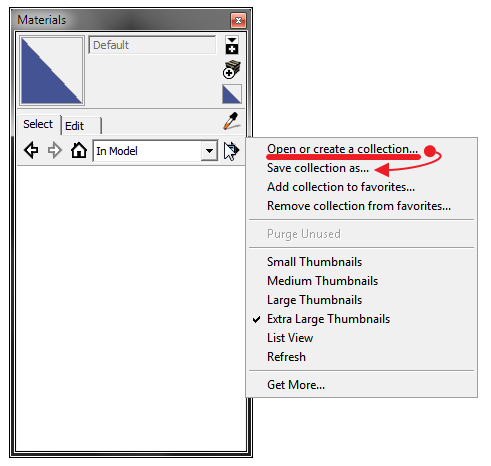
                                  Are you adding them via this method?

                                  PickPic 4.png

                                  Download the free D'oh Book for SketchUp πŸ“–

                                  1 Reply Last reply
                                  Reply Quote 0
                                  • S
                                    stumor
                                    last edited by

                                    Ah, havn't tried that before. Thanks, so the .skm go directly into SU's materials library, up to now I have been importing textures as jpeg images.

                                    1 Reply Last reply
                                    Reply Quote 0
                                    • Rich O BrienR
                                      Rich O Brien Moderator
                                      last edited by

                                      @stumor said:

                                      Ah, havn't tried that before. Thanks, so the .skm go directly into SU's materials library, up to now I have been importing textures as jpeg images.

                                      Under Windows > Preferences you can dictate where you materials are stored.

                                      I think by default SketchUp places everything, models, styles, textures etc... in the My Documents folder in Windows. But in Preferences you can tell SketchUp that you store Materials in a particular location.

                                      So, when you download a .zip and extract it to a folder place that folder in the defined location. As long as the textures in the folder are .skm you can access them

                                      Try this....

                                      In the image previous you can see a 'Get More...' link. This bring you to the SketchUp blog that has a tutorial on adding materials to SketchUp. Hope that helps

                                      Download the free D'oh Book for SketchUp πŸ“–

                                      1 Reply Last reply
                                      Reply Quote 0
                                      • S
                                        stumor
                                        last edited by

                                        Thanks again, πŸ‘ β˜€

                                        1 Reply Last reply
                                        Reply Quote 0
                                        • bobpineoB
                                          bobpineo
                                          last edited by

                                          Thanks Rich,
                                          I can use many of these already!
                                          Christmas came early!

                                          Bob Pineo, Design Develop LLC http://www.designdevelop.org.

                                          1 Reply Last reply
                                          Reply Quote 0
                                          • Rich O BrienR
                                            Rich O Brien Moderator
                                            last edited by

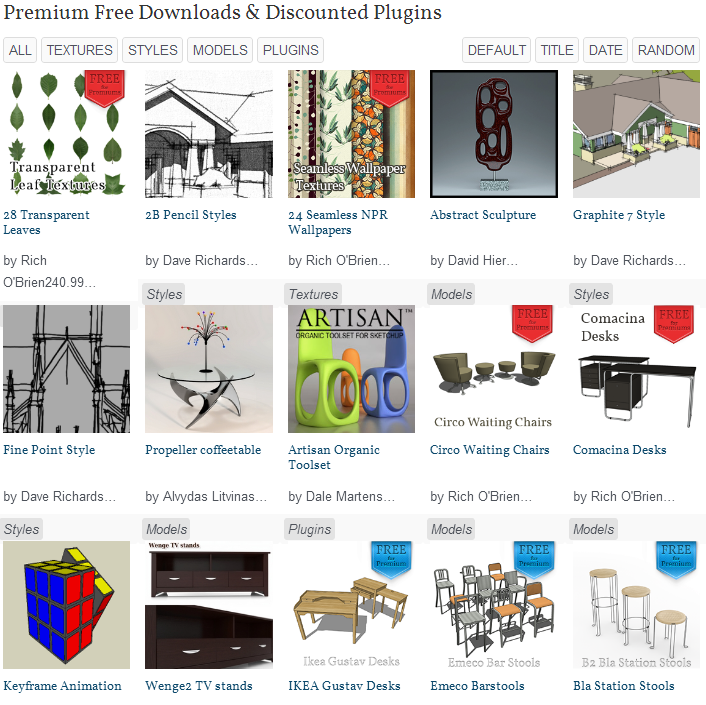
                                            If you click here you get a total list of what's available

                                            PickPic 1.png

                                            PickPic 2.png

                                            This is constantly updated to reflect what you can grab

                                            Download the free D'oh Book for SketchUp πŸ“–

                                            1 Reply Last reply
                                            Reply Quote 0

                                            Hello! It looks like you're interested in this conversation, but you don't have an account yet.

                                            Getting fed up of having to scroll through the same posts each visit? When you register for an account, you'll always come back to exactly where you were before, and choose to be notified of new replies (either via email, or push notification). You'll also be able to save bookmarks and upvote posts to show your appreciation to other community members.

                                            With your input, this post could be even better πŸ’—

                                            Register Login
                                            • 1
                                            • 2
                                            • 1 / 2
                                            • First post
                                              Last post
                                            Buy SketchPlus
                                            Buy SUbD
                                            Buy WrapR
                                            Buy eBook
                                            Buy Modelur
                                            Buy Vertex Tools
                                            Buy SketchCuisine
                                            Buy FormFonts

                                            Advertisement