sketchucation logo sketchucation
    • 登入
    Oops, your profile's looking a bit empty! To help us tailor your experience, please fill in key details like your SketchUp version, skill level, operating system, and more. Update and save your info on your profile page today!
    🔌 Smart Spline | Fluid way to handle splines for furniture design and complex structures. Download

    [Plugin] Material_Maintenance v2.2 - 2013-01-13

    已排程 已置頂 已鎖定 已移動 Plugins
    155 貼文 19 Posters 58.6k 瀏覽 19 Watching
    正在載入更多貼文
    • 從舊到新
    • 從新到舊
    • 最多點贊
    回覆
    • 在新貼文中回覆
    登入後回覆
    此主題已被刪除。只有擁有主題管理權限的使用者可以查看。
    • M 離線
      Myhand
      最後由 編輯

      @tig said:

      But params.each{|p|puts "p1 = >>#{p}<<"}
      should be the way ?
      NOT p.puts

      😳 thanks TIG!

      Still strange it worked on windows and driven's MAC and that the second parameter comes looks wrong but as long as it works.

      I am making a new build without the trace code which I will upload soon.

      http://www.keepingmyhandin.com/

      1 條回覆 最後回覆 回覆 引用 0
      • M 離線
        Myhand
        最後由 編輯

        Bug fix version V2.1.1 released.

        Can be found here:

        http://www.keepingmyhandin.com/Downhome/Sketchup/material_maintenance_2

        CMD this should fix your problem also as the trace code that had the bug in is also now removed.

        http://www.keepingmyhandin.com/

        1 條回覆 最後回覆 回覆 引用 0
        • T 離線
          Tpdart
          最後由 編輯

          It may be me, but I've put the .rbz in the plugins folder, restarted SU but I cannot find the command or interface. Any thoughts?

          Thanks!

          1 條回覆 最後回覆 回覆 引用 0
          • GaieusG 離線
            Gaieus
            最後由 編輯

            You do not use an RBZ file like that. Please, read this tutorial on installing plugins:
            http://sketchucation.com/resources/tutorials/37-beginner/108-installing-sketchup-plugins

            Gai...

            1 條回覆 最後回覆 回覆 引用 0
            • T 離線
              Tpdart
              最後由 編輯

              DOH!
              I didn't install the extension- once I PROPERLY followed the instructions it looks great I can't wait to try it out on an inherited complex model with many similar materials.

              1 條回覆 最後回覆 回覆 引用 0
              • cmdC 離線
                cmd
                最後由 編輯

                @myhand said:

                Bug fix version V2.1.1 released.

                ... CMD this should fix your problem also as the trace code that had the bug in is also now removed.

                Myhand,

                Good stuff! no more errors!

                .... but I am not getting material thumbnails nor am I getting component images to display.

                Is this due to the change for mac?
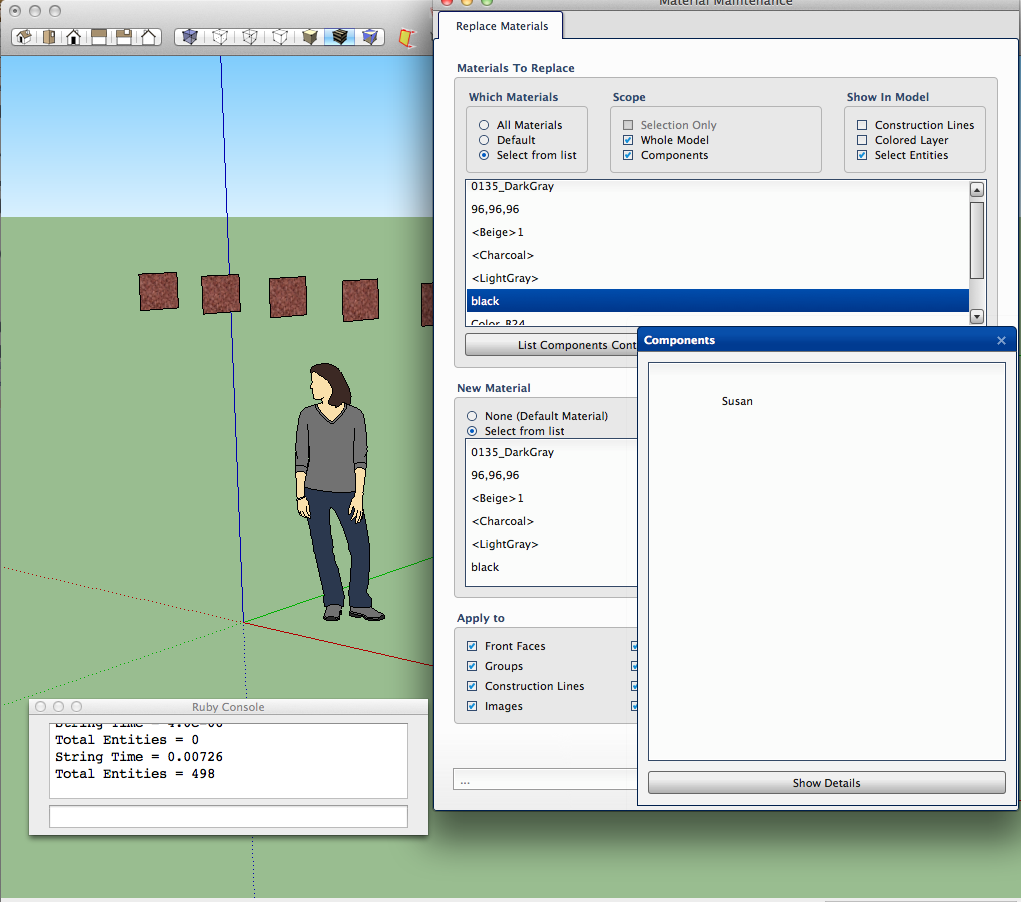

                Screen Shot 2012-12-03 at 7.16.11 AM.png

                • CMD
                1 條回覆 最後回覆 回覆 引用 0
                • TIGT 離線
                  TIG Moderator
                  最後由 編輯

                  @cmd
                  If you write this in the Ruby Console ENV['TMPDIR'] + <enter> it gives the path to your 'temp' folder.
                  In that folder ought to be a subfolder named 'material_maintenance' and in that the xxx.png material thumbnails and xxx.comp.png component thumbnails ? They might have weird looking 'id' type names...
                  The subfolder is emptied when the tool runs, or it's made if it is missing.
                  It could be that the files are getting made but some enduring issue in the html/js on MAC is preventing them displaying ??
                  Can you confirm if the subfolder/files exist...

                  TIG

                  1 條回覆 最後回覆 回覆 引用 0
                  • M 離線
                    Myhand
                    最後由 編輯

                    @cmd said:

                    Myhand,

                    Good stuff! no more errors!

                    .... but I am not getting material thumbnails nor am I getting component images to display.

                    Is this due to the change for mac?

                    I suspect it can be to do with the temp folder location on your MAC. I save the thumbs in a folder I create within the system temp folder. I use a technique (from ThomThom's very good article on materials http://www.thomthom.net/thoughts/2012/03/the-secrets-of-sketchups-materials/)
                    to "guess" the temp folder.

                    temp_path = File.expand_path( ENV['TMPDIR'] || ENV['TMP'] || ENV['TEMP'] )

                    It might be that this does not work on your system and we might have to add some options to the list.

                    driven, did you see the thumbs on your system?

                    http://www.keepingmyhandin.com/

                    1 條回覆 最後回覆 回覆 引用 0
                    • TIGT 離線
                      TIG Moderator
                      最後由 編輯

                      The ENV['TMPDIR'] should work on MAC, with the other two for PCs.
                      CMD needs to go look see if the subfolder/thumbnails are getting made...
                      If they aren't there's an issue with this bit; if they are the issue is with the html/js end ?

                      TIG

                      1 條回覆 最後回覆 回覆 引用 0
                      • thomthomT 離線
                        thomthom
                        最後由 編輯

                        I have experienced some OSX user that didn't have the environment set up correctly - there was no environment temp variable defined at all. That was a once-time thing though.

                        Thomas Thomassen — SketchUp Monkey & Coding addict
                        List of my plugins and link to the CookieWare fund

                        1 條回覆 最後回覆 回覆 引用 0
                        • TIGT 離線
                          TIG Moderator
                          最後由 編輯

                          OK ... then
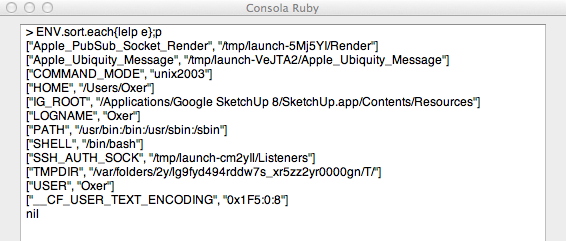
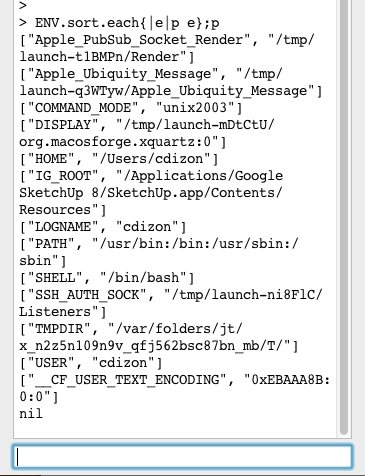
                          ENV.sort.each{|e|p e};p
                          will list everything available...
                          😒

                          TIG

                          1 條回覆 最後回覆 回覆 引用 0
                          • OxerO 離線
                            Oxer
                            最後由 編輯

                            I have the same problem like cmd, the material thumbnails don't appear, I work on Mac OSX.
                            Other question, is it possible translate the plugin to another language?
                            Thanks Myhand !!

                            "The result is the end what is important is the process" by Oxer
                            http://www.oxervision.blogspot.com/

                            1 條回覆 最後回覆 回覆 引用 0
                            • M 離線
                              Myhand
                              最後由 編輯

                              @oxer said:

                              I have the same problem like cmd, the material thumbnails don't appear, I work on Mac OSX.

                              Can you please follow TIG's instructions below and let us know the results?

                              @tig said:

                              @cmd
                              If you write this in the Ruby Console ENV['TMPDIR'] + <enter> it gives the path to your 'temp' folder.
                              In that folder ought to be a subfolder named 'material_maintenance' and in that the xxx.png material thumbnails and xxx.comp.png component thumbnails ? They might have weird looking 'id' type names...
                              The subfolder is emptied when the tool runs, or it's made if it is missing.
                              It could be that the files are getting made but some enduring issue in the html/js on MAC is preventing them displaying ??
                              Can you confirm if the subfolder/files exist...

                              Can you also please run

                              ENV.sort.each{|e|p e};p

                              and attach the console output.

                              http://www.keepingmyhandin.com/

                              1 條回覆 最後回覆 回覆 引用 0
                              • cmdC 離線
                                cmd
                                最後由 編輯

                                @myhand said:

                                @tig said:

                                Can you confirm if the subfolder/files exist...

                                Myhand & TIG

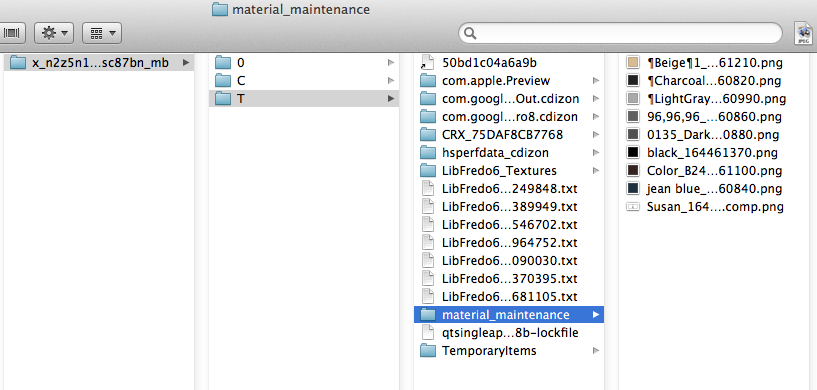
                                Yes... the folders and image files do exist.

                                CMD


                                Screen Shot 2012-12-03 at 4.14.37 PM.png

                                • CMD
                                1 條回覆 最後回覆 回覆 引用 0
                                • cmdC 離線
                                  cmd
                                  最後由 編輯

                                  @unknownuser said:

                                  Can you also please run

                                  ENV.sort.each{|e|p e};p

                                  and attach the console output.


                                  Screen Shot 2012-12-03 at 4.04.08 PM.png

                                  • CMD
                                  1 條回覆 最後回覆 回覆 引用 0
                                  • TIGT 離線
                                    TIG Moderator
                                    最後由 編輯

                                    So the folder/subfolder is OK and the images exist.

                                    The image naming seems unduly convoluted, as it's adding some special characters etc...
                                    Why not use each material.display_name [with some replacement of characters like \ / : * ? " < > | etc] linked to a hash of the display-name containing its 'id' ?
                                    The thumbnail-images names match the 'display-names' ?

                                    TIG

                                    1 條回覆 最後回覆 回覆 引用 0
                                    • M 離線
                                      Myhand
                                      最後由 編輯

                                      @tig said:

                                      So the folder/subfolder is OK and the images exist.

                                      The image naming seems unduly convoluted, as it's adding some special characters etc...
                                      Why not use each material.display_name [with some replacement of characters like \ / : * ? " < > | etc] linked to a hash of the display-name containing its 'id' ?
                                      The thumbnail-images names match the 'display-names' ?

                                      This is sort of what I have done. i.e.

                                      display_name + "_" + object_id + ".png"

                                      with invalid windows file name characters replaced with the ¶ character. I know this character caused us problems in the marshaling on OSX, but forgot to remove it here. I will do so in the next patch.

                                      I do not think this is the problem though as some of the .png files do not have this character in the name...

                                      I will add some trace code (and remove the ¶ character) if you do not mind testing again CMD.

                                      http://www.keepingmyhandin.com/

                                      1 條回覆 最後回覆 回覆 引用 0
                                      • TIGT 離線
                                        TIG Moderator
                                        最後由 編輯

                                        Why no just remove the miscreant character OR use an _ ?

                                        TIG

                                        1 條回覆 最後回覆 回覆 引用 0
                                        • OxerO 離線
                                          Oxer
                                          最後由 編輯

                                          The same like cmd, the folders and image files do exist.
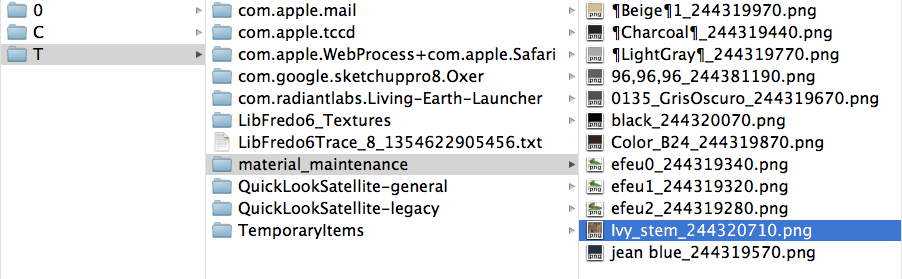
                                          Captura de pantalla 2012-12-04 a la(s) 13.17.16.png
                                          ENV.sort.each{|e|p e};p

                                          Captura de pantalla 2012-12-04 a la(s) 13.13.54.png

                                          "The result is the end what is important is the process" by Oxer
                                          http://www.oxervision.blogspot.com/

                                          1 條回覆 最後回覆 回覆 引用 0
                                          • M 離線
                                            Myhand
                                            最後由 編輯

                                            @tig said:

                                            Why no just remove the miscreant character OR use an _ ?

                                            Three reasons (none valid anymore)

                                            • I wanted descriptive file names (help with debugging)
                                            • I wanted to be clear which chars I replaced (helped with debugging)
                                            • I also have an OCD nerve and in theory by just deleting or replacing with a "ordinary" character could clash two similarly names materials that only differed in special characters (and yes it could still happen if each string have the same number of special characters all in the same positions but different characters or if someone actually used the ¶) but I felt the chances were sufficiently small.

                                            I will probably go for using object_id as it will be exact(which I did not know existed when I wrote this part if the code initially).


                                            http://www.keepingmyhandin.com/

                                            1 條回覆 最後回覆 回覆 引用 0
                                            • 1
                                            • 2
                                            • 3
                                            • 4
                                            • 5
                                            • 6
                                            • 7
                                            • 8
                                            • 5 / 8
                                            • 第一個貼文
                                              最後的貼文
                                            Buy SketchPlus
                                            Buy SUbD
                                            Buy WrapR
                                            Buy eBook
                                            Buy Modelur
                                            Buy Vertex Tools
                                            Buy SketchCuisine
                                            Buy FormFonts

                                            Advertisement