A tool for generation circular objects
-
You show the typical method at the top of your drawing, using a profile and pathing it around a circle. TIG has a tool called Lathe, or Extrude Edges by Lathe. If you are not too fussy about the result, you can use either Scale, or FredoScale in one direction on a sphere.
Otherwise, I am not aware of a tool such as you describe. Perhaps someone else? -
An external application that might do it is Rigmesh. However, while attempting to download it, my security software stopped it.
-
-
Ah, seems I understand that you want

You want a tool like a PushPull but in circular form for see the volume created in real timeThe basic Follow-me tool can do that!

You must draw a circular rail and
Make a "profil face" (must be pependicular to the first segment of the rail )
Call the Followme
CLick the face then Follow the rail with the mouse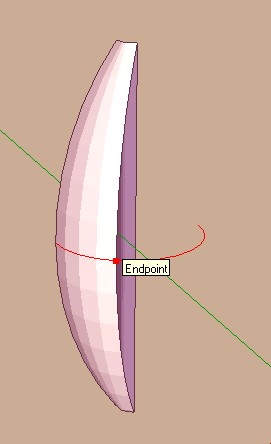
-
hi pilou & mitcorb,
thanx for your advice,
i know the basic follow-me tool, just looking for a simplier functionality
curviloft is the next to be tried,i also found fantastic rubies:
-
extrude along path
-
follow me and keep
for generating profiles.....
thanx a lot
stan
-
-
Also think about my EEbyLathe which gives truly formed end-parts when compared to a part-circle from a FollowMe... BUT FollowMe IS ideal for full circular 'lathing'...
-
@artmusicstudio said:
i know the basic follow-me tool, just looking for a simplier functionality
How could it get simpler?
-
@dave r said:
@artmusicstudio said:
i know the basic follow-me tool, just looking for a simplier functionality
How could it get simpler?
if your revolve axis isn't on an xyz then setting up the circle profile can become difficult.. TIG's lathe makes dealing with those situations relatively easy.
(and i really don't want to get into it again right now but for all intents/purposes, the follow-me tool should only be used on straight lined paths.. never curves (though 360º can be ok if you're set up properly))
[edit]- well actually.. if your intents/purposes don't require accuracy then feel free to use the followme tool anywhere
-
@dave r said:
@artmusicstudio said:
i know the basic follow-me tool, just looking for a simplier functionality
How could it get simpler?
hi, well, yes, it could,
for closed object (means 360 dg. )
this could work without any circle-path etc.,simply saying : this is the axis (vector),, this ist the form, this is the centerpoint on the form.....
so any line along another line could create closed forms.......just an idea
regards stan
-
Then try my 'EEbyLathe' using 360 degrees.
You Select a face or a set of welded edges [aka a curve] for the profile.
Pick a 'center-point'.
Pick a point off from this, to give the 'axis of rotation'.
Type 360 and press <enter> to use that as the swept angle.
You can enter any swept angle >0<=360, -ve values sweep the form in the other direction.
No need to type 360 if you have used it last time as it's remembered for that session.
To commit double-click or press Ctrl.
Answer questions about coplanar faces, reversed faces, exploding the grouped form etc...Note: the other thing you need to be able to adjust is the number of segments in the swept form - the default is 9.
You do this by typing Ns + <enter>, before committing...
You'll probably want 24s or 36s, again this setting is remembered for that session, but easily adjusted as desired before committing the form.






Hello! It looks like you're interested in this conversation, but you don't have an account yet.
Getting fed up of having to scroll through the same posts each visit? When you register for an account, you'll always come back to exactly where you were before, and choose to be notified of new replies (either via email, or push notification). You'll also be able to save bookmarks and upvote posts to show your appreciation to other community members.
With your input, this post could be even better 💗
Register Login


Advertisement