[wishlist] SketchUp Viewer
-
Dan,
I think artmusicstudio is talking about 'Global Shadow Override Button' in SU Viewer (ON or OFF) regardless on how the SU Scenes are set - good idea.
At present SU Viewer is reading Scenes settings set in SU.
If shadow was ON - is ON in the VIEWER - you cannot override the settings or update the Scene.
Of course you can Switch OFF but, is ON again when you jump to the next Scene which has shadow.Dan, I agree with you on Animation.
Overall, SU Viewer needs to get few more buttons (ribbon would be nice) to have 'more room to maneuver'.
The buttons exist - somebody needs to switch them ON
-
@beginner said:
The buttons exist - somebody needs to switch them ON
Unfortunately.. they do not. The button and cursor images for the extra tools we wish for, have been stripped out of the program, as well as dialog resources for the Entity Info inspector, etc.
So they went just a bit too far with their scissors.
The native MFC toolbars are not resources, they are built "on-the-fly" using C++ code, so it would be difficult to insert new buttons onto existing toolbars.
The size of executable is much smaller, so I would imagine they stripped out code to support any tools that they did not intend the Viewer to have.So.. we will have to rely upon the Trimble Team in Boulder to make changes. (Besides it is likely a violation of the EULA and copyright to distro any "hacked" edition.)
That's just the way it is ...
However I wonder if it would make more sense, to have the Free edition, just run in "Viewer Mode" when a read-only viewer file is opened. Meaning the app "remembers" UI setups for "Edit Mode" and "Viewer Mode" and any not-supported feature in "Viewer Mode" is either hidden or grayed out. The main menubar would be replaced with a smaller "Viewer Mode" menu, etc.

-
Great list of features already! One thing I have been missing ever since I used SketchUp to give a 3D presentation is a fullscreen option. This should be in all versions but can be really useful in the viewer.
Cheers,
Alex -
Hi Dan,
They have to strip the Full Version again but not too far
The Free and Viewer Mode (2 in 1) make sense - you would save SKPV in PRO Version and open in Free Version as View-Only.
I have seen that somewhere. Can't remember where
Hi alexschreyer,
I would like to see the Full Screen 'button' in Full Version not just in Viewer - good ideaAutoCAD - Ctrl + 0
Photoshop - Tab
Various Software including IE, FF and so on - F11 or
we could have even more sophisticated button mode Professional Mode
-
@beginner said:
I would like to see the Full Screen 'button' in Full Version not just in Viewer - good idea:
AutoCAD - Ctrl + 0
Photoshop - Tab
Various Software including IE, FF and so on - F11Actually these are examples of special HotKey settings.
The base standard accelerator on Windows to toggle between Full Screen mode is ALT + ENTER (historical,) and later SHIFT + ALT + ENTER
If such a command is placed on one of the standard menus (MS usually puts it on the View/Views menu,) users can assign whatever hotkey they desire to it, for their own use.You might see SilverLight apps allow ESC to exit from Full Screen mode, but this we cannot do in SketchUp, because the ESC key is the Tool reset key and "interrupter" Tool exit key (exit back to some edit tool, after suspending to say the OrbitTool.)

-
Correction:
This MSDN page, which gives Guidelines on Window Frames for programming application, says that F11 should also be assigned as the Full Screen shortcut key.

-
It would be nice to be able to use a cut down form of viewer on an android tablet! (If we cant have the full program)
-
An icon that plays the slide-animation. The user who is unfamiliar with SU should NOT have to be instructed on where to find this function in a menu.
-
@beginner said:
The Free and Viewer Mode (2 in 1) make sense - you would save SKPV in PRO Version and open in Free Version as View-Only.
Problem is we cannot install Free and Pro side-by-side on the same system, so the Pro version would also need to have "Viewer Mode".
This has already been requested, especially for Pro network users with more installations than license keys.
Some of the seats just want to open a model to view it or see a dimension, and do not want to "hold" one of the license keys (because they do not intend to do any editing.)
-
-The Viewer as portable Version. I often have clients with reduced knowledge of installation Processes. ( or IT administration rights )
-I have a linked Videobutton to Youtube, which opens in a Web Browser. A short documentation of what the Viewer is cabable would be nice to have.
-A screenshotbutton ( save as jpg option )and a way to set arrows and text spaces. Sometimes it is unbelavable what clients are trying to explain
-
@burkhard said:
-The Viewer as portable Version.
I can successfully run the Viewer off a thumb drive.
(However it still writes settings into the computer's registry, rather than saving them on the thumbdrive. This is one of my FRs above.)@burkhard said:
-A screenshotbutton ( save as jpg option ) and a way to set arrows and text spaces.
Markup / Annotation features ?? (This is also one of the above FRs.)
-
Yep, sorry Dan 12 and 13. Other words, same intensions.
-
@beginner said:
With regards to password - you could integrate ZIP Archive with Password when saving *.SKP file and UNZIP with Password when try to open.
SU + 7-ZIP = 2 in 1
http://www.7-zip.org/I myself do use 7zip, it's nice.
But SketchUp does not need it. It already has zip compression libraries included, that it use to read and write zip archives.
SKM (material) files are zip archives.
KMZ also are zip archives.
As well as the new RBZ plugin archives.... probably other file formats as well.
-
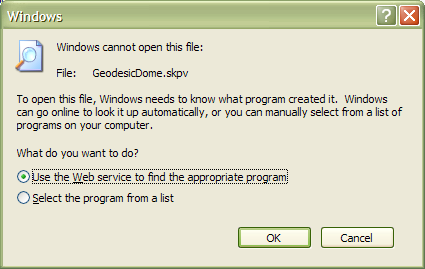
Yes this is already built into Windows. (But I am unsure of how the correct program is found. Perhaps a company has to pay Microsoft ???)
I made a new textfile and renamed it "GeodesicDome.skpv", then clicked on it:
-
This may not be the best place to ask this, but I just downloaded SketchUp Viewer. On the bottom of the license page (http://www.sketchup.com/intl/en/download/gsuviewer.html), the system requirements link appears to be broken. My system is a bit old, so if someone could point me to the Viewer sys requirements page, I'd be grateful. In case such a page no longer exists, here's a description of my system:
WinXP (sp2)
Athalon 64X2 Dual 4200+
2MB RAM
GeForce 7600 GS / 512MB -
@unknownuser said:
WinXP (sp2)
Athalon 64X2 Dual 4200+
2MB RAM
GeForce 7600 GS / 512MBI assume you have 2GB RAM not 2MB RAM.
SUV should work, just try.
In the worst case scenario it wouldn't -
@beginner said:
I assume you have 2GB RAM not 2MB RAM.
Yes, sorry, that's 2GB. I can't test because I don't yet have the SU file I need to view. I'd prefer not to ask the client for the file until after I check the system requirements.
-
Download some SKP files from Google Warehouse.
You can find some small and big files on any subject - right files to test your computer with SUV.
http://sketchup.google.com/3dwarehouse/ -
On a 32bit PC you can't ever use more than ~3.3Gb of RAM, so ~4Gb is a logical choice for such chip-sets - since they come in crude 'size-steps' and they never report having exactly the RAM it says on the packet anyway.
Your PC's OS is going to use about >~1.3Gb - depending on what you have auto-loading etc.
This leaves you with a potential maximum of <~2Gb of available RAM for SketchUp/Viewer - but of course you ARE likely to have other apps running concurrently too...
If your current RAM is only ~2Gb then you'll only have ~0.7Gb to run all things other than the OS... i.e. that's ~1/3rd of the maximum possible [useful] RAM you can have had installed.
You CAN probably run SketchUp/Viewer on this minimal amount of RAM, but you ought to see considerable improvements in performance if you added some more RAM to the PC [up to ~4Gb, as more on a 32bit system is 'wasted'] - RAM is now relatively inexpensive...
Also your Graphics card will impinge on your PC's usability, but I think that adding a better GC that might way out-class the RAM is not your best initial approach initially...
-
What if the .skp could have info stored in it (in its header?) such that when double-clicked to open it and SU or the SU viewer is not installed the user is given a menu to download and auto-install the Viewer?
Update to message: I was thinking it would work in a way similar to when Flash was initiated. If a file was opened in your browser and the plugin was not installed, then a dialog would appear and the plugin could automatically be downloaded and installed.








Advertisement