[Plugin] TIG-export_SKP_by_layer.rb
-
(c) TIG 2012-2017
TIG-export_SKP_by_layer.rb
Usage: Type into the Ruby Console
TIG.export_SKP_by_layer
Exports everything in the current Model into a set of SKP files 'by Layer',
Faces with Edges on another layer take those Edges with them.
Potential duplicate layer/skp names are suffixed _1 etc...
Unused 'empty' layers are ignored.
The files are named 'modelname-layername.skp'
Only -a-zA-Z0-9 are used in the file-name, all other characters become ''With v2.0 exported SKPs are put into a 'SKP_by_layer' subfolder with the model.
*With v2.0 you can pass an optional argument to save the SKPs as another version
e.g. for SketchUp version 8 SKPs pass 8.TIG.export_SKP_by_layer(8)The version passed must be lower than the Current SketchUp version.
Allowable versions are: 8, 2013, 2014, 2015, 2016, 2017.
Note the version passed must be an integer, not a string.
Passing anything else defaults the SKPs to the Current version.
Note: with SketchUp < v2014 a different version cannot be specified,
if one is passed, then it is ignored and it defaults to the Current version.You might need to manually delete any unwanted SKB/~.SKP backup files in the
sub-folder...v2.0 20171105
Now compatible with newer versions of SketchUp.
Exported SKPs are put into a 'SKP_by_layer' subfolder with the model.
Optional SKP version argument added to the command*.
Unused Components, Layers & Materials are properly purged from the SKPs.
v2.1 20171105
Layer which exported is not switched ON.
If the SKP's entities is empty a guide-point is added at the ORIGIN.Download the latest version from the PluginStore https://sketchucation.com/pluginstore?pln=TIG_export_SKP_by_layer
-
Thanks TIG
(14 downloads and no comments
 )
) -
That's life - ungrateful bunch !
-
@tig said:
That's life - ungrateful bunch !
could be we're just a bunch of slackers when it comes to testing and haven't yet checked it out

-
Sounds useful but I don't have a use for it at the moment. Thanks for thinking of useful things even before there is a use for them.
Regards.
-
I think it will be useful when a model will need to be used by another application .... provided "meaningful" layer naming has been used.
-
Nice one.
-
thanks a lot TIG .... thanks

best for exporting to 3Ds maxdo you have a plan to make it more ? .. a menu .. a toolbar ..
do you let me creat a Icon for it ?

-
Thanks
-
Hi TIG,
Using this script, can you export SKP layers as .pdf files?
Thank you.
-
@halftonejones said:
Hi TIG,
Using this script, can you export SKP layers as .pdf files?
Thank you.
If you want a PDF there's the built in Print to a 2d vector PDF tools, or use a 2d raster PDF system printer like PDF995 ? The built in version only does edges/faces etc and no shadow info is retained.
You would need to re-construe the code to get a desired layer/view and then NOT use 'export' but rather 'write_image'.@model.active_view.refresh keys={ ;filename => imgpath, ;width => vpw, ;height => vph, ;antialias => false, ;compression => 0.9 } @model.active_view.write_image(keys)This code snippet taken from Slicer5's export_to_png code is for a PNG file, where 'imgpath' tells us where to save it. The equivalent for a PDF would be similar...
-
Thanks TIG! layers to 3DS! yes.
-
TIG,
I am having trouble finding out where to locate and how to actually use the plugin...
any help would be much appreciated!
thank you,
Stephen
-
Stephen, does this answer your question?
Example 1. The location where the ruby script needs to be copied to.
Example 2. How to execute the ruby script (ignore the short-keys for the "Window" menu
as these are my custom shortcut key assignments).
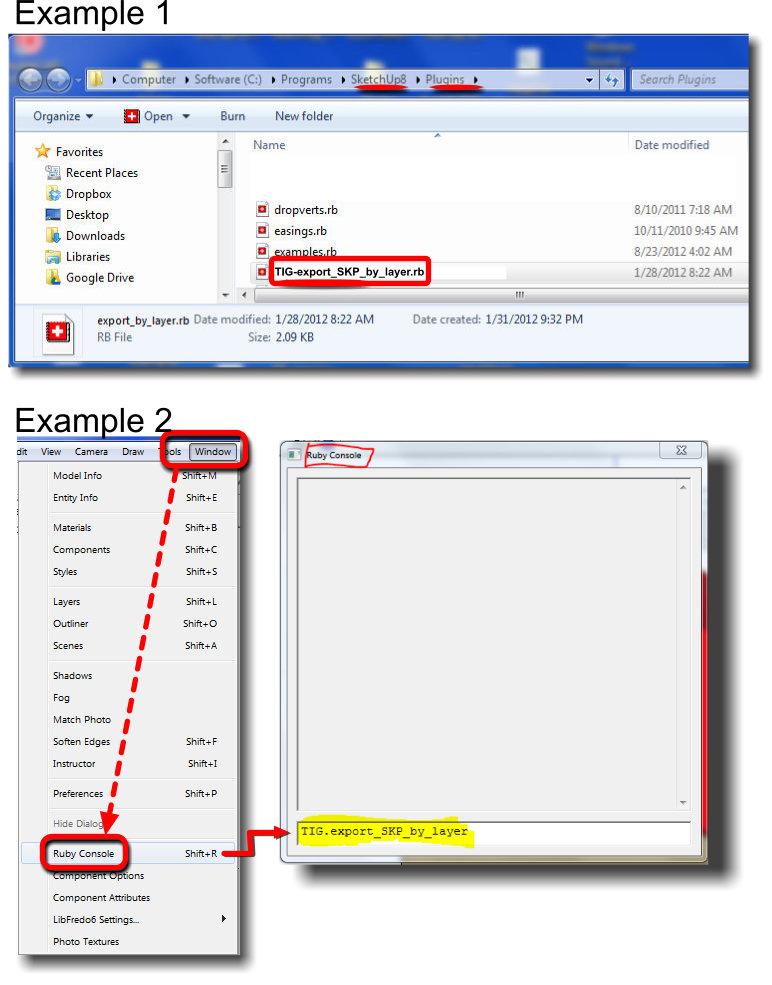
-
I was going to say much the same... but thanks to John !
His explanation is better than mine anyway -
Thank you TIG! I didn't knew i need this one until i read the description! Life saver, really

-
Originally I did that approach and it was not recognizing it... now on a monday morning it works... Figures! haha
The program must have checked out for the week/weekend Friday...
Thank you for the timely response,
Stephen
-
Thanks TIG!
-
Tig,
Just a quick question regarding your Layers to SKP plugin:
I have been searching for some ways to get SKP into Revit, and have a couple workflows that I am able to use well currently, however I am trying to just find some quick optimizations and found your old plugin! I am currently using SKP Pro 2015, and just tried your script and this is what the ruby console spat back at me:
TIG.export_SKP_by_layer
Exporting from...
//Mac/Home/Desktop/SKP2RVT/RVT2SKP.skp
as//Mac/Home/Desktop/SKP2RVT/RVT2SKP-Layer0.skp
Error: #<TypeError: reference to deleted Layers>
C:/Users//AppData/Roaming/SketchUp/SketchUp 2015/SketchUp/Plugins/TIG-export_SKP_by_layer.rb:43:inpurge_unused' C:/Users/*****/AppData/Roaming/SketchUp/SketchUp 2015/SketchUp/Plugins/TIG-export_SKP_by_layer.rb:43:inblock in export_SKP_by_layer'
C:/Users//AppData/Roaming/SketchUp/SketchUp 2015/SketchUp/Plugins/TIG-export_SKP_by_layer.rb:40:ineach' C:/Users/*****/AppData/Roaming/SketchUp/SketchUp 2015/SketchUp/Plugins/TIG-export_SKP_by_layer.rb:40:inexport_SKP_by_layer'
<main>:in<main>' SketchUp:1:ineval'I am using a Mac Laptop with Windows 10 on Parallels if that info helps at all? Anyway, it just creates the first "RVT2SKP-Layer0.skp" file and then stops... I am wondering what is going wrong?
If we can get past this hurdle, one feature I have been looking for in this whole deal is to make sure that whatever files are saved, are saved in SKP8 format

Let me know if you can see where I am erring...
Thanks! -
Updated v2.0 now available.
See first post full full chanage-log: http://sketchucation.com/forums/viewtopic.php?p=422953#p422953@unknownuser said:
v2.0 20171105
Now compatible with newer versions of SketchUp.
Exported SKPs are put into a 'SKP_by_layer' subfolder with the model.
Optional SKP version argument added to the command*.
Unused Components, Layers & Materials are properly purged from the SKPs.
SketchUp Plugins | PluginStore | SketchUcation
SketchUp Plugin and Extension Store by SketchUcation provides free downloads of hundreds of SketchUp extensions and plugins
(sketchucation.com)








Hello! It looks like you're interested in this conversation, but you don't have an account yet.
Getting fed up of having to scroll through the same posts each visit? When you register for an account, you'll always come back to exactly where you were before, and choose to be notified of new replies (either via email, or push notification). You'll also be able to save bookmarks and upvote posts to show your appreciation to other community members.
With your input, this post could be even better 💗
Register Login


Advertisement