sketchucation logo sketchucation
    • 登入
    Oops, your profile's looking a bit empty! To help us tailor your experience, please fill in key details like your SketchUp version, skill level, operating system, and more. Update and save your info on your profile page today!
    🔌 Smart Spline | Fluid way to handle splines for furniture design and complex structures. Download

    [Plugin][$] Curvizard - v2.5a - 01 Apr 24


    已排程 已置頂 已鎖定 已移動 Plugins
    198 貼文 58 Posters 330.5k 瀏覽 57 Watching
    正在載入更多貼文
    • 從舊到新
    • 從新到舊
    • 最多點贊
    回覆
    • 在新貼文中回覆
    登入後回覆
    此主題已被刪除。只有擁有主題管理權限的使用者可以查看。
    • fredo6F 離線
      fredo6
      最後由 編輯

      @ahmed0007 said:

      Watch This!
      https://www.youtube.com/watch?v=1OV_YF6jsQA

      Thanks. Good tutorial video. I noticed that TutorialUp makes very didactic videos, going into some details and some usage that I did not think of myself.

      In the case of this video on Curvizard, I think what may be missing is the interactive approach of Curvizard, that is the point-and-click capability to operate transformations (as opposed to pre-selection)

      Fredo

      1 條回覆 最後回覆 回覆 引用 0
      • C 離線
        CassieFlo
        最後由 編輯

        Hi,

        I've downloaded this plugin using the SCF Plugin Store (and restarted Sketchup right after) and have LibFredo6 8.1. However I keep getting a message that pops up saying that I have to install LibFredo6 v6.9 or higher to run curvizard...any thoughts on what is going on or how I can get this plugin working?

        Thanks in advance!

        Cassie

        1 條回覆 最後回覆 回覆 引用 0
        • TIGT 離線
          TIG Moderator
          最後由 編輯

          Assuming you have download both the latest LibFredo and installed it, and also the the latest version of Curvizard...
          and you have restarted SketchUp completely...

          Then that error is indeed strange.

          You profile says: you have a MAC using SketchUp Pro - pre-v6 !
          Can you correct it and advise us on your current configuration...

          Help us to help you...

          TIG

          1 條回覆 最後回覆 回覆 引用 0
          • C 離線
            CassieFlo
            最後由 編輯

            @tig said:

            Assuming you have download both the latest LibFredo and installed it, and also the the latest version of Curvizard...
            and you have restarted SketchUp completely...

            Then that error is indeed strange.

            You profile says: you have a MAC using SketchUp Pro - pre-v6 !
            Can you correct it and advise us on your current configuration...

            Help us to help you...

            I have indeed installed both latest versions and restarted SU completely multiple times.

            And oops! I am not sure why that was listed as such, I am using SU 2018.

            1 條回覆 最後回覆 回覆 引用 0
            • fredo6F 離線
              fredo6
              最後由 編輯

              Cassie,

              I just published an update to Curvizard (v2.1a), as I realized the published version was quite old (2015).

              Can you tell me if you still get an error.

              Thanks

              Fredo

              1 條回覆 最後回覆 回覆 引用 0
              • fredo6F 離線
                fredo6
                最後由 編輯

                NEW RELEASE: Curvizard v2.1a - 28 Mar 18

                Curvizard 2.1a is a maintenance release to keep the plugin on par with latest LibFredo6 versions. So upgrade is strongly suggested[/b][/color][/size].

                Requirement: LibFredo6 8.1 or above

                See main post of this thread for Download of Curvizard.

                Fredo

                1 條回覆 最後回覆 回覆 引用 0
                • C 離線
                  CassieFlo
                  最後由 編輯

                  Fredo-

                  Yes! That worked, thank you so much!

                  1 條回覆 最後回覆 回覆 引用 0
                  • B 離線
                    bambutec
                    最後由 編輯

                    Hi Fredo,

                    actually ´m using your palette tools a lot. Not the Curvizard yet, but wonder if it would be possible to draw a real spatial contour.
                    The tutorial did not refer on a spatial type of editing the vertices.

                    My desire is related to an intuitive process creating contour lines of a hull, which is not yet defined , means from scratch.

                    The strategy follows many times to find a resulting spatial contour from two related planar contours.

                    Do you have an idea in terms of Plugin for this ?

                    Thank you for your work its really great .

                    Uli

                    1 條回覆 最後回覆 回覆 引用 0
                    • BoxB 離線
                      Box
                      最後由 編輯

                      Hi Fredo I'm getting a repeatable error when using Curvizard Convert Edges to Guides.
                      It happens with any edge, even a single straight line.
                      This is with 2018 pro all plugins up to date, Libfredo6 8.4g
                      It works correctly in 2017.
                      I've attached the error text.


                      Ruby Error - Curvizard#convert_to_guide - 04-Jul-18 00_03_59.txt

                      1 條回覆 最後回覆 回覆 引用 0
                      • fredo6F 離線
                        fredo6
                        最後由 編輯

                        NEW RELEASE: Curvizard v2.1c - 03 Jul 18

                        Curvizard 2.1c is a maintenance release fixing a small bug signaled by Box.

                        Requirement: LibFredo6 8.1 or above

                        See main post of this thread for Download of Curvizard.

                        Fredo

                        1 條回覆 最後回覆 回覆 引用 0
                        • fredo6F 離線
                          fredo6
                          最後由 編輯

                          NEW RELEASE: Curvizard v2.2a - 23 Nov 18

                          Requirement: LibFredo6 8.6m or above

                          Curvizard 2.2a introduces new toolbar icons designed by JClements. They are provided in Vector mode (SVG, PDF) and Raster mode (PNG), and thus should scale for hi-res screens on SketchUp versions >= SU2016 (and all versions on Mac)
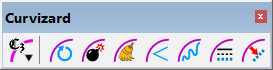
                          Curvizard Toolbar.png


                          See Plugin Page of Curvizard for Download.

                          See main post of this thread for discussion on Curvizard.

                          Fredo

                          1 條回覆 最後回覆 回覆 引用 0
                          • R 離線
                            rv1974
                            最後由 編輯

                            Since there's a little hope to see this as core function, I wish we had a commercialFredoSplines with following interactivefeatures:

                            1. handles for shape editing
                            2. 3 types of control points: smooth\corner\bezier
                            3. interactive refinement (=segmentation) control
                            4. Important for arch modelling: total slope (in %%) AND (optionaly) total height input
                            1 條回覆 最後回覆 回覆 引用 0
                            • pbacotP 離線
                              pbacot
                              最後由 編輯

                              That can be very useful at times. Thanks!

                              MacOSX MojaveSketchUp Pro v19 Twilight v2 Thea v3 PowerCADD

                              1 條回覆 最後回覆 回覆 引用 0
                              • fredo6F 離線
                                fredo6
                                最後由 編輯

                                NEW RELEASE: Curvizard v2.4a - 24 Feb 19

                                Curvizard 2.4a offers 2 new tools[/b][/color] in order to reconstruct Polygons, Arc or Circle from a sequence of edges, when this is possible.

                                Requirement: LibFredo6 8.8a or above


                                See Home Page of Curvizard for information and Download.

                                See Main post of this Curvizard thread for discussion, bug reports and suggestions.

                                1 條回覆 最後回覆 回覆 引用 0
                                • designerbursaD 離線
                                  designerbursa
                                  最後由 編輯

                                  "Convert Guides to Edges" Are you considering adding ?

                                  1 條回覆 最後回覆 回覆 引用 0
                                  • designerbursaD 離線
                                    designerbursa
                                    最後由 編輯

                                    "Convert to Arc / Circle"
                                    thank you fredo6

                                    1 條回覆 最後回覆 回覆 引用 0
                                    • fredo6F 離線
                                      fredo6
                                      最後由 編輯

                                      @designerbursa said:

                                      "Convert Guides to Edges" Are you considering adding ?

                                      This would be different!

                                      Anyway, there are already several plugins doing that, like TIG xLine2Line.

                                      1 條回覆 最後回覆 回覆 引用 0
                                      • uwesketchU 離線
                                        uwesketch
                                        最後由 編輯

                                        New feature "Convert to Arc/Circle":

                                        Great, thanks a lot Fredo.

                                        • Is it correct, that when using "Make curves", that now the curve is converted automatically to an arc as well?

                                        • Now I can finally convert the corner edges generated by FredoCorner (using circle rounding) back to arcs, if desired. This then allows adding radius measurements in Sketchup and Layout! 😄

                                        • Any chance that this feature is added as an option to FredoCorner for the generation of the corner edges when rounding using circles?

                                        1 條回覆 最後回覆 回覆 引用 0
                                        • fredo6F 離線
                                          fredo6
                                          最後由 編輯

                                          @uwesketch said:

                                          Is it correct, that when using "Make curves", that now the curve is converted automatically to an arc as well?

                                          Correct. I may introduce an option to disable this behavior however.

                                          @uwesketch said:

                                          Any chance that this feature is added as an option to FredoCorner for the generation of the corner edges when rounding using circles?

                                          I understand that you ask for creating curves, possibly arcs when applicable.
                                          I assume that only the rounding edges on rounded borders are to be converted to curves.

                                          Fredo

                                          1 條回覆 最後回覆 回覆 引用 0
                                          • B 離線
                                            bharralure
                                            最後由 編輯

                                            Merci beaucoup Fredo

                                            Un outil qui va remplacer avantageusement (parce que beaucoup plus complet) "niline2arc" de Nobnob qui, malgré tout et sans mise à jour depuis 6 ans, fonctionne toujours.
                                            Les améliorations que j'apprécie:

                                            • sélection multiple, y compris avec les faces
                                            • ne pas être obligé d'entrer à l'intérieur des groupes et composants
                                            • l'outil reconnait les cercle ou arc même si l'option "convertir en courbe" à été choisie

                                            peut être est t'il possible de découvrir d'autres astuces ...

                                            1 條回覆 最後回覆 回覆 引用 0
                                            • 1
                                            • 2
                                            • 6
                                            • 7
                                            • 8
                                            • 9
                                            • 10
                                            • 9 / 10
                                            • 第一個貼文
                                              最後的貼文
                                            Buy SketchPlus
                                            Buy SUbD
                                            Buy WrapR
                                            Buy eBook
                                            Buy Modelur
                                            Buy Vertex Tools
                                            Buy SketchCuisine
                                            Buy FormFonts

                                            Advertisement