[Plugin] Gradientator v1.21
-
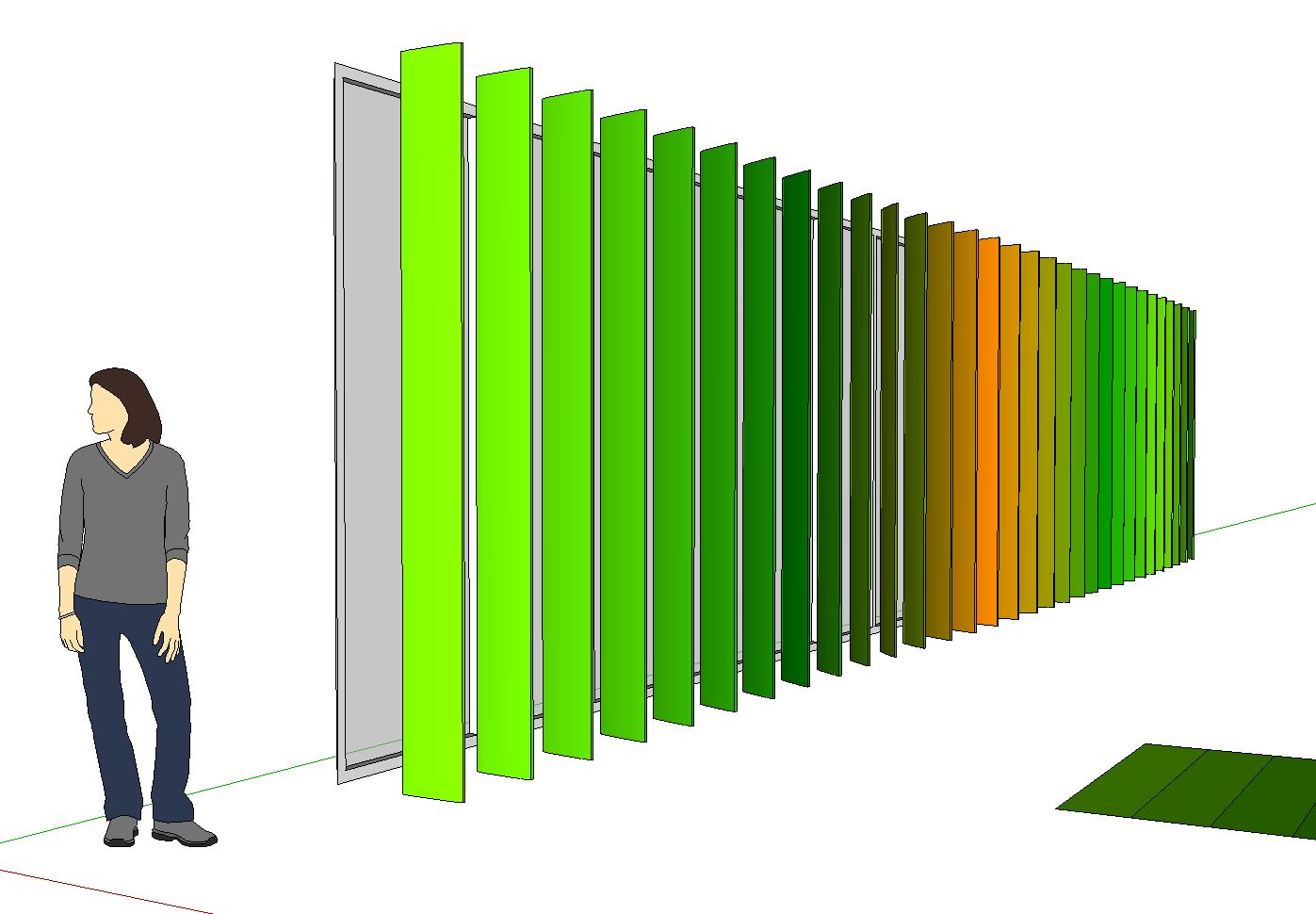
Would it be possible to apply a colour gradient to a selection of groups/components like in this example:
While still maintaining component definitions?
joel
-
@unknownuser said:
I've been looking forward to this plugin developing a bit more. This upgrade is a really big improvement, and it works well. I can't see the OK button in the dialog though unless I maximize the window. Is there a way to make the dialog bigger or adjustable? Anyone else see this too?
What OS are you using? Could you take a screenshot of the dialog before you maximize it?
EDIT: I've updated the plugin so the WebDialog is resizeable, and I've made it a bit taller. Let me know if that helps!
-
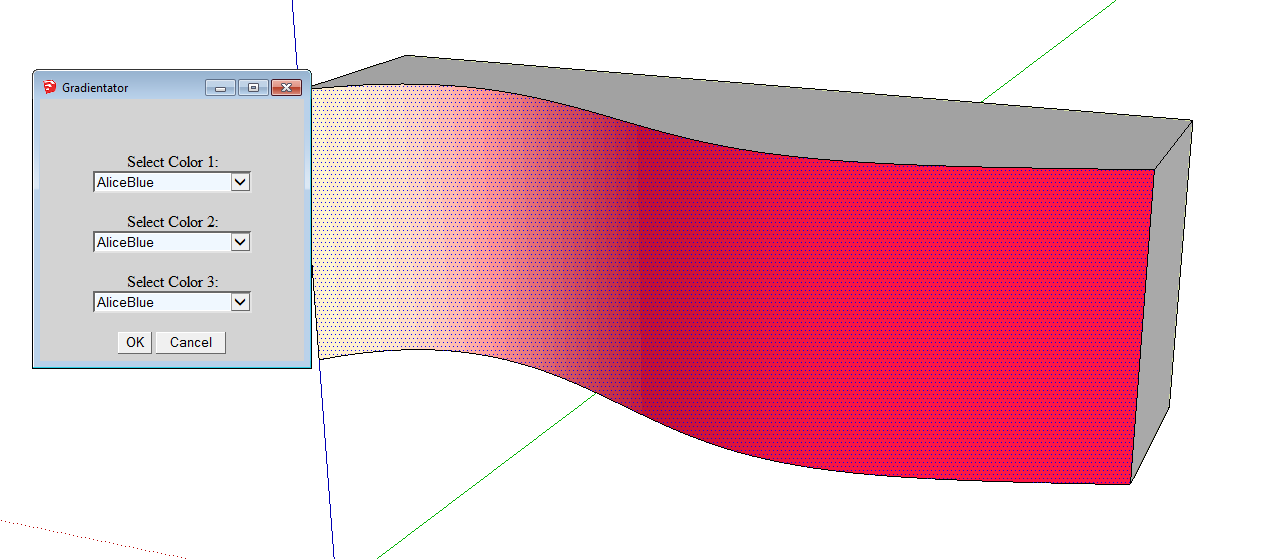
I was at home on Windows 7 last night. I tested it this morning at work, also Win7 and came up with this:
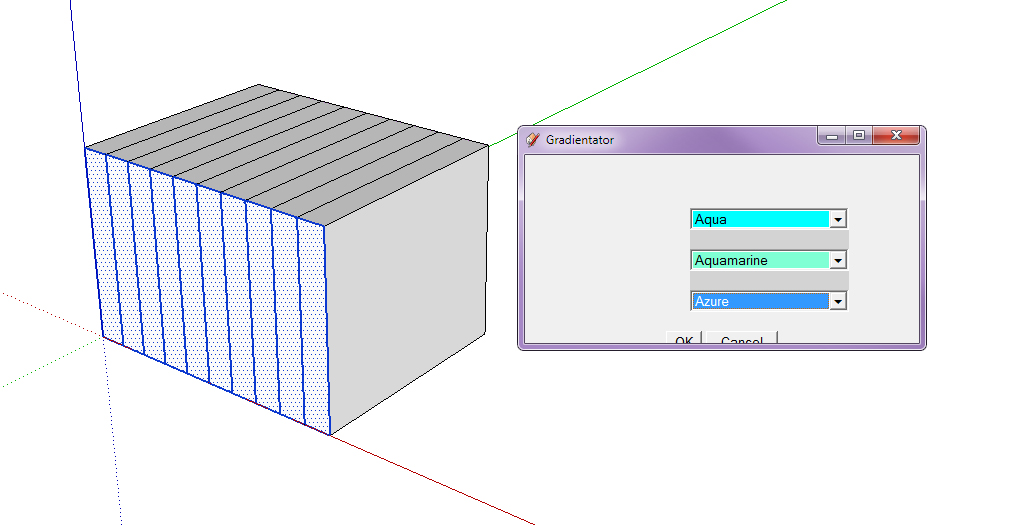
At home I couldn't see the tops of the Ok and Cancel button. I'm not sure why I can now at work. I can test 1.2 again at home later today and post that screenshot too. The 1.21 update fixes it, at least at work. I was able to resize and it seems to remember the setting even after I close and restart SU. Thanks for the quick response.One request if you decide to continue updating this script would be to add the ability to sort the colors by color in addition to by name. This option would put all the greens together for instance. Just an idea.
-
@thomthom said:
I hope you got more plugin creations coming!

I do! This was just a small project to get my feet wet, so to speak. My main SketchUp Ruby project has been in development for over a year, but a small part of it required dynamic gradient generation, and I thought this might be useful for others. I hope to release my other project this year, but who knows.
Also, thanks for all your help! I was really hoping I could get some coding tips, and it was extremely helpful to have such a thorough review.
@ivreich said:
Would it be possible to apply a colour gradient to a selection of groups/components... While still maintaining component definitions?
I don't know anything about how Sketchup handles applying colors to components, but I know you can apply the paint bucket in SketchUp "outside" of a component manually. This is a good idea -- I'll have to look into it!
@unknownuser said:
At home I couldn't see the tops of the Ok and Cancel button... One request if you decide to continue updating this script would be to add the ability to sort the colors by color in addition to by name. This option would put all the greens together for instance. Just an idea.
Sorry about the problems, I thought I had fixed the width and height to fit all the contents, but having the option to adjust the size of the window is probably better. Sorting by color is a good thought. I made a few attempts at this, the best I could do is sort by saturation, or by one of the three channels (red, green, blue) which is close but not what most people would want. If I can get this to work, I'll update for sure!
-
Oh, one more thing: I messed with
color.blenda little, and it seems to be pretty accurate. The SketchUp developer page only provides examples of 0.0, 0.5, and 1.0, but it seems to work quite well withFloatvalues of any precision. However, it seems to truncate the results, not round them. So, if you're blending Red [255,0,0] and Lime [0,255,0] with these values:color1.blend color2, 0.2156
color1.blend color2, 0.2157In the first case, you'd expect 54.978 ( = 0.2156 * 255 ) for the red channel, which should round to 55, but instead you'll get 54 for the red channel. In the second case, you'd expect 55.0035 ( = 0.2157 * 255 ) for the red channel, which SketchUp makes 55.
So, it appears that
color.blendwill truncate its results, not round them. Just thought that might be useful bit of information. -
@steve r said:
So, it appears that
color.blendwill truncate its results, not round them. Just thought that might be useful bit of information.That is interesting. I replicated blend in a C Extension for speed - not sure if I caught that detail. Will have to check.
-
Have loaded gradientator v 1.2. When using, only the first colour is applied to the face, not all three.
Any ideas?
Cheers....Scotty
-
@stuartmitch said:
Have loaded gradientator v 1.2. When using, only the first colour is applied to the face, not all three.
Any ideas?
Cheers....Scotty
You selected only one face? It doesn't do a gradient over a single face, but apply plain colours to a set of faces based on their distance from each other.
-
Thanks Thom Thom, is there anything you don't know about???
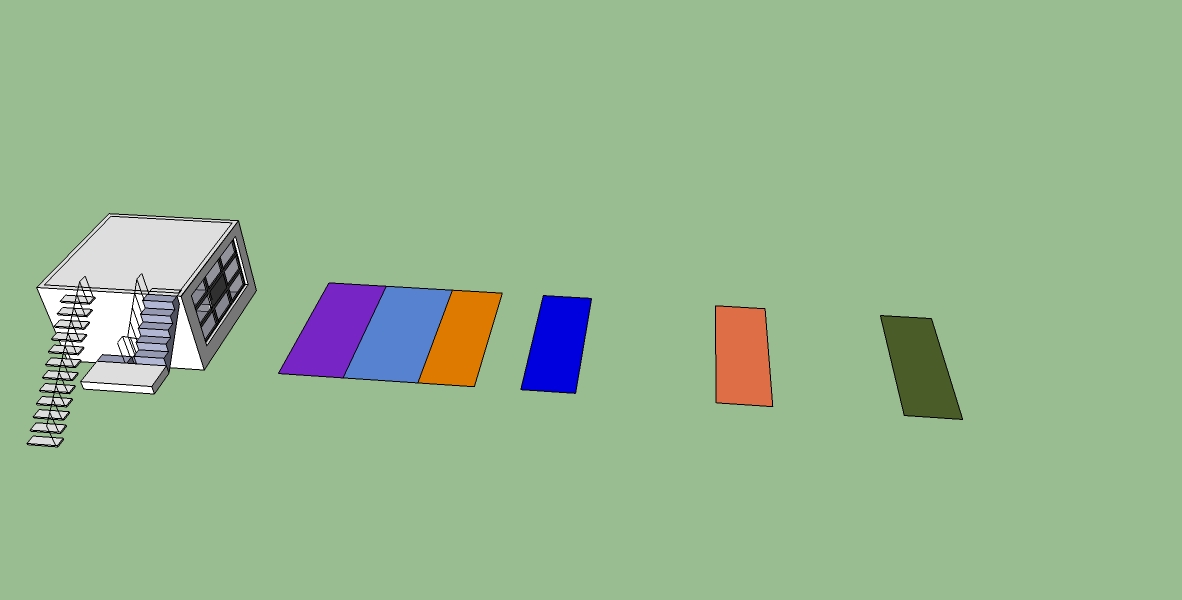
I have tried it with adjoining and separate faces and it still doesn't seem to provide a Gradient of colors. Rather, it simply adds color 1 to the first face, color 2 to the second face and so on. Do I need to stipulate the degree of gradient somewhere?
Cheers....Scotty
-
thank you for sharing it!
-
@stuartmitch said:
Thanks Thom Thom, is there anything you don't know about???
I have tried it with adjoining and separate faces and it still doesn't seem to provide a Gradient of colors. Rather, it simply adds color 1 to the first face, color 2 to the second face and so on. Do I need to stipulate the degree of gradient somewhere?
Cheers....Scotty
It seems like the issue you might be having is with the number of faces. This plugin only applies one color to one face at a time, and doesn't sub-divide them. In the picture you've provided, it looks like you've got two different applications of the plugin, but each time it's to only three faces. So, Gradientator sees that you've got three faces selected, and just applies the three colors; no gradient needed. However, with more than three faces, it will begin to gradient to greater degrees. So, trying to replicate your image with more faces:

As you can see, it's still applying those three colors, but the "in-between" faces are getting the gradient colors, or colors that are in-between those main colors. So, the amount of gradientating you'll get is dependent on the number of faces you select at one time. Does that help?
-
@steve r said:
It seems like the issue you might be having is with the number of faces. This plugin only applies one color to one face at a time, and doesn't sub-divide them. In the picture you've provided, it looks like you've got two different applications of the plugin, but each time it's to only three faces. So, Gradientator sees that you've got three faces selected, and just applies the three colors; no gradient needed. However, with more than three faces, it will begin to gradient to greater degrees. So, trying to replicate your image with more faces:
As you can see, it's still applying those three colors, but the "in-between" faces are getting the gradient colors, or colors that are in-between those main colors. So, the amount of gradientating you'll get is dependent on the number of faces you select at one time. Does that help?
Steve,
many thanks for clarifying that for me. I had missed the point that I needed more than three faces. From the initial illustrations it had looked like only 1 face was having colours gradiented (no such word??) across it.
I've got it now. Just needed to be belted on the head a couple of times!
Cheers...>Scotty
-
its so cool!
-
It shows an error on sketchup 2014
Error Loading File gradientator.rb
Error: #<SyntaxError: C:/Users/admin/AppData/Roaming/SketchUp/SketchUp 2014/SketchUp/Plugins/gradientator.rb:79: formal argument cannot be an instance variable
...ck("get_data") do |@grad_dialog,action_name|... ^>
how to
-
@leefordjudes said:
It shows an error on sketchup 2014
Error Loading File gradientator.rb
Error: #<SyntaxError: C:/Users/admin/AppData/Roaming/SketchUp/SketchUp 2014/SketchUp/Plugins/gradientator.rb:79: formal argument cannot be an instance variable
...ck("get_data") do |@grad_dialog,action_name|... ^>
how to
Using Notepad or similar text editor, simply remove the '@' in |@grad_dialog,action_name| in line 79 to this
@grad_dialog.add_action_callback("get_data") do |grad_dialog,action_name| -
That works, Cheers Sd.

-
Thx a bunch Mitch.
Just plain fun to mess with.
Works too
dtr
-
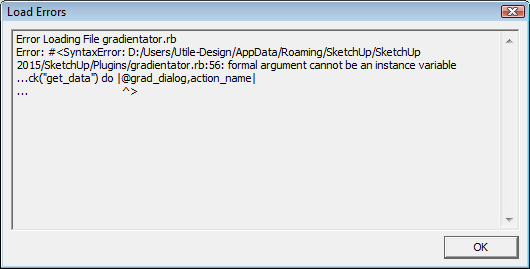
In SketchUp 2015 I get the following error after the install:
Error: #<SyntaxError: C:/Users/nessuno/AppData/Roaming/SketchUp/SketchUp 2015/SketchUp/Plugins/gradientator.rb:79: formal argument cannot be an instance variable
...ck("get_data") do |@grad_dialog, action_name|... ^>
C:/Users/nessuno/AppData/Roaming/SketchUp/SketchUp 2015/SketchUp/Plugins/rubytoolbar/rubytoolbar.rb:144:inload' C:/Users/nessuno/AppData/Roaming/SketchUp/SketchUp 2015/SketchUp/Plugins/rubytoolbar/rubytoolbar.rb:144:inrt_load'
C:/Users/nessuno/AppData/Roaming/SketchUp/SketchUp 2015/SketchUp/Plugins/rubytoolbar/rubytoolbar.rb:190:inblock in <module:RubyToolbar>' SketchUp:1:incall'I solved changing row 79 to the end of the do block in this way
@grad_dialog.add_action_callback("get_data") do |grad_dialog, action_name| if action_name == "begin_gradientating" @grad_dialog = grad_dialog @coloronename = @grad_dialog.get_element_value("color_one_name") @colortwoname = @grad_dialog.get_element_value("color_two_name") @colorthreename = @grad_dialog.get_element_value("color_three_name") @grad_dialog.close gradientate(@coloronename,@colortwoname,@colorthreename,@faces,@model) end if action_name == "close_this_window" @grad_dialog.close end end -
So do I. Would love to try this plugin....
-
@utiler said:
So do I. Would love to try this plugin....
Andrew, did you try the solution offered by sdmitch? I just tried it and that makes it work in SU2015.








Advertisement