sketchucation logo sketchucation
    • Login
    Oops, your profile's looking a bit empty! To help us tailor your experience, please fill in key details like your SketchUp version, skill level, operating system, and more. Update and save your info on your profile page today!
    Mac User? | Join the Rayscaper Beta for Mac Learn More

    [Plugin] Create Section Drawing V1.3(update Dec16.2012.)

    Scheduled Pinned Locked Moved Plugins
    50 Posts 30 Posters 57.5k Views 30 Watching
    Loading More Posts
    • Oldest to Newest
    • Newest to Oldest
    • Most Votes
    Reply
    • Reply as topic
    Log in to reply
    This topic has been deleted. Only users with topic management privileges can see it.
    • G
      glro
      last edited by

      @tak2hata said:

      ...
      #The ComponentDefinition named "BST_BASELINES" will add baselines to drawings.

      The problem for me when i use section plans is that there is no inference; you can not set their position precisely

      for a reinforced concrete structure, it may not be important; for a steel structure it is because you might have to be more precise

      is there a way to paste a section plan precisely to a point, or a line, for example?

      It is only a detail compared to all the work you have already done... congratulations...

      1 Reply Last reply
      Reply Quote 0
      • P
        Panga
        last edited by

        Amazing tak2hata, this will be very usefull !!! Thanks a lot !!

        1 Reply Last reply
        Reply Quote 0
        • pbacotP
          pbacot
          last edited by

          That looks great. I might be wanting this in my workflow. Must have taken a lot of work (and brains). Thank you. Peter

          MacOSX MojaveSketchUp Pro v19 Twilight v2 Thea v3 PowerCADD

          1 Reply Last reply
          Reply Quote 0
          • guanjinG
            guanjin
            last edited by

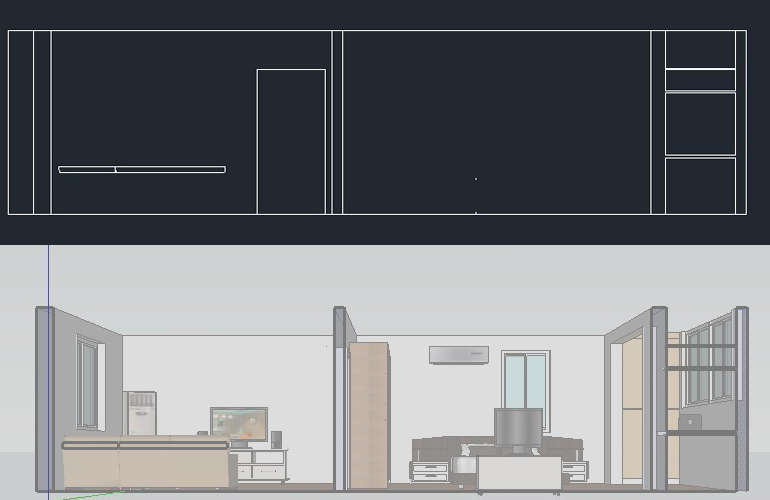
            I do not see the video, so I got the effect is, am I doing wrong what. 😒
            020629mt1zs8q1rrrr1ps8.jpg

            I come from China, is to learn

            1 Reply Last reply
            Reply Quote 0
            • S
              SUFractal
              last edited by

              #Description
              #Select the section plane and pulldown menu "Create Section Drawing".
              #And The section will be created in the component definition list of the model.
              #and export to "DrawingSection" folder as skp and dxf.
              #The section from solid will be filled.
              #The infomation of component or group will add text to drawings.(name,and BST info)
              #The ComponentDefinition named "BST_BASELINES" will add baselines to drawings.

              Download Version1.0:[attachment=0:jbleajfj]<!-- ia0 -->create_section_drawings.rb<!-- ia0 -->[/attachment:jbleajfj]

              Looks interesting.

              Where is the "Section Drawing" folder? I can't seem to locate it?

              1 Reply Last reply
              Reply Quote 0
              • T
                tak2hata
                last edited by

                Hi,guanjin.
                This plugin create section to drawing.

                So the drawing of face side is not supported.

                But,The door openning in center of the picture you posted weighs on my mind.

                I want upload your file here.

                Hi,SU Fractal.
                "DrawingSection" folder will be created in the same folder with the editing sketchup model file.
                Do not create new folder when it is not saved.
                But section drawing is created as component definition ,too.
                So looking for the component list.It will be found.

                Thanks.


                by TAK2HATA

                1 Reply Last reply
                Reply Quote 0
                • T
                  tomislavm
                  last edited by

                  Thank You!

                  1 Reply Last reply
                  Reply Quote 0
                  • Z
                    ZFRPS
                    last edited by

                    Very very nice!

                    sketchup is bim

                    1 Reply Last reply
                    Reply Quote 0
                    • mitcorbM
                      mitcorb
                      last edited by

                      Hi, tak2hata:
                      I would like to say that this is a significant accomplishment based on what I saw in the video. I can see this as a very useful and valuable tool in a document production process. Congratulations.

                      I take the slow, deliberate approach in my aimless wandering.

                      1 Reply Last reply
                      Reply Quote 0
                      • B
                        Ben Ritter
                        last edited by

                        Very nice and thank you. However, when the section is created, the window that pops up indicates how long the process took and it says "Time Wasted". I wouldn't call it "time wasted". It's not a waste at all, but it is a time saver. 👍 👍 Thank you so much.

                        1 Reply Last reply
                        Reply Quote 0
                        • S
                          SUFractal
                          last edited by

                          @tak2hata said:

                          Hi,SU Fractal.
                          "DrawingSection" folder will be created in the same folder with the editing sketchup model file.
                          Do not create new folder when it is not saved.
                          But section drawing is created as component definition ,too.
                          So looking for the component list.It will be found.

                          Thanks.

                          I'm sorry tak2hata, I'm not following you. I looked inside the folder (on my hard drive) where the model is located ... is that what you mean?

                          Thanks.

                          1 Reply Last reply
                          Reply Quote 0
                          • T
                            tak2hata
                            last edited by

                            Hi,SU Fractal.
                            I fixed bug about calculating baselines on mac.
                            This script was aborted on mac with this problem.
                            This version become to 1.1 .
                            So "DrawingSection" folder will be created.

                            Thanks


                            by TAK2HATA

                            1 Reply Last reply
                            Reply Quote 0
                            • M
                              mwm5053
                              last edited by

                              Thanks,tak2hata very good stuff

                              2011 iMac
                              SU 2015 Pro, 2017 Make
                              V2 Twilight
                              macOS Sierra 10.12.5

                              1 Reply Last reply
                              Reply Quote 0
                              • S
                                saturne45
                                last edited by

                                Thank you, tak2hata, very good plugin.

                                1 Reply Last reply
                                Reply Quote 0
                                • S
                                  SUFractal
                                  last edited by

                                  @tak2hata said:

                                  Hi,SU Fractal.
                                  I fixed bug about calculating baselines on mac.
                                  This script was aborted on mac with this problem.
                                  This version become to 1.1 .
                                  So "DrawingSection" folder will be created.

                                  Thanks

                                  Beautiful! 😄

                                  1 Reply Last reply
                                  Reply Quote 0
                                  • ElibjrE
                                    Elibjr
                                    last edited by

                                    Wow, Tak2hata This is truly an amazing plugin. I can't wait to use it. The more I see plugins like this, I keep asking the question why Revit when you can SketchUp? It's plugins like this that will make Trimble proud they are getting a program that gets cooler by each user's contribution. Autodesk could NEVER say that. Great work!

                                    1 Reply Last reply
                                    Reply Quote 0
                                    • N
                                      nabilaaftab
                                      last edited by

                                      hey but where can i doownload this great plugin????????????????

                                      1 Reply Last reply
                                      Reply Quote 0
                                      • T
                                        tak2hata
                                        last edited by

                                        @nabilaaftab said:

                                        hey but where can i doownload this great plugin????????????????

                                        Hi,nabikaaftab.
                                        It can be downloaded in the top of this thread.Need to login this forum.

                                        It can be downloaded from my homepage,too.http://onigiriburning.so.land.to/plugins.html when you can not log in this forum.

                                        Thanks.


                                        by TAK2HATA

                                        1 Reply Last reply
                                        Reply Quote 0
                                        • N
                                          nabilaaftab
                                          last edited by

                                          hey, thanx a lot for ur reply. but i must have missed sth. i cant find any download link in this tread even though i am logged in. i also tried ur website where i could download some other great plugins. but i couldnot download section cut plugin...

                                          what am i doing worng...?

                                          1 Reply Last reply
                                          Reply Quote 0
                                          • GaieusG
                                            Gaieus
                                            last edited by

                                            @nabilaaftab said:

                                            i cant find any download link in this tread even though i am logged in.

                                            Go to the first post of this topic: http://forums.sketchucation.com/viewtopic.php?p=402561#p402561 and find the download link at the bottom of that topic:
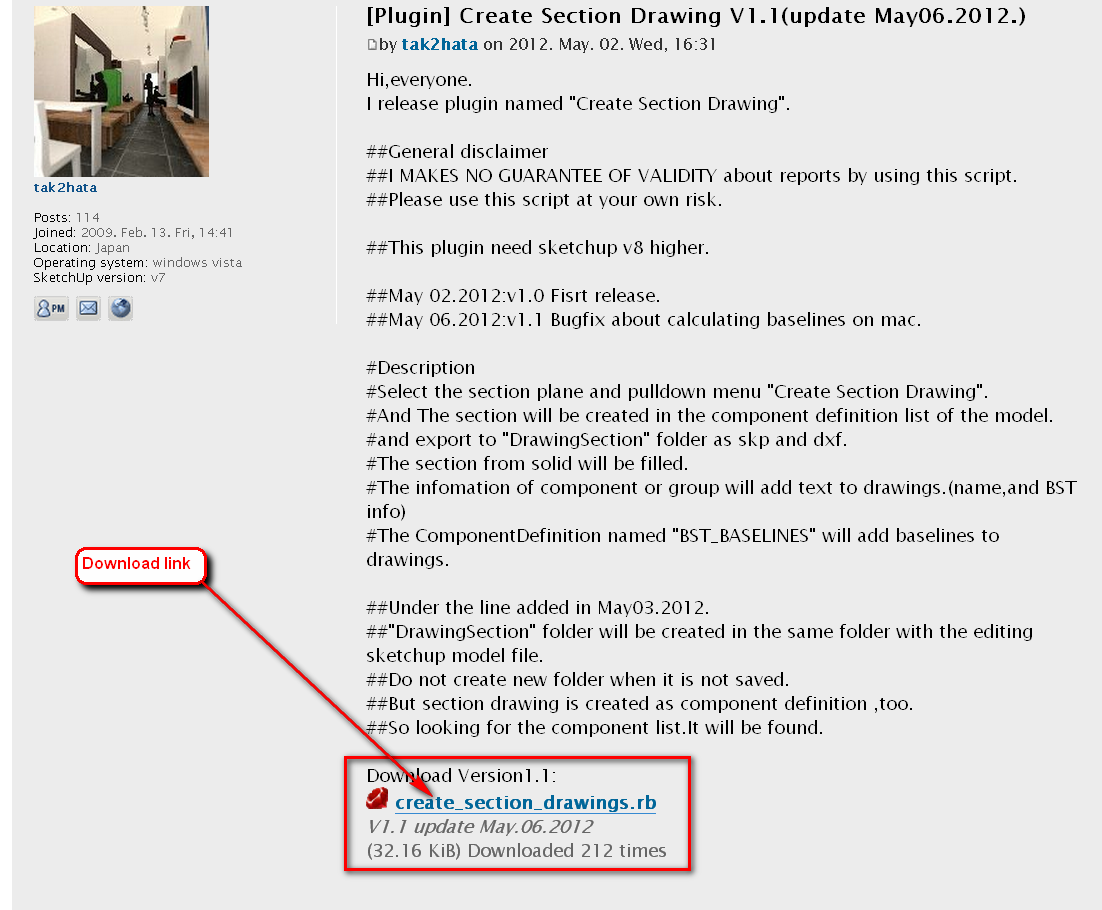

                                            download.png

                                            Gai...

                                            1 Reply Last reply
                                            Reply Quote 0

                                            Hello! It looks like you're interested in this conversation, but you don't have an account yet.

                                            Getting fed up of having to scroll through the same posts each visit? When you register for an account, you'll always come back to exactly where you were before, and choose to be notified of new replies (either via email, or push notification). You'll also be able to save bookmarks and upvote posts to show your appreciation to other community members.

                                            With your input, this post could be even better 💗

                                            Register Login
                                            • 1
                                            • 2
                                            • 3
                                            • 2 / 3
                                            • First post
                                              Last post
                                            Buy SketchPlus
                                            Buy SUbD
                                            Buy WrapR
                                            Buy eBook
                                            Buy Modelur
                                            Buy Vertex Tools
                                            Buy SketchCuisine
                                            Buy FormFonts

                                            Advertisement