sketchucation logo sketchucation
    • 登入
    Oops, your profile's looking a bit empty! To help us tailor your experience, please fill in key details like your SketchUp version, skill level, operating system, and more. Update and save your info on your profile page today!
    🔌 Smart Spline | Fluid way to handle splines for furniture design and complex structures. Download

    Mini-challenge

    已排程 已置頂 已鎖定 已移動 SketchUp Discussions
    sketchup
    328 貼文 26 Posters 38.2k 瀏覽 26 Watching
    正在載入更多貼文
    • 從舊到新
    • 從新到舊
    • 最多點贊
    回覆
    • 在新貼文中回覆
    登入後回覆
    此主題已被刪除。只有擁有主題管理權限的使用者可以查看。
    • M 離線
      mac1
      最後由 編輯

      @jason_maranto said:

      OK, I broke down and looked at the math on this -- it seems dirt simple to do so I think this is the solution (based on the math).

      [attachment=0:n6vj9qbd]<!-- ia0 -->challenge solved.skp<!-- ia0 -->[/attachment:n6vj9qbd]

      In this instance the desired width is 2 inches.

      Best,
      Jason.

      You have a closed form solution to this?
      Hcos(theta)-d(1+cos(2theta)) /2-Ssin(theta)=0
      Where H post height; d dimensional lumber width; s post spacing; theta rotation angle at post base.
      If you have a closed form solution should not the measured width be exactly 2.00000??
      IMHO all focus of the accuracy is questionable. Jeff is not building a watch. One will have to deal with dimensional lumber tolerance, crowning the lumber and maybe using a side winder to cut angles not to mention the angle layout. Maybe a good chop saw is at hand.???

      1 條回覆 最後回覆 回覆 引用 0
      • jeff hammondJ 離線
        jeff hammond
        最後由 編輯

        mac1
        I was hoping it's already been established in the thread that the challenge isnt about accuracy from a real world construction standpoint. I mean, depending on the time of day (temperature) and humidity, a board will expand/contract far more than the results being given in the thread.

        dotdotdot

        1 條回覆 最後回覆 回覆 引用 0
        • M 離線
          moujiik
          最後由 編輯

          Hi

          May be like this?

          Moujiik


          Chalenge.skp

          1 條回覆 最後回覆 回覆 引用 0
          • jeff hammondJ 離線
            jeff hammond
            最後由 編輯

            Jason. the problem with that is you're going 90° from the diagonal. which isn't the same thing as going 90° from the edge of the board.

            dotdotdot

            1 條回覆 最後回覆 回覆 引用 0
            • jason_marantoJ 離線
              jason_maranto
              最後由 編輯

              All that mathematical notation is greek to me, but here's what we know:

              1. we know the diagonal length and position (call it a hypotenuse if you want but it's really a diagonal to me).
              2. we know the desired width of the beam.
              3. we know that the angle should be 90 degrees on the opposite corners from the diagonal.

              As far as I can see with that information we should have no trouble drawing the thing directly using nothing but the line tool and a few guides... because the actual numbers (aside from what we already know) should completely irrelevant.

              Here's a video -- it works, and consistently (not to mention dirt simple)... it's just that SketchUp seems to have lower than perfect tolerances for the 90 degree guides.

              [flash=960,720:5o5ld983]http://www.youtube.com/v/OfHaC40zvxM?rel=0&amp;hd=1[/flash:5o5ld983]

              Best,
              Jason.

              I create video tutorial series about several 2D & 3D graphics programs.

              1 條回覆 最後回覆 回覆 引用 0
              • jeff hammondJ 離線
                jeff hammond
                最後由 編輯

                @moujiik said:

                Hi

                May be like this?

                Moujiik

                im curious to see what you've come up with. I'll be able to download your file in an hour or so.

                dotdotdot

                1 條回覆 最後回覆 回覆 引用 0
                • jason_marantoJ 離線
                  jason_maranto
                  最後由 編輯

                  I'm not sure why you think so -- all 4 corners are 90 degrees, and since we know where 2 of the corner are why not use them...

                  It works fine and you get about as accurate results as any other non-plugin solution put out here.

                  Best,
                  Jason.

                  I create video tutorial series about several 2D & 3D graphics programs.

                  1 條回覆 最後回覆 回覆 引用 0
                  • jeff hammondJ 離線
                    jeff hammond
                    最後由 編輯

                    @jason_maranto said:

                    I'm not sure why you think so -- all 4 corners are 90 degrees, and since we know where 2 of the corner are why not use them...

                    It works fine and you get about as accurate results as any other non-plugin solution put out here.

                    Best,
                    Jason.

                    nah.. the corners won't end up square when doing that

                    dotdotdot

                    1 條回覆 最後回覆 回覆 引用 0
                    • jason_marantoJ 離線
                      jason_maranto
                      最後由 編輯

                      OK... did you watch the video? Those results are as accurate as any other non-plugin result I've seen in this thread -- it works, you can say it shouldn't if you want to but it does.

                      I guess the thing here is I don't think square corners matter anyway, since they will be trimmed off -- what matters is the width... I mean after all this is a cross brace.

                      Best,
                      Jason.

                      I create video tutorial series about several 2D & 3D graphics programs.

                      1 條回覆 最後回覆 回覆 引用 0
                      • M 離線
                        moujiik
                        最後由 編輯

                        you're right.
                        And it's the same solution as Tig's.
                        I miss my real wood planks. It is so easy to do that for real!

                        moujiik

                        1 條回覆 最後回覆 回覆 引用 0
                        • jeff hammondJ 離線
                          jeff hammond
                          最後由 編輯

                          yep. watched it.

                          the corners need to be perfectly square if thats where you're drawing a line to determine the boards width.

                          upon finishing your method, delete the diagonal (as to avoid confusion) then measure the angles of the board's corners. they won't be 90°

                          dotdotdot

                          1 條回覆 最後回覆 回覆 引用 0
                          • jeff hammondJ 離線
                            jeff hammond
                            最後由 編輯

                            @moujiik said:

                            you're right.
                            And it's the same solution as Tig's.
                            I miss my real wood planks. It is so easy to do that for real!

                            moujiik

                            sometimes.. I'll upload a picture a little later which shows a situation where you can't just put a long board in there and trace/cut it.

                            another reason for having a precut board is that you can use it to plumb a wall with. (instead of needing two people do it -- one to use the level and one to trace the board)

                            dotdotdot

                            1 條回覆 最後回覆 回覆 引用 0
                            • jason_marantoJ 離線
                              jason_maranto
                              最後由 編輯

                              Yeah, I already said that several posts back -- but it is consistently the same regardless of the distance between the beams, which is why I said I think there may be an accuracy issue with the engine somewhere.

                              If the method was faulty there would random results each time... right? 😕

                              Best,
                              Jason.

                              I create video tutorial series about several 2D & 3D graphics programs.

                              1 條回覆 最後回覆 回覆 引用 0
                              • jeff hammondJ 離線
                                jeff hammond
                                最後由 編輯

                                @jason_maranto said:

                                Yeah, I already said that several posts back -- but it is consistently the same regardless of the distance between the beams, which is why I said I think there may be an accuracy issue with the engine somewhere.

                                If the method was faulty there would random results each time... right? 😕

                                Best,
                                Jason.

                                in this particular case, the fault isn't sketchups. the approach is geometrically flawed.

                                edit-- for instance, doing what you're doing.. the wider you decide to make your board, the further away from 90° you'll get in the corners.

                                dotdotdot

                                1 條回覆 最後回覆 回覆 引用 0
                                • jason_marantoJ 離線
                                  jason_maranto
                                  最後由 編輯

                                  Gotcha, yeah, I see that now -- so it was just an illusion created by the long rectangles/aspect ratio of the beams here.

                                  I guess nothing is as simple as it seems with math (which is why I avoid it as much as possible). 😞

                                  I'm ready to just use Fredos tool and call it a day 😄

                                  Best,
                                  Jason.

                                  I create video tutorial series about several 2D & 3D graphics programs.

                                  1 條回覆 最後回覆 回覆 引用 0
                                  • jeff hammondJ 離線
                                    jeff hammond
                                    最後由 編輯

                                    @jason_maranto said:

                                    Gotcha, yeah, I see that now -- so it was just an illusion created by the long rectangles/aspect ratio of the beams here.

                                    I guess nothing is as simple as it seems with math (which is why I avoid it as much as possible). 😞

                                    I'm ready to just use Fredos tool and call it a day 😄

                                    Best,
                                    Jason.

                                    me too. fredo solved it..
                                    I'm still curious to see an alternative solution but as far as actually drawing the thing, the fastest method will win and I think it's going to be fredoScale's latest addition.

                                    dotdotdot

                                    1 條回覆 最後回覆 回覆 引用 0
                                    • fredo6F 離線
                                      fredo6
                                      最後由 編輯

                                      Jason,

                                      You're right.
                                      The native Rotate tool seems to find inference in alignment of edges with others. You have to play around with it, but it seems to find it in the end.
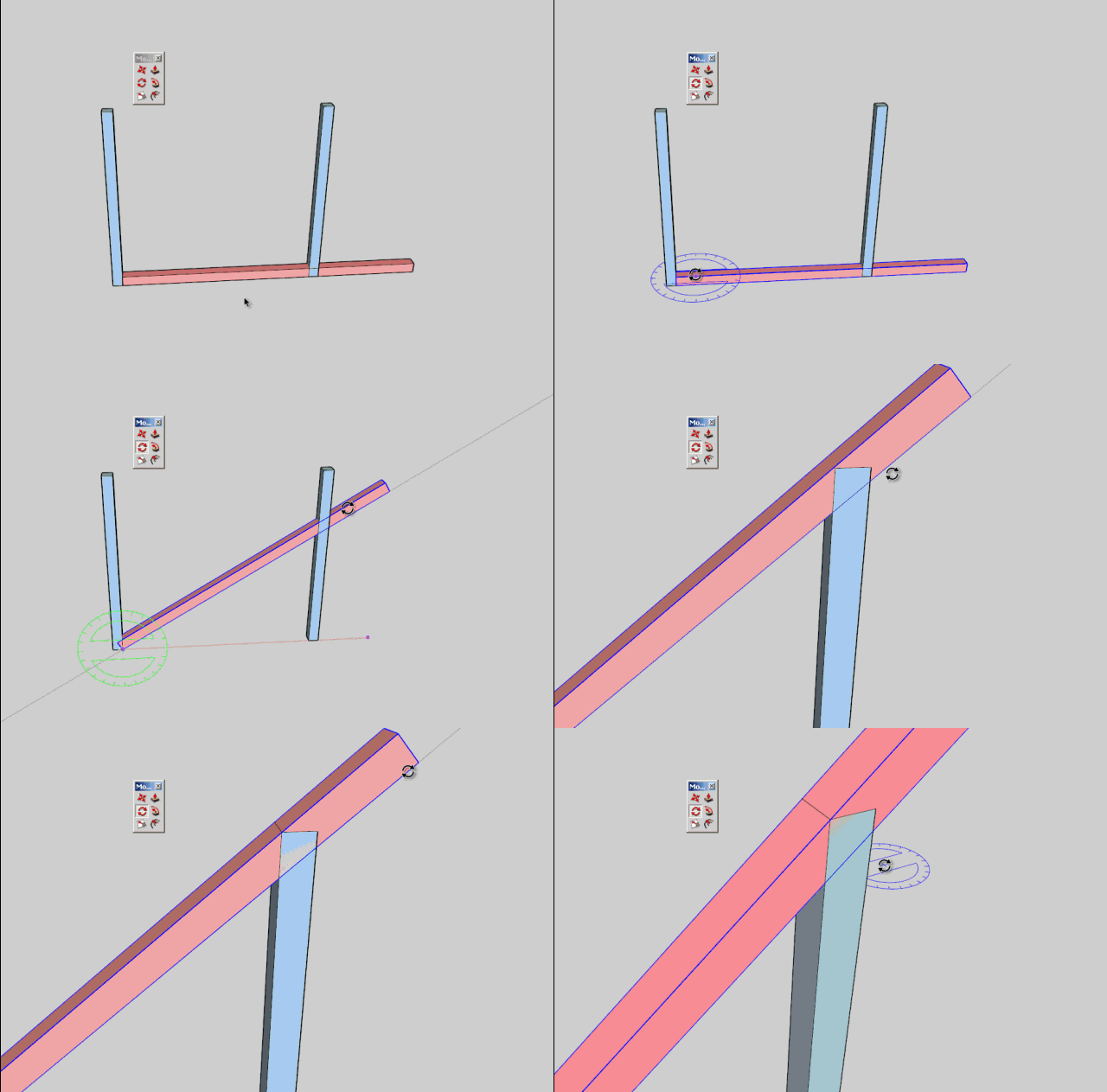
                                      Jeff Challenge3.gif

                                      Fredo

                                      1 條回覆 最後回覆 回覆 引用 0
                                      • jason_marantoJ 離線
                                        jason_maranto
                                        最後由 編輯

                                        Yeah I was trying for stupid simplicity, and just ended up with stupid 😉

                                        BTW I'm playing with the protractor a bit more and it seems to be snapping to something, I can't tell what -- and it's not giving me any feedback, but the result is the missing correct 90 degree reference... maybe they (SketchUp Devs) already solved this problem and we just never found it.

                                        It's strange though because you have to kind-of slide the protractor along a guideline until it just decides to snap for some reason. 😕

                                        Best,
                                        Jason.

                                        I create video tutorial series about several 2D & 3D graphics programs.

                                        1 條回覆 最後回覆 回覆 引用 0
                                        • jeff hammondJ 離線
                                          jeff hammond
                                          最後由 編輯

                                          @unknownuser said:

                                          Jason,

                                          You're right.
                                          The native Rotate tool seems to find inference in alignment of edges with others. You have to play around with it, but it seems to find it in the end.

                                          [attachment=0:1qducgxr]<!-- ia0 -->Jeff Challenge3.gif<!-- ia0 -->[/attachment:1qducgxr]

                                          Fredo

                                          what the heck ??

                                          at first i though 'this guy is nuts' but then after fiddling around for a minute or so, it eventually snapped exactly into place ???

                                          so i guess the quest now is figuring out what it's doing and how to gain better control over it..

                                          dotdotdot

                                          1 條回覆 最後回覆 回覆 引用 0
                                          • jeff hammondJ 離線
                                            jeff hammond
                                            最後由 編輯

                                            haha.. this is crazy..

                                            what's going on here? i don't understand..

                                            (i mean, the reference click of the rotate tool doesn't even happen on the edge of the board that needs aligned.. like in fredo's latest video.. i'll click on the bottom of the board then the top of it snaps perfectly into place.. and i've been able to repeat it a few times now..)


                                            dotdotdot

                                            1 條回覆 最後回覆 回覆 引用 0
                                            • 1
                                            • 2
                                            • 3
                                            • 4
                                            • 5
                                            • 16
                                            • 17
                                            • 1 / 17
                                            • 第一個貼文
                                              最後的貼文
                                            Buy SketchPlus
                                            Buy SUbD
                                            Buy WrapR
                                            Buy eBook
                                            Buy Modelur
                                            Buy Vertex Tools
                                            Buy SketchCuisine
                                            Buy FormFonts

                                            Advertisement
