sketchucation logo sketchucation
    • 登入
    Oops, your profile's looking a bit empty! To help us tailor your experience, please fill in key details like your SketchUp version, skill level, operating system, and more. Update and save your info on your profile page today!
    🔌 Smart Spline | Fluid way to handle splines for furniture design and complex structures. Download

    [Plugin] FredoTools::ThruPaint - v1.3a - 20 Oct 16

    已排程 已置頂 已鎖定 已移動 Plugins
    331 貼文 102 Posters 538.1k 瀏覽 102 Watching
    正在載入更多貼文
    • 從舊到新
    • 從新到舊
    • 最多點贊
    回覆
    • 在新貼文中回覆
    登入後回覆
    此主題已被刪除。只有擁有主題管理權限的使用者可以查看。
    • R 離線
      rv1974
      最後由 編輯

      The same components with the same material applied, but with randomized UV's..
      Is it theoretically possible in current SU? Maybe some trick thru dynamic components?

      1 條回覆 最後回覆 回覆 引用 0
      • fredo6F 離線
        fredo6
        最後由 編輯

        @rv1974 said:

        The same components with the same material applied, but with randomized UV's..
        Is it theoretically possible in current SU? Maybe some trick thru dynamic components?

        Still not clear...
        Component instances behave the same when you paint their elements. And there is no control of UV when you paint their instances.

        1 條回覆 最後回覆 回覆 引用 0
        • summerson1990S 離線
          summerson1990
          最後由 編輯

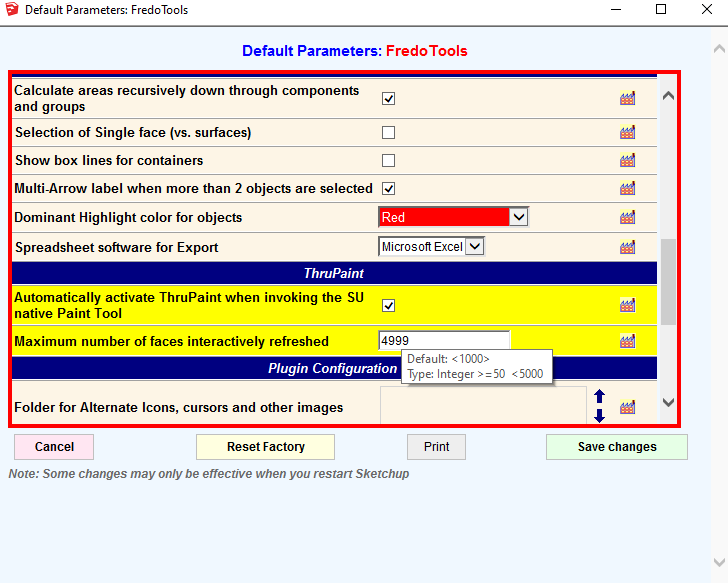
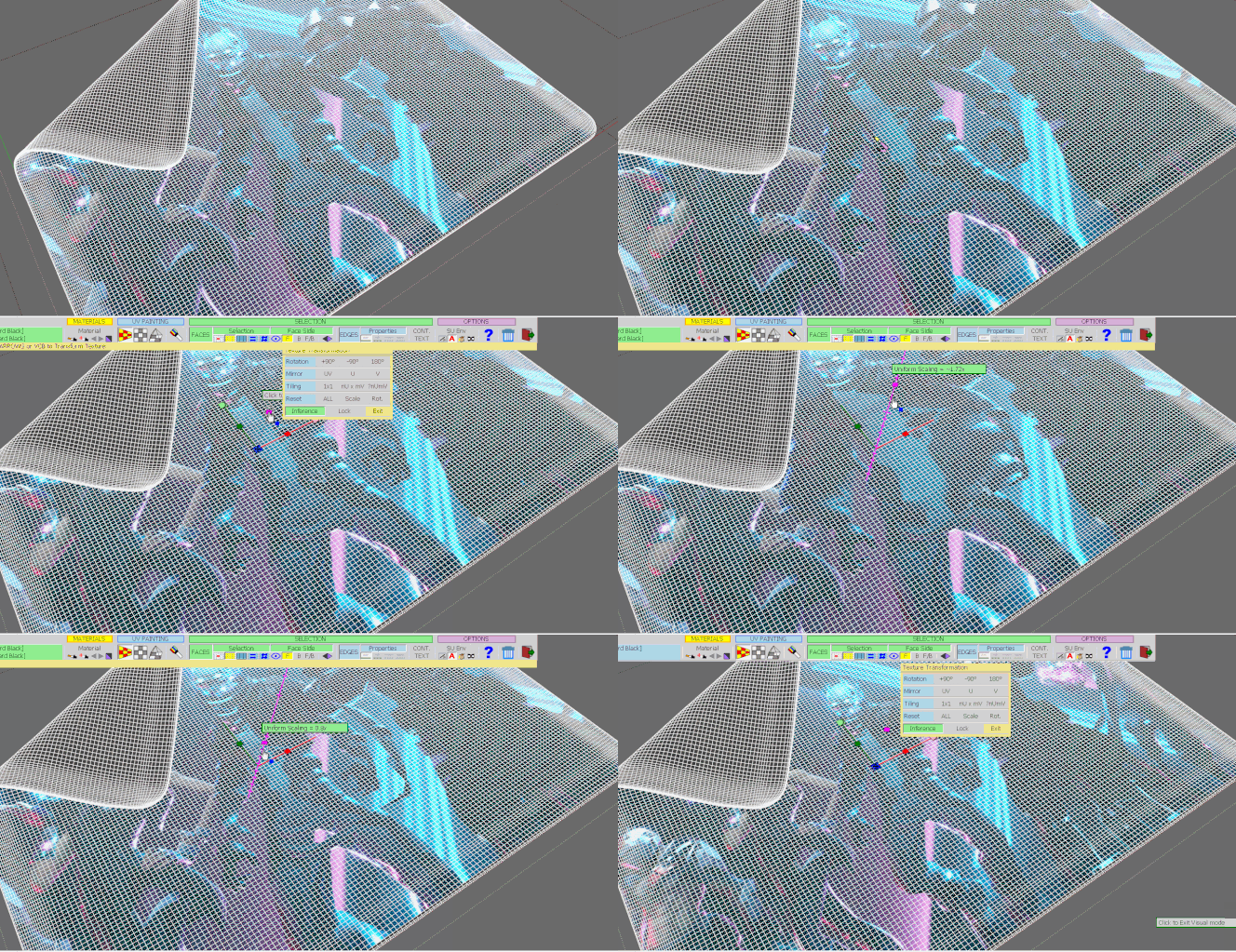
          Why is there a limit for only 5000 faces interactively refreshed while manipulating with the texture? Sometimes it's not possible to see interactive results on high poly meshes.
          Screenshot_19.png


          Here is a GIF as an example

          1 條回覆 最後回覆 回覆 引用 0
          • fredo6F 離線
            fredo6
            最後由 編輯

            I could increase the limit, as apparently machines become more powerful.

            Still, what it means that you can preview the 5000 faces around the face where you manipulate the gizmo. So It should be sufficient to see what is going on.

            Fredo

            1 條回覆 最後回覆 回覆 引用 0
            • summerson1990S 離線
              summerson1990
              最後由 編輯

              @fredo6 said:

              I could increase the limit, as apparently machines become more powerful.

              Still, what it means that you can preview the 5000 faces around the face where you manipulate the gizmo. So It should be sufficient to see what is going on.

              Fredo

              I think my GIF screen record above shows that in some cases it's not so comfortable to see what is going on when we've got a highpoly surface. Did you see it? Of course I can make a position of texture I need in other ways. But I was just interested about why did you do such a limitation and ask if it's ok if you could allow us to increase this value.

              1 條回覆 最後回覆 回覆 引用 0
              • fredo6F 離線
                fredo6
                最後由 編輯

                @summerson1990 said:

                But I was just interested about why did you do such a limitation and ask if it's ok if you could allow us to increase this value.

                As you show in the GIF video, the interactivity of the transformation is slowed down when you use a high number of faces.
                It's OK for increasing the number, but you may then suffer from a lag as you play with the gizmo.

                1 條回覆 最後回覆 回覆 引用 0
                • G 離線
                  goldviper
                  最後由 編輯

                  Please help
                  How can i enable nodes for non uniform scale
                  my Thrupaint only has pink node for uniform scale?

                  1 條回覆 最後回覆 回覆 引用 0
                  • fredo6F 離線
                    fredo6
                    最後由 編輯

                    @goldviper said:

                    Please help
                    How can i enable nodes for non uniform scale
                    my Thrupaint only has pink node for uniform scale?

                    The non uniform scaling is only available when you paint with the Quad Mesh UV or the Project UV modes, not with the Natural mode.

                    1 條回覆 最後回覆 回覆 引用 0
                    • G 離線
                      germscb21
                      最後由 編輯

                      Hi guys, i tried to download but it keeps loading forever and it never actually downloads it. I tried also downloading from the extension manager or directly from fredo tools in skp, but it doesnt work.. plzz heeelp

                      1 條回覆 最後回覆 回覆 引用 0
                      • K 離線
                        kakashi66
                        最後由 編輯

                        Is this plugin still available? It doesn't come up with any search.

                        1 條回覆 最後回覆 回覆 引用 0
                        • pbacotP 離線
                          pbacot
                          最後由 編輯

                          TruPaint is now installed as part of FredoTools. See first post above, and read down towards the bottom, or go look for FredoTools.

                          For that matter I don't know if the search is working right on the store, but you can find FreodTools in a full listing of Fredo6 plugins in the search

                          MacOSX MojaveSketchUp Pro v19 Twilight v2 Thea v3 PowerCADD

                          1 條回覆 最後回覆 回覆 引用 0
                          • D 離線
                            Dmeat
                            最後由 編輯

                            hi everyone, is the downloadlink broken, or is it just me?

                            1 條回覆 最後回覆 回覆 引用 0
                            • TIGT 離線
                              TIG Moderator
                              最後由 編輯

                              What 'downlink' ?
                              https://sketchucation.com/pluginstore?pln=FredoTools
                              works fine...
                              You do need to be logged in to the PluginStore ??

                              TIG

                              1 條回覆 最後回覆 回覆 引用 0
                              • M 離線
                                maxder
                                最後由 編輯

                                I have been modeling in SU for years and have gained so much from the plugins and discussions with Fredo, Thom Thom, Tig and many others.

                                But I have been going in circles figuring out a UV workflow for taking my SU model into UE4 using Datasmith. My architectural forms are not super complex or organic, but a fair amount of curved surfaces and some double curvature. I have been using SubD and Quadface Tools.

                                I have played with SketchUV, Wrap-r and Thrupaint. Thrupaint is the most intuitive to me, but it says that it is not actually UV Mapping, and I don't know enough about UV to know what that means. Will it get me into trouble in UE4 (which I haven't trained on yet)? Or will it be enough for Datasmith to convert properly?

                                I haven't been able to get SketchUV to work with SubD quads unless I de-triangulate, which in turn messes with my curved geometry.

                                I thought Wrap-r was the solution when I unwrapped and textured the control mesh, but then it is distorted when I SubD. Unwrapping the subdivided mesh seems to be a royal pain. I am not trying to add edge wear or anything at least in SU, just want stand-in metal, stone and wood textures, but as seamless as possible.

                                Again, Thrupaint is the most intuitive tool for me, but is it UV mapping or not? I appreciate any help anyone can give.

                                1 條回覆 最後回覆 回覆 引用 0
                                • J 離線
                                  jonorman
                                  最後由 編輯

                                  Are there any known issues with Twinmotion and its sync plugin ??? Each time I reload the models after saving, i have to retexture in Twinmotion.

                                  1 條回覆 最後回覆 回覆 引用 0
                                  • pilouP 離線
                                    pilou
                                    最後由 編輯

                                    Sorry no problem for me : with ThruPaint or Not!
                                    The Sync works like a charm! 😎
                                    (Su 2017 Make --> TwinMotion 2019 free )
                                    I believe that we must have the SU Pro for Sync with free TwinMotion 2020 ?

                                    When you say "reload" what is exactly ?
                                    Direct from SU with the Twin Sync plugin or a simple reload inside Twin after saved a SU FIle ?

                                    Frenchy Pilou
                                    Is beautiful that please without concept!
                                    My Little site :)

                                    1 條回覆 最後回覆 回覆 引用 0
                                    • J 離線
                                      jonorman
                                      最後由 編輯

                                      Ok, a bit short explanation 😄

                                      Example.

                                      I model a pipe, steel pipe. Create a material in SU and load a albedo image. Then i use Fredos Thru paint (latest version) and i texture it using Quadmesh UV mapping. The texture adds nicely in SU and I`m all happy to send it to TM using the sync tool (No merging, keeping all objects)
                                      When the model shows up in TM, i load the rest of the textures, roughness, metallic and bump.
                                      The model looks good in TM.
                                      Now I save the model in SU and TM and shut down for the day.

                                      Next day: Open SU model, open Twinmotion model.. Maybe I add somthing in SU, maybe a second pipe, using the same workflow as described above, and syncing with TM The material i added on the first pipe the day before are gone and replaced with the one from SU.
                                      I have to reload all the other maps. Rough, metallic and bump..

                                      This happens every time. I found another comment on this issue in the TM forums, saying it had to do with our favorite mapping tools, Thrupaint.. 😕 (I don't belivee it 😄)

                                      Hope this makes sense 😄

                                      1 條回覆 最後回覆 回覆 引用 0
                                      • M 離線
                                        misticalages
                                        最後由 編輯

                                        Hello dear Fredo,

                                        I come across a problem regarding ThruPaint, makeing it exporting separate material for each face, which i don't want it to happen. 🤓 Final model exports and it has for like 238 materials and so...

                                        I encountered and found out when i was changing the material and deleting it, the error it never happens. 😐

                                        Using Sketchup 2020 and the last FredoTools on the sketchUcation.

                                        https://discourse-cloud-file-uploads.s3.dualstack.us-west-2.amazonaws.com/sketchup/original/3X/c/c/ccaa7394f365bbd6c76312fcda8d503ecfef5377.png

                                        Thank you.
                                        Misticalages

                                        1 條回覆 最後回覆 回覆 引用 0
                                        • S 離線
                                          suprachs
                                          最後由 編輯

                                          I am using sketchup pro 2020, installed ThruPhaint, does not show buttons, images cannot be used.


                                          icon visible

                                          1 條回覆 最後回覆 回覆 引用 0
                                          • fredo6F 離線
                                            fredo6
                                            最後由 編輯

                                            @suprachs said:

                                            I am using sketchup pro 2020, installed ThruPaint, does not show buttons, images cannot be used.

                                            Are you on Sketchup 2016?

                                            If so, you need to take the legacy version of LibFredo6 and the legacy version of FredoTools.

                                            1 條回覆 最後回覆 回覆 引用 0
                                            • 1
                                            • 2
                                            • 7
                                            • 8
                                            • 9
                                            • 10
                                            • 11
                                            • 16
                                            • 17
                                            • 9 / 17
                                            • 第一個貼文
                                              最後的貼文
                                            Buy SketchPlus
                                            Buy SUbD
                                            Buy WrapR
                                            Buy eBook
                                            Buy Modelur
                                            Buy Vertex Tools
                                            Buy SketchCuisine
                                            Buy FormFonts

                                            Advertisement