Is working with Maxwell Render like shooting with a Real Cam
-
From all the render engines out thete for SketchUP... is it safe to say Maxwell Render resembles the work with a real camera the most...
What do you think?
-
shallow dof is achieved via camera settings/perspective.
basically- big aperture (small f stop) and short focal distance.. longer lenses will amplify the effect as well.
not sure if that's how it works in maxwell but Indigo renderer is allows you to work this way.
-
@bakbek said:
From all the render engines out thete for SketchUP... is it safe to say Maxwell Render resembles the work with a real camera the most...
What do you think?
EDIT: Lemme fix my mess of a post... In a word, No. I do not think it is safe to say Maxwell resembles work with a real camera the most. It has a great interface, but the limits of the SU plugin I feel outweigh the benefits. Vray, Luxrender, Indigo, and many other plugins allow you to control the exposure and DOF as you would a real camera. I think more depends on what you are trying to do. I actually like Luxrender the best as regards to camera-like workflow. It works as if you were taking a raw HDR image where you can set exposure, etc. after the render is complete. I feel this gives superior flexibility similar to a digital darkroom. There are other things I dislike about Luxrender, but that's my opinion (of the plugins I've tried) that has the best photography-like workflow.
-
I'm sure Maxwell has a decent camera simulation system but I haven't tried it lately so I can't say how it compares for sure.
However, I can't imagine a render engine having a more physically accurate camera system than Indigo. It's got all the typical camera settings you'd expect plus less common ones such as lens shift, aperture shape, physically correct aperture diffraction, aperture obstacle map, and the choice of tonemapping using over 50 measured camera response functions.
-
@andybot said:
I just wish I knew what was controlling the depth, it must be some internal SU distance.
If you set the camera's Focus to Manual, then you set the focal distance by enabling the Set focal distance tool (found in the menu & toolbar) and picking points in the model. Additionally, there are three Auto-focus modes: Spot, Average, and Average + DOF. If you use Spot, the plugin samples the center of the image to find the distance. If you use Average, it uses the average distance of several samples. And if you use Average + DOF, it performs the Average sampling, then adjusts fStop (while maintaining exposure) to ensure that objects lying within the range are in focus.
-
@andybot said:
that's what I mean, there's no control over dof in maxwell plugin (like there is in vray for example)
*edit - actually there appears to be built-in dof, just have no idea how the location of the focal plane is controlled.
EDIT - so here's a test I did with Maxwell with this scene. As you can see, it automatically produces DOF (using the same f3.5 aperture setting), I just wish I knew what was controlling the depth, it must be some internal SU distance.
the other factor, besides the aperture, is the focal distance.. (assuming we're not going to be changing lenses here
 )
)like i said earlier.. focus close and you'll get a shallower dof.. focus further away and a wider swath will be in focus..
(super basic rule of thumb.. but a 'how lenses work' post could get super long )
)there are a lot of online dof calculators out there.. have a play with one.. notice as you shrink the aperture, more of the scene will be in focus.. also watch which happens when you change your focal point..
-
hmmm.. just looked at a vray dof how-to thing and apparently, it has a dof checkbox and some other controls for setting up depth of field..
real cameras don't have that
-
that's what I mean, there's no control over dof in maxwell plugin (like there is in vray for example)
*edit - actually there appears to be built-in dof, just have no idea how the location of the focal plane is controlled.
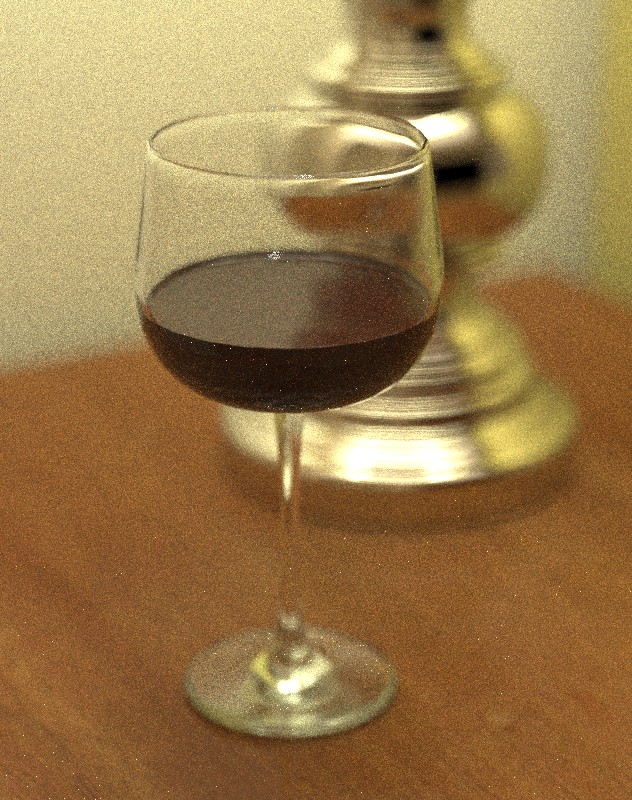
EDIT - so here's a test I did with Maxwell with this scene. As you can see, it automatically produces DOF (using the same f3.5 aperture setting), I just wish I knew what was controlling the depth, it must be some internal SU distance. As you can also see, I had some serious issues trying to get the materials to match - that's one huge drawback for the Maxwell plugin - a severely limited material editing capability. edit: updated render at SL19
-
JD - thanks, didn't realize the distance setting was in another menu. Now I see, thanks.
Dale - Indigo sounds pretty good, I'll have to take a look sometime. I never got the blender exporter to work though. (I'm trying to transition to rendering from Blender instead of SU)
Jeff, I think of it the other way 'round in vray. The setting, in my view, is to disable DOF in the interest of speed and being able to edit in post (with a zdeph pass). Also, it has an override so you can tweak it. I consider myself an amateur photographer, so I am well versed in photographic concepts, and understand about focal planes, lens length, and FOV, etc. I would raise one issue is that most of the "camera" systems for the renderers are based on the 35mm format, which is not actually currently representative of what kind of cameras are being used. On the one hand, most DSLR cameras are predominantly APS-C sized sensors, which the actual size of the sensor varies across brands. The other is that commercial arch photo is done with medium or large format, which is even shallower dof than 35mm. Fortunately for me, the Sony I use is an actual 2/3 of the full size sensor, but others like Canon or Nikon are actually smaller than that. Anyway, the smaller the sensor, the larger the apparent DOF for a given (35mm equivalent) lens length. My 50mm lens is equivalent in FOV to a 75mm lens on full-frame. however, the dof calculation is only correct for 50mm (larger dof) In vray, you can actually override the sensor size, taking this into account. vray also has lens shift, aperture blade config (basic # of blades)
-
@andybot said:
I would raise one issue is that most of the "camera" systems for the renderers are based on the 35mm format, which is not actually currently representative of what kind of cameras are being used. On the one hand, most DSLR cameras are predominantly APS-C sized sensors, which the actual size of the sensor varies across brands. The other is that commercial arch photo is done with medium or large format, which is even shallower dof than 35mm. Fortunately for me, the Sony I use is an actual 2/3 of the full size sensor, but others like Canon or Nikon are actually smaller than that. Anyway, the smaller the sensor, the larger the apparent DOF for a given (35mm equivalent) lens length. My 50mm lens is equivalent in FOV to a 75mm lens on full-frame. however, the dof calculation is only correct for 50mm (larger dof) In vray, you can actually override the sensor size, taking this into account. vray also has lens shift, aperture blade config (basic # of blades)
for all intents and purposes, film size is irrelevant when it comes to 3D renderings.. that's because we can control the resolution as opposed to resolution being film/sensor dependent and the big kicker-- in renderings, we can control how bright the sun is..
basically, larger film means finer detail and/or ability to make bigger prints.. you want a bigger print in a rendering, just adjust the output size and wait longer..
as far as dof is concerned, again, film size doesn't matter… it's all about aperture, focal length, and focal distance..
when comparing cameras with different sensor sizes, it's the fact that you have to use different lenses(focal length) to achieve similar field of view..
with a digi crop sensor (say a nikon 1.5 crop), i have to use a 35mm lens to give a similar fov as a medium format camera with an 80mm lens.. the 80mm lens is going to give a shallower dof (if i'm maintaining the same focal distance and aperture) than the 35mm lens on the dslr… so it's the focal length that has affected the dof.. not the sensor size..
personally, i shoot two rangefinders.. a mamiya7 (6x7 medium format) and a ziess ikon 35.. i generally want deep focus in my photos but i also want hirez pictures.. that's my battle.. i want the deep dof that's easier to achieve on the zeiss but i want the big negs of the mamiya..
with rendering, that problem is non existent.. i can set my perspective and field of view to my liking.. i can then set my aperture for dof control.. after which, i can adjust how bright the sun is in order to give a proper exposure..
(whereas if i tried that in real life, say f/64 on a cloudy day, i'd have to set the shutter speed way too slow in order to get enough light on the film.. in rendering apps, i can just brighten the sun/skylight or set iso to some ungodly number with no discernible differences in image quality) -
@andybot said:
That's actually part of my point - with the render engines, all that shutter speed, lens length, aperture nonsense is all fungible. That's why adhering strictly to a 35mm equivalence seems kind of limited to me. The reason I mention conversions to different sensor formats is that if you are, say, trying to match a photo, it will very much depend on that particular camera setup, like for example the shallow dof of your mamiya. It won't work to just use the default 35mm dof equivalence.
sure it will.. all you have to do is adjust the aperture.. 35mm with a larger aperture then adjust the brightness of the sky..
since you can adjust the brightness (and resolution), format doesn't matter
all the controls (shutter speed, f-stops, iso, lens length, focal point, etc) still function as they would on a real camera.. only with rendering apps, we can play god and adjust the brightness of the sky..
-
That's actually part of my point - with the render engines, all that film/sensor size, lens length, aperture nonsense is all fungible. That's why adhering strictly to a 35mm equivalence seems kind of limited to me. The reason I mention conversions to different sensor formats is that if you are, say, trying to match a photo, it will very much depend on that particular camera setup, like for example the shallow dof of your mamiya. It won't work to just use the default 35mm dof equivalence.
-
Sure. For me, I tend to just adjust the iso to what I need it to be. I also adjust the sky and the GI to balance the contrast that I'm looking for. What I'm getting at is that saying something is like a "real" camera is rather misleading, and in many ways limiting if you say a real camera is a 35mm film camera. There are many ways to play with DOF, and it all depends on the look you are going for.
-
You can use any size film in Maxwell, but not in the plugin, since it places first priority on providing a wysiwyg workflow within the context of SketchUp. In other plugins, I have provided tools for visualizing (using an overlay, via OpenGL or whatever is available) the Maxwell film size & location (given lens shift) with respect to the associated view as it is composed in the host application, which is not generally capable of displaying perspective based on arbitrary film sizes. It is on my list to do this here as well, at which point you would see film size parameters show up in the plugin, but it does not exist yet.
-
@unknownuser said:
sure it will.. all you have to do is adjust the aperture.. 35mm with a larger aperture then adjust the brightness of the sky..
But then you're back to being fungible about it being a real world camera...
-
JD - that's impressive the things you are working on bringing over from the studio. That's pretty cool.
-
I'm far from an expert with real/traditional cameras -- but there is nothing I've seen in any other engine that Maxwell does not also have as far as traditional camera analog toolset.
However being that I am not particularly camera-centric in my mindset I don't find this a strength or a weakness, but rather just a tool, to me it could be organized in a very different way (with similar results) and I would not be bothered... because after all Maxwell is not really limited in the same way a film/digital camera is. The UI is really nothing more than a conceit to make the concepts less abstract, and more accessible to people already familiar with cameras (an advantage I did not have).
I will say it would be a bad mistake to judge Maxwell's capabilities based on the stand-alone plugin... that is not what Maxwell is, but rather a subset of what Maxwell can do, and is somewhat limited by SketchUp itself. The full render suite is much more powerful in many ways (as it should be).
The UI in Maxwell Studio to me feels much more camera centric since the entire viewport is set up as if you are looking through a viewfinder. I would not mind seeing a similar interface in SketchUp at some point (for the sake of consistency) but obviously there are other things that are more important.
All that said, the paradigm I am really most interested in is the human eye(s) -- for which a camera is a very poor substitute.
Best,
Jason. -
@bakbek said:
From all the render engines out thete for SketchUP... is it safe to say Maxwell Render resembles the work with a real camera the most...
What do you think?
I think it's safe to say it's a perfect example of camouflaged ad.
-
@rv1974 said:
I think it's safe to say it's a perfect example of camouflaged ad.
It's foolish sentiment like yours that caused me alot of trouble here recently, which I am not eager to repeat or see happen to anybody else -- how about researching the facts before jerking the knee in overreaction?
Best,
Jason. -
It was a rather leading question from the 'Bek though...
-eh, no need to bug jason any more...






Advertisement