[Plugin] TextureRandomizer
-
Thanks again TIG. Your patience is equal to your abilities...

-
TIP: Using the same value for the 'max' AND 'min' settings will make that change with no randomization, e.g. set UXmax=1 and UXmin=1 will jump all of the selected faces' textures across by +1 unit.
-
@tig said:
TIP: Using the same value for the 'max' AND 'min' settings will make that change with no randomization, e.g. set UXmax=1 and UXmin=1 will jump all of the selected faces' textures across by +1 unit.
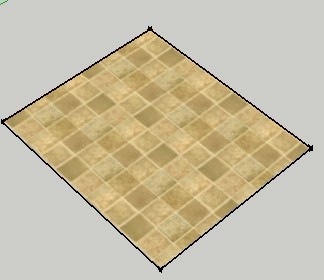
The plane can not be adjusted, the tool does not work -
Explain how it is "not working" !
Your bug reports can be annoyingly brief and unclear.
Is your textured-material applied directly to a face and NOT a group/component-instance - remember that you CANNOT adjust textures unless they are applied directly to a face - that applies to either with this tool or using the native Texture tool available through the context-menu...
Is the texture-material applied to a 'front' face - you cannot adjust the texture that are incorrectly applied to a 'back' face.
If your rectangle was drawn on the ground and you haven't reversed the face then you have textured the back NOT the front !
To check this... ensure your Style has a distinct color difference between front and back default materials - typically an off-white and a blue-gray respectively - now toggle the view between Monochrome mode and Textured mode. Faces that are textured incorrectly on their backs will show 'blue'; they need to be Reversed [context-menu] and the texture applied to their fronts - it will now be editable using this tool
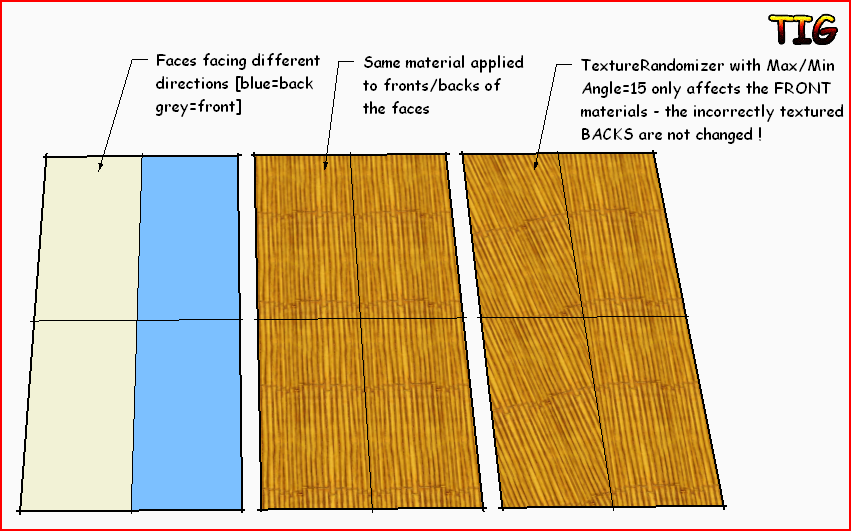
If this is not the case [my best guess!]...
What values do you have in the tool's dialog?
If the max/min for a pair of setting are the same number [that is NOT 0] then the texture[s] WILL change by the fixed amount [without any randomization].If you are working in mm and enter 1 then the 1mm jump could be hard for you to see unless you are close to it as it changes.
Also, if your pattern repeats at say 150mm and you also enter 150... then although the texture will jump over by that value it will once again starting in the same place... so you will see no change.I know this tool works perfectly well - I have tested it extensively - so you must be doing something wrong.

-
-
Can you provide a simpler example.
[Reread my previous post about 'reversed' faces]
Unless you have a face selected that has a front-material with a texture the tool won't run.
I can't see exactly what you are doing to get nothing happening...
Regarding the rotation - remember that there is no way of knowing a textures current rotation - so any rotation you apply is relative to its current transformation, it is not 'absolute' - so rotating a texture by 45 then by 45 later is equivalent to one rotation of 90; you do not set the texture's rotation to 45, rather you change it by 45 degrees. [also remember that positive angles rotate counter-clockwise, negative angles clockwise] -
@tig said:
Can you provide a simpler example.
[Reread my previous post about 'reversed' faces]
Unless you have a face selected that has a front-material with a texture the tool won't run.
I can't see exactly what you are doing to get nothing happening...
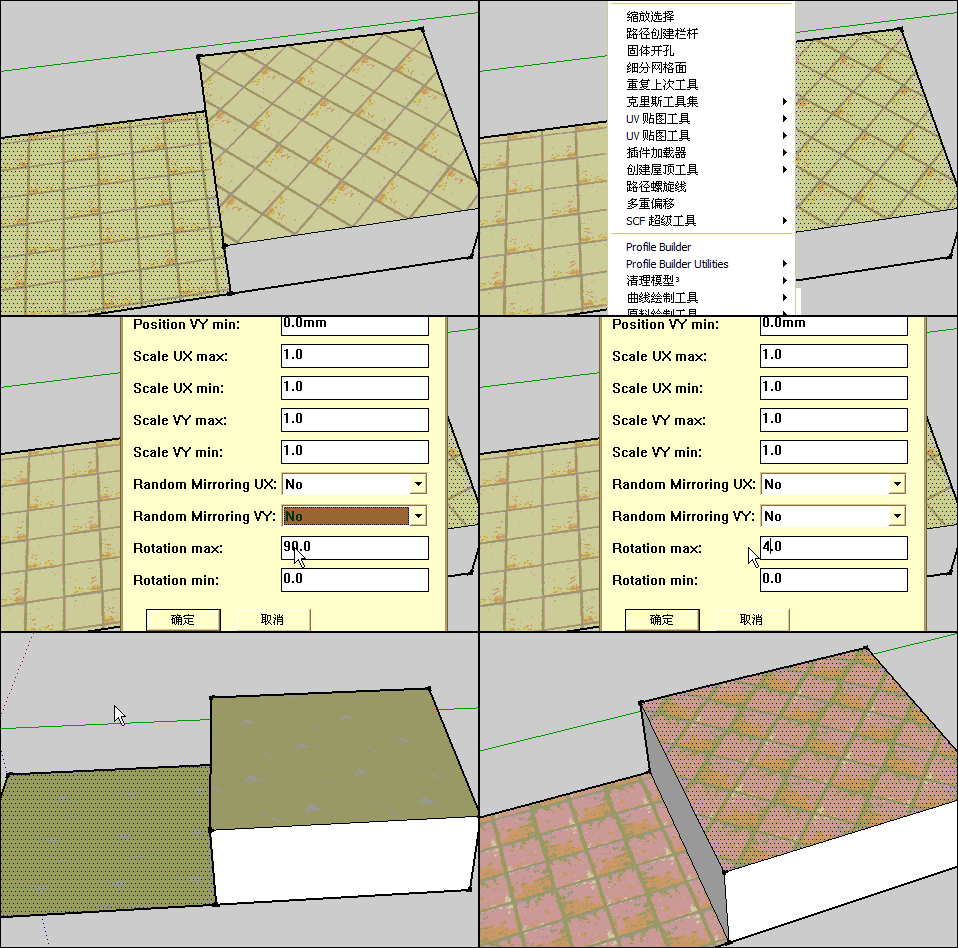
Regarding the rotation - remember that there is no way of knowing a textures current rotation - so any rotation you apply is relative to its current transformation, it is not 'absolute' - so rotating a texture by 45 then by 45 later is equivalent to one rotation of 90; you do not set the texture's rotation to 45, rather you change it by 45 degrees. [also remember that positive angles rotate counter-clockwise, negative angles clockwise]2D plane can not use this tool.
-
@guanjin said:
@tig said:
Can you provide a simpler example.
[Reread my previous post about 'reversed' faces]
Unless you have a face selected that has a front-material with a texture the tool won't run.
I can't see exactly what you are doing to get nothing happening...
Regarding the rotation - remember that there is no way of knowing a textures current rotation - so any rotation you apply is relative to its current transformation, it is not 'absolute' - so rotating a texture by 45 then by 45 later is equivalent to one rotation of 90; you do not set the texture's rotation to 45, rather you change it by 45 degrees. [also remember that positive angles rotate counter-clockwise, negative angles clockwise]Chose not 2D plane, sliding into the entity can
2D plane can not use this tool. -
@unknownuser said:
2D plane can not use this tool.
OH YES it can.
I works just fine if the face is made and textured properly.
Reread my earlier post and see the illustration about 'back' face issues.
YOU have your supposed 'problem' face 'upside down'!
You have applied the textured-material onto its back NOT onto its front, where it should be!
Please 'Reverse' the face and apply the textured-material correctly onto its front.
My tool only adjusts textured-materials applied onto the fronts of faces.
You should never be applying any materials to the backs of faces - it is very bad practice - if you ever come to render a model using most 3rd-party renderers you'll get unexpected results - most of them will render back faces as black/white/transparent, completely ignoring any applied textured-materials [the result varies with the app.].Always consider you model as made of 'solids' with faces that have their 'fronts' looking outwards towards the viewer - then there is no need to ever apply materials to the back face.
When you draw a new rectangular/circular/etc face at Z=0 [on the ground] Sketchup automatically makes it 'face down', this is because it is assuming you will PushPull it into a volume and therefore the initially downwards looking face is correctly oriented for when it becomes the bottom face of a solid.
You can easily 'Reverse' [context-menu] any faces drawn this way if you do not intend to PushPull the, and especially if you are going to add materials to them, because once they have materials you cannot differentiate between a face's front and its back unless you use Monochrome mode to view, or you use a tool that does differentiate like a 3rd party renderer or my tool ! -
Thank you TIG: I see a positive paste material must be flipped faces
-
Ok TIG,
i'm close to say i love you- but i don't

That's something i was thinking of for really a long time as it's a major improvement!!
I was just searching today before posting a request for that
Would really be worth an icon in the toolbar!
Additionally, it would be great to have something like a TextureMover tool which:
- highlights the face when you hover over it
- when you keep the mouse button pressed you see the texture like in the texture editing mode and
- your able just to move the texture really easy
It happens quite often that the texture is not in the right place or you have an edge of a non-tiled texture which you want to move aside.
Maybe with an icon at the cursortop like this: (ok, it's really simple)

The extension to randomize HUE, saturation and gamma would for sure be great but it's understandable that it's not that easy to implement.
It would rise the filesize very much as every texture will be resaved several times.
Maybe there will be something like this one day.
(In case of rendering there could be an option like MultiTexture for 3dsMax but that's of minor importance here)--
I can't believe i missed that..
There should be something like a sticky "Brand New Must Have Plugin" Post where such plugins are posted- and if you missed one or were not in the forums for a while it would be really great so see what has happend during the last days, something you really don't want to miss
Maybe just one post each plugin with a link to each topic.
It would make sense if it was in reversed order, like first post is always the latest..
Ok, maybe it'd need some improvement but you get what i mean, i guess.Anyway, thanks TIG
-
harnsein
Find my other 'TextureTools' which allow you to Rotate/Position/Scale the texture of a selected face by either amount[s] entered in a dialog; OR by a set 'increment', using the arrow keys to nudge it into place, by say 1mm at a time in XU/YV... -
TIG,
i know about your other plugin as it came across my way during my search today.
It's handy for sure.
And it's great to get over the problem of rotating a texture but not scaling it.
But it doesn't seem to do what i was looking for -> a simple moving of a face's texture.
And i'd have to do several clicks or entering numbers to use it.
This does make sense if you need it, but not in this case.I mean, i can select a face, use context-menu > texture > position > move texture.
But doing this for each face sums up quite quick to an annoying process.Therefor a one-click-solution would be really handy, don't you think?
-
I don't really understand you comments or alternative ideas...
The accuracy of the native Texture > Position tool etc is 'manual'.
With my TextureToolc you can set the UX/VY nudge to 1mm and use the arrow keys to relocate the texture up/down and/or right/left by those steps as desired... Its rotation tool doesn't do any scaling [?], so enter 1 degree and rotate using the arrow keys back/forth by 1 degree steps. If its not rotated about the desired 'origin' then the nudge tool can be used to realign it as needed ? It also scales textures by steps if desired.You can use this TextureRandomizer but set with min=max values to make a fixed change to ALL selected faces' textures; so if you want to rotate them all by 22 degrees enter that as both min and max angles... and hey presto all textures selected rotate by 22 degrees with no randomization !
-
Ok, i produced some misunderstanding
Sure your tools are accurate and therefor really handy.
But- if you could shift some textures (e.g. planks of a wooden floor) slightly and manually (approximately) with ease (with a tool), that would be great.
Like in the wooden floor example:
- some planks just don't look good where they were placed randomly or
- are randomized in a way that some by chance look repetitive again or
- the edge of a texture is visible
then you'd just want to shift them a bit.
-
Hi TIG
your extention is graet . My problem well solved with this .
A request to develop this extension:
randomiz with select texture and group or component .thanks
-
You can only affect the UV-mapping of a Textured-Material that is applied onto a Face.
As evidenced by the available context-menu 'Texture'...
A Textured-Material applied onto a 'container' [i.e. a Group or Component-Instance] cannot be adjusted - neither using any native tool, nor via the Ruby API.Sorry

-
Hi SU2021 needs a *.rbz file.
Even renaming the *rb file to *rbz encounters an install errorDo I miss something?
-
This is an ancient thread...
But a simple search shows that v1.3 of this tool is available from in PluginStore [that's premade into an RBZ]
https://sketchucation.com/pluginstore?pln=TextureRandomizerTo make any single RB file into an RBZ you need to ZIP the RB then change the file-type suffix to RBZ...
Then install it as from hat file...OR you could simply put the RB directly into the relevant Plugins folder, and then restart SketchUp so that it loads...
-
@tig said:
This is an ancient thread...
But a simple search shows that v1.3 of this tool is available from in PluginStore [that's premade into an RBZ]
https://sketchucation.com/pluginstore?pln=TextureRandomizerTo make any single RB file into an RBZ you need to ZIP the RB then change the file-type suffix to RBZ...
Then install it as from hat file...OR you could simply put the RB directly into the relevant Plugins folder, and then restart SketchUp so that it loads...
Thanks for your swift reply !




Hello! It looks like you're interested in this conversation, but you don't have an account yet.
Getting fed up of having to scroll through the same posts each visit? When you register for an account, you'll always come back to exactly where you were before, and choose to be notified of new replies (either via email, or push notification). You'll also be able to save bookmarks and upvote posts to show your appreciation to other community members.
With your input, this post could be even better 💗
Register Login


Advertisement