sketchucation logo sketchucation
    • Login
    Oops, your profile's looking a bit empty! To help us tailor your experience, please fill in key details like your SketchUp version, skill level, operating system, and more. Update and save your info on your profile page today!
    ⚠️ Important | Libfredo 15.6b introduces important bugfixes for Fredo's Extensions Update

    8 button mouse in Sketchup

    Scheduled Pinned Locked Moved Corner Bar
    13 Posts 7 Posters 468 Views 7 Watching
    Loading More Posts
    • Oldest to Newest
    • Newest to Oldest
    • Most Votes
    Reply
    • Reply as topic
    Log in to reply
    This topic has been deleted. Only users with topic management privileges can see it.
    • L Offline
      liam887
      last edited by

      @solo said:

      Can't you just assign a seperate shortcut for each button? or assign a keyboard key for each button that corrosponds with your SU shortcut?

      probably but I dont know how to do that lol, on a PC I know but not on the mac!
      All I could find was an option to make a keyboard shortcut open SU!
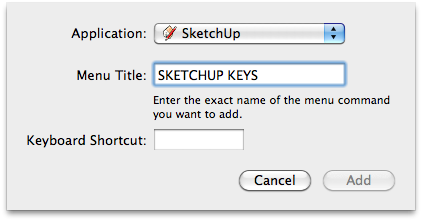

      Screen shot 2012-03-19 at 20.40.11.png

      VISIT MY ONLINE GALLERY
      http://www.robotsvdinosaurs.com/

      1 Reply Last reply Reply Quote 0
      • soloS Offline
        solo
        last edited by

        Ah...

        Does the mouse not have a setup disk? there may be a way of setting it up using it's own software, something like this:

        http://4.bp.blogspot.com/__3h7Ewy8aM8/S_zIRYKwifI/AAAAAAAADdc/8GmMRalgYGE/s1600/3.png

        http://www.solos-art.com

        If you see a toilet in your dreams do not use it.

        1 Reply Last reply Reply Quote 0
        • L Offline
          liam887
          last edited by

          yeah it has an amazing set up screen for customizations, but only on the PC! On the mac I can change the tracking speed and thats about it.

          Was just wondering if I could assign keys from within SU or by using a plugin?

          VISIT MY ONLINE GALLERY
          http://www.robotsvdinosaurs.com/

          1 Reply Last reply Reply Quote 0
          • soloS Offline
            solo
            last edited by

            Sorry mate, cannot help with Mac settings.

            http://www.solos-art.com

            If you see a toilet in your dreams do not use it.

            1 Reply Last reply Reply Quote 0
            • wind-borneW Offline
              wind-borne
              last edited by

              @liam887 said:

              yeah it has an amazing set up screen for customizations, but only on the PC! On the mac I can change the tracking speed and thats about it.

              Was just wondering if I could assign keys from within SU or by using a plugin?

              Here is Logitech on Mac
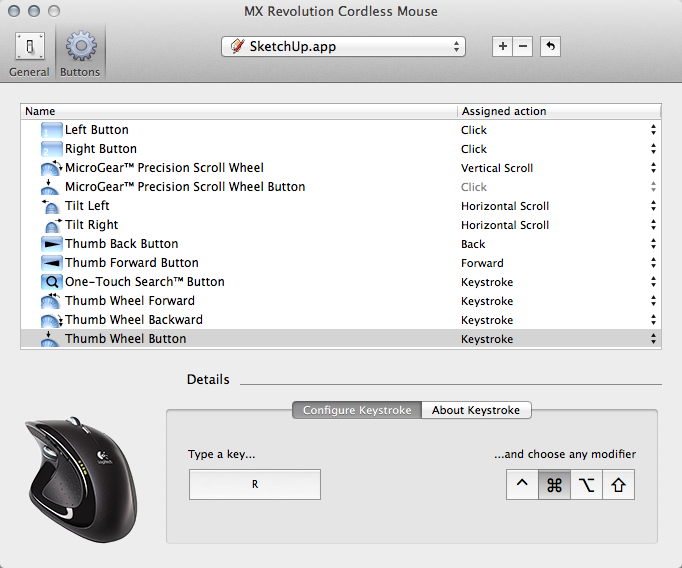

              MX Revolution Cordless Mouse.png

              "To read between the lines was easier than to follow the text."OSX 10.11.6

              %(#BF80BF)[SU 8 pro

              1 Reply Last reply Reply Quote 0
              • L Offline
                liam887
                last edited by

                @wind-borne said:

                @liam887 said:

                yeah it has an amazing set up screen for customizations, but only on the PC! On the mac I can change the tracking speed and thats about it.

                Was just wondering if I could assign keys from within SU or by using a plugin?

                Here is Logitech on Mac

                Yeah I got a mamba with me today http://1.bp.blogspot.com/-NsdngJeWTbE/Tywhcv7IYsI/AAAAAAAABZU/1DiZy543PL0/s400/Razer%2BMamba.jpg

                the customization screen is really good but seems to be PC only 😞 http://www.bjorn3d.com/Material/revimages/Peripherals/Razer_Mamba4G/d_assign.JPG

                VISIT MY ONLINE GALLERY
                http://www.robotsvdinosaurs.com/

                1 Reply Last reply Reply Quote 0
                • jeff hammondJ Offline
                  jeff hammond
                  last edited by

                  you might have to use something like this:

                  Link Preview Image
                  SteerMouse

                  favicon

                  (plentycom.jp)

                  .

                  dotdotdot

                  1 Reply Last reply Reply Quote 0
                  • L Offline
                    liam887
                    last edited by

                    @unknownuser said:

                    you might have to use something like this:

                    Link Preview Image
                    SteerMouse

                    favicon

                    (plentycom.jp)

                    .

                    Thanks Jeff, once I get the internet in my new place I will give it a try.

                    VISIT MY ONLINE GALLERY
                    http://www.robotsvdinosaurs.com/

                    1 Reply Last reply Reply Quote 0
                    • T Offline
                      tiptongrange
                      last edited by

                      Yes, use Steermouse or USB Overdrive.

                      1 Reply Last reply Reply Quote 0
                      • MarianM Offline
                        Marian
                        last edited by

                        8 button mouse....HA

                        http://www.boingboing.net/images/muce/8-1.jpg

                        http://marian87.deviantart.com/

                        1 Reply Last reply Reply Quote 0
                        • 1 / 1
                        • First post
                          Last post
                        Buy SketchPlus
                        Buy SUbD
                        Buy WrapR
                        Buy eBook
                        Buy Modelur
                        Buy Vertex Tools
                        Buy SketchCuisine
                        Buy FormFonts

                        Advertisement