sketchucation logo sketchucation
    • Login
    Oops, your profile's looking a bit empty! To help us tailor your experience, please fill in key details like your SketchUp version, skill level, operating system, and more. Update and save your info on your profile page today!
    Mac User? | Join the Rayscaper Beta for Mac Learn More

    8 button mouse in Sketchup

    Scheduled Pinned Locked Moved Corner Bar
    13 Posts 7 Posters 799 Views 7 Watching
    Loading More Posts
    • Oldest to Newest
    • Newest to Oldest
    • Most Votes
    Reply
    • Reply as topic
    Log in to reply
    This topic has been deleted. Only users with topic management privileges can see it.
    • gillesG
      gilles
      last edited by

      😲
      How much fingers have you in one hand? πŸ’š

      " c'est curieux chez les marins ce besoin de faire des phrases "

      1 Reply Last reply
      Reply Quote 0
      • L
        liam887
        last edited by

        @solo said:

        Can't you just assign a seperate shortcut for each button? or assign a keyboard key for each button that corrosponds with your SU shortcut?

        probably but I dont know how to do that lol, on a PC I know but not on the mac!
        All I could find was an option to make a keyboard shortcut open SU!
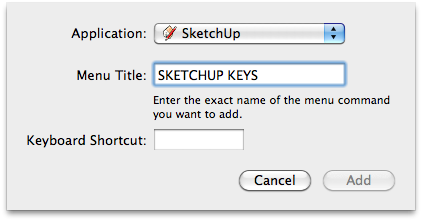

        Screen shot 2012-03-19 at 20.40.11.png

        VISIT MY ONLINE GALLERY
        http://www.robotsvdinosaurs.com/

        1 Reply Last reply
        Reply Quote 0
        • soloS
          solo
          last edited by

          Ah...

          Does the mouse not have a setup disk? there may be a way of setting it up using it's own software, something like this:

          http://4.bp.blogspot.com/__3h7Ewy8aM8/S_zIRYKwifI/AAAAAAAADdc/8GmMRalgYGE/s1600/3.png

          http://www.solos-art.com

          If you see a toilet in your dreams do not use it.

          1 Reply Last reply
          Reply Quote 0
          • L
            liam887
            last edited by

            yeah it has an amazing set up screen for customizations, but only on the PC! On the mac I can change the tracking speed and thats about it.

            Was just wondering if I could assign keys from within SU or by using a plugin?

            VISIT MY ONLINE GALLERY
            http://www.robotsvdinosaurs.com/

            1 Reply Last reply
            Reply Quote 0
            • soloS
              solo
              last edited by

              Sorry mate, cannot help with Mac settings.

              http://www.solos-art.com

              If you see a toilet in your dreams do not use it.

              1 Reply Last reply
              Reply Quote 0
              • wind-borneW
                wind-borne
                last edited by

                @liam887 said:

                yeah it has an amazing set up screen for customizations, but only on the PC! On the mac I can change the tracking speed and thats about it.

                Was just wondering if I could assign keys from within SU or by using a plugin?

                Here is Logitech on Mac
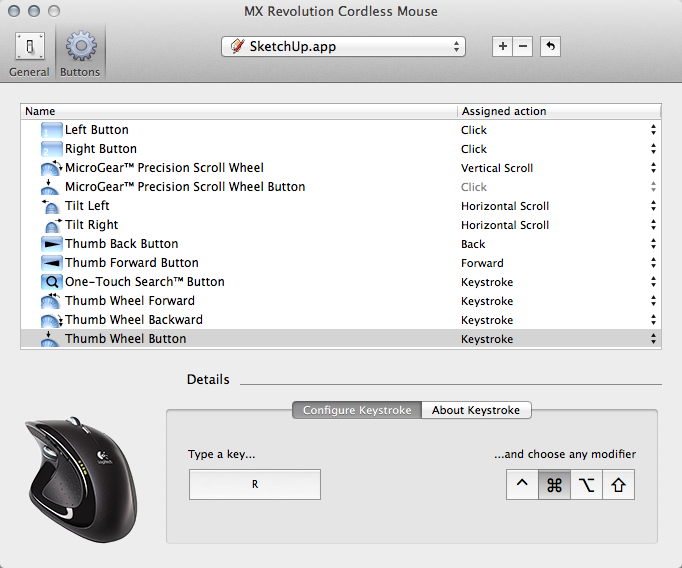

                MX Revolution Cordless Mouse.png

                "To read between the lines was easier than to follow the text."OSX 10.11.6

                %(#BF80BF)[SU 8 pro

                1 Reply Last reply
                Reply Quote 0
                • L
                  liam887
                  last edited by

                  @wind-borne said:

                  @liam887 said:

                  yeah it has an amazing set up screen for customizations, but only on the PC! On the mac I can change the tracking speed and thats about it.

                  Was just wondering if I could assign keys from within SU or by using a plugin?

                  Here is Logitech on Mac

                  Yeah I got a mamba with me today http://1.bp.blogspot.com/-NsdngJeWTbE/Tywhcv7IYsI/AAAAAAAABZU/1DiZy543PL0/s400/Razer%2BMamba.jpg

                  the customization screen is really good but seems to be PC only 😞 http://www.bjorn3d.com/Material/revimages/Peripherals/Razer_Mamba4G/d_assign.JPG

                  VISIT MY ONLINE GALLERY
                  http://www.robotsvdinosaurs.com/

                  1 Reply Last reply
                  Reply Quote 0
                  • jeff hammondJ
                    jeff hammond
                    last edited by

                    you might have to use something like this:

                    403 Error - Forbidden

                    favicon

                    (plentycom.jp)

                    .

                    dotdotdot

                    1 Reply Last reply
                    Reply Quote 0
                    • L
                      liam887
                      last edited by

                      @unknownuser said:

                      you might have to use something like this:

                      403 Error - Forbidden

                      favicon

                      (plentycom.jp)

                      .

                      Thanks Jeff, once I get the internet in my new place I will give it a try.

                      VISIT MY ONLINE GALLERY
                      http://www.robotsvdinosaurs.com/

                      1 Reply Last reply
                      Reply Quote 0
                      • T
                        tiptongrange
                        last edited by

                        Yes, use Steermouse or USB Overdrive.

                        1 Reply Last reply
                        Reply Quote 0
                        • MarianM
                          Marian
                          last edited by

                          8 button mouse....HA

                          http://www.boingboing.net/images/muce/8-1.jpg

                          http://marian87.deviantart.com/

                          1 Reply Last reply
                          Reply Quote 0

                          Hello! It looks like you're interested in this conversation, but you don't have an account yet.

                          Getting fed up of having to scroll through the same posts each visit? When you register for an account, you'll always come back to exactly where you were before, and choose to be notified of new replies (either via email, or push notification). You'll also be able to save bookmarks and upvote posts to show your appreciation to other community members.

                          With your input, this post could be even better πŸ’—

                          Register Login
                          • 1 / 1
                          • First post
                            Last post
                          Buy SketchPlus
                          Buy SUbD
                          Buy WrapR
                          Buy eBook
                          Buy Modelur
                          Buy Vertex Tools
                          Buy SketchCuisine
                          Buy FormFonts

                          Advertisement