Drawing A Bottle HELP!!
-
Hi everyone..please bear with me as I am new to Sketchup.
I took all of the courses that google offers online and I am just getting started.
I've been trying for the last few days to draw a bottle..like a Coke Bottle.
I made a round circle pulled up the circle then tried to bend the edges on the left and right side of the circle to make it curvy. But I dont think sketchup allows you to do that on rounded surfaces. Im sure there is but is there some type of plugin or something I need to create the curved edges on the rounded surface...Hope this makes sense..Thank you for you help....
-
Think of it another way...
Draw a circle that the bottle's 'bottom'.
Now draw the 'elevation' of the bottle [side view].
Position it centered on the circle.
Select the circle [as the path].
Start the FollowMe tool.
Pick the face of the bottle's elevation.
It rotates 360 degrees around the circle and makes the 3d form...
You can refine the 'outline' of the bottle to give thickness etc...
this method is used for making anything that is 'lathed' around an axis - e.g. a wine-glass...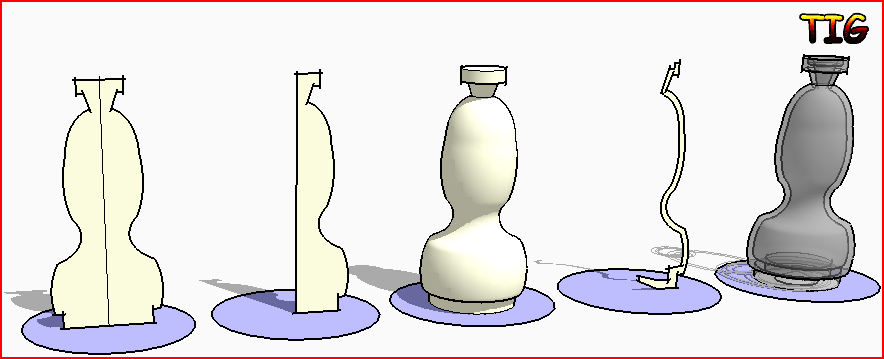
-
Or....
click the red CatchUp button at the top of this thread and download edition 7 which has a step by step tutorial by Eric Lay in modeling a bottle.


Hello! It looks like you're interested in this conversation, but you don't have an account yet.
Getting fed up of having to scroll through the same posts each visit? When you register for an account, you'll always come back to exactly where you were before, and choose to be notified of new replies (either via email, or push notification). You'll also be able to save bookmarks and upvote posts to show your appreciation to other community members.
With your input, this post could be even better 💗
Register Login


Advertisement