sketchucation logo sketchucation
    • Login
    Oops, your profile's looking a bit empty! To help us tailor your experience, please fill in key details like your SketchUp version, skill level, operating system, and more. Update and save your info on your profile page today!
    ⚠️ Update | Sketchucation Tools 5.0.8 released with licensing improvements and bugfixes Download

    [Tutorial] Modeling a Space Frame

    Scheduled Pinned Locked Moved SketchUp Tutorials
    sketchup
    25 Posts 14 Posters 11.3k Views 14 Watching
    Loading More Posts
    • Oldest to Newest
    • Newest to Oldest
    • Most Votes
    Reply
    • Reply as topic
    Log in to reply
    This topic has been deleted. Only users with topic management privileges can see it.
    • boofredlayB
      boofredlay
      last edited by

      Well thanks again guys. Sometimes I surprise myself.

      http://www.coroflot.com/boofredlay

      1 Reply Last reply
      Reply Quote 0
      • david_hD
        david_h
        last edited by

        Once again. . .you are engineered to amaze.

        If I make it look easy...It is probably easy

        1 Reply Last reply
        Reply Quote 0
        • mitcorbM
          mitcorb
          last edited by

          @Boofredlay: I suggest a warning label on all of your tutorials "Caution to learners: watching these tutorials may cause one of two things--it may stunt your growth, or it will inspire your inner artist. 💚

          I take the slow, deliberate approach in my aimless wandering.

          1 Reply Last reply
          Reply Quote 0
          • boofredlayB
            boofredlay
            last edited by

            😄 Thanks.

            http://www.coroflot.com/boofredlay

            1 Reply Last reply
            Reply Quote 0
            • L
              Late
              last edited by

              Great and inspiring tutorial. But I'm totally hobbyist so how you moved the sphere from it's center point?

              1 Reply Last reply
              Reply Quote 0
              • boofredlayB
                boofredlay
                last edited by

                When you use the sphere plugin, placement is at the center bottom of the sphere.
                #1 in my example image.

                Then get the move tool, click on the midpoint of one of the outside lines (midpoint on the sphere). I turned on the x-ray view style for this step. Start moving it in the blue direction, hold shift then click the reference point where you want the sphere to "land".
                #2 in my example image.
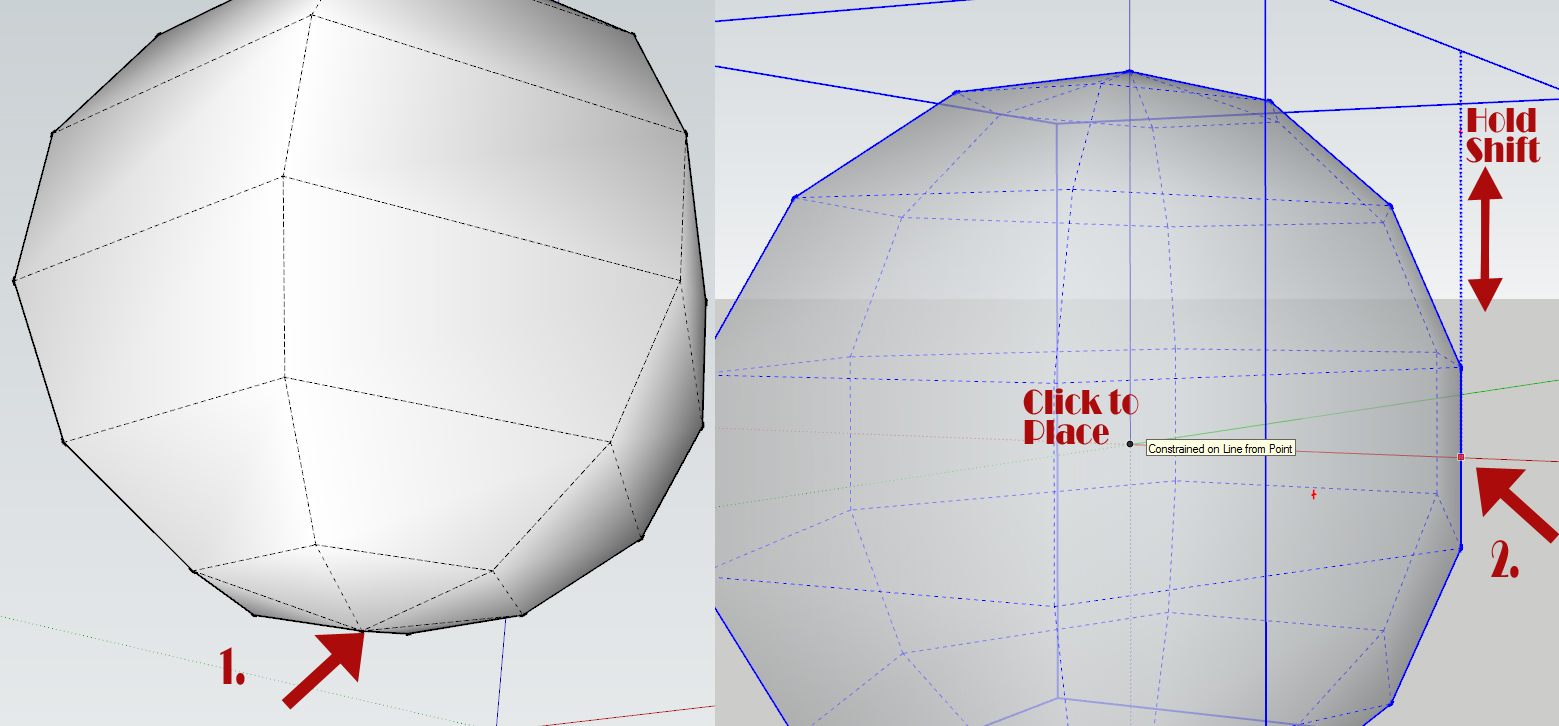

                Sphere-Placement.jpg

                http://www.coroflot.com/boofredlay

                1 Reply Last reply
                Reply Quote 0
                • L
                  Late
                  last edited by

                  Thanks. It's always fun to learn new things.

                  1 Reply Last reply
                  Reply Quote 0
                  • utilerU
                    utiler
                    last edited by

                    @solo said:

                    Doh!!!

                    I just learned something new, almost embarrassed to say, I never knew about the additional setting with JPP, damn, if I knew this before I could've modeled even faster.

                    Thanks Eric.

                    Slaps head.

                    Nether did I, Pete!!!

                    BTW how do you upload a youtube video to here? And what software are you using to record?

                    Well done, Boo. Love your work!

                    Just Curious...

                    1 Reply Last reply
                    Reply Quote 0
                    • boofredlayB
                      boofredlay
                      last edited by

                      Thanks Andrew.

                      I use Hypercam2
                      http://www.hyperionics.com/hc/

                      Make sure you change the keyboard shortcuts (Hot Keys) because they can interfere with your SU ones and mess up your video. I found that out the hard way.

                      After taking the video I used Windows Live Movie Maker to add text and edit it. Then uploaded to Youtube.

                      Both Hypercam and WLMM are free.

                      Attaching the Youtube to your post is best explained in Miguel's post here:
                      http://forums.sketchucation.com/viewtopic.php?p=144086#p144086

                      http://www.coroflot.com/boofredlay

                      1 Reply Last reply
                      Reply Quote 0
                      • utilerU
                        utiler
                        last edited by

                        Cheers, Boo
                        👍

                        Just Curious...

                        1 Reply Last reply
                        Reply Quote 0
                        • mitcorbM
                          mitcorb
                          last edited by

                          You think maybe Hypercam 2 will work on Win 7? The info stops at xp?

                          I take the slow, deliberate approach in my aimless wandering.

                          1 Reply Last reply
                          Reply Quote 0
                          • boofredlayB
                            boofredlay
                            last edited by

                            Yep. I use it at home and work on Win7.

                            http://www.coroflot.com/boofredlay

                            1 Reply Last reply
                            Reply Quote 0
                            • mitcorbM
                              mitcorb
                              last edited by

                              Ok, thanks.

                              I take the slow, deliberate approach in my aimless wandering.

                              1 Reply Last reply
                              Reply Quote 0
                              • pilouP
                                pilou
                                last edited by

                                Cool tut ☀

                                Maybe you can use the Guides Tool by ThomThom for put the Spheres more quickly?

                                Image by guanjin

                                http://forums.sketchucation.com/download/file.php?id=84409

                                Frenchy Pilou
                                Is beautiful that please without concept!
                                My Little site :)

                                1 Reply Last reply
                                Reply Quote 0
                                • usenU
                                  usen
                                  last edited by

                                  Thanks. 👍

                                  http://www.sketchupturkiye.com/

                                  1 Reply Last reply
                                  Reply Quote 0
                                  • S
                                    shahriyar
                                    last edited by

                                    Thanks Again

                                    1 Reply Last reply
                                    Reply Quote 0
                                    • brookefoxB
                                      brookefox
                                      last edited by

                                      Thank you, Eric.

                                      Now if we could only get the size and res of embedded vids jacked up so we can see what the plugin settings are that are being used (JPP in this case). Alas, at present, there seems not to be a way.

                                      ~ Brooke

                                      1 Reply Last reply
                                      Reply Quote 0
                                      • Rich O BrienR
                                        Rich O Brien Moderator
                                        last edited by

                                        @brookefox said:

                                        Now if we could only get the size and res of embedded vids jacked up so we can see what the plugin settings are that are being used (JPP in this case). Alas, at present, there seems not to be a way.

                                        Why not go to Eric's YouTube page and watch it full screen?

                                        Download the free D'oh Book for SketchUp 📖

                                        1 Reply Last reply
                                        Reply Quote 0
                                        • GaieusG
                                          Gaieus
                                          last edited by

                                          I am pretty sure we can fix all sorts of video embedding issues soon. 😉

                                          Gai...

                                          1 Reply Last reply
                                          Reply Quote 0
                                          • brookefoxB
                                            brookefox
                                            last edited by

                                            @rich o brien said:

                                            @brookefox said:

                                            Now if we could only get the size and res of embedded vids jacked up so we can see what the plugin settings are that are being used (JPP in this case). Alas, at present, there seems not to be a way.

                                            Why not go to Eric's YouTube page and watch it full screen?

                                            I often have problems trying to go to the vid source: I click this way and that, nothing happens. Better not to have to do anything but watch the thing in front of you, I think.

                                            Glad Gai's got it covered, pretty surely...

                                            ~ Brooke

                                            1 Reply Last reply
                                            Reply Quote 0

                                            Hello! It looks like you're interested in this conversation, but you don't have an account yet.

                                            Getting fed up of having to scroll through the same posts each visit? When you register for an account, you'll always come back to exactly where you were before, and choose to be notified of new replies (either via email, or push notification). You'll also be able to save bookmarks and upvote posts to show your appreciation to other community members.

                                            With your input, this post could be even better 💗

                                            Register Login
                                            • 1
                                            • 2
                                            • 1 / 2
                                            • First post
                                              Last post
                                            Buy SketchPlus
                                            Buy SUbD
                                            Buy WrapR
                                            Buy eBook
                                            Buy Modelur
                                            Buy Vertex Tools
                                            Buy SketchCuisine
                                            Buy FormFonts

                                            Advertisement