Calque window
-
I have been using Sketch up 8 for a while without (major) problem.
Suddenly I am unable to open de calque window on all the files I have created.
The other windows are opened OK. I have reloaded the program but no effect.
Anybody with an idea on what is the problem?
Thanks in advance for the help.
DB -
Do you have multiple monitors?
Sometimes a window can get lost hiding on a different monitor position.
If you do have more than one monitor, use display settings to reposition the monitors and see if the Layer window appears, if it does, move it back to the main window and reset your monitor position.
If no multiple monitors, ignore me.Perhaps try Reset Workspace under preferences.
-
OR try using the maximum screen resolution to bring the errant window back into view...
If none of this works...
Close Sketchup and use
Start > Run... > regedit
HKEY_CURRENT_USER\Software\Google\SketchUp8\SnappyLayers
set x and y to 0 so it moves into view after you close the regedit session and restart Sketchup...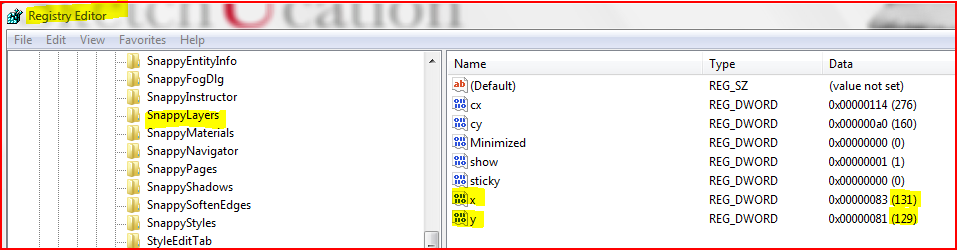
-
Thanks to all. Problem solved.
This was indeed a monitor problem.
Dan


Hello! It looks like you're interested in this conversation, but you don't have an account yet.
Getting fed up of having to scroll through the same posts each visit? When you register for an account, you'll always come back to exactly where you were before, and choose to be notified of new replies (either via email, or push notification). You'll also be able to save bookmarks and upvote posts to show your appreciation to other community members.
With your input, this post could be even better 💗
Register Login


Advertisement