sketchucation logo sketchucation
    • 登入
    Oops, your profile's looking a bit empty! To help us tailor your experience, please fill in key details like your SketchUp version, skill level, operating system, and more. Update and save your info on your profile page today!
    🔌 Smart Spline | Fluid way to handle splines for furniture design and complex structures. Download

    [Plugin] FullScreen v5.1.3 (25 April 2024)

    已排程 已置頂 已鎖定 已移動 Plugins
    285 貼文 79 Posters 411.4k 瀏覽 80 Watching
    正在載入更多貼文
    • 從舊到新
    • 從新到舊
    • 最多點贊
    回覆
    • 在新貼文中回覆
    登入後回覆
    此主題已被刪除。只有擁有主題管理權限的使用者可以查看。
    • L 離線
      laudhi
      最後由 編輯

      @anton_s said:

      Thank you for the report laudhi.

      I found and fixed it. Download the latest version of AMS Library.

      thanks Anton_S,now everything is running smoothly without any problems with other plugins 😍

      i love the floating window....

      1 條回覆 最後回覆 回覆 引用 0
      • A 離線
        Anton_S
        最後由 編輯

        3.6.0 Jan 29, 2014

        • Figured out a way to keep all shortcuts working while the menu bar is removed. The fancy shortcuts sections and the show/hide menu bar option were removed. They are no longer required! 😄
        • Fixed the get screen resolution function in AMS library. Now, it will return the size of all monitors combined. This fixes an issue where the dialog could not be moved to another screen.
        • Simplified and improved stuff.
        1 條回覆 最後回覆 回覆 引用 0
        • CadFatherC 離線
          CadFather
          最後由 編輯

          Master Anton strikes again - thanks!

          1 條回覆 最後回覆 回覆 引用 0
          • U 離線
            unearthed
            最後由 編輯

            Thanks for this plugin Anton, it's arguably the number 1 plugin for me as it enables me to quickly clear my screen for online client presentations. The only thing is could the floating black dialog be made smaller?

            Growplan - People ∩ Plants ∩ Place

            windows 7 64b, 4GB RAM, SU 8.0.16846
            Gimp, QGIS, Vectorworks 12, Bricscad 11

            1 條回覆 最後回覆 回覆 引用 0
            • A 離線
              Anton_S
              最後由 編輯

              @cadfather said:

              Master Anton strikes again - thanks!

              Thank you, CadFather!

              @unearthed said:

              Thanks for this plugin Anton, it's arguably the number 1 plugin for me as it enables me to quickly clear my screen for online client presentations. The only thing is could the floating black dialog be made smaller?

              I'm glad you like it. 😄 I've been thinking about making another collapsible on top, that would collapse/uncollapse all other collapsibles. Perhaps this feature could be available in the next release. Thanks for suggestion!

              1 條回覆 最後回覆 回覆 引用 0
              • V 離線
                vicxp0518
                最後由 編輯

                @unclex said:

                and i can not dare try the Menu Option, if i close it, how reopen it ??

                Yes i'm encountering with the problem 😞 It's bad to me, 'cos I've already hidden everything in the window include the menu bar, then, how can I bring it back again?? I've got nothing to do with my Sketchup now even if I reinstalled both SU and this plugin. Please tell me.

                1 條回覆 最後回覆 回覆 引用 0
                • A 離線
                  Anton_S
                  最後由 編輯

                  @vicxp0518 said:

                  @unclex said:

                  and i can not dare try the Menu Option, if i close it, how reopen it ??

                  Yes i'm encountering with the problem 😞 It's bad to me, 'cos I've already hidden everything in the window include the menu bar, then, how can I bring it back again?? I've got nothing to do with my Sketchup now even if I reinstalled both SU and this plugin. Please tell me.

                  Didn't you download the latest version? Use F12 to toggle the menubar and it would be a good idea to assign more shortcuts, as well. For example, SHIFT-S could be used to toggle statusbar, SHIFT-D could be used to toggle toolbar containers, and F11 could be assigned to toggle fullscreen. The latest version automatically assigns F12 shortctut at the begging of use.

                  If you don't have any shortcuts, and made it so all elements hide at start, do the following:

                  1. run regedit.exe
                  2. If using SU6-SU8, locate to HKEY_CURRENTUSER/Software/Google/Sketchup[n]/, otherwise locate HKEY_CURRENTUSER/Software/SketchUp/SketchUp[n]/
                  3. Delete the Plugins_ams folder. This will reset all plugin data.

                  Next time, have assign shortcut to reset.

                  1 條回覆 最後回覆 回覆 引用 0
                  • A 離線
                    Anton_S
                    最後由 編輯

                    @vicxp0518, I updated the plugin so the menubar remains visible on start, under certain conditions. Download the latest version 3.7.3 and your good to go.

                    1 條回覆 最後回覆 回覆 引用 0
                    • H 離線
                      HirokaMatsuiko
                      最後由 編輯

                      this is wonderful plugin

                      my shortcut is almost full

                      request if can future updates
                      add Full Screen Button toggle on / off for toolbar

                      thank you again

                      1 條回覆 最後回覆 回覆 引用 0
                      • A 離線
                        Anton_S
                        最後由 編輯

                        @hirokamatsuiko said:

                        add Full Screen Button toggle on / off for toolbar

                        Added!. 👍

                        1 條回覆 最後回覆 回覆 引用 0
                        • J 離線
                          Jim
                          最後由 編輯

                          Really nice plugin, Anton. Thank you.

                          Hi

                          1 條回覆 最後回覆 回覆 引用 0
                          • W 離線
                            whiteanne
                            最後由 編輯

                            I have a proble when running this plugin(latest version) on sketchup pro 2014,it shows like the photo below. Can anyone tell me what should I do to fix it??? it would helps,thats really a useful plugin.
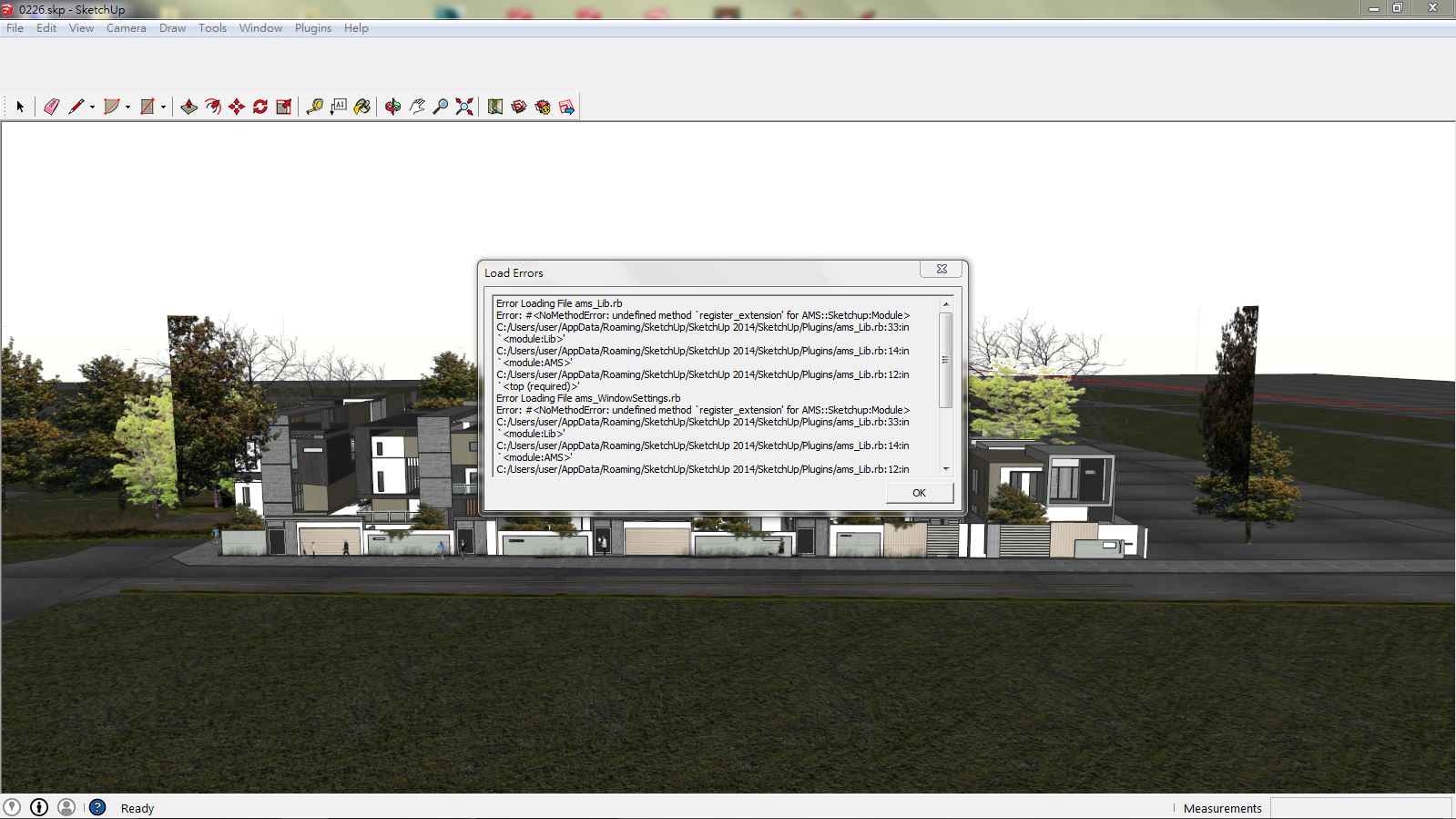

                            BrCNe4C.jpg

                            1 條回覆 最後回覆 回覆 引用 0
                            • A 離線
                              Anton_S
                              最後由 編輯

                              It seems Sketchup.register_extension is undefined. Scroll down to line 33 and add :: in from of the word Sketchup, save, and test.
                              It should look like this:
                              ::Sketchup.register_extension @extension, true

                              If it doesn't work then your SU was modified, or some files were deleted. Try re-installing SketchUp and see what happens.

                              1 條回覆 最後回覆 回覆 引用 0
                              • ArchieAA 離線
                                ArchieA
                                最後由 編輯

                                Windows 8, SU 2014. There's no Plugins folder to unzip ams_Lib_1.0.8.zip so I extracted the files to the folder Tools.

                                Fullscreen still doesn't work.

                                How to I get rid of the annoying popup stating, Download ams_Lib? Or remove the plugin?

                                Thanks in advance.

                                1 條回覆 最後回覆 回覆 引用 0
                                • A 離線
                                  Anton_S
                                  最後由 編輯

                                  @archieA The plugins folder is located in %appdata%\Roaming\SketchUp\SketchUp 2014\SketchUp\Plugins

                                  This plugin is not a standalone plugin. It requires AMS Library. Here is the link: http://sketchucation.com/forums/viewtopic.php?t=55067#p499835 Extract AMS Library in the plugins folder as well.

                                  1 條回覆 最後回覆 回覆 引用 0
                                  • ArchieAA 離線
                                    ArchieA
                                    最後由 編輯

                                    @anton_s said:

                                    @archieA The plugins folder is located in %appdata%\Roaming\SketchUp\SketchUp 2014\SketchUp\Plugins

                                    This plugin is not a standalone plugin. It requires AMS Library. Here is the link: http://sketchucation.com/forums/viewtopic.php?t=55067#p499835 Extract AMS Library in the plugins folder as well.

                                    Thank you. I got it working on SU 2014 on Windows 8. Easy enough when it's clear. I've started using it using F12 to toggle. Great plugin!

                                    1 條回覆 最後回覆 回覆 引用 0
                                    • chriC 離線
                                      chri
                                      最後由 編輯

                                      Hi Anton

                                      You have done a great job 👍

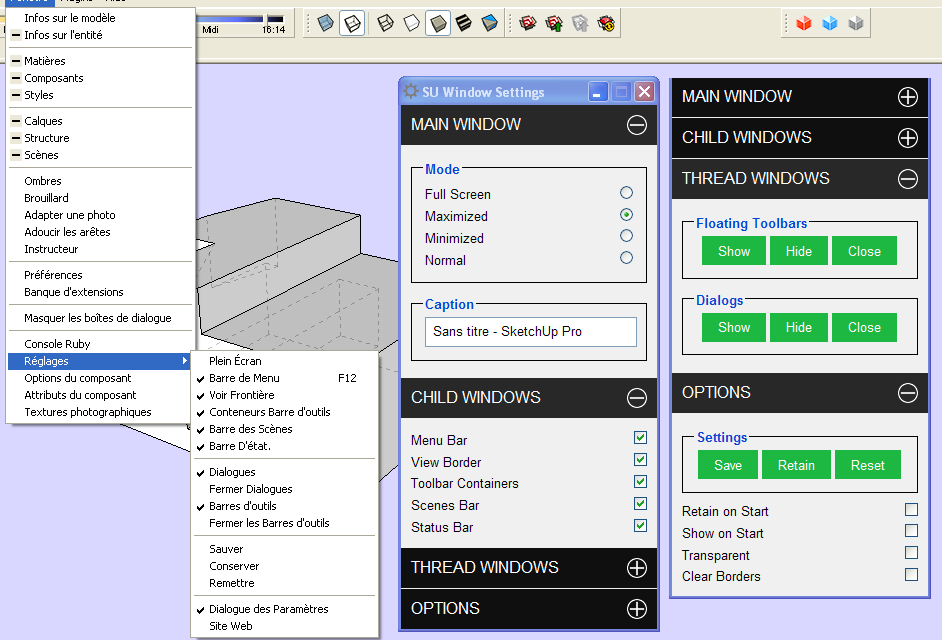
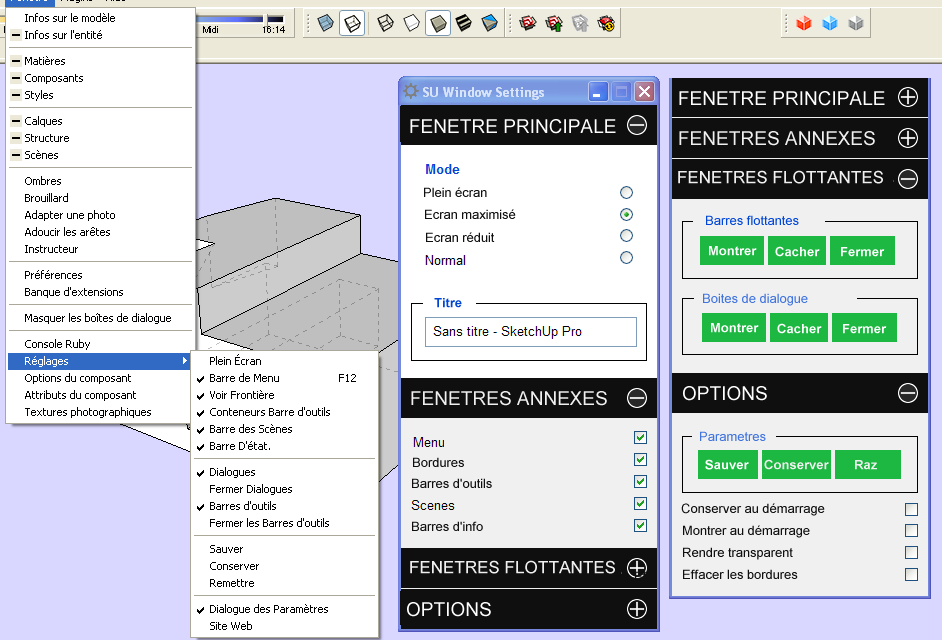
                                      Is-it difficult to create a file ( rb for example ) to change the commands language ?
                                      I have done a french example of what i mean on the next pictures .

                                      Bye
                                      Chri


                                      FULL SCREEN.png


                                      PLEIN ECRAN.png

                                      1 條回覆 最後回覆 回覆 引用 0
                                      • A 離線
                                        Anton_S
                                        最後由 編輯

                                        @archiea said:

                                        Thank you. I got it working on SU 2014 on Windows 8. Easy enough when it's clear. I've started using it using F12 to toggle. Great plugin!

                                        Very well, I'll add the description to first post. 😄

                                        @chri said:

                                        Is-it difficult to create a file ( rb for example ) to change the commands language ?

                                        Yeah, its quite difficult to translate webdialogs.

                                        I heard Aerilius created a method, that could translate the Webdialog, so we'll see.

                                        Thanks for request.

                                        1 條回覆 最後回覆 回覆 引用 0
                                        • JQLJ 離線
                                          JQL
                                          最後由 編輯

                                          Hi Anton,

                                          I don't think this plugin is 2015 ready or is it?

                                          www.casca.pt
                                          Visit us on facebook!

                                          1 條回覆 最後回覆 回覆 引用 0
                                          • P 離線
                                            Pherim
                                            最後由 編輯

                                            It's not, because AMS library isn't.

                                            1 條回覆 最後回覆 回覆 引用 0
                                            • 1
                                            • 2
                                            • 3
                                            • 4
                                            • 5
                                            • 6
                                            • 7
                                            • 14
                                            • 15
                                            • 5 / 15
                                            • 第一個貼文
                                              最後的貼文
                                            Buy SketchPlus
                                            Buy SUbD
                                            Buy WrapR
                                            Buy eBook
                                            Buy Modelur
                                            Buy Vertex Tools
                                            Buy SketchCuisine
                                            Buy FormFonts

                                            Advertisement