Mysterious Bug [followme related]
-
Hi all,
i have this code (i know it looks confusing, because i don't know
how to program the 'followme'-function, but it's not the problem)module LineA def LineA.create_line unless Sketchup.active_model; until Sketchup.active_model.active_entities end end model = Sketchup.active_model entities = model.active_entities #-------------------------------------------------------------------------- # Add the group to the entities in the model group = entities.add_group # Get the entities within the group entities2 = group.entities #-------------------------------------------------------------------------- @width_small = 55 # 55 @depth_small = 45 # 45 @height_small = 30 # 30 @width_big = 70 # 70 @depth_big = 60 # 60 @height_big = 70 # 40 @height_line = (4/3) * @height_small @radius = 1 @arcradius = 3 #-------------------------------------------------------------------------- @mat_linie=model.materials.add("Material_Linie") @mat_linie.color=Sketchup;;Color.new(124,252,0) # => LawnGreen #-------------------------------------------------------------------------- @anzahl_arcs = ((@depth_small-6)/6).to_i @pts =[] @helpvar_depth = 3 @helpvar_pts = 1 @helpvar_baseline = 1 @helpvar_basearc = 1 #-------------------------------------------------------------------------- 1.upto(@anzahl_arcs) do |x| @helpvar2_pts = @helpvar_pts +1 #-------------------------------------------------------------------------- if (x%2 > 0) @pts[@helpvar_pts] = [((@width_big-@width_small)/2)+5.35, ((@depth_big-@depth_small)/2)+@helpvar_depth, @height_line] @pts[@helpvar_pts+1] = [@width_small+((@width_big-@width_small)/2)-5.3, ((@depth_big-@depth_small)/2)+@helpvar_depth, @height_line] # arc_point @pts[@helpvar_pts+2] = [@width_small+((@width_big-@width_small)/2)-5, ((@depth_big-@depth_small)/2)+(@helpvar_depth+3), @height_line] arc_circle_odd = entities2.add_circle @pts[@helpvar_pts+1], X_AXIS, @radius, 42 arc_circle_face_odd = entities2.add_face arc_circle_odd arc_circle_face_odd.material = @mat_linie arc_circle_face_odd.back_material = @mat_linie line_circle_odd = entities2.add_circle @pts[@helpvar_pts], X_AXIS, @radius, 42 line_circle_face_odd = entities2.add_face line_circle_odd line_circle_face_odd.material = @mat_linie line_circle_face_odd.back_material = @mat_linie @helpvar_baseline_odd = entities2.add_line @pts[@helpvar_pts], @pts[@helpvar_pts+1] @helpvar_basearc_odd = entities2.add_arc @pts[@helpvar_pts+2],[0,-1,0],[0,0,1],@arcradius,-5.degrees,185.degrees arc_circle_face_odd.followme @helpvar_basearc_odd line_circle_face_odd.followme @helpvar_baseline_odd #-------------------------------------------------------------------------- elsif (x%2 == 0) @pts[@helpvar2_pts-1] = [((@width_big-@width_small)/2)+5.3, ((@depth_big-@depth_small)/2)+@helpvar_depth, @height_line] @pts[@helpvar2_pts] = [@width_small+((@width_big-@width_small)/2)-5.35, ((@depth_big-@depth_small)/2)+@helpvar_depth, @height_line] # arc_point @pts[@helpvar2_pts+1] = [((@width_big-@width_small)/2)+5, ((@depth_big-@depth_small)/2)+(@helpvar_depth+3), @height_line] arc_circle_even = entities2.add_circle @pts[@helpvar2_pts-1], X_AXIS, @radius, 42 arc_circle_face_even = entities2.add_face arc_circle_even arc_circle_face_even.material = @mat_linie arc_circle_face_even.back_material = @mat_linie line_circle_even = entities2.add_circle @pts[@helpvar2_pts], X_AXIS, @radius, 42 line_circle_face_even = entities2.add_face line_circle_even line_circle_face_even.material = @mat_linie line_circle_face_even.back_material = @mat_linie @helpvar_baseline_even = entities2.add_line @pts[@helpvar2_pts], @pts[@helpvar2_pts-1] @helpvar_basearc_even = entities2.add_arc @pts[@helpvar2_pts+1],[0,1,0],[0,0,1],@arcradius,-5.degrees,185.degrees arc_circle_face_even.followme @helpvar_basearc_even line_circle_face_even.followme @helpvar_baseline_even end # if #-------------------------------------------------------------------------- if (x == @anzahl_arcs) @pts[@helpvar_pts] = [((@width_big-@width_small)/2)+5.35, ((@depth_big-@depth_small)/2)+(@helpvar_depth+6), @height_line] @pts[@helpvar_pts+1] = [@width_small+((@width_big-@width_small)/2)-5, ((@depth_big-@depth_small)/2)+(@helpvar_depth+6), @height_line] @helpvar_baseline_ende = entities2.add_line @pts[@helpvar_pts], @pts[@helpvar_pts+1] line_circle_odd = entities2.add_circle @pts[@helpvar_pts], X_AXIS, @radius, 42 line_circle_face_odd = entities2.add_face line_circle_odd line_circle_face_odd.material = @mat_linie line_circle_face_odd.back_material = @mat_linie line_circle_face_odd.followme @helpvar_baseline_ende end # if #-------------------------------------------------------------------------- @helpvar_depth = @helpvar_depth + 6 @helpvar_pts = @helpvar_pts + 3 #-------------------------------------------------------------------------- end # upto - do #-------------------------------------------------------------------------- end # def end # module LineA.create_lineWhen i execute it in SU there's no error, but if i load it in the plugins of SU,
the hole SU break down and show me a 'Bug Splat', however no significant error message.
I hope you can help me.
Thanks -
<span class="syntaxdefault"><br />unless Sketchup</span><span class="syntaxkeyword">.</span><span class="syntaxdefault">active_model</span><span class="syntaxkeyword">;<br /></span><span class="syntaxdefault"> until Sketchup</span><span class="syntaxkeyword">.</span><span class="syntaxdefault">active_model</span><span class="syntaxkeyword">.</span><span class="syntaxdefault">active_entities<br /> end<br /> end<br /></span>What is this strange loop?
Is it that you try to make it run when SU starts? I see you have this line at the end:
LineA.create_lineWhy do you have that strange loop?
Have you tried without it?I'd be very surprised if that lop doesn't block up all processing of SketchUp.
If that isn't the issue - have you tried commenting out blocks of your code to see when it does not crash? When it doesn't then you know the offending line is within that block and you can narrow down further.
-
the strange loop ist an advice of TIG... http://forums.sketchucation.com/viewtopic.php?f=180&t=41767,
it makes sure that all services of SU are loaded succesfully.
it runs also without this loop.And i have commenting out all loops and many lines, but i didn't found the failure.
It's strange that i can run the script succesfully in SU, this bug is only when loading the script out of the plugins or starting SU per cmd with the script as parameter.(P.S. i have SU 8 free version)
-
@chris88 said:
this bug is only when loading the script out of the plugins
What you explain what you mean by this?
@chris88 said:
It's strange that i can run the script succesfully in SU
I'm confused - is it when the script is located in another location? Or if you load the script manually via the Ruby Console?
-
I can't start to guess why you might want always to do this weirdness at every startup - for example, why make geometry that might clash with existing stuff etc... why not simply load a premade component, or make a new template containing the desired stuff as the default for your new SKPs ???
Also do you haverequire 'sketchup.rb'at the very start of the script ?
It might be needed somewhere in your code
Your [my
 ] code
unless Sketchup.active_model until Sketchup.active_model.active_entities end endis wrong.
It waits until themodel.active_entitiesexist before continuing, BUT it only does the pause if there is NOT anactive_model?
Therefore it never pauses because theactive_modelalways exists as it is loading the script's code, although theactive_entitiesmight not [on a MAC for example]...
Tryuntil Sketchup.active_model until Sketchup.active_model.active_entities ### wait end endwhich WILL wait until there's both an active_model and it has active_entities...
ALSO , as I suggested in that other thread... why not encapsulate your 'loose' code in a 'timer' which waits a few seconds before kicking off, like this:
UI.start_timer(2.0, false){LineA.create_line}
This lurks for 2.0 seconds after the script loads before doing its dirty deeds...
Then most things will have 'passed' before it works...
http://code.google.com/apis/sketchup/docs/ourdoc/ui.html#start_timer -
@thomthom: i can start successfully the script in SU per Ruby Code Editor or per Sketchup Bridge in RDE to test it. The error appears when i copy my script in the plugin-folder, load it from ruby console in SU or start SU per cmd and assign my script as parameter in the cmd.
@TIG: thanks for your corrected code and suggestion, but it doesn't solve the bug. And i don't 'understand' your first lines: "make a new template containing the desired stuff as the default" ... and it shouldn't be premade components (that's was my first attempt
 )
) -
Why make all of the complex geometry in a new group every time ?
Make it as a SKP, load that as a component, and add an instance of it inside a new group's entities, and explode the instance, then erase all of the just loaded component's definition's entities and it is removed from the model [provided there's a start/commit_operation around the actions]... That way you don't need to 'code' the making of the object and it's still inside a group as you have now AND there's no new component been added to the model...
IF you explained what it is you are attempting to 'automate' then we might have more insight... -
Maybe we need to take a step back. What is the overall goal of what you are making?
-
So because i'm almost at the end of coding my program, i actually don't want to modify the rubyscript, that it loads premade components.
-
The course of action of my program, which conduces to woodworking:
in C#:- read technical values out of xml-files
- generate a rubyscript for every object
(tool, wood, machining line,...) in .txt- format - replace the wildcards (i.e: width,height,depth of a wooden box)
- put all rubyscripts together an name the file xy.rb
- start Sketchup with the file xy.rb as argument
... and my code is all but finished, when i start SU with the file xy.rb it crashes and SU reports a "bug splat"
http://images.wikia.com/sketchyphysics/images/6/63/BugSplat.png -
Right. And I understand that it crashes when you start SU with an argument to execute that plugin? Correct?
But not if start SketchUp and use the Ruby Console to load it?
If the plugin is located in the plugin folder - does it crash then?
This is what is unclear to me.
@unknownuser said:
this bug is only when loading the script out of the plugins
<- I don't understand what you mean there. "out of the plugins"? -
Try it like this:
module Chris88

  module LineA

    TIMER = nil

    def self.create_line()
      # delete lines 1-4 with loop
      #
      begin
        model.start_operation( 'LineA' )
        #
        # the rest of your method code
        #
      rescue => e
        model.abort_operation
        puts("#{Module.nesting[0].name} Error #<#{e.class.name}; #{e.message}>")
        puts(e.backtrace)
      else
        model.commit_operation
      end
    end # def

  end # module LineA


  # run when file loads
  #
  if Sketchup.active_model &&
  Sketchup.active_model.active_entities
    LineA.create_line
  else
    LineA;;TIMER = UI.start_timer(2.0, true){
      if Sketchup.active_model &&
      Sketchup.active_model.active_entities
        UI.stop_timer(LineA;;TIMER)
        LineA.create_line
      end #if
    }
  end

end # module Chris88
Your modules need to be wrapped inside your "author" outer module.
-
-
I tried the code you posted initially. I get no crash. I did however leave out
LineA.create_lineso that it would not execute when SU loaded.I called the method afterwards in SU.
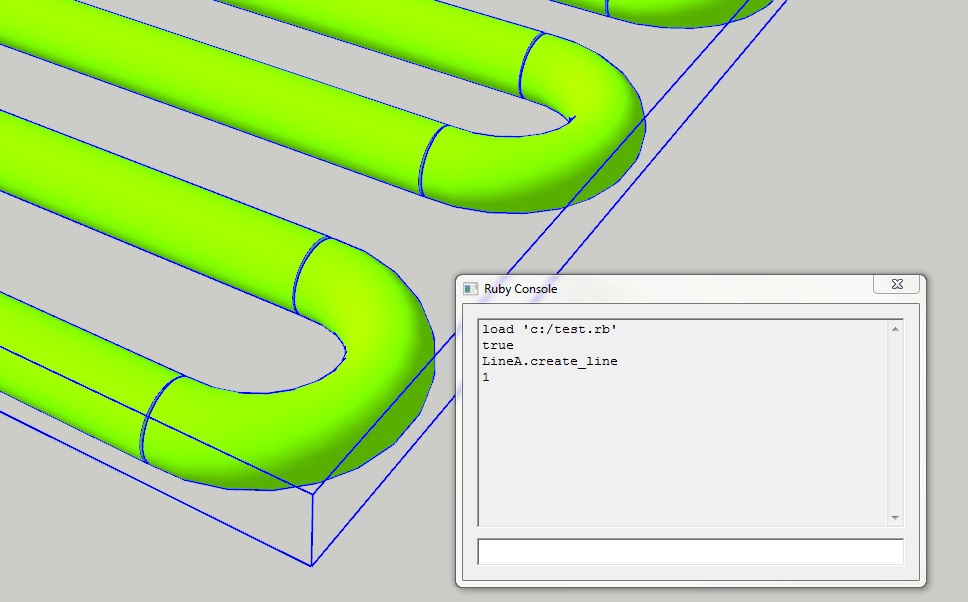
Sidenote - it seems that you create the profile for your shape (the circle) many times. Many small segments for what is in reality one single tube. As you can see- you end up with gaps where the straight sides meets the arced corners.
You would avoid that by making the tube as you would in SU. Making one single path, and one profile - then using follow me only once for the whole shape.
Should make a cleaner geometry, be faster and simplify the code.
-
Oh yea - as Dan suggested with his code. several operations should be wrapped in
.start_operation-.commit_operationso it produces only one undo step. And if you use thedisable_uiargument it should run faster. -
@thomthom said:
I tried the code you posted initially. I get no crash. I did however leave out
LineA.create_lineso that it would not execute when SU loaded.Yea, it's dangerous to do stuff during SU load, as all the Google extensions are not yet loaded like Dynamic Components.
-
maybe a wait timer like this is safer...
# run when file loads # if Sketchup.active_model && Sketchup.active_model.active_entities UI.start_timer(0.0, false){ LineA.create_line } else LineA;;TIMER = UI.start_timer(2.0, true){ if Sketchup.active_model && Sketchup.active_model.active_entities UI.stop_timer(LineA;;TIMER) LineA.create_line end #if } end -
@Dan: Thank you. Now my code looks like:
require 'sketchup.rb'

module Chris88

  module LineA

    TIMER = nil

    def self.create_line()
      # delete lines 1-4 with loop
      #
       model = Sketchup.active_model
       entities = model.active_entities
#--------------------------------------------------------------------------
       # Add the group to the entities in the model
       group = entities.add_group
       # Get the entities within the group
       # alle Objekte die den entities2 zugeordnet werden, werden automatisch zu einer gemeinsamen Gruppe gemacht
       entities2 = group.entities

      begin
        model.start_operation( 'LineA' )

        @width_small = 55 # 55
        @depth_small = 45 # 45
        @height_small = 30 # 30
        @width_big = 70 # 70
        @depth_big = 60 # 60
        @height_big = 70 # 40

        @height_line = (4/3) * @height_small
        @radius = 1
        @arcradius = 3
#--------------------------------------------------------------------------
        @mat_linie=model.materials.add("Material_Linie")
        @mat_linie.color=Sketchup;;Color.new(124,252,0)  # => LawnGreen
#--------------------------------------------------------------------------
        @anzahl_arcs = ((@depth_small-6)/6).to_i

        @pts =[]
        @helpvar_depth = 3
        @helpvar_pts = 1
        @helpvar_baseline = 1
        @helpvar_basearc = 1
#--------------------------------------------------------------------------
       1.upto(@anzahl_arcs) do |x|
        @helpvar2_pts = @helpvar_pts +1
#--------------------------------------------------------------------------
       if (x%2 > 0)
        @pts[@helpvar_pts] = [((@width_big-@width_small)/2)+5.35, ((@depth_big-@depth_small)/2)+@helpvar_depth, @height_line]
        @pts[@helpvar_pts+1] = [@width_small+((@width_big-@width_small)/2)-5.3, ((@depth_big-@depth_small)/2)+@helpvar_depth, @height_line]
        # arc_point
        @pts[@helpvar_pts+2] = [@width_small+((@width_big-@width_small)/2)-5, ((@depth_big-@depth_small)/2)+(@helpvar_depth+3), @height_line]

        arc_circle_odd = entities2.add_circle @pts[@helpvar_pts+1], X_AXIS, @radius, 42
        arc_circle_face_odd = entities2.add_face arc_circle_odd
        arc_circle_face_odd.material = @mat_linie
        arc_circle_face_odd.back_material = @mat_linie

        line_circle_odd = entities2.add_circle @pts[@helpvar_pts], X_AXIS, @radius, 42
        line_circle_face_odd = entities2.add_face line_circle_odd
        line_circle_face_odd.material = @mat_linie
        line_circle_face_odd.back_material = @mat_linie

        @helpvar_baseline_odd = entities2.add_line @pts[@helpvar_pts], @pts[@helpvar_pts+1]

        @helpvar_basearc_odd = entities2.add_arc @pts[@helpvar_pts+2],[0,-1,0],[0,0,1],@arcradius,-5.degrees,185.degrees

        arc_circle_face_odd.followme @helpvar_basearc_odd
        line_circle_face_odd.followme @helpvar_baseline_odd

#--------------------------------------------------------------------------
      elsif (x%2 == 0)
        @pts[@helpvar2_pts-1] = [((@width_big-@width_small)/2)+5.3, ((@depth_big-@depth_small)/2)+@helpvar_depth, @height_line]
        @pts[@helpvar2_pts] = [@width_small+((@width_big-@width_small)/2)-5.35, ((@depth_big-@depth_small)/2)+@helpvar_depth, @height_line]
        # arc_point
        @pts[@helpvar2_pts+1] = [((@width_big-@width_small)/2)+5, ((@depth_big-@depth_small)/2)+(@helpvar_depth+3), @height_line]

        arc_circle_even = entities2.add_circle @pts[@helpvar2_pts-1], X_AXIS, @radius, 42
        arc_circle_face_even = entities2.add_face arc_circle_even
        arc_circle_face_even.material = @mat_linie
        arc_circle_face_even.back_material = @mat_linie

        line_circle_even = entities2.add_circle @pts[@helpvar2_pts], X_AXIS, @radius, 42
        line_circle_face_even = entities2.add_face line_circle_even
        line_circle_face_even.material = @mat_linie
        line_circle_face_even.back_material = @mat_linie

        @helpvar_baseline_even = entities2.add_line @pts[@helpvar2_pts], @pts[@helpvar2_pts-1]

        @helpvar_basearc_even = entities2.add_arc @pts[@helpvar2_pts+1],[0,1,0],[0,0,1],@arcradius,-5.degrees,185.degrees

        arc_circle_face_even.followme @helpvar_basearc_even
        line_circle_face_even.followme @helpvar_baseline_even

      end # if
#--------------------------------------------------------------------------
      if (x == @anzahl_arcs)
        @pts[@helpvar_pts] = [((@width_big-@width_small)/2)+5.35, ((@depth_big-@depth_small)/2)+(@helpvar_depth+6), @height_line]
        @pts[@helpvar_pts+1] = [@width_small+((@width_big-@width_small)/2)-5, ((@depth_big-@depth_small)/2)+(@helpvar_depth+6), @height_line]

        @helpvar_baseline_ende = entities2.add_line @pts[@helpvar_pts], @pts[@helpvar_pts+1]

        line_circle_odd = entities2.add_circle @pts[@helpvar_pts], X_AXIS, @radius, 42
        line_circle_face_odd = entities2.add_face line_circle_odd
        line_circle_face_odd.material = @mat_linie
        line_circle_face_odd.back_material = @mat_linie

        line_circle_face_odd.followme @helpvar_baseline_ende

      end # if
#--------------------------------------------------------------------------
      @helpvar_depth = @helpvar_depth + 6
      @helpvar_pts = @helpvar_pts + 3
#--------------------------------------------------------------------------
    end # upto - do

#--------------------------------------------------------------------------
      rescue => e
        model.abort_operation
        puts("#{Module.nesting[0].name} Error #<#{e.class.name}; #{e.message}>")
        puts(e.backtrace)
      else
        model.commit_operation
      end
    end # def

  end # module LineA


  # run when file loads
  #
  if Sketchup.active_model &&
  Sketchup.active_model.active_entities
    LineA.create_line
  else
    LineA;;TIMER = UI.start_timer(2.0, true){
      if Sketchup.active_model &&
      Sketchup.active_model.active_entities
        UI.stop_timer(LineA;;TIMER)
        LineA.create_line
      end #if
    }
  end

end # module Chris88
Is this what do you mean?
However it doesn't solve the bug.@thomthom: Thanks, that could help me. I know this, what you wrote in your sidenode, but it didn't work: When i draw a circle and a path, which starts at the central point of the cricle, Sketchup draw only the lines, but not the curves. This is why i decided alternatively to draw the lines and the curves seperately. Do you think the gaps could be the reason for the bug?
-
Dan, i have to correct myself: It works, when i load the script from the Ruby Console = step forward!
 [Edit:] i just noticed, this is what thomthom meant.
  [/Edit]
But it doesn't work yet, when i want to load the script from the plugin-folder by starting SU normally and the script is located in the plugin-folder. -
@chris88 said:
Do you think the gaps could be the reason for the bug?
Don't think so. Just a sidenote. It is possible to create that shape in one operation.



Hello! It looks like you're interested in this conversation, but you don't have an account yet.
Getting fed up of having to scroll through the same posts each visit? When you register for an account, you'll always come back to exactly where you were before, and choose to be notified of new replies (either via email, or push notification). You'll also be able to save bookmarks and upvote posts to show your appreciation to other community members.
With your input, this post could be even better 💗
Register Login


Advertisement