sketchucation logo sketchucation
    • 登入
    Oops, your profile's looking a bit empty! To help us tailor your experience, please fill in key details like your SketchUp version, skill level, operating system, and more. Update and save your info on your profile page today!
    🔌 Smart Spline | Fluid way to handle splines for furniture design and complex structures. Download

    [Plugin] Slicer5

    已排程 已置頂 已鎖定 已移動 Plugins
    336 貼文 82 Posters 321.1k 瀏覽 81 Watching
    正在載入更多貼文
    • 從舊到新
    • 從新到舊
    • 最多點贊
    回覆
    • 在新貼文中回覆
    登入後回覆
    此主題已被刪除。只有擁有主題管理權限的使用者可以查看。
    • A 離線
      Ahmed0007
      最後由 編輯

      favicon

      (streamable.com)

      1 條回覆 最後回覆 回覆 引用 0
      • TIGT 離線
        TIG Moderator
        最後由 編輯

        Thank you.
        Now I see your issue.

        I'll investigate further...

        TIG

        1 條回覆 最後回覆 回覆 引用 0
        • A 離線
          Ahmed0007
          最後由 編輯

          Thank you for your Time.
          i also noticed another issue
          Bug Splat when i try to export dxf with 2d text References
          (without text it's works fine and fast)

          1 條回覆 最後回覆 回覆 引用 0
          • TIGT 離線
            TIG Moderator
            最後由 編輯

            I think I've fixed the issue with the 'Add-Slot' tool failures...
            Here's v6.0...
            https://sketchucation.com/pluginstore?pln=TIG_Slicer

            Note that you can still only use this tool once on any 'un-slotted' set of parts...

            TIG

            1 條回覆 最後回覆 回覆 引用 0
            • A 離線
              Ahmed0007
              最後由 編輯

              😮 😲 Amazing Thank you soooooo Much.

              1 條回覆 最後回覆 回覆 引用 0
              • M 離線
                max444
                最後由 編輯

                Hey TIG, awesome plugin here. I'm pretty new to sketchup but I decided it was what I needed to do what I'm trying to do so I'm working through it well. Quick question - I got my model sliced and ready but I'm having issues with the PNG export. It seems to save the background only, regardless of what setting I'm using to view the slices. I've tried wireframe and shaded ect. not sure what I'm missing here? Thanks again!

                1 條回覆 最後回覆 回覆 引用 0
                • B 離線
                  boramille
                  最後由 編輯

                  After It finished sliding, I can not see my object and everything in the file. Can anyone tell me how to get my object back?

                  1 條回覆 最後回覆 回覆 引用 0
                  • TIGT 離線
                    TIG Moderator
                    最後由 編輯

                    Run it with the Ruby Panel open and report error messages, if any...

                    Assuming that it has worked - use the Layers-Panel to switch your layers’ visibility on/off - the original object that you chose to slice is reassigned to layer “SLCR-HIDN”, which is then ‘hidden’, so you can see the results clearly…

                    Other layers used by the various slices also have names that start “SLCR-…”, so you can also toggle these on/off as needed…

                    TIG

                    1 條回覆 最後回覆 回覆 引用 0
                    • Dave RD 離線
                      Dave R
                      最後由 編輯

                      You might also try Zoom Extents.

                      Etaoin Shrdlu

                      %

                      (THERE'S NO PLACE LIKE)

                      G28 X0.0 Y0.0 Z0.0

                      M30

                      %

                      1 條回覆 最後回覆 回覆 引用 0
                      • B 離線
                        boramille
                        最後由 編輯

                        @tig said:

                        Run it with the Ruby Panel open and report error messages, if any...

                        Assuming that it has worked - use the Layers-Panel to switch your layers’ visibility on/off - the original object that you chose to slice is reassigned to layer “SLCR-HIDN”, which is then ‘hidden’, so you can see the results clearly…

                        Other layers used by the various slices also have names that start “SLCR-…”, so you can also toggle these on/off as needed…

                        It is still not appear when I already switch the visibility on.

                        1 條回覆 最後回覆 回覆 引用 0
                        • TIGT 離線
                          TIG Moderator
                          最後由 編輯

                          Please re-post, attaching the SKP files, 1 before your slice it and 2 after you slice it.
                          So we can look at the possibilities...

                          TIG

                          1 條回覆 最後回覆 回覆 引用 0
                          • A 離線
                            alexakaczor
                            最後由 編輯

                            Is it possible to get this for sketchup 2019?

                            1 條回覆 最後回覆 回覆 引用 0
                            • Dave RD 離線
                              Dave R
                              最後由 編輯

                              @alexakaczor said:

                              Is it possible to get this for sketchup 2019?

                              Yes. It already is compatible with SU2019. Right here: https://sketchucation.com/pluginstore?pln=TIG_Slicer

                              Install the Sketchucation Extension Store tool and let it install Slicer and other extensions for you directly.

                              Etaoin Shrdlu

                              %

                              (THERE'S NO PLACE LIKE)

                              G28 X0.0 Y0.0 Z0.0

                              M30

                              %

                              1 條回覆 最後回覆 回覆 引用 0
                              • A 離線
                                alexakaczor
                                最後由 編輯

                                Is it possible to get this updated to be compatible with SKP 2019?? Thanks!

                                1 條回覆 最後回覆 回覆 引用 0
                                • Dave RD 離線
                                  Dave R
                                  最後由 編輯

                                  @alexakaczor said:

                                  Is it possible to get this updated to be compatible with SKP 2019?? Thanks!

                                  It already is compatible with SU2019. I just made an example in SU2019 to show you.
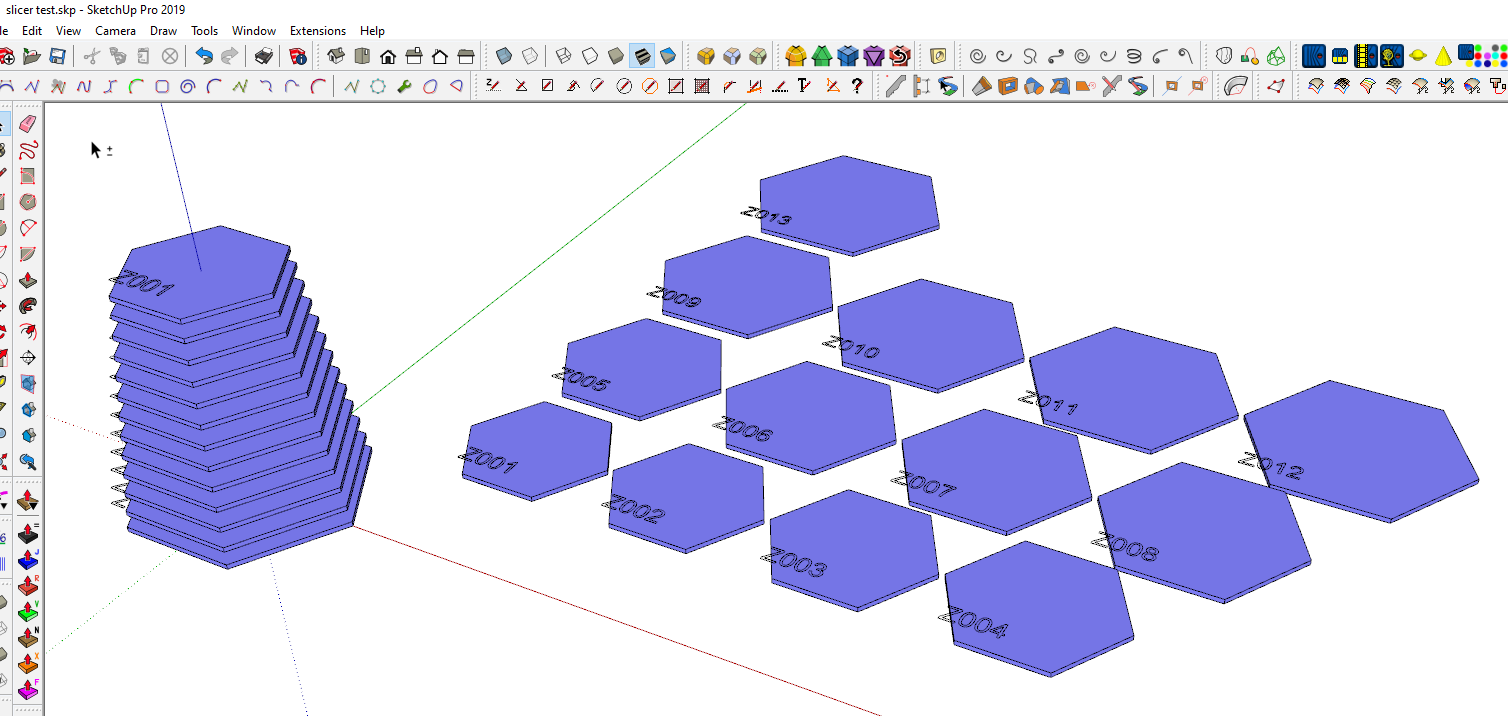
                                  Screenshot - 10_14_2019 , 6_11_58 AM.png

                                  Etaoin Shrdlu

                                  %

                                  (THERE'S NO PLACE LIKE)

                                  G28 X0.0 Y0.0 Z0.0

                                  M30

                                  %

                                  1 條回覆 最後回覆 回覆 引用 0
                                  • N 離線
                                    Nudornn
                                    最後由 編輯

                                    thxxxxxxxxxxx

                                    1 條回覆 最後回覆 回覆 引用 0
                                    • K 離線
                                      kulibin
                                      最後由 編輯

                                      Hi!
                                      Can you add dogbones
                                      like this https://fablab.ruc.dk/more-elegant-cnc-dogbones/
                                      and chamfer cut for start of joint?
                                      💚

                                      1 條回覆 最後回覆 回覆 引用 0
                                      • M 離線
                                        misterdee
                                        最後由 編輯

                                        Hello TIG

                                        Great PlugIn, thank you very much!

                                        However, when I slice with it, arcs are converted to edges and the sliced shape loses the nice curves.

                                        Is there any way to prevent this?

                                        Or an easy way to iron this out afterwards?

                                        Thanks in advance

                                        Best regards

                                        misterdee

                                        1 條回覆 最後回覆 回覆 引用 0
                                        • Dave RD 離線
                                          Dave R
                                          最後由 編輯

                                          @misterdee said:

                                          However, when I slice with it, arcs are converted to edges and the sliced shape loses the nice curves.

                                          Can you share an example .skp file that shows what you are seeing?

                                          What version of SketchUp are you actually using? Your profile says 2018 Free/Make but there is no such version.

                                          Etaoin Shrdlu

                                          %

                                          (THERE'S NO PLACE LIKE)

                                          G28 X0.0 Y0.0 Z0.0

                                          M30

                                          %

                                          1 條回覆 最後回覆 回覆 引用 0
                                          • TIGT 離線
                                            TIG Moderator
                                            最後由 編輯

                                            The slice is by its very nature a cut through a 3d-object.
                                            It ignores any 'curves' that might result and substitutes a segmented solution.
                                            If the surface you are cutting is for example a cylinder with 24 facets from its original circle the cut geometry will have 24 segments.
                                            So if you are cutting objects where you have control of their 'faceted-ness' from an early stage, then a cylinder with 72 facets will obviously result in a smoother slice...


                                            TIG

                                            1 條回覆 最後回覆 回覆 引用 0
                                            • 1
                                            • 2
                                            • 13
                                            • 14
                                            • 15
                                            • 16
                                            • 17
                                            • 15 / 17
                                            • 第一個貼文
                                              最後的貼文
                                            Buy SketchPlus
                                            Buy SUbD
                                            Buy WrapR
                                            Buy eBook
                                            Buy Modelur
                                            Buy Vertex Tools
                                            Buy SketchCuisine
                                            Buy FormFonts

                                            Advertisement