Shape bender problem
-
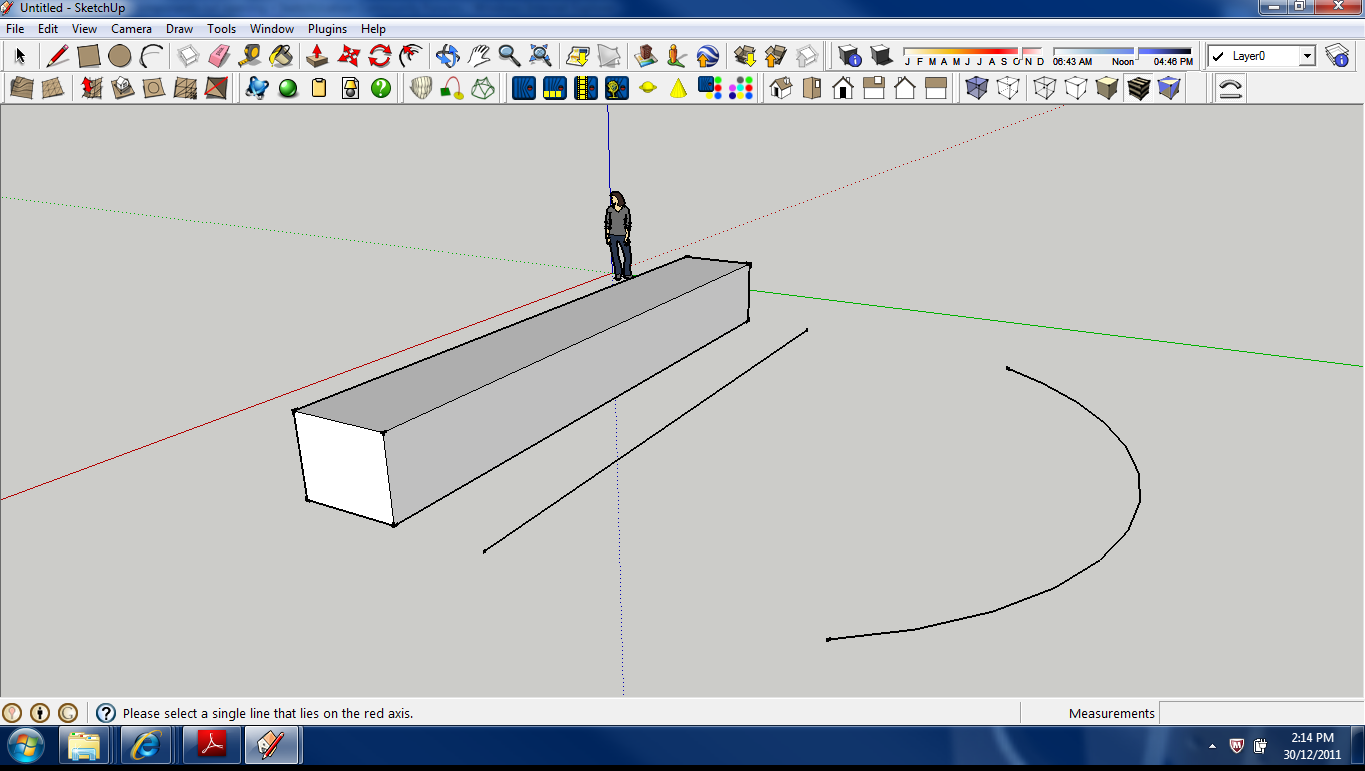
Hi All I installed "shape bender" and the associated "progress bar" plugin. Both of these were put into the SU plugin folder. No problem, found the Shape blender toolbar and it is now an addition to my normal toolbar. I have read a number of tutorials, so i make the item (and group it) i wish to bend, then it says select the item i wish to bend, it deselects the group and says to select the line on the red axis, but it will not select the line i click on, and I cannot progress any further. I have checked the progress bar is in my plugins folder but does not show in my SU plugins drop down, should it?
I have attached a screen shot with the line i attempt to activate bettween the object and the curve .
Please note command line.Sorry to be so long winded
Cheers

-
Hi, steved:
Perhaps bring up the ruby console interface and run the plugin again. Any errors in the plugin will be shown in the text. Post the results. This will give someone the information to suggest the fix.
Best Wishes. -
Two things,
make sure the line isn't part of the group
and move the mouse over the line until it highlights, I find it isn't always exactly where the cursor thinks it is. -
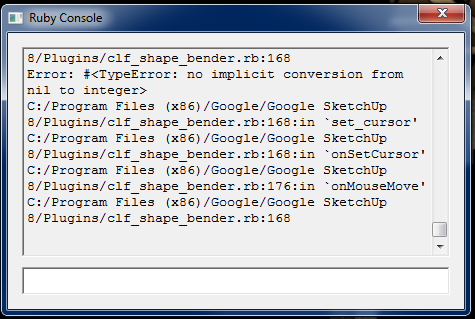
Hi I have attached the ruby script text image. I am trying to activate the straigt line on the red axis but I can do this till the cows come home to no avail.
I assume it is normal for the ruby script to scroll like crazy when I use the mouse.
I reiterate that I have not seen the "progress bar" plugin however it does exist in my SU plugin folder. But does not show in my plugin dropdown when i am in SU.
Thanks Guys
-
Hi.
You keep mentioning the uncertainty about the progressbar.rb Have you tried reinstalling it? -
I have reinstalled "progress bar" shut down SU opened it and no change. I guess one question I am asking is: Should the "progress bar" appear in the SU plugins drop menu? at least if I know that I can start narrowing it down.
Thanks
-
No, it should not. It just runs in the background. And the error message should give some clue if that were the issue.
-
Thanks, I am not getting an error though it simply will not let me select the straight line and thats as far as it goes
Thanks
-
Well, there is an error message in the ruby console. I cannot interpret it however...
-
The error is telling you that it can't find files needed to make cursors etc...
Therefore it fails.
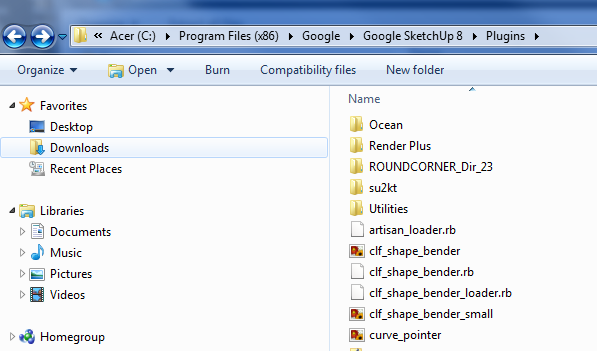
As well as the separately got/installedprogressbar.rb... your installation in the Plugins folder should look like this: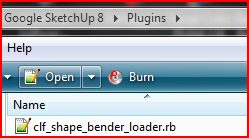 and the subfolder like this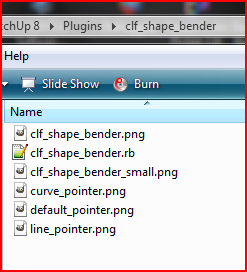
Are all of the required files in the subfolder ?
If so then are you sure you have full-access permission to that folder and that you have installed the files/subfolder properly - e.g. is there a 'Compatibility Files' button on the top bar of the Plugins folder window ? If so Vista might have protected you from yourself and although it lets you think files were installed it's put them into a 'side-folder'... move them back and ensure you have full-rights to the Plugins/Components/Materials/Styles folders... [right-click each folder's icon > properties > security...] -
Incidentally if you have not installed files/subfolder in the standard Plugins folder, but have added another folder to the $LOAD_PATH then the main .rb will load from the subfolder because the 'loader' .rb looks directly at the subfolder from wherever it is based... but then you need to adjust the lines of code in the main .rb file thus:
def make_cursors
	line_cursor_path = Sketchup.find_support_file("line_pointer.png", "Plugins/clf_shape_bender")
	curve_cursor_path = Sketchup.find_support_file("curve_pointer.png", "Plugins/clf_shape_bender")
	default_cursor_path = Sketchup.find_support_file("default_pointer.png", "Plugins/clf_shape_bender")
which expect a standard Plugins folder location... becomes
def make_cursors
	line_cursor_path = File.join(File.dirname(__FILE__), "line_pointer.png")
	curve_cursor_path = File.join(File.dirname(__FILE__), "curve_pointer.png")
	default_cursor_path = File.join(File.dirname(__FILE__), "default_pointer.png")
which will work in any setup provided those png files are in the same folder as the main .rb file...
-
@tig said:
Incidentally if you have not installed files/subfolder in the standard Plugins folder, but have added another folder to the $LOAD_PATH then the main .rb will load from the subfolder because the 'loader' .rb looks directly at the subfolder from wherever it is based... but then you need to adjust the lines of code in the main .rb file thus:
def make_cursors
> 	line_cursor_path = Sketchup.find_support_file("line_pointer.png", "Plugins/clf_shape_bender")
> 	curve_cursor_path = Sketchup.find_support_file("curve_pointer.png", "Plugins/clf_shape_bender")
> 	default_cursor_path = Sketchup.find_support_file("default_pointer.png", "Plugins/clf_shape_bender")
>
which expect a standard Plugins folder location... becomes
def make_cursors
> 	line_cursor_path = File.join(File.dirname(__FILE__), "line_pointer.png")
> 	curve_cursor_path = File.join(File.dirname(__FILE__), "curve_pointer.png")
> 	default_cursor_path = File.join(File.dirname(__FILE__), "default_pointer.png")
>
which will work in any setup provided those png files are in the same folder as the main .rb file...
Thanks Tig, but I tried real hard to understand what you said but most of it went over my head.
Have attached an image of what the files look like. I have a few plugins, never had an issue before.Thanks
-
OK - you have the dreaded "Compatibility Files" 'button' in the strap-line on top of the Window for the Plugins folder.
This suggests you have insufficient permissions to add files/subfolders into Plugins and Vista is protecting you from yourself.
Click on that 'button' and see what's NOT been installed...
It's an annoying Vista feature as it gives little indication that things didn't go as you hoped.I suggest you select the Plugins folder icon, right-click > properties > security and give yourself full permissions to the folder [repeat for other folders you might want to work in like Components/Materials/Styles]...
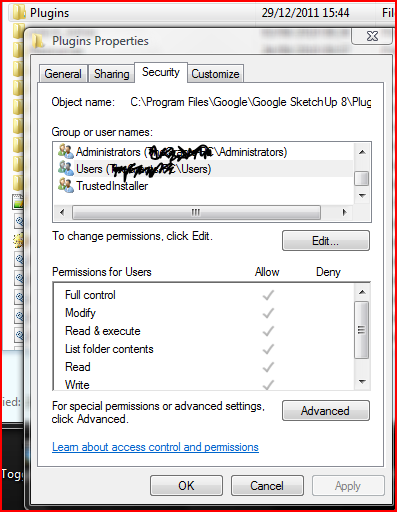
I assume that the 'clf_shape_bender' icon that I can see inside Plugins is the zip file and not the required folder ?
Why not adjust 'folder-options' to show all file-extensions - it makes life much easier if you don't use 'details' view for folders...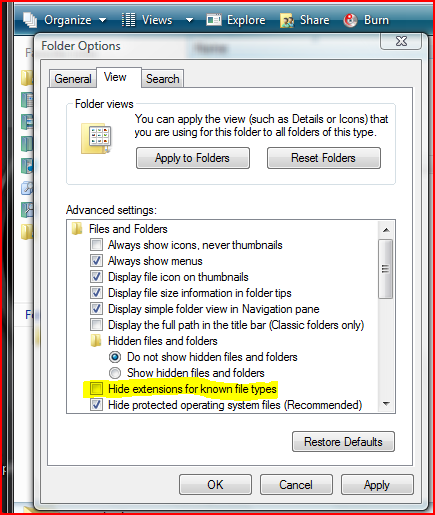
-
Thanks Tig, very much appreciated!




Hello! It looks like you're interested in this conversation, but you don't have an account yet.
Getting fed up of having to scroll through the same posts each visit? When you register for an account, you'll always come back to exactly where you were before, and choose to be notified of new replies (either via email, or push notification). You'll also be able to save bookmarks and upvote posts to show your appreciation to other community members.
With your input, this post could be even better 💗
Register Login


Advertisement