sketchucation logo sketchucation
    • 登入
    Oops, your profile's looking a bit empty! To help us tailor your experience, please fill in key details like your SketchUp version, skill level, operating system, and more. Update and save your info on your profile page today!
    🔌 Smart Spline | Fluid way to handle splines for furniture design and complex structures. Download

    [Plugin] FredoTools - v4.5c - 24 Jun 24


    已排程 已置頂 已鎖定 已移動 Plugins
    463 貼文 123 Posters 710.8k 瀏覽 121 Watching
    正在載入更多貼文
    • 從舊到新
    • 從新到舊
    • 最多點贊
    回覆
    • 在新貼文中回覆
    登入後回覆
    此主題已被刪除。只有擁有主題管理權限的使用者可以查看。
    • JClementsJ 離線
      JClements
      最後由 編輯

      Should this appear in your update log?
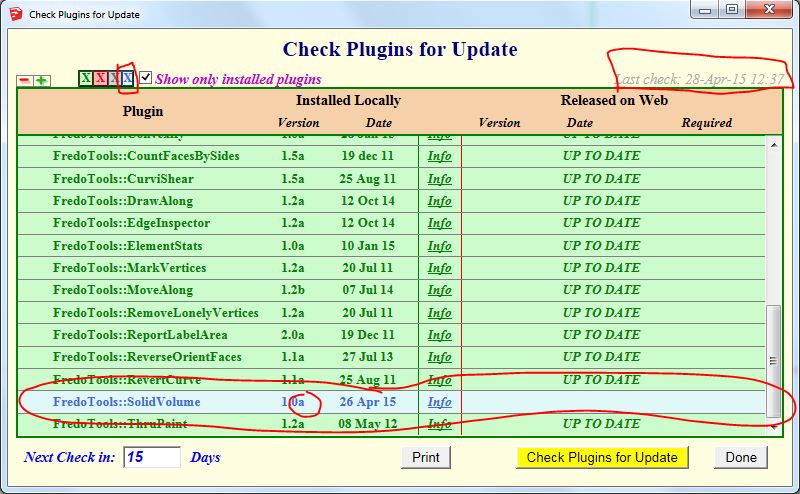
      Fredo Update Log

      John | Illustrator | Beaverton, Oregon

      1 條回覆 最後回覆 回覆 引用 0
      • fredo6F 離線
        fredo6
        最後由 編輯

        This should be OK now.

        Fredo

        1 條回覆 最後回覆 回覆 引用 0
        • JClementsJ 離線
          JClements
          最後由 編輯

          Looks to be operating properly now. Thank you.

          John | Illustrator | Beaverton, Oregon

          1 條回覆 最後回覆 回覆 引用 0
          • fredo6F 離線
            fredo6
            最後由 編輯

            NEW RELEASE: FredoTools v2.7e - 29 Apr 15

            FredoTools 2.7e is a release for FredoTools::SolidVolume v1.1d, which computes the volume and faces area of solids in the selection. This fourth version includes a fix for the correct display of the main dialog box.

            See main post of this thread for Download.

            Fredo

            1 條回覆 最後回覆 回覆 引用 0
            • P 離線
              ptma2008
              最後由 編輯

              Now it works perfect
              thank you

              1 條回覆 最後回覆 回覆 引用 0
              • A 離線
                arquimecho
                最後由 編輯

                great plugin, complete and really functional

                1 條回覆 最後回覆 回覆 引用 0
                • fredo6F 離線
                  fredo6
                  最後由 編輯

                  NEW RELEASE: FredoTools v2.8a - 09 Jul 15

                  FredoTools 2.8a is a minor release for:

                  • SolidVolume, which now accepts solids with holes
                  • ReportLabelArea, which now computes the correct area removing the space taken by the glued componentss in cut opening mode.

                  See main post of this thread for Download.

                  Fredo

                  1 條回覆 最後回覆 回覆 引用 0
                  • fredo6F 離線
                    fredo6
                    最後由 編輯

                    Warning:

                    Please upgrade to LibFredo6 6.8c if you installed FredoTools v2.8.

                    There is a bug in FredoTools::Convexify, which is fixed in LibFredo6 v6.8c.

                    Sorry for inconvenience

                    Fred

                    1 條回覆 最後回覆 回覆 引用 0
                    • pbacotP 離線
                      pbacot
                      最後由 編輯

                      Thanks Fredo!

                      MacOSX MojaveSketchUp Pro v19 Twilight v2 Thea v3 PowerCADD

                      1 條回覆 最後回覆 回覆 引用 0
                      • E 離線
                        elvirem
                        最後由 編輯

                        Hello Fredo, je viens de passer sur skp 2015. J etais sur 2008 et tout allait bien et voici ce qui m'arrive malgré pas mal de tentatives.. ça fait 15 jours que c'est comme ça... et moi SKP sans libfredo, c'est comme si on me coupait un bras...tu saurais ce que je pourrais faire pour telecharger ton plugin et qu il fonctionne ? je suis sous mac yosemite ( non de Dieu que Mavericks me manque!!!)
                        Merci de tes lumières.... si tu en as !
                        Elvirem

                        Erreur de chargement du fichier Fredo6_!LibFredo6.rb
                        Error: #<ArgumentError: invalid byte sequence in UTF-8>
                        /Users/ME/Library/Application Support/SketchUp 2015/SketchUp/Plugins/Fredo6_!LibFredo6/Lib6Core.rb:716:in match' /Users/ME/Library/Application Support/SketchUp 2015/SketchUp/Plugins/Fredo6_!LibFredo6/Lib6Core.rb:716:in block (2 levels) in load_from_config'
                        /Users/ME/Library/Application Support/SketchUp 2015/SketchUp/Plugins/Fredo6_!LibFredo6/Lib6Core.rb:715:in each' /Users/ME/Library/Application Support/SketchUp 2015/SketchUp/Plugins/Fredo6_!LibFredo6/Lib6Core.rb:715:in block in load_from_config'
                        /Users/ME/Library/Application Support/SketchUp 2015/SketchUp/Plugins/Fredo6_!LibFredo6/Lib6Core.rb:713:in foreach' /Users/ME/Library/Application Support/SketchUp 2015/SketchUp/Plugins/Fredo6_!LibFredo6/Lib6Core.rb:713:in load_from_config'
                        /Users/ME/Library/Application Support/SketchUp 2015/SketchUp/Plugins/Fredo6_!LibFredo6/Lib6Core.rb:1099:in block in load_all_plugins' /Users/ME/Library/Application Support/SketchUp 2015/SketchUp/Plugins/Fredo6_!LibFredo6/Lib6Core.rb:1099:in each'
                        /Users/ME/Library/Application Support/SketchUp 2015/SketchUp/Plugins/Fredo6_!LibFredo6/Lib6Core.rb:1099:in load_all_plugins' /Users/ME/Library/Application Support/SketchUp 2015/SketchUp/Plugins/Fredo6_!LibFredo6/Lib6Core.rb:786:in load_from_config'
                        /Users/ME/Library/Application Support/SketchUp 2015/SketchUp/Plugins/Fredo6_!LibFredo6.rb:188:in startup' /Users/ME/Library/Application Support/SketchUp 2015/SketchUp/Plugins/Fredo6_!LibFredo6.rb:338:in module:LibFredo6'
                        /Users/ME/Library/Application Support/SketchUp 2015/SketchUp/Plugins/Fredo6_!LibFredo6.rb:34:in <top (required)>' `

                        1 條回覆 最後回覆 回覆 引用 0
                        • B 離線
                          BIANI patrick
                          最後由 編輯

                          Where downloading Move along ???????

                          1 條回覆 最後回覆 回覆 引用 0
                          • cottyC 離線
                            cotty
                            最後由 編輯

                            @biani patrick said:

                            Where downloading Move along ???????

                            It's part of this collection and you can download it at the first post or with the Plugin store.

                            Make sure that you have installed LibFredo too.

                            my SketchUp gallery

                            1 條回覆 最後回覆 回覆 引用 0
                            • JClementsJ 離線
                              JClements
                              最後由 編輯

                              VOLUME Calculator.

                              I am getting a very large difference in calculated volumes between what SU displays in the Entity Info and what the volume calculator comes up with. I suspect it is due to a small sized object with many very small facets.

                              Can I send you the model to look it over?

                              Model created in SU2015, 64-bit. Windows 7.
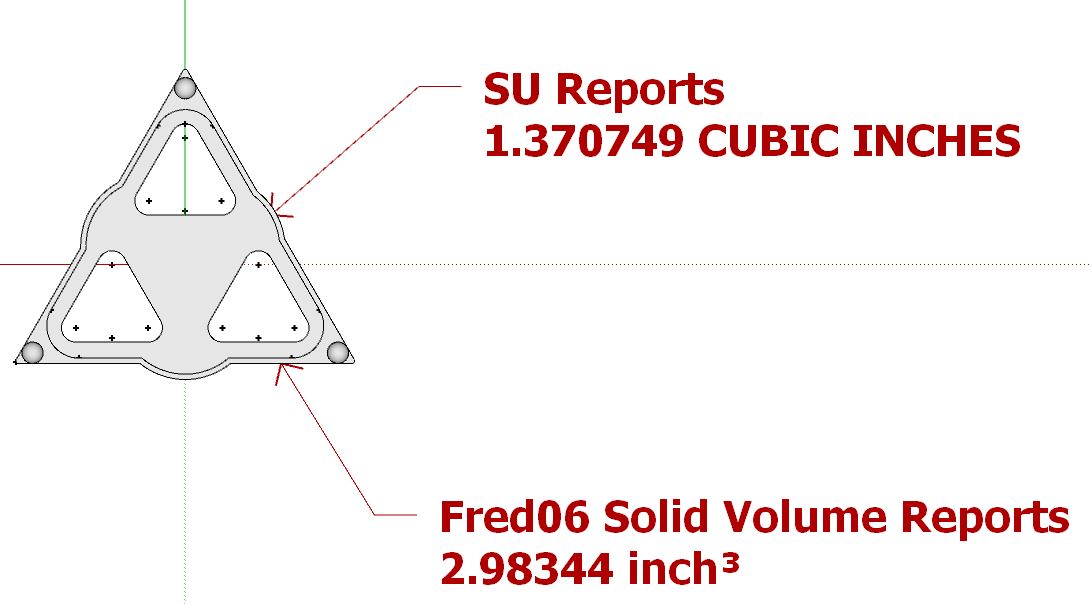

                              Pointed Thingy.JPG

                              John | Illustrator | Beaverton, Oregon

                              1 條回覆 最後回覆 回覆 引用 0
                              • fredo6F 離線
                                fredo6
                                最後由 編輯

                                Yes. Please send the model.

                                By the way, do you already know which result is the correct one?

                                Fredo

                                1 條回覆 最後回覆 回覆 引用 0
                                • JClementsJ 離線
                                  JClements
                                  最後由 編輯

                                  Please see your messages. Thanks.

                                  John | Illustrator | Beaverton, Oregon

                                  1 條回覆 最後回覆 回覆 引用 0
                                  • E 離線
                                    Elster32
                                    最後由 編輯

                                    Is it possible to increase the size of the dialog box? On my screen it is so small it is almost impossible to see the buttons! I wondered whether there was an option but because of the small size I was unable to see it? Thank you
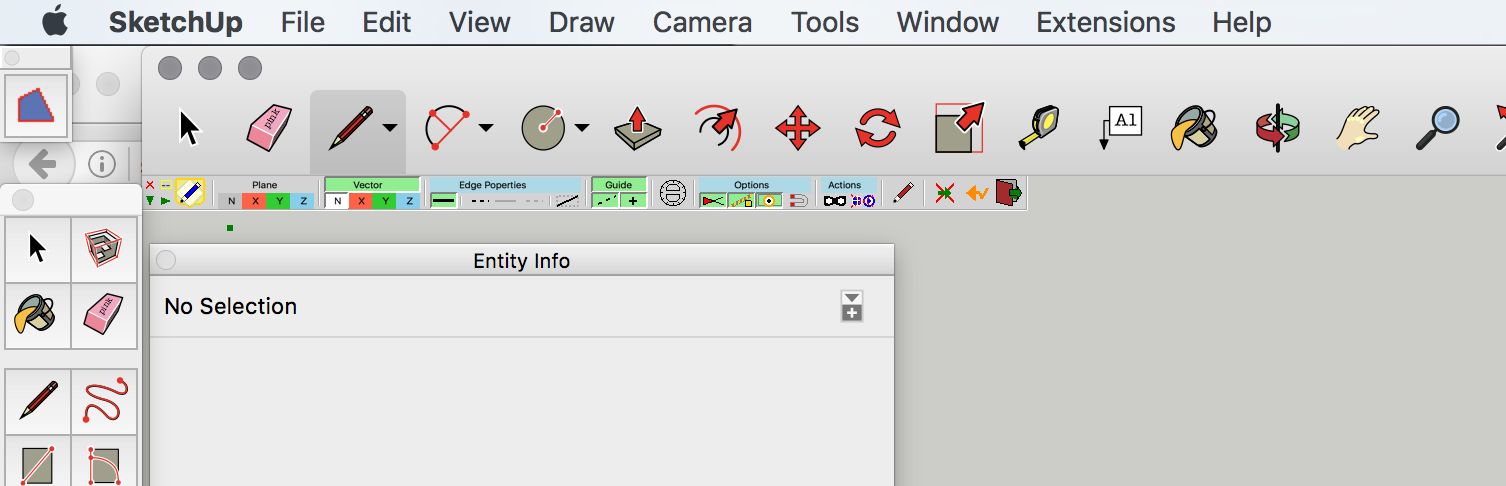

                                    Screen Shot 2016-08-15 at 17.37.32.png

                                    1 條回覆 最後回覆 回覆 引用 0
                                    • fredo6F 離線
                                      fredo6
                                      最後由 編輯

                                      NEW RELEASE: FredoTools v3.0a - 20 Oct 16

                                      FredoTools 3.0a is a release mainly related to FredoTools::ThruPaint with the introduction of a Purge feature.

                                      See main post of this thread for Download.

                                      Fredo

                                      1 條回覆 最後回覆 回覆 引用 0
                                      • fredo6F 離線
                                        fredo6
                                        最後由 編輯

                                        NEW RELEASE: FredoTools v3.0b - 31 Oct 16

                                        FredoTools 3.0b fixes a major bug bug preventing FredoTools to load properly for SU versions < 2014. So, if you run SU6, SU7, SU8 or SU2013, please upgrade to v3.0b.

                                        See main post of this thread for Download.

                                        Fredo

                                        1 條回覆 最後回覆 回覆 引用 0
                                        • S 離線
                                          SpookyChick1013
                                          最後由 編輯

                                          Hi Fredo,

                                          Thanks for continuing to update your tools.

                                          I'm having an issue with ThruPaint where I invoke the tool and it promptly does nothing. Nothing shows in the error console, it just refuses to come up.

                                          EDIT:]Woops! Mybad. There is something in the Ruby console.

                                          @unknownuser said:

                                          (eval):1: warning: already initialized constant T7

                                          Hope this helps.

                                          It was working fine for me prior to me updating things over the last two days. I'm using the latest downloads of FredoTools, and FredoLib, right out of the SU Plugin store.

                                          I have double-checked the plugin footprint, and it looks like it should look.

                                          Still on SU7.1.6860, Win7Prox64

                                          Second update.
                                          I have no idea why this worked but I unchecked Fredo Tools in the extensions, restarted and now Thrupaint is working just fine, as is everything else. The weird thing is, I did not re-enable The Fredo6 Fredo Tools extension, yet things are working fine. 😲 😕

                                          Update weirdness makes my head hurt, 😆

                                          I guess there's nothing to worry about after all.

                                          Thanks in advance,
                                          Cathryn

                                          https://kuromatsudriveyards.com

                                          Fo-su to tomo ni aran koto o...

                                          1 條回覆 最後回覆 回覆 引用 0
                                          • B 離線
                                            bharralure
                                            最後由 編輯

                                            Bonjour Fredo
                                            Puisque c'est ma journée "réclamations", après LibFredo6, je reviens avec FredoTools.
                                            Depuis un certain temps, je ne me souviens plus trop quand d'ailleurs (peut-être depuis ma migration vers Windows 10, il y a seulement quelques mois), la fenêtre qui s'affiche à l'écran après avoir lancé l'outil "Étiqueter les Surfaces" se trouve réduite en hauteur tel que montré sur la capture d'écran qui suit.
                                            Ce n'est pas un gros problème, mais dans sa taille d'origine, je suis pas obligé de jouer de l'ascenseur.

                                            2017-02-13 16_25_44-Etiquetter avec Surfaces.png

                                            1 條回覆 最後回覆 回覆 引用 0
                                            • 1
                                            • 2
                                            • 7
                                            • 8
                                            • 9
                                            • 10
                                            • 11
                                            • 23
                                            • 24
                                            • 9 / 24
                                            • 第一個貼文
                                              最後的貼文
                                            Buy SketchPlus
                                            Buy SUbD
                                            Buy WrapR
                                            Buy eBook
                                            Buy Modelur
                                            Buy Vertex Tools
                                            Buy SketchCuisine
                                            Buy FormFonts

                                            Advertisement