sketchucation logo sketchucation
    • 登入
    Oops, your profile's looking a bit empty! To help us tailor your experience, please fill in key details like your SketchUp version, skill level, operating system, and more. Update and save your info on your profile page today!
    🔌 Smart Spline | Fluid way to handle splines for furniture design and complex structures. Download

    [Plugin] FredoTools - v4.5c - 24 Jun 24


    已排程 已置頂 已鎖定 已移動 Plugins
    463 貼文 123 Posters 710.8k 瀏覽 121 Watching
    正在載入更多貼文
    • 從舊到新
    • 從新到舊
    • 最多點贊
    回覆
    • 在新貼文中回覆
    登入後回覆
    此主題已被刪除。只有擁有主題管理權限的使用者可以查看。
    • srxS 離線
      srx
      最後由 編輯

      Now it works perfect! 👍

      www.saurus.rs

      1 條回覆 最後回覆 回覆 引用 0
      • srxS 離線
        srx
        最後由 編輯

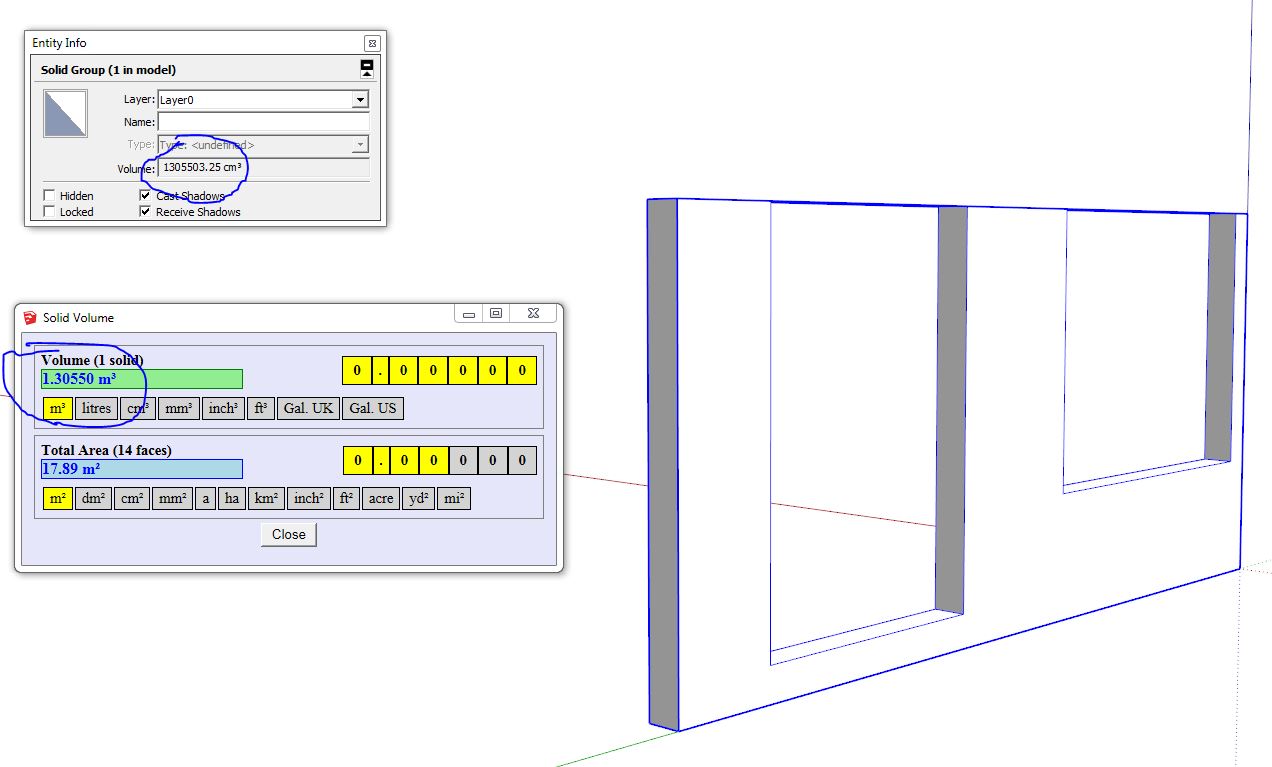
        😕 It seems not so perfect. There is a problem when dealing with small faces I guess. Here is the example. Group is a solid, lines are ortho. Geometry is OK. The only thing is there is a small misalignment between the faces. But it could be made on purpose...To fix it I just moved one of the faces to meet another and erased the line, which made volume ok.
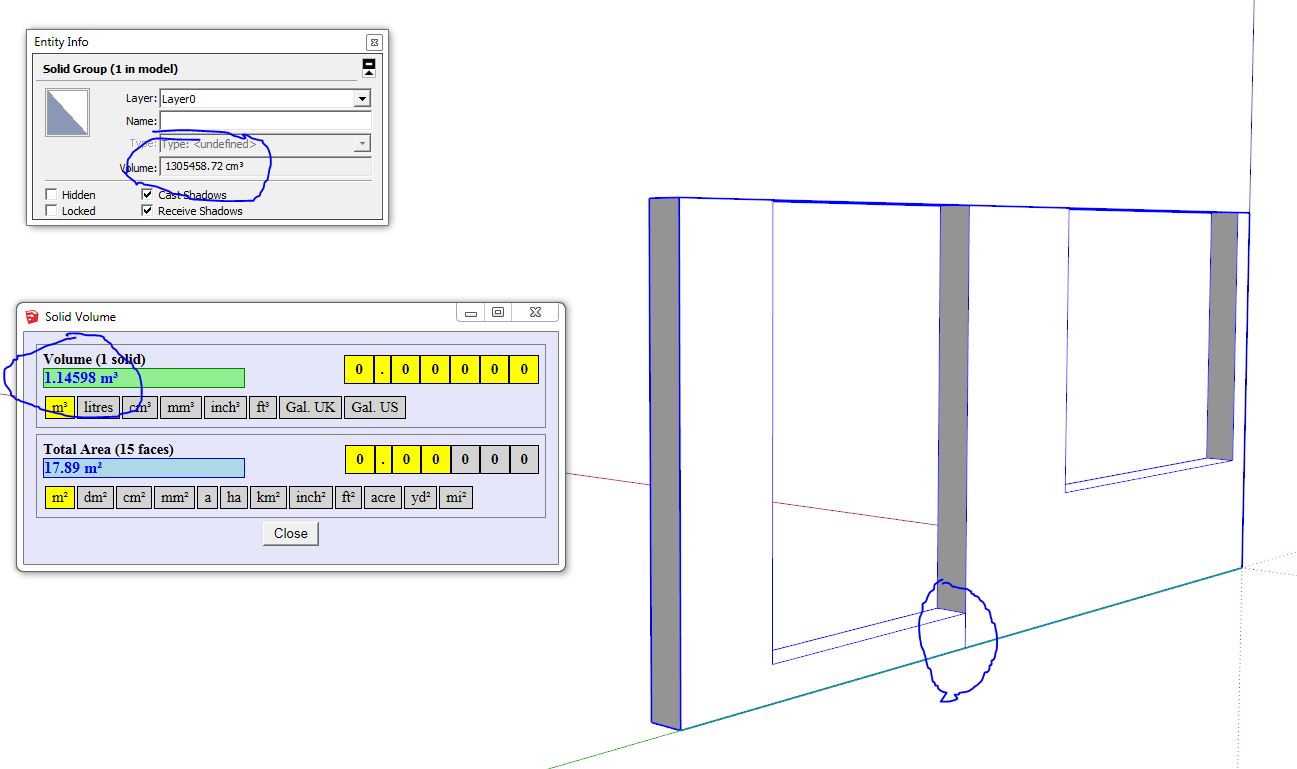
        1 Wrong volume 2.JPG


        2 Fixed small faces volume OK.JPG


        Example of wrong volume 2.skp

        www.saurus.rs

        1 條回覆 最後回覆 回覆 引用 0
        • fredo6F 離線
          fredo6
          最後由 編輯

          Thanks for signaling.
          This is actually not related to small faces.

          I will republsih soon with the fix

          Fredo

          1 條回覆 最後回覆 回覆 引用 0
          • fredo6F 離線
            fredo6
            最後由 編輯

            NEW RELEASE: FredoTools v2.7d - 28 Apr 15

            FredoTools 2.7d is a release for FredoTools::SolidVolume v1.1c, which computes the volume and faces area of solids in the selection. In this third version, the volume and areas are shown in a persistent dialog box, allowing you to change the selection and use the outliner. I also fixed bugs in the calculation of volumes.

            See main post of this thread for Download.

            Fredo

            1 條回覆 最後回覆 回覆 引用 0
            • JClementsJ 離線
              JClements
              最後由 編輯

              Should this appear in your update log?
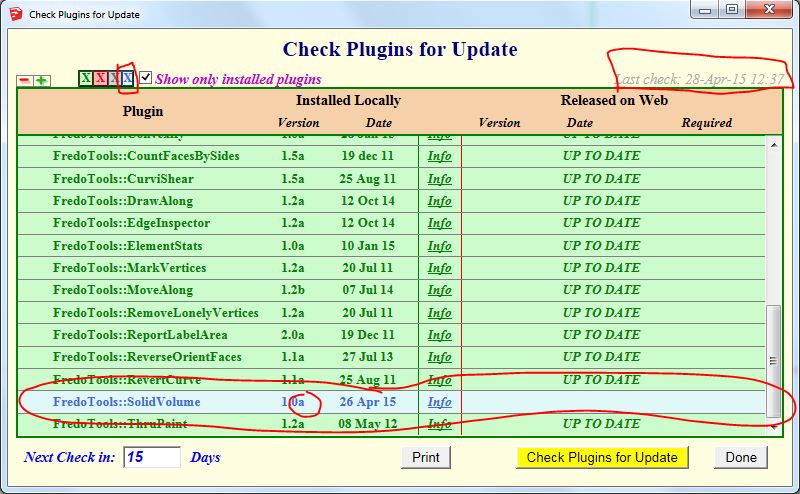
              Fredo Update Log

              John | Illustrator | Beaverton, Oregon

              1 條回覆 最後回覆 回覆 引用 0
              • fredo6F 離線
                fredo6
                最後由 編輯

                This should be OK now.

                Fredo

                1 條回覆 最後回覆 回覆 引用 0
                • JClementsJ 離線
                  JClements
                  最後由 編輯

                  Looks to be operating properly now. Thank you.

                  John | Illustrator | Beaverton, Oregon

                  1 條回覆 最後回覆 回覆 引用 0
                  • fredo6F 離線
                    fredo6
                    最後由 編輯

                    NEW RELEASE: FredoTools v2.7e - 29 Apr 15

                    FredoTools 2.7e is a release for FredoTools::SolidVolume v1.1d, which computes the volume and faces area of solids in the selection. This fourth version includes a fix for the correct display of the main dialog box.

                    See main post of this thread for Download.

                    Fredo

                    1 條回覆 最後回覆 回覆 引用 0
                    • P 離線
                      ptma2008
                      最後由 編輯

                      Now it works perfect
                      thank you

                      1 條回覆 最後回覆 回覆 引用 0
                      • A 離線
                        arquimecho
                        最後由 編輯

                        great plugin, complete and really functional

                        1 條回覆 最後回覆 回覆 引用 0
                        • fredo6F 離線
                          fredo6
                          最後由 編輯

                          NEW RELEASE: FredoTools v2.8a - 09 Jul 15

                          FredoTools 2.8a is a minor release for:

                          • SolidVolume, which now accepts solids with holes
                          • ReportLabelArea, which now computes the correct area removing the space taken by the glued componentss in cut opening mode.

                          See main post of this thread for Download.

                          Fredo

                          1 條回覆 最後回覆 回覆 引用 0
                          • fredo6F 離線
                            fredo6
                            最後由 編輯

                            Warning:

                            Please upgrade to LibFredo6 6.8c if you installed FredoTools v2.8.

                            There is a bug in FredoTools::Convexify, which is fixed in LibFredo6 v6.8c.

                            Sorry for inconvenience

                            Fred

                            1 條回覆 最後回覆 回覆 引用 0
                            • pbacotP 離線
                              pbacot
                              最後由 編輯

                              Thanks Fredo!

                              MacOSX MojaveSketchUp Pro v19 Twilight v2 Thea v3 PowerCADD

                              1 條回覆 最後回覆 回覆 引用 0
                              • E 離線
                                elvirem
                                最後由 編輯

                                Hello Fredo, je viens de passer sur skp 2015. J etais sur 2008 et tout allait bien et voici ce qui m'arrive malgré pas mal de tentatives.. ça fait 15 jours que c'est comme ça... et moi SKP sans libfredo, c'est comme si on me coupait un bras...tu saurais ce que je pourrais faire pour telecharger ton plugin et qu il fonctionne ? je suis sous mac yosemite ( non de Dieu que Mavericks me manque!!!)
                                Merci de tes lumières.... si tu en as !
                                Elvirem

                                Erreur de chargement du fichier Fredo6_!LibFredo6.rb
                                Error: #<ArgumentError: invalid byte sequence in UTF-8>
                                /Users/ME/Library/Application Support/SketchUp 2015/SketchUp/Plugins/Fredo6_!LibFredo6/Lib6Core.rb:716:in match' /Users/ME/Library/Application Support/SketchUp 2015/SketchUp/Plugins/Fredo6_!LibFredo6/Lib6Core.rb:716:in block (2 levels) in load_from_config'
                                /Users/ME/Library/Application Support/SketchUp 2015/SketchUp/Plugins/Fredo6_!LibFredo6/Lib6Core.rb:715:in each' /Users/ME/Library/Application Support/SketchUp 2015/SketchUp/Plugins/Fredo6_!LibFredo6/Lib6Core.rb:715:in block in load_from_config'
                                /Users/ME/Library/Application Support/SketchUp 2015/SketchUp/Plugins/Fredo6_!LibFredo6/Lib6Core.rb:713:in foreach' /Users/ME/Library/Application Support/SketchUp 2015/SketchUp/Plugins/Fredo6_!LibFredo6/Lib6Core.rb:713:in load_from_config'
                                /Users/ME/Library/Application Support/SketchUp 2015/SketchUp/Plugins/Fredo6_!LibFredo6/Lib6Core.rb:1099:in block in load_all_plugins' /Users/ME/Library/Application Support/SketchUp 2015/SketchUp/Plugins/Fredo6_!LibFredo6/Lib6Core.rb:1099:in each'
                                /Users/ME/Library/Application Support/SketchUp 2015/SketchUp/Plugins/Fredo6_!LibFredo6/Lib6Core.rb:1099:in load_all_plugins' /Users/ME/Library/Application Support/SketchUp 2015/SketchUp/Plugins/Fredo6_!LibFredo6/Lib6Core.rb:786:in load_from_config'
                                /Users/ME/Library/Application Support/SketchUp 2015/SketchUp/Plugins/Fredo6_!LibFredo6.rb:188:in startup' /Users/ME/Library/Application Support/SketchUp 2015/SketchUp/Plugins/Fredo6_!LibFredo6.rb:338:in module:LibFredo6'
                                /Users/ME/Library/Application Support/SketchUp 2015/SketchUp/Plugins/Fredo6_!LibFredo6.rb:34:in <top (required)>' `

                                1 條回覆 最後回覆 回覆 引用 0
                                • B 離線
                                  BIANI patrick
                                  最後由 編輯

                                  Where downloading Move along ???????

                                  1 條回覆 最後回覆 回覆 引用 0
                                  • cottyC 離線
                                    cotty
                                    最後由 編輯

                                    @biani patrick said:

                                    Where downloading Move along ???????

                                    It's part of this collection and you can download it at the first post or with the Plugin store.

                                    Make sure that you have installed LibFredo too.

                                    my SketchUp gallery

                                    1 條回覆 最後回覆 回覆 引用 0
                                    • JClementsJ 離線
                                      JClements
                                      最後由 編輯

                                      VOLUME Calculator.

                                      I am getting a very large difference in calculated volumes between what SU displays in the Entity Info and what the volume calculator comes up with. I suspect it is due to a small sized object with many very small facets.

                                      Can I send you the model to look it over?

                                      Model created in SU2015, 64-bit. Windows 7.
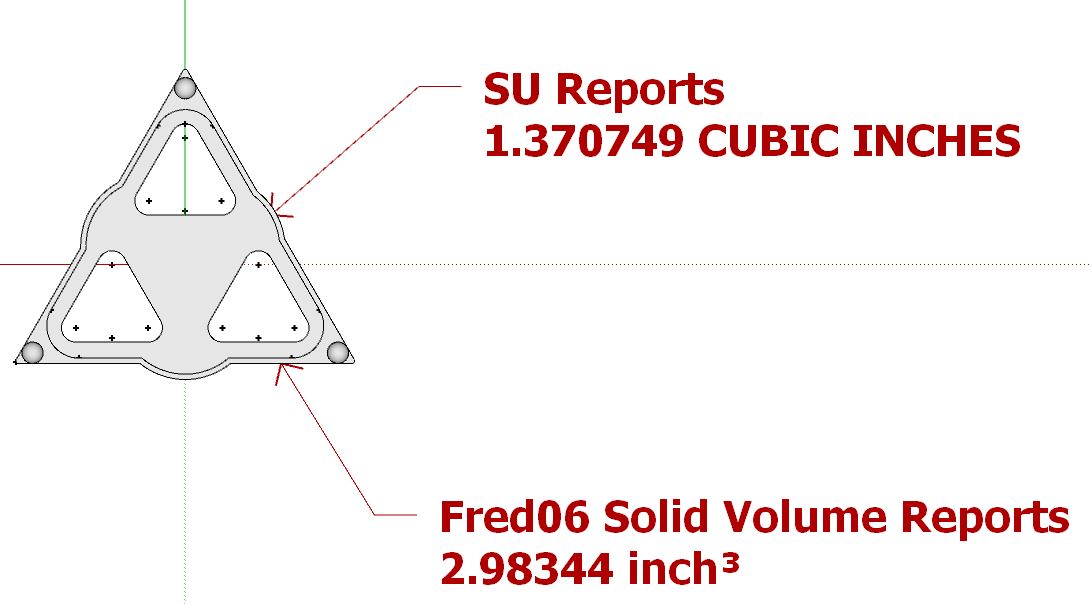

                                      Pointed Thingy.JPG

                                      John | Illustrator | Beaverton, Oregon

                                      1 條回覆 最後回覆 回覆 引用 0
                                      • fredo6F 離線
                                        fredo6
                                        最後由 編輯

                                        Yes. Please send the model.

                                        By the way, do you already know which result is the correct one?

                                        Fredo

                                        1 條回覆 最後回覆 回覆 引用 0
                                        • JClementsJ 離線
                                          JClements
                                          最後由 編輯

                                          Please see your messages. Thanks.

                                          John | Illustrator | Beaverton, Oregon

                                          1 條回覆 最後回覆 回覆 引用 0
                                          • E 離線
                                            Elster32
                                            最後由 編輯

                                            Is it possible to increase the size of the dialog box? On my screen it is so small it is almost impossible to see the buttons! I wondered whether there was an option but because of the small size I was unable to see it? Thank you
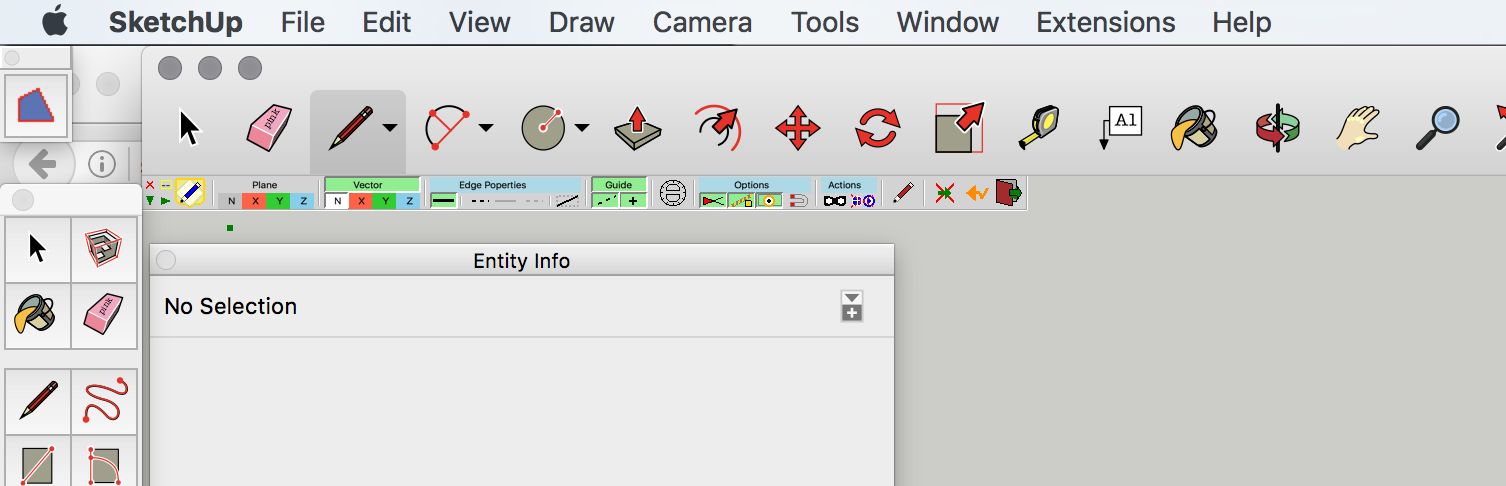


                                            Screen Shot 2016-08-15 at 17.37.32.png

                                            1 條回覆 最後回覆 回覆 引用 0
                                            • 1
                                            • 2
                                            • 3
                                            • 4
                                            • 5
                                            • 6
                                            • 7
                                            • 23
                                            • 24
                                            • 5 / 24
                                            • 第一個貼文
                                              最後的貼文
                                            Buy SketchPlus
                                            Buy SUbD
                                            Buy WrapR
                                            Buy eBook
                                            Buy Modelur
                                            Buy Vertex Tools
                                            Buy SketchCuisine
                                            Buy FormFonts

                                            Advertisement