sketchucation logo sketchucation
    • 登入
    Oops, your profile's looking a bit empty! To help us tailor your experience, please fill in key details like your SketchUp version, skill level, operating system, and more. Update and save your info on your profile page today!
    🔌 Smart Spline | Fluid way to handle splines for furniture design and complex structures. Download

    [Plugin] ShadowProjector

    已排程 已置頂 已鎖定 已移動 Plugins
    129 貼文 36 Posters 89.4k 瀏覽 36 Watching
    正在載入更多貼文
    • 從舊到新
    • 從新到舊
    • 最多點贊
    回覆
    • 在新貼文中回覆
    登入後回覆
    此主題已被刪除。只有擁有主題管理權限的使用者可以查看。
    • A 離線
      AirWindSolar
      最後由 編輯

      OK, consistent splat on this one. I can run Shadowprojector on the two at right for 12/21 09:00 and it works, but either of the left ones, which shouldn't have any shade anyway, will splat.


      VTest.skp

      1 條回覆 最後回覆 回覆 引用 0
      • TIGT 離線
        TIG Moderator
        最後由 編輯

        Of course it shouldn't splat !
        But if a face is not receiving any shadows why include it in the process ?

        If I process a face in shadow it works, a face in shadow and one NOT works but the un-shaded face gives an error in the Ruby Console [which of course it shouldn't!] - some kind of transformation error...

        If I try and process just the un-shaded face on its own I too get a splat.

        Some something is clearly adrift...

        I'm investigating...

        TIG

        1 條回覆 最後回覆 回覆 引用 0
        • A 離線
          AirWindSolar
          最後由 編輯

          @tig said:

          But if a face is not receiving any shadows why include it in the process ?

          Normally I wouldn't in a model this simple, but in something more complex, I tend to just select all the faces of interest on each run. Those faces would be shaded for the 16:00 run, so in a complex model I wouldn't be picking each one individually. I was only checking them one at a time this time because I wanted to narrow the problem down as much as possible to see if there was something goofy with my model first.

          1 條回覆 最後回覆 回覆 引用 0
          • D 離線
            driven
            最後由 編輯

            it's working on my mac...

            maybe it's because I have the % turned on...

            john

            learn from the mistakes of others, you may not live long enough to make them all yourself...

            1 條回覆 最後回覆 回覆 引用 0
            • TIGT 離線
              TIG Moderator
              最後由 編輯

              I've worked out the issue.
              It IS to do with empty groups - there's an intersection needed but if there is nothing to intersect it was splatting...
              With a % text it's NOT empty so no issues !
              Now I have it trapped and so far in retesting there's not splatting.
              I'm preparing an update.
              I'll also get it signed for v2016 full compatibility...

              TIG

              1 條回覆 最後回覆 回覆 引用 0
              • TIGT 離線
                TIG Moderator
                最後由 編輯

                Here's v5.0 http://sketchucation.com/pluginstore?pln=TIG_shadowProjector Main changes:

                • Unshaded face splat trapped.
                • Text better placed.
                • Signed for v2016 full compatibility.

                TIG

                1 條回覆 最後回覆 回覆 引用 0
                • A 離線
                  AirWindSolar
                  最後由 編輯

                  @tig said:

                  I've worked out the issue.
                  It IS to do with empty groups - there's an intersection needed but if there is nothing to intersect it was splatting...
                  With a % text it's NOT empty so no issues !
                  Now I have it trapped and so far in retesting there's not splatting.

                  That makes perfect sense now; even on the full model, it didn't splat on the first run, but after I'd exploded the shadow lines and marked the shaded areas, the remaining area was split into multiple faces, and apparently some of those were empty.

                  5.0 is working perfectly on a couple of the smaller sections. I'm tempted to test it on the full model when I have some free time.

                  1 條回覆 最後回覆 回覆 引用 0
                  • G 離線
                    gudlopez
                    最後由 編輯

                    MUCHAS GRACIAS.....

                    1 條回覆 最後回覆 回覆 引用 0
                    • N 離線
                      Newvector
                      最後由 編輯

                      Hello Friend.
                      You made a very good plugin. But I have problems in using it. I get artifacts with a shadow. Can you help me with this problem?
                      I installed this plugin in 2017

                      1 條回覆 最後回覆 回覆 引用 0
                      • TIGT 離線
                        TIG Moderator
                        最後由 編輯

                        @newvector said:

                        Hello Friend.
                        You made a very good plugin. But I have problems in using it. I get artifacts with a shadow. Can you help me with this problem?
                        I installed this plugin in 2017
                        Please explain these 'artifacts' more fully.
                        Use a screen-shot or even a small SKP example...

                        TIG

                        1 條回覆 最後回覆 回覆 引用 0
                        • N 離線
                          Newvector
                          最後由 編輯

                          Hi
                          I regret the inconvenience. That's my fault. I reduced the value of the variable 've.length' too much. This led to the appearance of artifacts. Now everything is fine, I changed this value to 0.00001.mm
                          The value chosen by you 0.25mm is not very good, it generates additional points when the scene is exporting.

                          1 條回覆 最後回覆 回覆 引用 0
                          • I 離線
                            ideas_arte
                            最後由 編輯

                            This tool is incredibly useful... thank you very much TIG! 👍

                            Do you plan to update it? I'm using it in Sketchup 2018, and it's very slow, even though the geometry is simple. 😲 Neither it is able to create the percentages.

                            Best regards!!!

                            1 條回覆 最後回覆 回覆 引用 0
                            • W 離線
                              wag1
                              最後由 編輯

                              i just want to leave my thanks
                              this helped me to get the sketch-up shadow over into autocad
                              still needed a bit trickery but still a step closer to getting all these programs closer together
                              keep on tig!

                              1 條回覆 最後回覆 回覆 引用 0
                              • E 離線
                                Einstein
                                最後由 編輯

                                Great plugin for shadow analysis!

                                If I may suggest a few improvements:

                                • ability to project shadows on grouped faces, so if you select a group with faces, shadows are also projected there and you don't have to explode groups,
                                • applying the projecton wouldn't reset the selection,
                                • make an automatic text tablel (outside the shadow face) only informing at what time of day a projection was taken.
                                1 條回覆 最後回覆 回覆 引用 0
                                • E 離線
                                  Einstein
                                  最後由 編輯

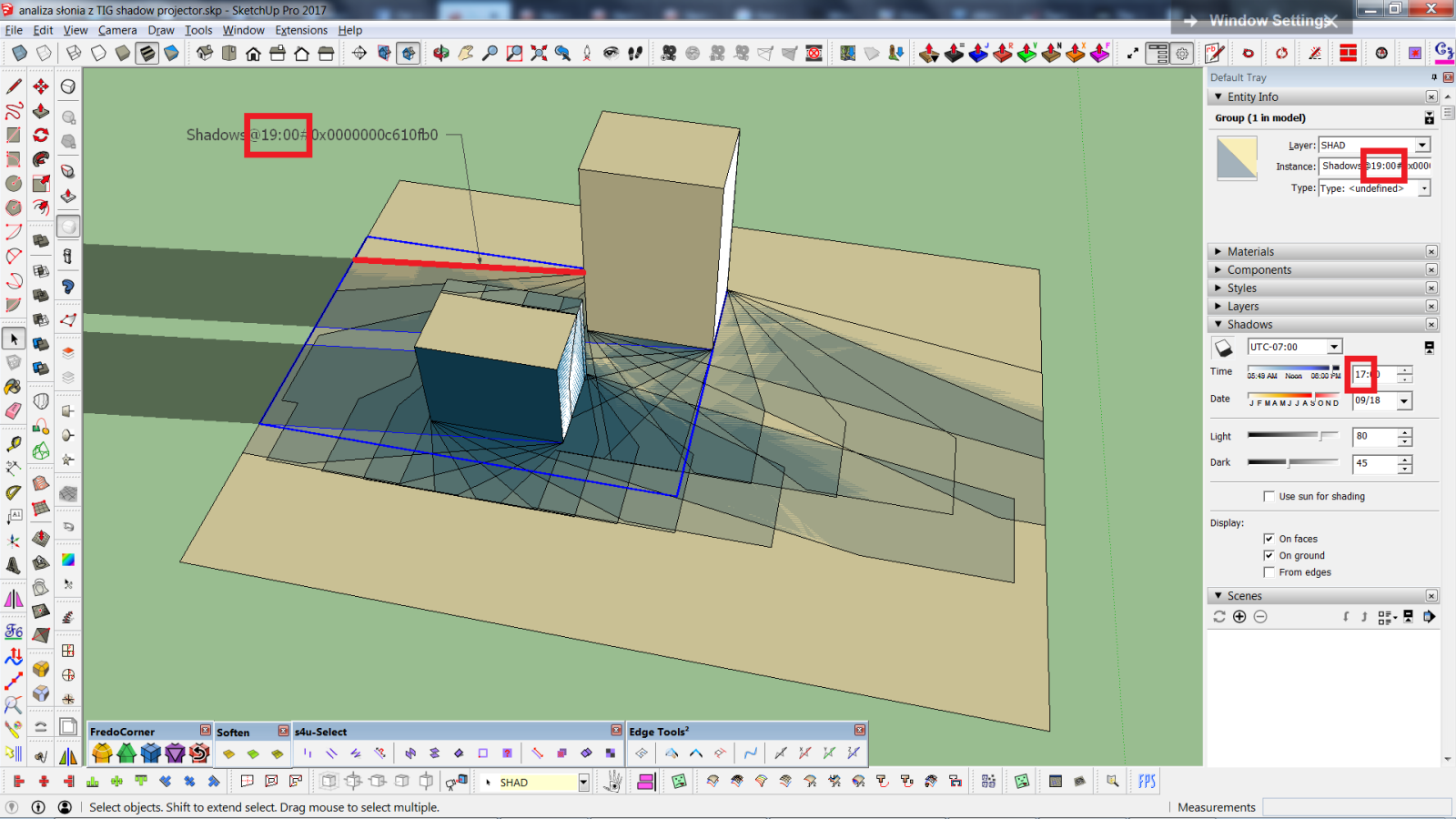
                                  I also noticed that the instance ID of a projected shadow-face shows wrong hour (the difference is always 2 hours). As in example below: I projected a shadow at 17:00 and it says 19:00.

                                  sun analysis.png


                                  analiza słonia z TIG shadow projector.skp

                                  1 條回覆 最後回覆 回覆 引用 0
                                  • TIGT 離線
                                    TIG Moderator
                                    最後由 編輯

                                    Thanks for the report on the time-stamp error.
                                    There was also an error with the % formatting in the newer SketchUps.
                                    Here's v6.0 https://sketchucation.com/pluginstore?pln=TIG_shadowProjectorI've fixed the issue with those incorrect UTC time-stamps, and the error with sprintf %. It's also been re-signed.

                                    Apparently the incorrect time-stamp from the UTC AND ignored DaylightSavings when reported by SketchUp's ShadowInfo have been known for some time. But I've only just learnt of the workaround when extracting the time from the data, which I think now fixes it...

                                    TIG

                                    1 條回覆 最後回覆 回覆 引用 0
                                    • E 離線
                                      Einstein
                                      最後由 編輯

                                      Wow, you did this faster than I could think 😮 Thanks, it's fixed!
                                      Are you perhaps going to further develop this plugin? Implementing these three points would be so cool!

                                      1 條回覆 最後回覆 回覆 引用 0
                                      • TIGT 離線
                                        TIG Moderator
                                        最後由 編輯

                                        Here's v7.0 https://sketchucation.com/pluginstore?pln=TIG_shadowProjector The original Selection is now kept on completion.
                                        The Time & Date [...@hh:mm-mo-dd] is now added to the Shadow group's name for clarity - so it's easier to find and select in the Outliner.
                                        It has been re-signed.

                                        TIG

                                        1 條回覆 最後回覆 回覆 引用 0
                                        • E 離線
                                          Einstein
                                          最後由 編輯

                                          Thank you!
                                          Would it make a lot of work to also code projecting shadows onto grouped faces when a group is selected?

                                          1 條回覆 最後回覆 回覆 引用 0
                                          • TIGT 離線
                                            TIG Moderator
                                            最後由 編輯

                                            Yes, it is much much more difficult - since the group's transformation must be accounted for when deciding the 'hits' etc.
                                            I have already looked at it briefly, but I've decided to do nothing in the immediate future, since I have other more urgent fish-to-fry...
                                            A workaround that avoids exploding a group, is [after processing any faces within the model's context] to edit that group, and then select any faces within it to process.
                                            Any objects outside of the group [in the model's context] should still cast shadows on the face[s], making the Shadow@... group[s] as normal.
                                            You can then Select any Shadow@... groups inside the group's edit [use the Outline if needed] and then use Edit>Cut; immediately exit the group-edit, and use Edit>PasteInPlace to relocate the Shadow@... group[s] into the main model's context onto the surface of the group...

                                            TIG

                                            1 條回覆 最後回覆 回覆 引用 0
                                            • 1
                                            • 2
                                            • 3
                                            • 4
                                            • 5
                                            • 6
                                            • 7
                                            • 2 / 7
                                            • 第一個貼文
                                              最後的貼文
                                            Buy SketchPlus
                                            Buy SUbD
                                            Buy WrapR
                                            Buy eBook
                                            Buy Modelur
                                            Buy Vertex Tools
                                            Buy SketchCuisine
                                            Buy FormFonts

                                            Advertisement