Cannot change V-RAY values
-
I installed a demo version of v-ray for sketchup 8. When I try to change the material parameters (for example color or transparency) the values are all set to 0.0 as default(should be 1.0 as default). I can click into the textfield but i'm not able to change the value.
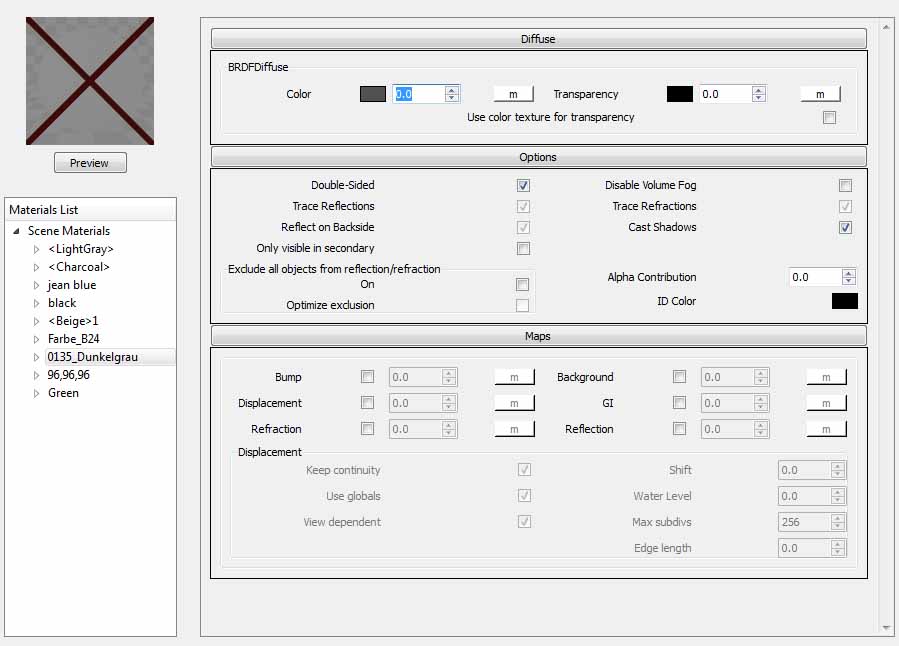
-
what version are you using, and where did you download it from?
-
im using the newest demo version of v-ray. I downloaded it from the official chaosgroup website. I think its a c++ conflict with autocad.
-
@gonzo80 said:
im using the newest demo version of v-ray.
Are you sure? Because I got a few more controls than you there. Exactly what version are you using? (Version number please) There's quite a few people who think they have the latest - whilst in reality they don't.
@gonzo80 said:
I downloaded it from the official chaosgroup website. I think its a c++ conflict with autocad.
Very much doubt that, the UI is written in Python....
-
http://www.flickr.com/photos/23893151@N03/8675800302/
I have got this problem too. My sketchup is ver.8.0.16846 Pro with v-ray ver 1.49.02
I couldn't set the value numbers of which parameters that were set to 0.0 as default. -
Ah, the good old 1.49.02 version.
-
Yea - 1.49.02 is unsupported - because it's a pirated version. ChaosGroup is a advertiser on this forum and many here work closely with them - there is no way anyone will answer this. Nor will I allow it. To get support, buy it.


Hello! It looks like you're interested in this conversation, but you don't have an account yet.
Getting fed up of having to scroll through the same posts each visit? When you register for an account, you'll always come back to exactly where you were before, and choose to be notified of new replies (either via email, or push notification). You'll also be able to save bookmarks and upvote posts to show your appreciation to other community members.
With your input, this post could be even better 💗
Register Login


Advertisement