Way to make grooves or reveals?
-
thanks Brodie and Jeff
I think the offset and pushpull out method doesn't work that well here as I really need to start with the outside dimensions of the piece. Greeble comes close in that same vein, but there are problems and clean up there. Also not all edges are to be indented so the offset creates more than I want. I should look at this with edge tools.
I just think this sort of thing should be in a plugin. Maybe I will have to learn to write one. Think of all the joints on building facades or just making joints in coplanar things like window sashes or between doors, so they show in renderings. All could be done starting with the one edge.
I look forward to the profile builder technique. I should look at PB and 1001 bits. Don't know why I haven't go into those...
-
Jeff,
I got profile builder. I'm sure it will pay-off though I shouldn't be spending the money right now...
So this is the process (See if I am right):
It needs a solid group for the basic shape. Make a box and group. On the outside of the group draw or apply lines. Select all edges. In Profile Builder use a square profile and set the insertion point at the center (I don't know if rectangular shape will work). Apply profile to all the edges. Select all resulting solid group "sticks" and use solid tools/"Union". Apply "Subtract" with this to your solid group box. Works beautifully! Any other pointers?
Thanks for the idea and all your helpfulness.
Peter
-
@pbacot said:
Jeff,
I got profile builder. I'm sure it will pay-off though I shouldn't be spending the money right now...
So this is the process (See if I am right):
It needs a solid group for the basic shape. Make a box and group. On the outside of the group draw or apply lines. Select all edges. In Profile Builder use a square profile and set the insertion point at the center (I don't know if rectangular shape will work). Apply profile to all the edges. Select all resulting solid group "sticks" and use solid tools/"Union". Apply "Subtract" with this to your solid group box. Works beautifully! Any other pointers?
Thanks for the idea and all your helpfulness.
Peter
use a rectangle that's twice as wide as the depth of the grove you'd like (if you want a grove that's 1cm x 1cm then use a rectangle that's 1cm x 2cm with the insertion set to middle.. (or use a square if the groove is to be twice as wide as it is deep.. it all depends on the shape of the groove but if you want a square groove then use a rectangle profile.. if that makes sense
you've probably already tried to use an exact same sized profile as the desired groove with the insertion point set to an edge but when doing multi direction edges, some of the extrusions are on the proper side while some aren't' and you can't choose to flip them because it will make the same mistake on the other lines.
i'm guessing it's something to do with the direction of the line which fredo made a plugin to reverse but that would be a headache to go through each line and figure out it's direction..
so the 2x wider than desired depth works out good in most circumstance..
other than that, you have the workflow mostly dialed in.. one thing i would do is make it easy to select all the individual groups prior to joining them all together.. in the case of your cabinet, i would ⌘A then deselect the cabinet group (as in-- all the profile builder groups are selected and the lines you used are as well.. then run outer shell from solid tools..
you'll get a warning saying 'some items aren't solid groups' and it's referring to the lines.. you can still run the tool and it will just ignore those lines but still join all the PB groups into one solid..
fwiw, one of the biggest timesavers in sketchup is how ace you are at selecting.. the above method is one keystroke then one mouse click with mod key.. or simply one keystroke if you happen to have the cabinet hidden or on an invisible layer.. easy peasy.

-
@unknownuser said:
but when doing multi direction edges, some of the extrusions are on the proper side while some aren't' and you can't choose to flip them because it will make the same mistake on the other lines.
Exactly!
Thanks for the tips. I keep forgetting to try "shell".
-
right Pilou. I will look at those too. My original approach was that the main form of the surface stays where it is and grooves are subtracted from it. It seemed to me that these grooves should be positioned by single lines, and given standard width and depth input. Buildings and many things are made up with grooves or joints defining every part. The quickest and simplest way is best. Surface lines (edges) can often represent it but co-planar lines in SU do not render and must be added to final images selectively.
-
maybe this ? http://www.1001bit.com/pro/1001bit_pro_user_guide.pdf
Goto page 37 ...
-
Thanks Chris. The 1001 bits tool is a great tool, but doesn't quite fit the bill. It just creates grooved via a face select with an incremental offset. We need more of a "engraver" tool that works via preselected edges. Hopefully TIG can come up with something. If he can't do it, no one can.

-
Seems multiface-offset by Remus + inverse selection by Tig
- Joint PushPull by fredo 6 can make some tricks in 3 clicks
- Joint PushPull by fredo 6 can make some tricks in 3 clicks
-
I worked on joinery company and most of the time offset or copying lines can outline the groove. and do a joint-push pull all at the same time.
Once one groove is outlined, copy or array to as many as required. quick select by doing a crossing in parallel front or side view. then joint push-pull to give it a uniform recess.
this works with curved faces as well.
-
@unknownuser said:
Seems multiface-offset by Remus + inverse selection by Tig
- Joint PushPull by fredo 6 can make some tricks in 3 clicks
Windowizer would do it with one OK click (bonus: material separation)
- Joint PushPull by fredo 6 can make some tricks in 3 clicks
-
Has this been solved with a plugin yet? If so could someone kindly point me to the download? Thank you!
-
@jmqrsq said:
Has this been solved with a plugin yet? If so could someone kindly point me to the download? Thank you!
If you look back in the thread a few ideas were discussed. Profile builder for one. There's not a one-shot solution, I don't think. What I was imagining was more of line(s) on surface(s) , select,run ruby, default setting box (depth and width), OK, and --boom --grooves in surface(s), no cleanup or other steps to do.
-
IMO The lack of efficient rock solid groove maker is one of the narrowest bottle necks (in SU-ArchViz field). I requested it over 9000 times here and there but no luck. Would gladly buy it for sure.
-
Maybe the Inverse of Lattice Maker http://sketchucation.com/forums/viewtopic.php?p=244981#p244981
...and with boolean tools you make groovs
-
And there is also Bevel Maker https://youtu.be/ye4mcp0TPy8
-
None of mentioned above work with preselected edges (THE only edges I want to be grooved).
The only combo that more or less 'holds the water' is S4U Frame Maker+ Booltools 2,
but still, there's a lot of space for improvement. -
Maybe this can help you...
Sdmitch has made an X,Y "Inflator" component(s)
Ask him!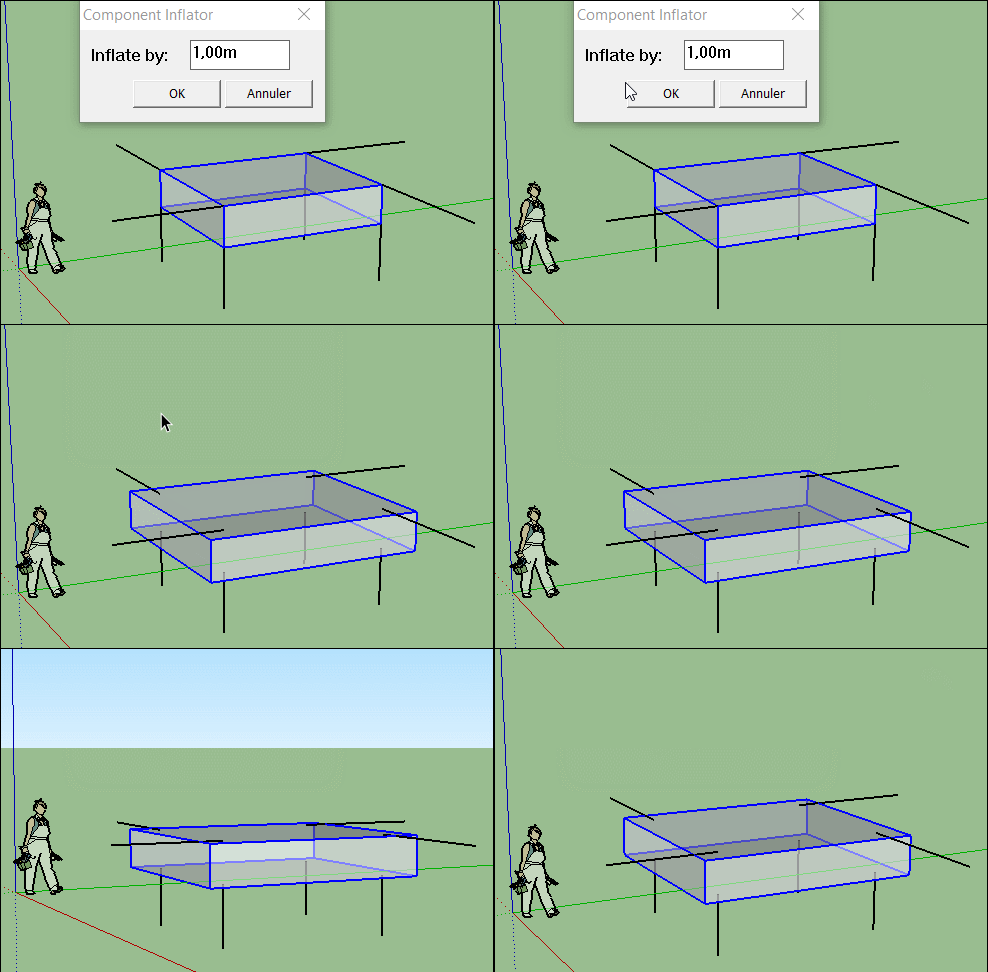
-
How does this relate to groove making?
-
@unknownuser said:
How does this relate to groove making?
About the first post #1
If you copy the original component, launch the plug Inflator, Copy in Place then explode...
Seems you must have the result asked ?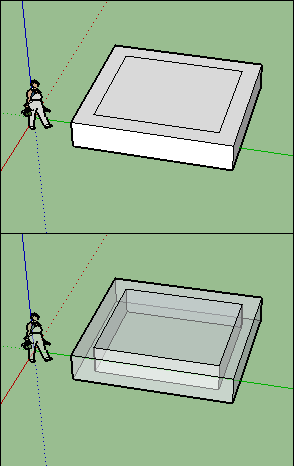
-
@srx said:
And there is also Bevel Maker https://youtu.be/ye4mcp0TPy8
Do you have any idea where to find this plugin!?







Advertisement