Using DropBox and symbolic links with SketchUp.
-
That would be cool. I have it set up that with a team I'm working with. I write stuff, and they get the updates automatically. I've got a loader script that they all put into their plugins folder that points to their dropbox, but I like this symbolic link a lot.
We should set something like that up. Of course, we would need to do better at making plugins be extensions so the user could turn them off within SU - as modifying the name/moving to a different directory would not work since everyone is accessing the same file.
How many people does dropbox let you share a folder with? There are public folders that share with unlimited people, right?
-
@unknownuser said:
How many people does dropbox let you share a folder with? There are public folders that share with unlimited people, right?
There's a limit of 10GB of traffic with DropBox. Then you're folder is suspended from use.
-
@unknownuser said:
There's a limit of 10GB of traffic with DropBox. Then you're folder is suspended from use.
per month?
Using LibFred6 as an example, 10GB / 3.5 MB = 2,925 downloads.
-
That I'm not sure of. I got suspended when I hosted the first CatchUp on my DropBox folder. They informed me that it's not a file hosting service it's a file storage service?
I do know the suspension lasted 2 weeks on the Public folder only.
-
so i set this up today and i gotta say, it's pretty awesome..
(i'm also syncing my keyboard shortcuts, materials, components, and styles.. i'd like to do my preferences as well but i think the fact that i have different sized screens is going to cause some problems with toolbar placement, window size, etc.)
i'm on Mac and since no one itt has talked about it yet, i'll lay out the steps i took..
assuming you already have a dropbox acct, do the following steps on all of your computers you'd like to sync..
● Download Symbolic Linker:
http://seiryu.home.comcast.net/~seiryu/symboliclinker.html
this makes it a breeze to create symbolic links in osx.. it adds a symlink service to finder so you just right-click the file and choose 'make symbolic link'.. the download includes a service which works with 10.6+ or a plugin which is for leopard and earlier.. only use the one that applies to your os version.. install instruction are included in the download.. otherwise, take a trip to terminal

● Backup your plugins folder(s)
i just right-click the plugins folder and choose 'compress'.. generates an archive right there inside the SketchUp folder for easy access later on.. or just drag a copy to your desktop
● Empty your plugins folder
open the actual sketchup plugins folder then select everything and trash it.. you may want to rethink this step? i'm just outlining how i went about it (which worked perfectly btw
 ).. my thinking was that i wanted to get the folders synced up with a minimal amount of files being transferred so if something went wrong, i wouldn't be waiting for ever to re-upload etc..
● Create Symbolic Links for the plugins folders
right-click the folder and choose 'make symbolic link'.. you'll now have a folder called plugins symlink which will have the little little alias arrow on the folder icon.
● Move symlink folders into your dropbox
locate your dropbox folder.. i keep a dropbox shortcut in my finder sidebar.. if you don't, the default location is in your home folder.. otherwise go wherever you put yours..
move the folder 'plugins symlink' into the dropbox folder (or a parent folder inside dropbox if you wish)..
(this step is where my method differs from the ones previously outlined itt… my plugins stay in their proper location with the symbolic links branching out from there)
do this on all computers● Test your sync
since you synced empty folders, the plugin folders on the different computers should have linked up very quickly.. drag a test file into one of the plugins folders to ensure it transfers to dropbox an on to the other computer..● Re-install your plugins
open up the backup you made earlier.. select everything and drag them back into the sketchup plugins folder (or you could just drag them into the symlink folder.. you can also install future plugins through the symlink folder.. the files will transfer to your plugins folder, your dropbox, and your linked computers.. magic)
if your plugins folders weren't identical prior to doing all this (mine weren't), you can now use dropbox to merge them.. after the first computer's plugins have been uploaded and transferred to computer#2, take computer2's plugins and repeat this step.. in the case of having the same file already on both computers, you'll be prompted to overwrite the file (replace), or to keep both files (if using lion), or to stop.. you can go through each one individually or choose 'apply to all' (which is what i did).. any shared files will stay the same and any non-similar files will sync.
do the same thing for anything else you want to sync..
good luck. -
@unknownuser said:
● Create Symbolic Links for the plugins folders
right-click the folder and choose 'make symbolic link'.. you'll now have a folder called plugins symlink which will have the little little alias arrow on the folder icon.
I'm only basically familiar with Mac but I do have friends that often ask me to help them with theirs and I'm confused about how you Right Click on a one button mouse.
Sorry if I'm being stupid, but I know if I said right click to a girlfriend of mine she would simply pass out in confusion.
-
-
Thanks Jeff, I guess I knew that, it just threw me reading it before my morning coffee.
By the way, I've used dropbox for years but never thought of this and it works brilliantly, I'd recommend it to anyone.
-
fwiw, apple's one button mouse hasn't been sold since 2005 or so.. the version after that, while it looked like it had only one button (well, i guess it looks like it has no buttons), actually had 4 pressure sensitive areas which could be used for right-clicking.. in 2009(?), they updated again to the magic mouse which again is only one button but it's much smarter than the previous version.. it now depends on where you click, how many fingers you click with, which direction you move your finger(s) in, etc as to what action it preforms.. it's basically a mashup between a mouse and a trackpad.
regardless, i've never used an apple mouse.. always logitech.. but even then, osx requires no special drivers for (most)3rd party mice. plug and play..
-
My friend has one of the magic mice and I nearly bopped him over the head for being so stupid to have a single "mash here" one button mouse.
The he showed me the truth.....wow, its pretty cool.
I still can't live without a middle button to hold down for orbiting in SU. Not sure if you can make one of those magic mouse do that.
-
@chris fullmer said:
I still can't live without a middle button to hold down for orbiting in SU.
get a mouse with a thumb button(s)… thank me later
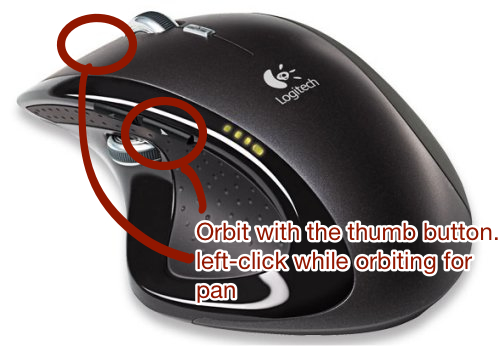
zoom while orbiting... your index finger is on the left button way more often.. faster/more flow-ey / more comfortable drawing..
-
What model is that, Jeff?
-
My mouse at home is similar to that, I'll set it up that way and see how it goes. Thanks for the tip!
-
@bob james said:
What model is that, Jeff?
it's the MX Revolution.. I've had 3 of them
 (my daughter is 5 now so my latest model has lasted a couple of years.. in my experience, 2 year olds and mice do not coexist peacefully in the same house )
apparently, logitech discontinued the revolution and replaced it with this model:
http://www.logitech.com/en-us/mice-pointers/mice/devices/performance-mouse-mxit looks better than the older version.. they did away with the thumbwheel and added new little thumb button in a handy looking spot (4 thumb buttons total)
for my laptops, i use the smaller MX.. the anywhere MX.. dunno, i like these things a lot because if i break/lose one, i'm not even going to shop around for anything else.. i just want an exact replacement..
http://www.logitech.com/en-us/mice-pointers/mice/devices/9422 -
I don't see a version for lefties? 'Sculpted for right' is the blurb
-
@unknownuser said:
I don't see a version for lefties? 'Sculpted for right' is the blurb
like a Mac user... you'll get used to it
weren't the teachers supposed to slap your hand every time you picked up a pencil with your left hand?
-
Jeff;
Thx a million for your MAC solution on doing this. One quick question: Where are the preference and keyboard shortcut files for SU located on a MAC?Thx,
Marc -
@unknownuser said:
weren't the teachers supposed to slap your hand every time you picked up a pencil with your left hand?

-
@mk11 said:
Jeff;
Thx a million for your MAC solution on doing this. One quick question: Where are the preference and keyboard shortcut files for SU located on a MAC?Thx,
Marcthe shortcuts are in your user library
~/library/application support/google sketchup (x)/sketchup/preferences are in
~/library/preferences.. (a file named com.google.sketchuppro8 (or whatever))..your user library is hidden by default on lion..
check this link for various ways to get there or unhide the folder
http://osxdaily.com/2011/07/22/access-user-library-folder-in-os-x-lion/ -
Anyone know if using dropbox for the plugins will work for going from sketchup 8 to 13? Also, will it work on windows 8?









Advertisement