sketchucation logo sketchucation
    • 登入
    Oops, your profile's looking a bit empty! To help us tailor your experience, please fill in key details like your SketchUp version, skill level, operating system, and more. Update and save your info on your profile page today!
    🔌 Smart Spline | Fluid way to handle splines for furniture design and complex structures. Download

    [plugin] Clip or Trim Terrain Mesh (Update)

    已排程 已置頂 已鎖定 已移動 Plugins
    38 貼文 18 Posters 59.4k 瀏覽 18 Watching
    正在載入更多貼文
    • 從舊到新
    • 從新到舊
    • 最多點贊
    回覆
    • 在新貼文中回覆
    登入後回覆
    此主題已被刪除。只有擁有主題管理權限的使用者可以查看。
    • sdmitchS 離線
      sdmitch
      最後由 sdmitch 編輯

      http://forums.sketchucation.com/viewtopic.php?f=323&t=40555

      When you grab several Google Earth Terrain patches, there is often a problem with how the images overlay each other. To help with this problem, the attached plugin, Clip or Trim Terrain Mesh, allows you to select the mesh which you want to keep and the mesh to be trimmed. Everything from the 2nd mesh that falls within the boundary of the 1st mesh is deleted thus eliminating the problem.

      In cases where smaller high resolution meshes are placed on top of larger low resolution meshes, you will often be left with vertical gaps especially in areas with significant elevation change due to the differences in the resolution of the grid and the interpolation of the surface.

      Another cause of image mis-match are the border rows and columns even when the terrain patches are of the same scale. To help with this problem, use the Trim option of Clip or Trim Terrain Mesh, to remove them from the selected mesh. Press and release the Shift Key to toggle between clipping and trimming. Hopefully now Mac compatible.

      Add Terrain Skirt, adds a skirt to the terrain mesh to give depth and definition to the mesh.


      clip or trim google earth terrain meshes


      Add skirt to terrain mesh

      Nothing is worthless, it can always be used as a bad example.

      http://sdmitch.blogspot.com/

      1 條回覆 最後回覆 回覆 引用 0
      • Bob JamesB 離線
        Bob James
        最後由 編輯

        Super!! Thank you sdmitch 👍

        i7-4930K 3.4Ghz, 2x GTX780 6GB, 32GB DDR3-1600 ECC, OCZ Vertex 4 500GB, WD Black 3TB, 32TB NAS, 4x 27" Monitors, SpaceMouse Pro, X-keys XK-60

        1 條回覆 最後回覆 回覆 引用 0
        • srxS 離線
          srx
          最後由 編輯

          Great. Thanks Sam.

          www.saurus.rs

          1 條回覆 最後回覆 回覆 引用 0
          • P 離線
            Panga
            最後由 編輯

            Thanks for this one Sam !! 👍

            1 條回覆 最後回覆 回覆 引用 0
            • sdmitchS 離線
              sdmitch
              最後由 編輯

              John, You should press and releasethe Shift key to toggle between clip and trim. Holding down the shift key is not required or advised.

              Nothing is worthless, it can always be used as a bad example.

              http://sdmitch.blogspot.com/

              1 條回覆 最後回覆 回覆 引用 0
              • sdmitchS 離線
                sdmitch
                最後由 編輯

                I wasn't aware of that difference with Macs since I only have windows at my disposal.

                Nothing is worthless, it can always be used as a bad example.

                http://sdmitch.blogspot.com/

                1 條回覆 最後回覆 回覆 引用 0
                • A 離線
                  AcesHigh
                  最後由 編輯

                  great plugin! Thanks a lot!

                  1 條回覆 最後回覆 回覆 引用 0
                  • thomthomT 離線
                    thomthom
                    最後由 編輯

                    @sdmitch said:

                    I wasn't aware of that difference with Macs since I only have windows at my disposal.

                    Don't use VK_ALT, VK_SHIFT etc - for cross platform, use

                    CONSTRAIN_MODIFIER_KEY = Shift Key
                    CONSTRAIN_MODIFIER_MASK = Shift Key
                    COPY_MODIFIER_KEY = Menu on Mac, Ctrl on PC
                    COPY_MODIFIER_MASK = Alt on Mac, Ctrl on PC
                    ALT_MODIFIER_KEY = Command on Mac, Menu on PC
                    ALT_MODIFIER_MASK = Command on Mac, Alt on PC

                    http://code.google.com/intl/no/apis/sketchup/docs/ourdoc/tool.html (top of this page)

                    Also - when I use these, I don't try to make Shift or Control match across platforms. Because as you can see from the constant names, the modifier key to make a copy (when you use the Move tool for instance) differ from platform to platform. So just use these to match the norm for each platform.

                    Thomas Thomassen — SketchUp Monkey & Coding addict
                    List of my plugins and link to the CookieWare fund

                    1 條回覆 最後回覆 回覆 引用 0
                    • sdmitchS 離線
                      sdmitch
                      最後由 編輯

                      Thanks ThomThom, I'm still learning and need all the help I can get.

                      Nothing is worthless, it can always be used as a bad example.

                      http://sdmitch.blogspot.com/

                      1 條回覆 最後回覆 回覆 引用 0
                      • thomthomT 離線
                        thomthom
                        最後由 編輯

                        No prob! Always good to see more people writing plugins. 😄

                        Thomas Thomassen — SketchUp Monkey & Coding addict
                        List of my plugins and link to the CookieWare fund

                        1 條回覆 最後回覆 回覆 引用 0
                        • D 離線
                          driven
                          最後由 編輯

                          Sam,
                          re: 'Clip or Trim' on MAC,
                          I just went over it all again and on the mac using if key ==16 || 131072 #shift PC || MAC,
                          makes it work as I believe you intended. [ is it?]

                          To start in 'Trim' mode:
                          'grab' grid/s >> select the 'Clip or Trim' from plugins >> press shift key once to activate 'Trim' >> click on 'Terrain' to 'Trim' grid/s in turn.

                          To start in 'Clip' mode:
                          'grab' grid/s >> select the 'Clip or Trim' from plugins >>click on 'Terrain' to 'Clip' grid/s in turn.

                          To switch between modes from either mode, press shift key once >> click on next 'Terrain'

                          To exit 'Clip or Trim' click outside of all 'Terrain' groups.

                          This is how it work with that change, I edited my above posts avoid to blind copying of my erroneous prior comments.

                          I believe this tweak is cross platform, due to the none applicable keycode being ignored, but I don't have a PC easily at hand.

                          Sorry if any confusion [other than my own] was caused by earlier comments, but I was in and out today without the time to plod through it properly.

                          john

                          learn from the mistakes of others, you may not live long enough to make them all yourself...

                          1 條回覆 最後回覆 回覆 引用 0
                          • D 離線
                            driven
                            最後由 編輯

                            Sam,

                            doesn't toggle on a mac, I should have pointed that out. EDIT INCORRECT you DON'T need to keep it held down

                            that's what was doing my head in I checked your code and couldn't see why it wouldn't work, so I guess it's a Mac thing...

                            john

                            learn from the mistakes of others, you may not live long enough to make them all yourself...

                            1 條回覆 最後回覆 回覆 引用 0
                            • D 離線
                              driven
                              最後由 編輯

                              removed

                              learn from the mistakes of others, you may not live long enough to make them all yourself...

                              1 條回覆 最後回覆 回覆 引用 0
                              • D 離線
                                driven
                                最後由 編輯

                                Love the combo tool,
                                once I got my head around it EDIT removed potentially misleading comment...

                                and I found a use for it for me as well. 3D cycle route maps...

                                anyone got an easy way of using Google Maps as the terrain texture,
                                this ones manually scaled and aligned with the 'Google Earth Snapshot' then applied as a projected texture onto the Terrain Grid.
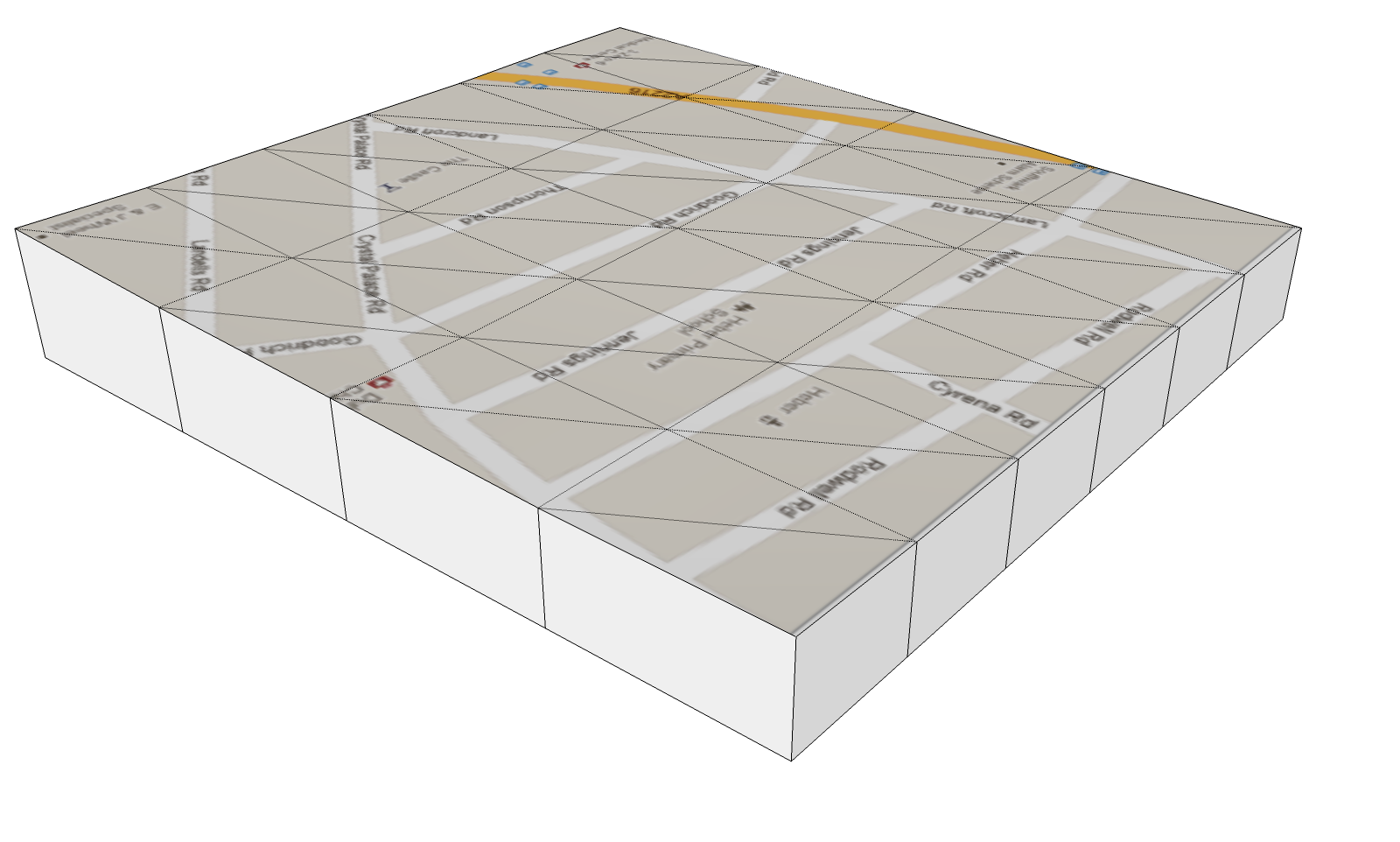
                                Maps on Terrain

                                Google if your reading, can we have a map option? please...

                                good work Sam

                                john

                                learn from the mistakes of others, you may not live long enough to make them all yourself...

                                1 條回覆 最後回覆 回覆 引用 0
                                • D 離線
                                  driven
                                  最後由 編輯

                                  No, me neither, I had a search for mac key-codes etc,,, but I might try searching mac 'toggle' as keycode 16 seems to work.
                                  EDIT 16 on it's own dosen't work on mac [I'd left the other in, but opened a copy when checking, what I'd done... sorry]

                                  learn from the mistakes of others, you may not live long enough to make them all yourself...

                                  1 條回覆 最後回覆 回覆 引用 0
                                  • mitcorbM 離線
                                    mitcorb
                                    最後由 編輯

                                    Hi, sdmitch:
                                    Thank you for your generousity in sharing this tool.

                                    I take the slow, deliberate approach in my aimless wandering.

                                    1 條回覆 最後回覆 回覆 引用 0
                                    • utilerU 離線
                                      utiler
                                      最後由 編輯

                                      Hi Sam, On your blog you have added an impressive list of plugins including these two however there is also a 'terrain tool's plugin that doesn't have a tutorial video. How does this differ from these two listed here?

                                      cheers, thanks for your fantastic work!! 👍

                                      Just Curious...

                                      1 條回覆 最後回覆 回覆 引用 0
                                      • sdmitchS 離線
                                        sdmitch
                                        最後由 編輯

                                        Terrain Tools is just the collection of all my plugins that pertain to GE Terrain's. Clip or Trim being one of them plus two others. There are no other differences. I just put them all into one to help minimize the entries in the Plugins menu.

                                        Nothing is worthless, it can always be used as a bad example.

                                        http://sdmitch.blogspot.com/

                                        1 條回覆 最後回覆 回覆 引用 0
                                        • utilerU 離線
                                          utiler
                                          最後由 編輯

                                          Ok, thanks Sam.Just on GE:
                                          I noticed in your Clip or Trim tutorial you merge two terrains of differing proxy. Does GE determine the resolution of your export into SU by your current eye high as well as the maximum resolution you end up with?

                                          I have a situation at the moment where I want to obtain the maximum resolution of of GE however my site covers about 3 hectares and I need to cover it with a GE image.

                                          I wonder if there is a way recall you last selection when exporting GE imagery or even replicate your selection left and right multiplied by how far you want? [See image below...]

                                          Cheers,
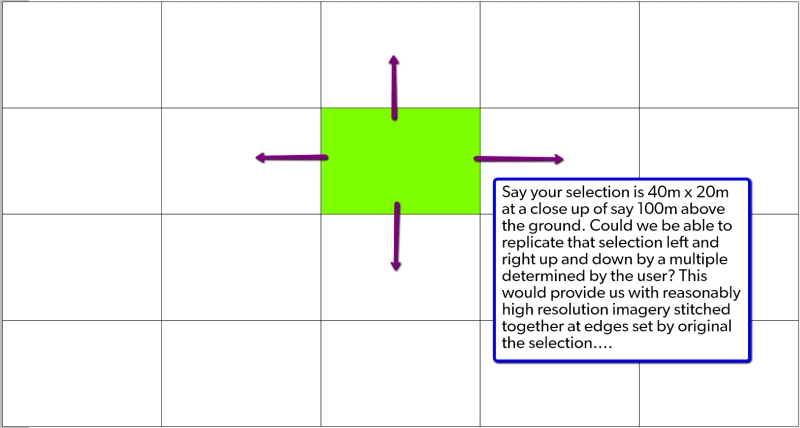

                                          2011-12-13_1218.jpg

                                          Just Curious...

                                          1 條回覆 最後回覆 回覆 引用 0
                                          • sdmitchS 離線
                                            sdmitch
                                            最後由 編輯

                                            Thers is no way to "automate" that that I am aware of.

                                            Nothing is worthless, it can always be used as a bad example.

                                            http://sdmitch.blogspot.com/

                                            1 條回覆 最後回覆 回覆 引用 0
                                            • 1
                                            • 2
                                            • 1 / 2
                                            • 第一個貼文
                                              最後的貼文
                                            Buy SketchPlus
                                            Buy SUbD
                                            Buy WrapR
                                            Buy eBook
                                            Buy Modelur
                                            Buy Vertex Tools
                                            Buy SketchCuisine
                                            Buy FormFonts

                                            Advertisement




