sketchucation logo sketchucation
    • 登入
    Oops, your profile's looking a bit empty! To help us tailor your experience, please fill in key details like your SketchUp version, skill level, operating system, and more. Update and save your info on your profile page today!
    🔌 Smart Spline | Fluid way to handle splines for furniture design and complex structures. Download

    [Plugin] QuadFaceTools

    已排程 已置頂 已鎖定 已移動 Plugins
    673 貼文 116 Posters 545.1k 瀏覽 116 Watching
    正在載入更多貼文
    • 從舊到新
    • 從新到舊
    • 最多點贊
    回覆
    • 在新貼文中回覆
    登入後回覆
    此主題已被刪除。只有擁有主題管理權限的使用者可以查看。
    • thomthomT 離線
      thomthom
      最後由 編輯

      Could it be some permission problem?

      Thomas Thomassen — SketchUp Monkey & Coding addict
      List of my plugins and link to the CookieWare fund

      1 條回覆 最後回覆 回覆 引用 0
      • daforumD 離線
        daforum
        最後由 編輯

        @driven said:

        Hi
        I just installed it using rbz file and you seem to be missing the entire TT_QuadFaceTools Folder?
        john

        TT_QuadfaceTools folder is installed!
        Please see attached png
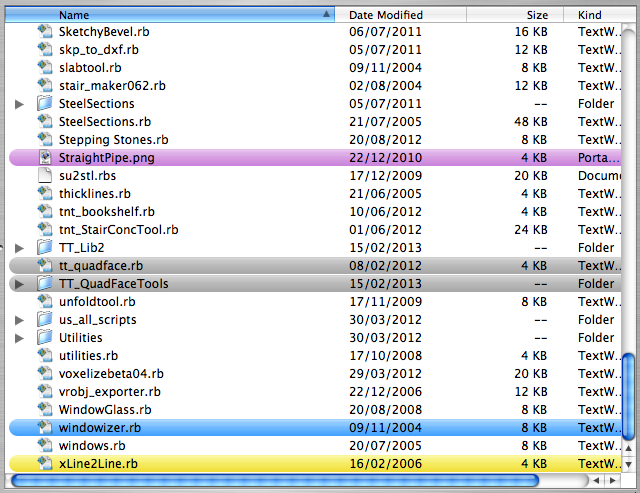

        tt-quadtools-folder.png

        1 條回覆 最後回覆 回覆 引用 0
        • daforumD 離線
          daforum
          最後由 編輯

          Oh well, if it's not working it's not working!

          Thanks for your help guys with all suggestions. Time to move on 😄

          1 條回覆 最後回覆 回覆 引用 0
          • thomthomT 離線
            thomthom
            最後由 編輯

            You never replied to my questions to whether you'd checked the folder permissions...

            Thomas Thomassen — SketchUp Monkey & Coding addict
            List of my plugins and link to the CookieWare fund

            1 條回覆 最後回覆 回覆 引用 0
            • daforumD 離線
              daforum
              最後由 編輯

              Hi thomthom,

              I originally downloaded the .rbz file and renamed it to a .zip file and unzipped it.
              It unzipped fine and the folder and .rb file I installed into my plugins folder without any problems.
              I'm the administrator on my computer so there are no problems with permissions.
              😄

              1 條回覆 最後回覆 回覆 引用 0
              • thomthomT 離線
                thomthom
                最後由 編輯

                hmm..

                I see you are using SketchUp 7 Free from your profile, why not SketchUp 8?
                You could then use the RBZ installing feature - and there's lots of API fixes as well.

                Thomas Thomassen — SketchUp Monkey & Coding addict
                List of my plugins and link to the CookieWare fund

                1 條回覆 最後回覆 回覆 引用 0
                • thomthomT 離線
                  thomthom
                  最後由 編輯

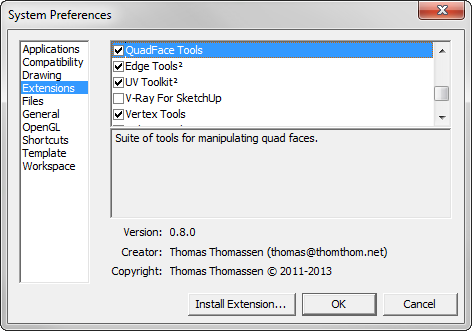
                  By the way - have you checked in the Extension list to make sure it's enabled?

                  ExtensionList.png

                  Thomas Thomassen — SketchUp Monkey & Coding addict
                  List of my plugins and link to the CookieWare fund

                  1 條回覆 最後回覆 回覆 引用 0
                  • daforumD 離線
                    daforum
                    最後由 編輯

                    Yes, I had a look and it is ticked.

                    Should i download the version you have v0.8.0, and do you recommend i update to TT_Lib2_v2.71 ?

                    1 條回覆 最後回覆 回覆 引用 0
                    • thomthomT 離線
                      thomthom
                      最後由 編輯

                      You can't download 0.8.0 - it's not released. It's what I am working on right now.
                      You could try to update TT_Lib2 - but I'm not sure if it'll work. (to be honest, I don't understand why it fails to show at all.) Oh, you do know that the menus are under Tools - not Plugins?

                      But for the sake of it, can you install SU8 and use the Install Extension feature? Just to see if that works?

                      Thomas Thomassen — SketchUp Monkey & Coding addict
                      List of my plugins and link to the CookieWare fund

                      1 條回覆 最後回覆 回覆 引用 0
                      • daforumD 離線
                        daforum
                        最後由 編輯

                        I can see the TT lib2 folder (i greyed it so to highlight it in my Plugins folder)
                        I have looked in the Tools section and it's not there.

                        The problem i have is that I'm still on Mac OSX 10.4.11 and SU8 runs on 10.5+
                        That's the reason I'm using SU7.

                        1 條回覆 最後回覆 回覆 引用 0
                        • M 離線
                          Mra
                          最後由 編輯

                          Hi, is the toolbar supported in 2013?

                          I installed via the extension but it's not showing up even though its ticked?

                          1 條回覆 最後回覆 回覆 引用 0
                          • jo-keJ 離線
                            jo-ke
                            最後由 編輯

                            @unknownuser said:

                            Hi, is the toolbar supported in 2013?

                            I installed via the extension but it's not showing up even though its ticked?

                            I've got the same problem with my notebook. At the desktop PC the toolbar is shown.

                            both win7

                            http://www.zz7.de

                            1 條回覆 最後回覆 回覆 引用 0
                            • thomthomT 離線
                              thomthom
                              最後由 編輯

                              That's a bug in the first release of SketchUp 2013. There is a new versiono out that fixes this. Go to sketchup.com and download SketchUp again.

                              Thomas Thomassen — SketchUp Monkey & Coding addict
                              List of my plugins and link to the CookieWare fund

                              1 條回覆 最後回覆 回覆 引用 0
                              • jo-keJ 離線
                                jo-ke
                                最後由 編輯

                                Can I overwrite the old version or should I reinstall everything new?

                                http://www.zz7.de

                                1 條回覆 最後回覆 回覆 引用 0
                                • thomthomT 離線
                                  thomthom
                                  最後由 編輯

                                  Just install over the old one.

                                  Thomas Thomassen — SketchUp Monkey & Coding addict
                                  List of my plugins and link to the CookieWare fund

                                  1 條回覆 最後回覆 回覆 引用 0
                                  • M 離線
                                    Mra
                                    最後由 編輯

                                    Confirmed. THanks thomthom.

                                    And thanks Trimblefor letting us all knwo about the patched 2013! 😒

                                    1 條回覆 最後回覆 回覆 引用 0
                                    • jo-keJ 離線
                                      jo-ke
                                      最後由 編輯

                                      Yes that solved the problem
                                      Thank you

                                      http://www.zz7.de

                                      1 條回覆 最後回覆 回覆 引用 0
                                      • ziiarZ 離線
                                        ziiar
                                        最後由 編輯

                                        Is there any way to over-scale? I would like the stone texture to match (or at least get close to) the scale of the cube.

                                        http://imageshack.us/a/img96/3663/vyw0.jpg

                                        I'm still trying to texture stone aches like what you did for your UV Toolkit thread. Is it possible/easier to do with that plugin? I couldn't figure out how to do it.

                                        http://sketchucation.com/forums/download/file.php?id=37073&mode=view/rokbox.jpg

                                        1 條回覆 最後回覆 回覆 引用 0
                                        • thomthomT 離線
                                          thomthom
                                          最後由 編輯

                                          "over-scale"? Not sure what you mean by that, but you adjust the size/scale of the UV mapping by using the red and green lines you get after picking origin and direction of the mapping. You see example of that in the videos.

                                          Sent from my LT25i using Tapatalk 2

                                          Thomas Thomassen — SketchUp Monkey & Coding addict
                                          List of my plugins and link to the CookieWare fund

                                          1 條回覆 最後回覆 回覆 引用 0
                                          • ziiarZ 離線
                                            ziiar
                                            最後由 編輯

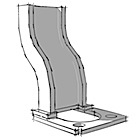
                                            Sorry, let me clarify. I want to control the texture right in SketchUp like this, where the texture goes past the face:

                                            http://imageshack.us/a/img197/7456/x0tg.jpg

                                            As you can see, It's easy enough to do with a square face, but I'm now trying to do this with arching textures. I realize this could be achieved by cropping the image beforehand, but given the nature of the project I'm working on, it would be so much better to do it right in SketchUp.

                                            1 條回覆 最後回覆 回覆 引用 0
                                            • 1
                                            • 2
                                            • 30
                                            • 31
                                            • 32
                                            • 33
                                            • 34
                                            • 34 / 34
                                            • 第一個貼文
                                              最後的貼文
                                            Buy SketchPlus
                                            Buy SUbD
                                            Buy WrapR
                                            Buy eBook
                                            Buy Modelur
                                            Buy Vertex Tools
                                            Buy SketchCuisine
                                            Buy FormFonts

                                            Advertisement