sketchucation logo sketchucation
    • 登入
    Oops, your profile's looking a bit empty! To help us tailor your experience, please fill in key details like your SketchUp version, skill level, operating system, and more. Update and save your info on your profile page today!
    🔌 Smart Spline | Fluid way to handle splines for furniture design and complex structures. Download

    [Plugin] QuadFaceTools

    已排程 已置頂 已鎖定 已移動 Plugins
    673 貼文 116 Posters 545.0k 瀏覽 116 Watching
    正在載入更多貼文
    • 從舊到新
    • 從新到舊
    • 最多點贊
    回覆
    • 在新貼文中回覆
    登入後回覆
    此主題已被刪除。只有擁有主題管理權限的使用者可以查看。
    • daforumD 離線
      daforum
      最後由 編輯

      Do the tools work with SketchUp V7?
      Do I need any other plugins/ scripts for them to work?

      Thank you. ❓

      1 條回覆 最後回覆 回覆 引用 0
      • thomthomT 離線
        thomthom
        最後由 編輯

        Yes.

        Just follow the instructions on the page that appear when you click the Download button and you'll be all set.

        Thomas Thomassen — SketchUp Monkey & Coding addict
        List of my plugins and link to the CookieWare fund

        1 條回覆 最後回覆 回覆 引用 0
        • Rich O BrienR 離線
          Rich O Brien Moderator
          最後由 編輯

          A quad face property is when the diagonal edge on a non planar 4 sided object has soften and smooth property on and the cast shadow property off.

          Sent from my iPad

          Download the free D'oh Book for SketchUp 📖

          1 條回覆 最後回覆 回覆 引用 0
          • Rich O BrienR 離線
            Rich O Brien Moderator
            最後由 編輯

            Ok, so I replied to a post that has now disappeared so it looks like I just blurted out random crap.

            But for that mystery guy see above....😉

            Sent from my iPad

            Download the free D'oh Book for SketchUp 📖

            1 條回覆 最後回覆 回覆 引用 0
            • thomthomT 離線
              thomthom
              最後由 編輯

              @dickorama said:

              Okay, I'm seriously confused here. Only managed to get this work once and all other attempts to repeat the process failed ever since. What do I do wrong?

              1. Creating a sandbox plane. 50x50 meters, if size matters anyhow.
              2. Converting sandbox to QuadTools quads.
              3. Copying the plane nearby.
              4. Texturing original plane. Texture is set to 50m, so it does not repeat.
              5. Entering original plane group and copying UV coordinates.

              So far so good, paste button is now active.

              1. Entering copied plane group and pasting UV coordinates.
              2. Nada.

              I tried all kinds of various methods for conversion - exploded, grouped, did whatnot. Something I noticed is sometimes sandbox quads are turned into triangles when converted and sometimes they are not?!

              Help 😞

              Didn't notice this until now. Still having problems?
              Got a sample model?

              Thomas Thomassen — SketchUp Monkey & Coding addict
              List of my plugins and link to the CookieWare fund

              1 條回覆 最後回覆 回覆 引用 0
              • daforumD 離線
                daforum
                最後由 編輯

                Unfortunately I get this error message when SU7 starts:

                "can't convert nil into StringError Loading File tt_quadface.rb
                can't convert nil into String"

                I don't know what this means so I can't use it.

                1 條回覆 最後回覆 回覆 引用 0
                • Rich O BrienR 離線
                  Rich O Brien Moderator
                  最後由 編輯

                  Have tt_quadface.rb in the root of the plugins folder?

                  It should not reside in a folder within the plugin folder as per the footprint in the first post.

                  Download the free D'oh Book for SketchUp 📖

                  1 條回覆 最後回覆 回覆 引用 0
                  • thomthomT 離線
                    thomthom
                    最後由 編輯

                    Open the Ruby Console (Window > Ruby Console) and enter: load 'tt_quadface.rb'. Report back the whole error.

                    (Btw, can you post a screenshot of your Plugins folder?)

                    Thomas Thomassen — SketchUp Monkey & Coding addict
                    List of my plugins and link to the CookieWare fund

                    1 條回覆 最後回覆 回覆 引用 0
                    • thomthomT 離線
                      thomthom
                      最後由 編輯

                      
                      > load 'tt_quadface.rb'
                      /Library/Application Support/Google SketchUp 7/SketchUp/Plugins/tt_quadface.rb;20; warning; already initialized constant PLUGIN
                      /Library/Application Support/Google SketchUp 7/SketchUp/Plugins/tt_quadface.rb;21; warning; already initialized constant PLUGIN_ID
                      /Library/Application Support/Google SketchUp 7/SketchUp/Plugins/tt_quadface.rb;22; warning; already initialized constant PLUGIN_NAME
                      /Library/Application Support/Google SketchUp 7/SketchUp/Plugins/tt_quadface.rb;23; warning; already initialized constant PLUGIN_VERSION
                      /Library/Application Support/Google SketchUp 7/SketchUp/Plugins/tt_quadface.rb;24; warning; already initialized constant PLUGIN_AUTHOR
                      /Library/Application Support/Google SketchUp 7/SketchUp/Plugins/tt_quadface.rb;27; warning; already initialized constant PATH_ROOT
                      /Library/Application Support/Google SketchUp 7/SketchUp/Plugins/tt_quadface.rb;28; warning; already initialized constant PATH
                      /Library/Application Support/Google SketchUp 7/SketchUp/Plugins/tt_quadface.rb;29; warning; already initialized constant PATH_ICONS
                      Error; #<LoadError; no such file to load -- TT_Lib2/core.rb>
                      /Library/Application Support/Google SketchUp 7/SketchUp/Plugins/TT_QuadFaceTools/core.rb;9;in `require'
                      /Library/Application Support/Google SketchUp 7/SketchUp/Plugins/TT_QuadFaceTools/core.rb;9
                      /Library/Application Support/Google SketchUp 7/SketchUp/Tools/extensions.rb;36;in `require'
                      /Library/Application Support/Google SketchUp 7/SketchUp/Tools/extensions.rb;36;in `load'
                      /Library/Application Support/Google SketchUp 7/SketchUp/Plugins/tt_quadface.rb;41;in `register_extension'
                      /Library/Application Support/Google SketchUp 7/SketchUp/Plugins/tt_quadface.rb;41
                      (eval);540;in `load'
                      (eval);540
                      Error; #<LoadError; /Library/Application Support/Google SketchUp 7/SketchUp/Plugins/TT_QuadFaceTools/core.rb;9;in `require'; no such file to load -- TT_Lib2/core.rb>
                      (eval);540
                      /Library/Application Support/Google SketchUp 7/SketchUp/Plugins/TT_QuadFaceTools/core.rb;9
                      /Library/Application Support/Google SketchUp 7/SketchUp/Tools/extensions.rb;36;in `require'
                      /Library/Application Support/Google SketchUp 7/SketchUp/Tools/extensions.rb;36;in `load'
                      /Library/Application Support/Google SketchUp 7/SketchUp/Plugins/tt_quadface.rb;41;in `register_extension'
                      /Library/Application Support/Google SketchUp 7/SketchUp/Plugins/tt_quadface.rb;41
                      (eval);540;in `load'
                      (eval);540


                      It appear that you do not have the required TT_lib2 installed.

                      Thomas Thomassen — SketchUp Monkey & Coding addict
                      List of my plugins and link to the CookieWare fund

                      1 條回覆 最後回覆 回覆 引用 0
                      • daforumD 離線
                        daforum
                        最後由 編輯

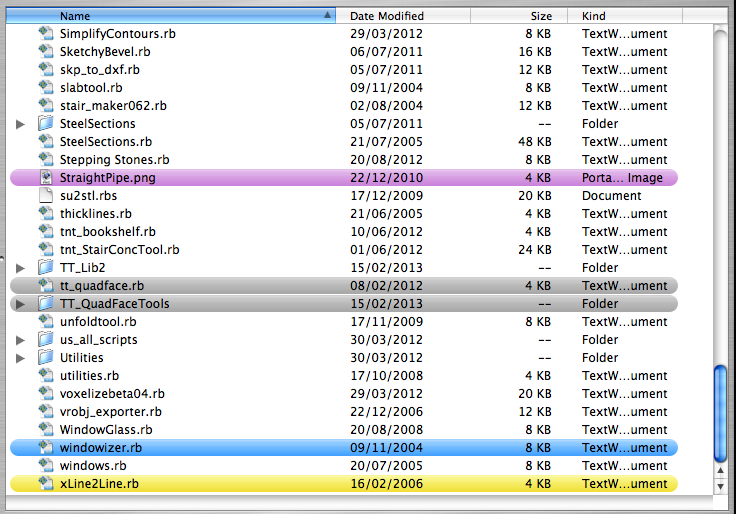
                        Apologies, I have included it - TT_lib2 - then taken a screenshot of the plugins folder (see attached)
                        and another report of the whole error (see attached txt file)

                        many thanks.


                        sketchup_plugins-folder1.png


                        tt-quadface-error1.txt

                        1 條回覆 最後回覆 回覆 引用 0
                        • daforumD 離線
                          daforum
                          最後由 編輯

                          DELETED: new post (see below)

                          1 條回覆 最後回覆 回覆 引用 0
                          • thomthomT 離線
                            thomthom
                            最後由 編輯

                            @daforum said:

                            Apologies, I have included it - TT_lib2

                            Are you sure it's installed correctly?
                            Do you by any chance have a TT_Lib2 folder inside an TT_Lib2 folder?
                            Can you post a screenshot of where the core.rb file inside TT_Lib2 lies? (Screenshot that includes the full path.)

                            Thomas Thomassen — SketchUp Monkey & Coding addict
                            List of my plugins and link to the CookieWare fund

                            1 條回覆 最後回覆 回覆 引用 0
                            • daforumD 離線
                              daforum
                              最後由 編輯

                              Here's a screenshot of the TT_Lib2 folder (can't display it all as my screen isn't big enough)
                              and I haven't got the folder inside another TT_Lib2 folder.

                              The full file path is this:

                              Macintosh HD/ Library/ Application Support/ Google Sketchup 7/ Sketchup/ plugins/ TT_Lib2/ core.rb
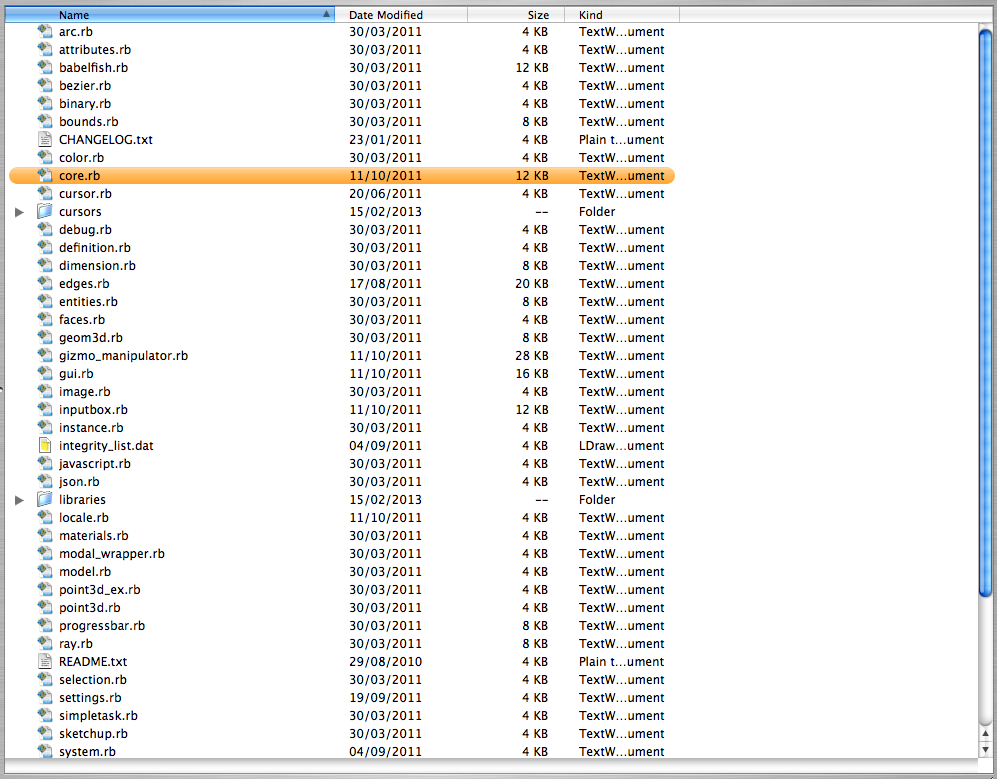

                              inside-tt_lib2-folder.png

                              1 條回覆 最後回覆 回覆 引用 0
                              • thomthomT 離線
                                thomthom
                                最後由 編輯

                                That is very strange. I have no idea what is going on here.

                                ...I've noticed lately there's been lots of OSX users with problems due to not sufficient permissions to the plugins folder. Though I'm not really familiar with what they did or what errors they where getting...

                                Thomas Thomassen — SketchUp Monkey & Coding addict
                                List of my plugins and link to the CookieWare fund

                                1 條回覆 最後回覆 回覆 引用 0
                                • thomthomT 離線
                                  thomthom
                                  最後由 編輯

                                  Do you happen to have Organizer installed?

                                  Thomas Thomassen — SketchUp Monkey & Coding addict
                                  List of my plugins and link to the CookieWare fund

                                  1 條回覆 最後回覆 回覆 引用 0
                                  • daforumD 離線
                                    daforum
                                    最後由 編輯

                                    Hi thomthom,

                                    I've done a search and nothing found, called Organizer on my machine.

                                    1 條回覆 最後回覆 回覆 引用 0
                                    • D 離線
                                      driven
                                      最後由 編輯

                                      hi daforum,

                                      can you run this in Ruby Console and paste the results back into a 'code' box for easy checking of possible conflicts...

                                      $LOADED_FEATURES.join("\n")
                                      

                                      if it dosen't have all your plugins try this one as well...

                                      $loaded_files.join("\n")
                                      

                                      lastly, can your fill in your profile so we know your on mac, etc...
                                      and since it doesn't tell us, which 'osx' version, a cat will do...

                                      cheers
                                      john

                                      learn from the mistakes of others, you may not live long enough to make them all yourself...

                                      1 條回覆 最後回覆 回覆 引用 0
                                      • daforumD 離線
                                        daforum
                                        最後由 編輯

                                        Hi driven,

                                        I will do the code pasting as soon as I can today; and I have updated my profile as suggested
                                        but it doesn't seem to be showing up 😞

                                        Edit

                                        ah, now it's there 😄

                                        1 條回覆 最後回覆 回覆 引用 0
                                        • thomthomT 離線
                                          thomthom
                                          最後由 編輯

                                          @daforum said:

                                          ah, now it's there 😄

                                          It's working? No errors?

                                          Thomas Thomassen — SketchUp Monkey & Coding addict
                                          List of my plugins and link to the CookieWare fund

                                          1 條回覆 最後回覆 回覆 引用 0
                                          • D 離線
                                            driven
                                            最後由 編輯

                                            @daforum said:

                                            ah, now it's there 🙂

                                            out of curiosity...
                                            do you use a 'Finder' enhancer/manager of any sort?
                                            I have found 'sometimes' I need to update 'Finder' before newly added files can be accessed.
                                            Turning your mac off overnight would have refreshed 'Finder'...
                                            john
                                            learn from the mistakes of others, you may not live long enough to make them all yourself...

                                            1 條回覆 最後回覆 回覆 引用 0
                                            • 1
                                            • 2
                                            • 25
                                            • 26
                                            • 27
                                            • 28
                                            • 29
                                            • 33
                                            • 34
                                            • 27 / 34
                                            • 第一個貼文
                                              最後的貼文
                                            Buy SketchPlus
                                            Buy SUbD
                                            Buy WrapR
                                            Buy eBook
                                            Buy Modelur
                                            Buy Vertex Tools
                                            Buy SketchCuisine
                                            Buy FormFonts

                                            Advertisement