sketchucation logo sketchucation
    • Login
    Oops, your profile's looking a bit empty! To help us tailor your experience, please fill in key details like your SketchUp version, skill level, operating system, and more. Update and save your info on your profile page today!
    ⚠️ Update | Sketchucation Tools 5.0.8 released with licensing improvements and bugfixes Download

    [Plugin] QuadFaceTools

    Scheduled Pinned Locked Moved Plugins
    680 Posts 116 Posters 745.0k Views 116 Watching
    Loading More Posts
    • Oldest to Newest
    • Newest to Oldest
    • Most Votes
    Reply
    • Reply as topic
    Log in to reply
    This topic has been deleted. Only users with topic management privileges can see it.
    • pbacotP
      pbacot
      last edited by

      @wind-borne said:

      @pbacot said:

      I looked at the online list of features but for some tools I can't easily associate the icon to the tool. I don't see icons for every tool noted. When I hover on the QFT icons I don't get a description either. Is there more on this, eg a pdf?

      Toolbar orientation?
      Horizontal toolbar icons seldom reveal themselves on Mac's?
      Hover over vertical toolbar maybe.

      Doesn't work for me. I just figured out if I leave the Ruby window open I can get some info when clicking on the icons.

      MacOSX MojaveSketchUp Pro v19 Twilight v2 Thea v3 PowerCADD

      1 Reply Last reply
      Reply Quote 0
      • thomthomT
        thomthom
        last edited by

        hmm... so are you getting no tooltips at all when you hover over the buttons? Because there are tooltips...

        Thomas Thomassen β€” SketchUp Monkey & Coding addict
        List of my plugins and link to the CookieWare fund

        1 Reply Last reply
        Reply Quote 0
        • pbacotP
          pbacot
          last edited by

          OK they're back. After restart. I know this has happened before... Sorry for the bother. I've been getting somewhere with it now.

          MacOSX MojaveSketchUp Pro v19 Twilight v2 Thea v3 PowerCADD

          1 Reply Last reply
          Reply Quote 0
          • R
            Ruck
            last edited by

            Hi!
            I can't load a plug-in on the first page. It because of new design of a site?
            Win7 x64, Chrome.

            1 Reply Last reply
            Reply Quote 0
            • thomthomT
              thomthom
              last edited by

              @ruck said:

              Hi!
              I can't load a plug-in on the first page. It because of new design of a site?

              😲 πŸ˜•

              Yes - that's a big fail on account of the new site. I'll let the admins know.

              Meanwhile - download here: https://bitbucket.org/thomthom/quadface-tools/wiki/Download

              Thomas Thomassen β€” SketchUp Monkey & Coding addict
              List of my plugins and link to the CookieWare fund

              1 Reply Last reply
              Reply Quote 0
              • R
                Ruck
                last edited by

                @thomthom said:

                Meanwhile - download here: https://bitbucket.org/thomthom/quadface-tools/wiki/Download

                Thanks for the fast help!
                Also forgive my English 😳

                1 Reply Last reply
                Reply Quote 0
                • D
                  dickorama
                  last edited by

                  Okay, I'm seriously confused here. Only managed to get this work once and all other attempts to repeat the process failed ever since. What do I do wrong?

                  1. Creating a sandbox plane. 50x50 meters, if size matters anyhow.
                  2. Converting sandbox to QuadTools quads.
                  3. Copying the plane nearby.
                  4. Texturing original plane. Texture is set to 50m, so it does not repeat.
                  5. Entering original plane group and copying UV coordinates.

                  So far so good, paste button is now active.

                  1. Entering copied plane group and pasting UV coordinates.
                  2. Nada.

                  I tried all kinds of various methods for conversion - exploded, grouped, did whatnot. Something I noticed is sometimes sandbox quads are turned into triangles when converted and sometimes they are not?!

                  Help 😞

                  1 Reply Last reply
                  Reply Quote 0
                  • daforumD
                    daforum
                    last edited by

                    Do the tools work with SketchUp V7?
                    Do I need any other plugins/ scripts for them to work?

                    Thank you. ❓

                    1 Reply Last reply
                    Reply Quote 0
                    • thomthomT
                      thomthom
                      last edited by

                      Yes.

                      Just follow the instructions on the page that appear when you click the Download button and you'll be all set.

                      Thomas Thomassen β€” SketchUp Monkey & Coding addict
                      List of my plugins and link to the CookieWare fund

                      1 Reply Last reply
                      Reply Quote 0
                      • Rich O BrienR
                        Rich O Brien Moderator
                        last edited by

                        A quad face property is when the diagonal edge on a non planar 4 sided object has soften and smooth property on and the cast shadow property off.

                        Sent from my iPad

                        Download the free D'oh Book for SketchUp πŸ“–

                        1 Reply Last reply
                        Reply Quote 0
                        • Rich O BrienR
                          Rich O Brien Moderator
                          last edited by

                          Ok, so I replied to a post that has now disappeared so it looks like I just blurted out random crap.

                          But for that mystery guy see above....πŸ˜‰

                          Sent from my iPad

                          Download the free D'oh Book for SketchUp πŸ“–

                          1 Reply Last reply
                          Reply Quote 0
                          • thomthomT
                            thomthom
                            last edited by

                            @dickorama said:

                            Okay, I'm seriously confused here. Only managed to get this work once and all other attempts to repeat the process failed ever since. What do I do wrong?

                            1. Creating a sandbox plane. 50x50 meters, if size matters anyhow.
                            2. Converting sandbox to QuadTools quads.
                            3. Copying the plane nearby.
                            4. Texturing original plane. Texture is set to 50m, so it does not repeat.
                            5. Entering original plane group and copying UV coordinates.

                            So far so good, paste button is now active.

                            1. Entering copied plane group and pasting UV coordinates.
                            2. Nada.

                            I tried all kinds of various methods for conversion - exploded, grouped, did whatnot. Something I noticed is sometimes sandbox quads are turned into triangles when converted and sometimes they are not?!

                            Help 😞

                            Didn't notice this until now. Still having problems?
                            Got a sample model?

                            Thomas Thomassen β€” SketchUp Monkey & Coding addict
                            List of my plugins and link to the CookieWare fund

                            1 Reply Last reply
                            Reply Quote 0
                            • daforumD
                              daforum
                              last edited by

                              Unfortunately I get this error message when SU7 starts:

                              "can't convert nil into StringError Loading File tt_quadface.rb
                              can't convert nil into String"

                              I don't know what this means so I can't use it.

                              1 Reply Last reply
                              Reply Quote 0
                              • Rich O BrienR
                                Rich O Brien Moderator
                                last edited by

                                Have tt_quadface.rb in the root of the plugins folder?

                                It should not reside in a folder within the plugin folder as per the footprint in the first post.

                                Download the free D'oh Book for SketchUp πŸ“–

                                1 Reply Last reply
                                Reply Quote 0
                                • thomthomT
                                  thomthom
                                  last edited by

                                  Open the Ruby Console (Window > Ruby Console) and enter: load 'tt_quadface.rb'. Report back the whole error.

                                  (Btw, can you post a screenshot of your Plugins folder?)

                                  Thomas Thomassen β€” SketchUp Monkey & Coding addict
                                  List of my plugins and link to the CookieWare fund

                                  1 Reply Last reply
                                  Reply Quote 0
                                  • thomthomT
                                    thomthom
                                    last edited by

                                    
                                    > load 'tt_quadface.rb'
                                    /Library/Application Support/Google SketchUp 7/SketchUp/Plugins/tt_quadface.rb;20; warning; already initialized constant PLUGIN
                                    /Library/Application Support/Google SketchUp 7/SketchUp/Plugins/tt_quadface.rb;21; warning; already initialized constant PLUGIN_ID
                                    /Library/Application Support/Google SketchUp 7/SketchUp/Plugins/tt_quadface.rb;22; warning; already initialized constant PLUGIN_NAME
                                    /Library/Application Support/Google SketchUp 7/SketchUp/Plugins/tt_quadface.rb;23; warning; already initialized constant PLUGIN_VERSION
                                    /Library/Application Support/Google SketchUp 7/SketchUp/Plugins/tt_quadface.rb;24; warning; already initialized constant PLUGIN_AUTHOR
                                    /Library/Application Support/Google SketchUp 7/SketchUp/Plugins/tt_quadface.rb;27; warning; already initialized constant PATH_ROOT
                                    /Library/Application Support/Google SketchUp 7/SketchUp/Plugins/tt_quadface.rb;28; warning; already initialized constant PATH
                                    /Library/Application Support/Google SketchUp 7/SketchUp/Plugins/tt_quadface.rb;29; warning; already initialized constant PATH_ICONS
                                    Error; #<LoadError; no such file to load -- TT_Lib2/core.rb>
                                    /Library/Application Support/Google SketchUp 7/SketchUp/Plugins/TT_QuadFaceTools/core.rb;9;in `require'
                                    /Library/Application Support/Google SketchUp 7/SketchUp/Plugins/TT_QuadFaceTools/core.rb;9
                                    /Library/Application Support/Google SketchUp 7/SketchUp/Tools/extensions.rb;36;in `require'
                                    /Library/Application Support/Google SketchUp 7/SketchUp/Tools/extensions.rb;36;in `load'
                                    /Library/Application Support/Google SketchUp 7/SketchUp/Plugins/tt_quadface.rb;41;in `register_extension'
                                    /Library/Application Support/Google SketchUp 7/SketchUp/Plugins/tt_quadface.rb;41
                                    (eval);540;in `load'
                                    (eval);540
                                    Error; #<LoadError; /Library/Application Support/Google SketchUp 7/SketchUp/Plugins/TT_QuadFaceTools/core.rb;9;in `require'; no such file to load -- TT_Lib2/core.rb>
                                    (eval);540
                                    /Library/Application Support/Google SketchUp 7/SketchUp/Plugins/TT_QuadFaceTools/core.rb;9
                                    /Library/Application Support/Google SketchUp 7/SketchUp/Tools/extensions.rb;36;in `require'
                                    /Library/Application Support/Google SketchUp 7/SketchUp/Tools/extensions.rb;36;in `load'
                                    /Library/Application Support/Google SketchUp 7/SketchUp/Plugins/tt_quadface.rb;41;in `register_extension'
                                    /Library/Application Support/Google SketchUp 7/SketchUp/Plugins/tt_quadface.rb;41
                                    (eval);540;in `load'
                                    (eval);540


                                    It appear that you do not have the required TT_lib2 installed.

                                    Thomas Thomassen β€” SketchUp Monkey & Coding addict
                                    List of my plugins and link to the CookieWare fund

                                    1 Reply Last reply
                                    Reply Quote 0
                                    • daforumD
                                      daforum
                                      last edited by

                                      Apologies, I have included it - TT_lib2 - then taken a screenshot of the plugins folder (see attached)
                                      and another report of the whole error (see attached txt file)

                                      many thanks.


                                      sketchup_plugins-folder1.png


                                      tt-quadface-error1.txt

                                      1 Reply Last reply
                                      Reply Quote 0
                                      • daforumD
                                        daforum
                                        last edited by

                                        DELETED: new post (see below)

                                        1 Reply Last reply
                                        Reply Quote 0
                                        • thomthomT
                                          thomthom
                                          last edited by

                                          @daforum said:

                                          Apologies, I have included it - TT_lib2

                                          Are you sure it's installed correctly?
                                          Do you by any chance have a TT_Lib2 folder inside an TT_Lib2 folder?
                                          Can you post a screenshot of where the core.rb file inside TT_Lib2 lies? (Screenshot that includes the full path.)

                                          Thomas Thomassen β€” SketchUp Monkey & Coding addict
                                          List of my plugins and link to the CookieWare fund

                                          1 Reply Last reply
                                          Reply Quote 0
                                          • daforumD
                                            daforum
                                            last edited by

                                            Here's a screenshot of the TT_Lib2 folder (can't display it all as my screen isn't big enough)
                                            and I haven't got the folder inside another TT_Lib2 folder.

                                            The full file path is this:

                                            Macintosh HD/ Library/ Application Support/ Google Sketchup 7/ Sketchup/ plugins/ TT_Lib2/ core.rb
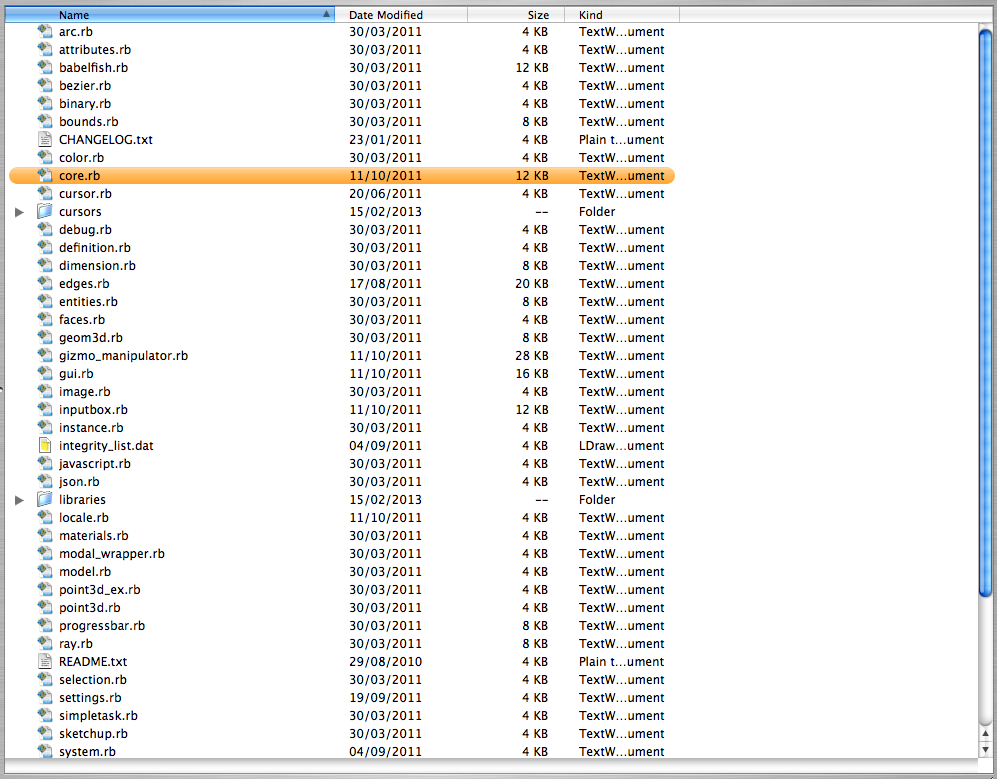


                                            inside-tt_lib2-folder.png

                                            1 Reply Last reply
                                            Reply Quote 0

                                            Hello! It looks like you're interested in this conversation, but you don't have an account yet.

                                            Getting fed up of having to scroll through the same posts each visit? When you register for an account, you'll always come back to exactly where you were before, and choose to be notified of new replies (either via email, or push notification). You'll also be able to save bookmarks and upvote posts to show your appreciation to other community members.

                                            With your input, this post could be even better πŸ’—

                                            Register Login
                                            • 1
                                            • 2
                                            • 13
                                            • 14
                                            • 15
                                            • 16
                                            • 17
                                            • 33
                                            • 34
                                            • 15 / 34
                                            • First post
                                              Last post
                                            Buy SketchPlus
                                            Buy SUbD
                                            Buy WrapR
                                            Buy eBook
                                            Buy Modelur
                                            Buy Vertex Tools
                                            Buy SketchCuisine
                                            Buy FormFonts

                                            Advertisement