sketchucation logo sketchucation
    • Login
    Oops, your profile's looking a bit empty! To help us tailor your experience, please fill in key details like your SketchUp version, skill level, operating system, and more. Update and save your info on your profile page today!
    Mac User? | Join the Rayscaper Beta for Mac Learn More

    [Plugin] Shell

    Scheduled Pinned Locked Moved Plugins
    93 Posts 33 Posters 74.1k Views 34 Watching
    Loading More Posts
    • Oldest to Newest
    • Newest to Oldest
    • Most Votes
    Reply
    • Reply as topic
    Log in to reply
    This topic has been deleted. Only users with topic management privileges can see it.
    • thomthomT
      thomthom
      last edited by

      Oh - can you try this: (Assuming you have Windows)

      Create a .bat file with this command:

      "C:\Program Files\Google\Google SketchUp 8\Sketchup.exe" > debug.txt

      Adjust the path to your Sketchup installation and execute it. That will start SketchUp and output errors to a file. Make sure to close SketchUp first before opening the file.
      [mod=:3ka9vm6y]I adjusted a typo in TT's text & added "" around the command - now will work in a PC .bat or .cmd file...
      TIG[/mod:3ka9vm6y]

      Thomas Thomassen — SketchUp Monkey & Coding addict
      List of my plugins and link to the CookieWare fund

      1 Reply Last reply
      Reply Quote 0
      • A
        archheni
        last edited by

        😒 ..Hm, I'm on a Mac. Maybe something similar can be done with terminal & system log..but I'm absolutely no expert on this.
        The system log gives the following information after startup (not sure whether this is useful at all): "SketchUp.app/Contents/MacOS/SketchUp and /Applications/Google SketchUp 8/SketchUp.app/Contents/PlugIns/Skp2AcadSection.plugin/Contents/MacOS/Skp2AcadSection. One of the two will be used. Which one is undefined."

        1 Reply Last reply
        Reply Quote 0
        • thomthomT
          thomthom
          last edited by

          hm.. then it will take some more digging. I'll see if I can work out what it is.

          Btw, could you fill out your profile information to include your OS and SketchUp version?

          Thomas Thomassen — SketchUp Monkey & Coding addict
          List of my plugins and link to the CookieWare fund

          1 Reply Last reply
          Reply Quote 0
          • Dave RD
            Dave R
            last edited by

            Thomthom, I just installed this on my Mac in the correct Plugins folder and it loads without a problem.

            Etaoin Shrdlu

            %

            (THERE'S NO PLACE LIKE)

            G28 X0.0 Y0.0 Z0.0

            M30

            %

            1 Reply Last reply
            Reply Quote 0
            • thomthomT
              thomthom
              last edited by

              I think it could be related to corrupted setting data. Not sure though...

              Thomas Thomassen — SketchUp Monkey & Coding addict
              List of my plugins and link to the CookieWare fund

              1 Reply Last reply
              Reply Quote 0
              • A
                archheni
                last edited by

                Hi, deleting the Sketchup preferences in the library seems to have solved the issue. Works fine again.

                1 Reply Last reply
                Reply Quote 0
                • thomthomT
                  thomthom
                  last edited by

                  Thanks for the info. I'm still trying to track down where it might have failed.

                  Thomas Thomassen — SketchUp Monkey & Coding addict
                  List of my plugins and link to the CookieWare fund

                  1 Reply Last reply
                  Reply Quote 0
                  • S
                    stch
                    last edited by

                    Hi - brilliant plugin - seems to be working for simpler shapes, but i can't get it to work for the attached file. I put in the shell thickness, then double click (or press return) and the shell just doesn't 'set' - when I click elsewhere the shell has disappeared. Help massively appreciated as I'm working to a deadline. Any ideas?shape that i cannot shell.skp

                    1 Reply Last reply
                    Reply Quote 0
                    • thomthomT
                      thomthom
                      last edited by

                      Yea, this plugin is in very early stages - an experiment. I've not had time to work on it. I'd recommend you try Fredo's JointPushPull instead: http://sketchucation.com/forums/viewtopic.php?t=6708

                      Thomas Thomassen — SketchUp Monkey & Coding addict
                      List of my plugins and link to the CookieWare fund

                      1 Reply Last reply
                      Reply Quote 0
                      • S
                        stch
                        last edited by

                        Thanks. I'll give it a go. And thanks for the other plugins of yours I'm using. Solid Inspector is a life saver, as I'm sure you know.

                        1 Reply Last reply
                        Reply Quote 0
                        • Bob JamesB
                          Bob James
                          last edited by

                          I downloaded version 0.3.0 last night and found the following differences:

                          Usage

                          Select groups and/or components.
                          Activate Shell from the Tools menu. %(#FF0000)[**It's in plugins under thomthom plugins**]
                          Enter a thickness in the VCB or pick a distance in the model.
                          Double-click to commit. (You can also use Return to commit as long as the thickness has not changed.) %(#FF0000)[**It defaults to the last value you used. (if you've not used it before it defaults to 1"). If you change it to something else you have to hit return before double-clicking.**]
                          

                          i7-4930K 3.4Ghz, 2x GTX780 6GB, 32GB DDR3-1600 ECC, OCZ Vertex 4 500GB, WD Black 3TB, 32TB NAS, 4x 27" Monitors, SpaceMouse Pro, X-keys XK-60

                          1 Reply Last reply
                          Reply Quote 0
                          • D
                            Dentice
                            last edited by

                            Hi there,
                            when selecting the group / component and then selecting the shell from the list of plugins, I do get the temporary shell. I can also type in the dimension but as soon as I double click or press enter, nothing happens. I do not know how I can terminate the command. please can you help?? thanks a lot.

                            1 Reply Last reply
                            Reply Quote 0
                            • mitcorbM
                              mitcorb
                              last edited by

                              I think the Spacebar works in most cases. See if that is correct.

                              I take the slow, deliberate approach in my aimless wandering.

                              1 Reply Last reply
                              Reply Quote 0
                              • tt_suT
                                tt_su
                                last edited by

                                @dentice said:

                                Hi there,
                                when selecting the group / component and then selecting the shell from the list of plugins, I do get the temporary shell. I can also type in the dimension but as soon as I double click or press enter, nothing happens. I do not know how I can terminate the command. please can you help?? thanks a lot.

                                Double-click or hit Return. It's described in the first post of this thread.

                                1 Reply Last reply
                                Reply Quote 0
                                • Randy HutniakR
                                  Randy Hutniak
                                  last edited by

                                  I've used the plugin for a few years very successfully but in SU17 I can't seem to get it to commit by using the Enter key and a set distance, in this case 1".

                                  I even drew a 1" line to try with the mouse and curser but that didn't work either. dbl click, triple, didn't matter. It did work with larger offsets, 4"+.

                                  any thoughts?

                                  1 Reply Last reply
                                  Reply Quote 0
                                  • thomthomT
                                    thomthom
                                    last edited by

                                    If you open the Ruby Console, is there any errors appearing?

                                    Thomas Thomassen — SketchUp Monkey & Coding addict
                                    List of my plugins and link to the CookieWare fund

                                    1 Reply Last reply
                                    Reply Quote 0
                                    • Randy HutniakR
                                      Randy Hutniak
                                      last edited by

                                      Hi Tomas

                                      Today its working fine...the Ruby Console says that Points are not planar.

                                      I've been having a few problems with SU17. 'Out of Memory' freeze and Move/Ctrl place crashes. maybe be it has something to do with those things. see my post: http://sketchucation.com/forums/viewtopic.php?f=11%26amp;t=66314%26amp;e=0

                                      thanx for the quick reply!

                                      1 Reply Last reply
                                      Reply Quote 0
                                      • thomthomT
                                        thomthom
                                        last edited by

                                        Do you have a sample model that reproduce this?

                                        Thomas Thomassen — SketchUp Monkey & Coding addict
                                        List of my plugins and link to the CookieWare fund

                                        1 Reply Last reply
                                        Reply Quote 0
                                        • em3diE
                                          em3di
                                          last edited by

                                          Hey thomthom, Thank's for this great plugin! But I instaled it and it doesn't show up on tools menu!
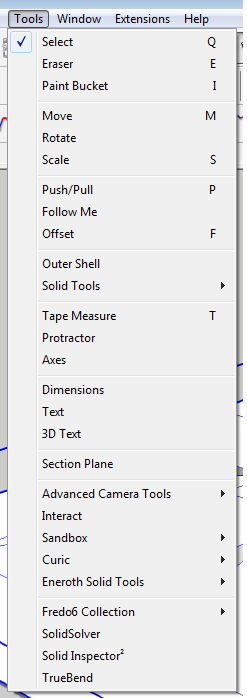
                                          https://cdn.steemitimages.com/DQmYNmtuA2NTauttxNz8Qu9MVq8oqdjXQcoQ165pZQYpHeR/1.png

                                          but when i go to "Extensions -> SketchUcation -> SketchUcation Plugins Manager" the "tt_shell" is there!
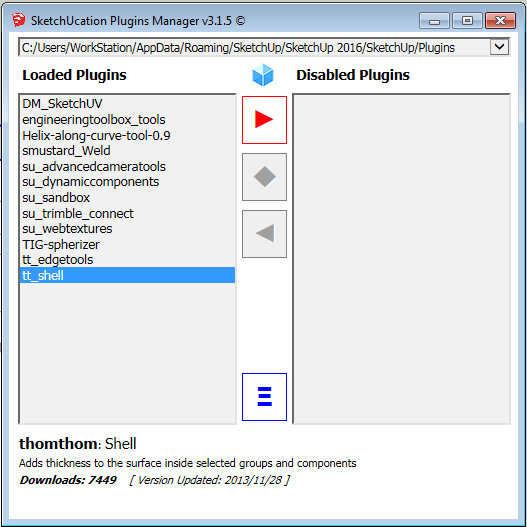
                                          https://cdn.steemitimages.com/DQmQAggY21so6ryCL1BT3TqQVKjQkJJA4UD9TbBor6WXgAm/2.png

                                          How can I acesse the Shell Plugin?

                                          1 Reply Last reply
                                          Reply Quote 0
                                          • Dave RD
                                            Dave R
                                            last edited by

                                            @em3di said:

                                            How can I acesse the Shell Plugin?

                                            What version of SketchUp are you using? Your profile indicates 2016 Make but your screen shot shows Solid Tools and Eneroth Solid Tools which aren't available for Make.

                                            Do you have the current version of TTLib installed?

                                            Etaoin Shrdlu

                                            %

                                            (THERE'S NO PLACE LIKE)

                                            G28 X0.0 Y0.0 Z0.0

                                            M30

                                            %

                                            1 Reply Last reply
                                            Reply Quote 0

                                            Hello! It looks like you're interested in this conversation, but you don't have an account yet.

                                            Getting fed up of having to scroll through the same posts each visit? When you register for an account, you'll always come back to exactly where you were before, and choose to be notified of new replies (either via email, or push notification). You'll also be able to save bookmarks and upvote posts to show your appreciation to other community members.

                                            With your input, this post could be even better 💗

                                            Register Login
                                            • 1
                                            • 2
                                            • 3
                                            • 4
                                            • 5
                                            • 1 / 5
                                            • First post
                                              Last post
                                            Buy SketchPlus
                                            Buy SUbD
                                            Buy WrapR
                                            Buy eBook
                                            Buy Modelur
                                            Buy Vertex Tools
                                            Buy SketchCuisine
                                            Buy FormFonts

                                            Advertisement